


Product
Introducing Reports: An Extensible Reporting Framework for Socket Data
Explore exportable charts for vulnerabilities, dependencies, and usage with Reports, Socket’s new extensible reporting framework.
By André Staltz - Apr 21, 2026
solidity-extension
Advanced tools
Affected versions:
A comprehensive Visual Studio Code extension that brings advanced support for the Ethereum Solidity smart contract language. This extension provides powerful features such as syntax highlighting, code completion, inline error checking, smart contract compilation, linting, code generation, and seamless integration with the Ethereum development workflow to enhance your productivity when building blockchain applications.





Important: Beware of fake extensions.
Always check the publisher and verify publishing history.
Available on VSCode Marketplace and OpenVSX.
Solidity is the primary language for Ethereum smart contracts.
This Visual Studio Code extension delivers a modern, productive developer experience—for dApps, audits, enterprise monorepos, and everything in between.
Autocomplete contracts, functions, variables, events, and more.
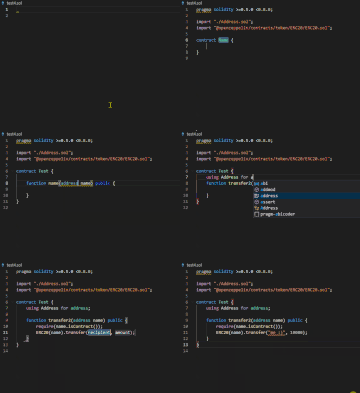
Change your Solidity compiler version easily from the status bar or context menu. No manual configuration required.
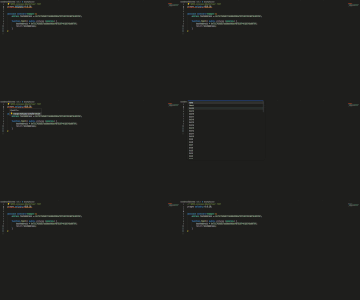
Receive instant fixes for frequent issues (e.g., license headers, version mismatches, invalid addresses).
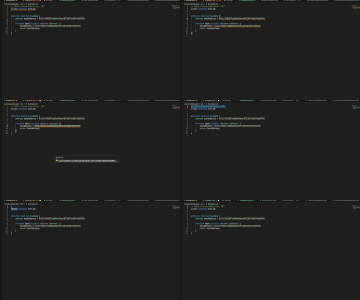
Retrieve verified contracts and ABIs with a single click from Etherscan.
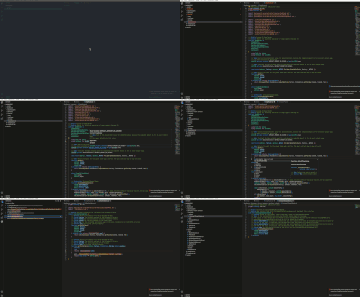
Hover over code to see instant NatSpec comments and in-code documentation.
*.sol)src/, lib/, etc.)Get started today and instantly boost your Solidity experience in VSCode!
Install globally and run anywhere as an LSP:
npm install -g vscode-solidity-server
vscode-solidity-server --stdio
solc-bin"solidity.compileUsingRemoteVersion": "latest"
// or
"solidity.compileUsingLocalVersion": "C:\\...\\soljson-v0.8.xx.js"
Context menu supports one-click download & switch.
Install solc with npm:
npm install solc
Right-click any .sol file to compile it with your preferred version—ideal for multiple versions or monorepo setups.
erc to generate common ERC contract standardsuni for Uniswap contract templatesMissing a template? PRs welcome!
src/, dependencies in lib/node_modules and lib/ importsremappings.txt or solidity.remappings in your settingsPerfect for mono repos and modular project structures.
Enable as-you-type error checking:
"solidity.enabledAsYouTypeCompilationErrorCheck": true,
"solidity.validationDelay": 1500
.solhint.json)"solidity.linter": "solhint",
"solidity.solhintRules": { "avoid-sha3": "warn" }
prettier-plugin-solidity (configure your .prettierrc)forge fmt (foundry.toml required)"editor.formatOnSave": true
.nethereum-gen.multisettings files.nethereum-gen.multisettings[
{
"paths": ["out/ERC20.sol/Standard_Token.json"],
"generatorConfigs": [
{
"baseNamespace": "Contracts",
"basePath": "output/MyProject.Contracts",
"codeGenLang": 0,
"generatorType": "ContractDefinition"
}
]
}
]
Create as many configs as you want:
project1.nethereum-gen.multisettings, game.nethereum-gen.multisettings, etc.
Thanks to the Solidity, Prettier, Solhint, Solium/Ethlint, and Nethereum communities, plus every contributor. Your ideas, bug reports, and PRs make Solidity better for everyone.
FAQs
A comprehensive Visual Studio Code extension that brings advanced support for the Ethereum Solidity smart contract language. This extension provides powerful features such as syntax highlighting, code completion, inline error checking, smart contract compilation, linting, code generation, and seamless integration with the Ethereum development workflow to enhance your productivity when building blockchain applications.
We found that sol-studio.solidity-extension demonstrated a healthy version release cadence and project activity because the last version was released less than a year ago. It has 0 open source maintainers collaborating on the project.
Did you know?

Socket for GitHub automatically highlights issues in each pull request and monitors the health of all your open source dependencies. Discover the contents of your packages and block harmful activity before you install or update your dependencies.
Product
Explore exportable charts for vulnerabilities, dependencies, and usage with Reports, Socket’s new extensible reporting framework.

Product
Socket for Jira lets teams turn alerts into Jira tickets with manual creation, automated ticketing rules, and two-way sync.

Company News
Socket won two 2026 Reppy Awards from RepVue, ranking in the top 5% of all sales orgs. AE Alexandra Lister shares what it's like to grow a sales career here.