


Research
2025 Report: Destructive Malware in Open Source Packages
Destructive malware is rising across open source registries, using delays and kill switches to wipe code, break builds, and disrupt CI/CD.
By Kush Pandya - Dec 24, 2025
apache-liminal
Advanced tools
Apache Liminal is an end-to-end platform for data engineers & scientists, allowing them to build, train and deploy machine learning models in a robust and agile way.
The platform provides the abstractions and declarative capabilities for data extraction & feature engineering followed by model training and serving. Liminal's goal is to operationalize the machine learning process, allowing data scientists to quickly transition from a successful experiment to an automated pipeline of model training, validation, deployment and inference in production, freeing them from engineering and non-functional tasks, and allowing them to focus on machine learning code and artifacts.
Using simple YAML configuration, create your own schedule data pipelines (a sequence of tasks to perform), application servers, and more.
A simple getting stated guide for Liminal can be found here
Full documentation of Apache Liminal can be found here
High level architecture documentation can be found here
---
name: MyLiminalStack
owner: Bosco Albert Baracus
volumes:
- volume: myvol1
local:
path: /Users/me/myvol1
images:
- image: my_python_task_img
type: python
source: write_inputs
- image: my_parallelized_python_task_img
source: write_outputs
- image: my_server_image
type: python_server
source: myserver
endpoints:
- endpoint: /myendpoint1
module: my_server
function: myendpoint1func
pipelines:
- pipeline: my_pipeline
start_date: 1970-01-01
timeout_minutes: 45
schedule: 0 * 1 * *
metrics:
namespace: TestNamespace
backends: [ 'cloudwatch' ]
tasks:
- task: my_python_task
type: python
description: static input task
image: my_python_task_img
env_vars:
NUM_FILES: 10
NUM_SPLITS: 3
mounts:
- mount: mymount
volume: myvol1
path: /mnt/vol1
cmd: python -u write_inputs.py
- task: my_parallelized_python_task
type: python
description: parallelized python task
image: my_parallelized_python_task_img
env_vars:
FOO: BAR
executors: 3
mounts:
- mount: mymount
volume: myvol1
path: /mnt/vol1
cmd: python -u write_inputs.py
services:
- service: my_python_server
description: my python server
image: my_server_image
pip install git+https://github.com/apache/incubator-liminal.git
echo 'export LIMINAL_HOME=</path/to/some/folder>' >> ~/.bash_profile && source ~/.bash_profile
This involves at minimum creating a single file called liminal.yml as in the example above.
If your pipeline requires custom python code to implement tasks, they should be organized like this
If your pipeline introduces imports of external packages which are not already a part of the liminal framework (i.e. you had to pip install them yourself), you need to also provide a requirements.txt in the root of your project.
When your pipeline code is ready, you can test it by running it locally on your machine.
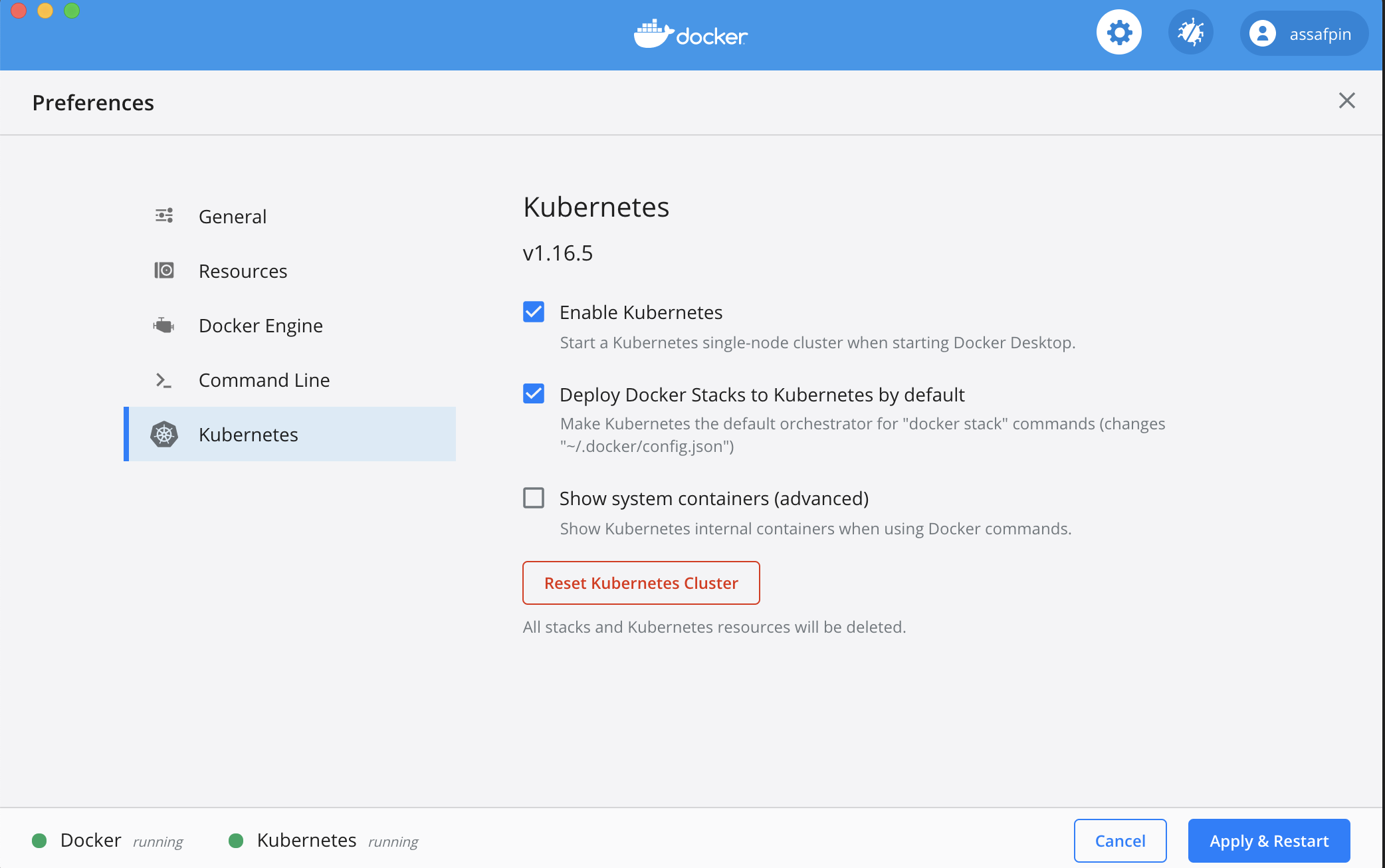
And allocate it at least 3 CPUs (under "Resources" in the Docker preference UI).
If you want to execute your pipeline on a remote kubernetes cluster, make sure the cluster is configured using:
kubectl config set-context <your remote kubernetes cluster>
In the example pipeline above, you can see that tasks and services have an "image" field - such as "my_static_input_task_image". This means that the task is executed inside a docker container, and the docker container is created from a docker image where various code and libraries are installed.
You can take a look at what the build process looks like, e.g. here
In order for the images to be available for your pipeline, you'll need to build them locally:
cd </path/to/your/liminal/code>
liminal build
You'll see that a number of outputs indicating various docker images built.
cd </path/to/your/liminal/code>
liminal create
cd </path/to/your/liminal/code>
liminal deploy
Note: after upgrading liminal, it's recommended to issue the command
liminal deploy --clean
This will rebuild the airlfow docker containers from scratch with a fresh version of liminal, ensuring consistency.
liminal start
liminal stop
liminal logs --follow/--tail

Number of lines to show from the end of the log:
liminal logs --tail=10

Follow log output:
liminal logs --follow
Navigate to http://localhost:8080/admin
You should see your 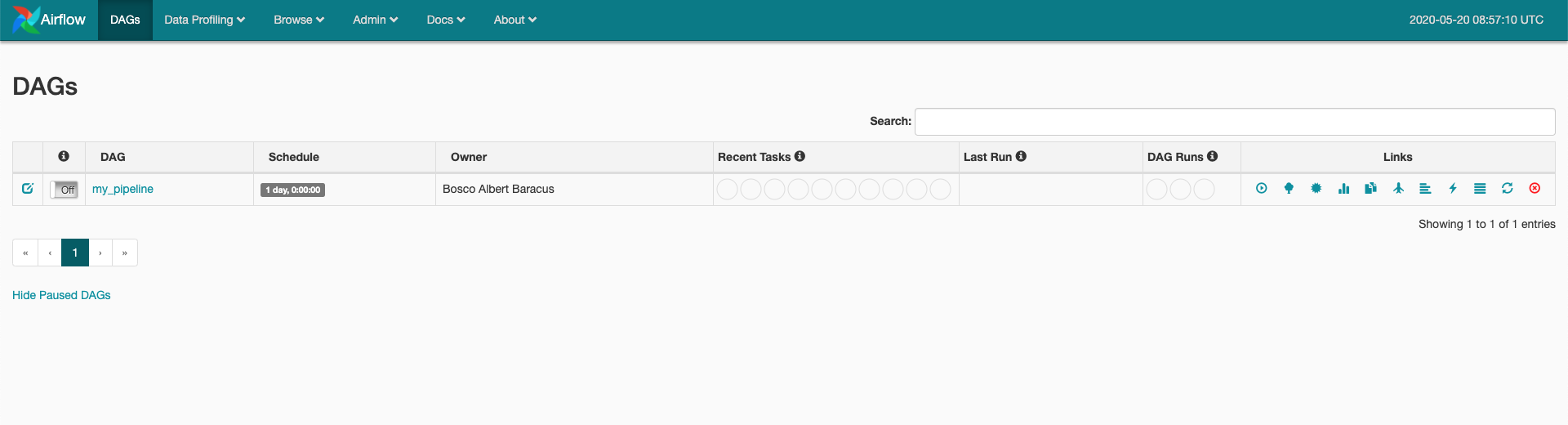 The pipeline is scheduled to run according to the
 json schedule: 0 * 1 * * field in the .yml file you provided.
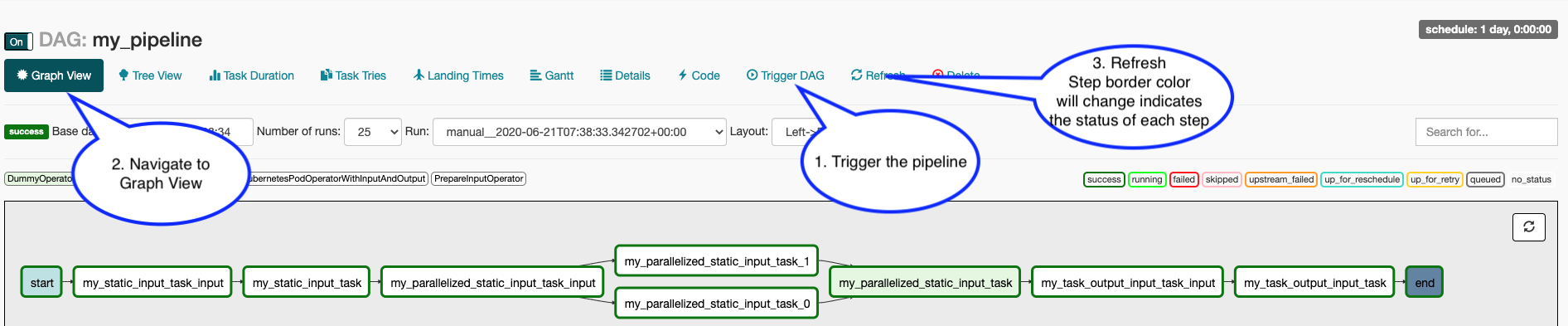
To manually activate your pipeline:
More information on contributing can be found here
The Liminal community holds a public call every Monday
When doing local development and running Liminal unit-tests, make sure to set LIMINAL_STAND_ALONE_MODE=True
FAQs
A package for authoring and deploying machine learning workflows
We found that apache-liminal demonstrated a healthy version release cadence and project activity because the last version was released less than a year ago. It has 1 open source maintainer collaborating on the project.
Did you know?

Socket for GitHub automatically highlights issues in each pull request and monitors the health of all your open source dependencies. Discover the contents of your packages and block harmful activity before you install or update your dependencies.
Research
Destructive malware is rising across open source registries, using delays and kill switches to wipe code, break builds, and disrupt CI/CD.

Security News
Socket CTO Ahmad Nassri shares practical AI coding techniques, tools, and team workflows, plus what still feels noisy and why shipping remains human-led.

Research
/Security News
A five-month operation turned 27 npm packages into durable hosting for browser-run lures that mimic document-sharing portals and Microsoft sign-in, targeting 25 organizations across manufacturing, industrial automation, plastics, and healthcare for credential theft.