
borders
Advanced tools

borders - pypi Package Compare versions
| from borders import frame | ||
| # Example 3: Using tuple to set different colours for each line | ||
| output = [ | ||
| "This text's color is Blue (System Color)", | ||
| ("This text's color is Aquamarine", "Aquamarine"), | ||
| ("This text's color is Coral","255;127;80"), | ||
| ("This text's color is Cosmic Latte","#FFF8E7"), | ||
| ("This text is highlighted in Yellow", "", "x226"), | ||
| ("Frame's color is Red (System Color)", 31), | ||
| "This text's color is back to Blue (System Color)" | ||
| ] | ||
| frame(output, colour=34, frame_colour=31) |
| from borders import frame | ||
| # Example 4: Setting a different styles for the frame | ||
| styles = ["single", "double", "double horizontal", "double vertical", "dots", None] | ||
| for s in styles: | ||
| # Print out the name of the style in a frame of that style. | ||
| frame(f"{s}", frame_colour="Red", frame_background="Gainsboro", alignment="centre", frame_style=s) |
| from borders import frame | ||
| styles = ["single", "double", "double horizontal", "double vertical", "dots", None] | ||
| to_print = ["012345678901234567890123456789012345678901234567890123456789012345678901234567890123456789","2nd item","3rd item"] | ||
| #to_print = "012345678901234567890123456789012345678901234567890123456789012345678901234567890123456789" | ||
| frame(to_print) |
| Metadata-Version: 2.1 | ||
| Name: borders | ||
| Version: 1.1.2.post1 | ||
| Version: 1.2.0 | ||
| Summary: A module to create a frame when printing a list of strings, with control on the alignment of the text and frame. In addition can be configured to act as 'input()'. | ||
@@ -19,2 +19,3 @@ Author-email: scalvaruso <calvaruso.simone@gmail.com> | ||
| License-File: LICENSE.md | ||
| Requires-Dist: polychromy>=1.0.2 | ||
| Requires-Dist: textlinebreaker>=0.1.0 | ||
@@ -38,13 +39,15 @@ Requires-Dist: colorama | ||
| [](#borders) is an updated version of **borders**: it enhances the functionality of creating frames around text output adding new features, and improving existing ones. Borders creates a frame around the content of a list, where any item of the list is considered a new line. | ||
| [](#borders) is an updated version of **borders**: it enhances the functionality of creating frames around text output adding new features, and improving existing ones. Borders creates a frame around a string or a list of strings where any item is considered a new line. | ||
| ## Features | ||
| * **Colour Support:** Expanded colour options now accept ANSI colour codes `0, 30 to 37, and 90 to 97` for setting text and frame colours. | ||
| * **Input Functionality:** Provides an option to use the `frame()` function in place of `input()` to create a framed prompt for user input. | ||
| * [Input Functionality](#input): Provides an option to use the `frame()` function in place of `input()` to create a framed prompt for user input. | ||
| * [Spacing Control](#alignment): Customisable alignment for the frame and the text within the frame. | ||
| * [Width Customization](#minimum-width):** Customisable width of frame and text lines. | ||
| ## Latest Version 1.1.2 | ||
| ## Latest Version 1.2.0 | ||
| * **Enhanced Spacing Control:** Added alignment control for the frame and the text within the frame. | ||
| * **Improved Width Customization:** Better control over minimum and maximum width of the frame and text lines. | ||
| * **Now supporting single string input.** | ||
| * [Colour Support](#text-and-frame-colours): Expanded colour options now accept most color names, ***sRGB*** values **[0-255];[0-255];[0-255]**, ***Hex*** values **#[00-FF][00-FF][00-FF]**, ***xterm*** color number in the format **x[0-255]**, and ***ANSI codes* 0, [40-47], [100-107]**. | ||
| * [Frame styles](#frame-style): Six different frame styles now available. | ||
@@ -75,3 +78,3 @@ ## Table of Contents | ||
| This script relies on the Python standard library and```textlinebreaker```library, if your system is ```Windows``` in addition will require```colorama```. | ||
| Borders relies on the Python standard library, [textlinebreaker](https://pypi.org/project/textlinebreaker/) and [polychromy](https://pypi.org/project/polychromy/) libraries, and if your system is ```Windows``` in addition it might require```colorama``` to fix color compatibility. | ||
@@ -120,13 +123,16 @@ ### Installation | ||
| * [colour](#text-and-frame-colours): set the text colour. | ||
| * allowed values: ANSI colour codes `0`, `30 to 37`, and `90 to 97` | ||
| * allowed values: most color names, RGB values [0-255];[0-255];[0-255], Hex values #[00-FF][00-FF][00-FF], xterm color number in the format x[0-255], and ANSI codes 0, [30-37], [90-97]. | ||
| * default value = `37`. | ||
| * [text_background](#text-and-frame-colours): set the background colour of the text. | ||
| * allowed values: ANSI colour codes `0`, `40 to 47`, and `100 to 107` | ||
| * allowed values: most color names, RGB values [0-255];[0-255];[0-255], Hex values #[00-FF][00-FF][00-FF], xterm color number in the format x[0-255], and ANSI codes 0, [40-47], [100-107]. | ||
| * default value = `0`. | ||
| * [frame_colour](#text-and-frame-colours): set the frame colour. | ||
| * allowed values: ANSI colour codes `0`, `30 to 37`, and `90 to 97` | ||
| * allowed values: most color names, RGB values [0-255];[0-255];[0-255], Hex values #[00-FF][00-FF][00-FF], xterm color number in the format x[0-255], and ANSI codes 0, [30-37], [90-97]. | ||
| * default value = `37`. | ||
| * [frame_background](#text-and-frame-colours): set the background colour of the frame. | ||
| * allowed values: ANSI colour codes `0`, `40 to 47`, and `100 to 107` | ||
| * allowed values: most color names, RGB values [0-255];[0-255];[0-255], Hex values #[00-FF][00-FF][00-FF], xterm color number in the format x[0-255], and ANSI codes 0, [40-47], [100-107]. | ||
| * default value = `0`. | ||
| * [frame_style](#frame-style): allows to change the style of the frame | ||
| * allowed values: ```'single'```, ```'double'```, ```'double horizontal'```, ```'double vertical'```, ```'dots'```, ```None``` | ||
| * default value = ```'double'``` | ||
| * [alignment](#alignment): set the alignment of the text inside the frame. | ||
@@ -200,10 +206,12 @@ * allowed values: ```'left'```, ```'centre'```, ```'center'```, ```'right'``` | ||
| output = [ | ||
| "Hello,", | ||
| "World!", | ||
| ("This line is yellow", 33), | ||
| ("This line is green", 32), | ||
| ("This line is highlighted in white", "", 47), | ||
| "This line is back to the general colour" | ||
| "This text's color is Blue (System Color)", | ||
| ("This text's color is Aquamarine", "Aquamarine"), | ||
| ("This text's color is Coral","255;127;80"), | ||
| ("This text's color is Cosmic Latte","#FFF8E7"), | ||
| ("This text is highlighted in Yellow", "", "x226"), | ||
| ("Frame's color is Red (System Color)", 31), | ||
| "This text's color is back to Blue (System Color)" | ||
| ] | ||
| frame(output, colour="34", frame_colour="31") | ||
| frame(output, colour=34, frame_colour=31) | ||
| ``` | ||
@@ -216,2 +224,20 @@ | ||
| <!--- Example 04 ---> | ||
| #### Frame Style | ||
| ```python | ||
| from borders import frame | ||
| # Example 4: Setting a different styles for the frame | ||
| styles = ["single", "double", "double horizontal", "double vertical", "dots", None] | ||
| for s in styles: | ||
| # Print out the name of the style in a frame of that style. | ||
| frame(f"{s}", frame_colour="Red", frame_background="Gainsboro", alignment="centre", frame_style=s) | ||
| ``` | ||
| ##### Output 4 | ||
| 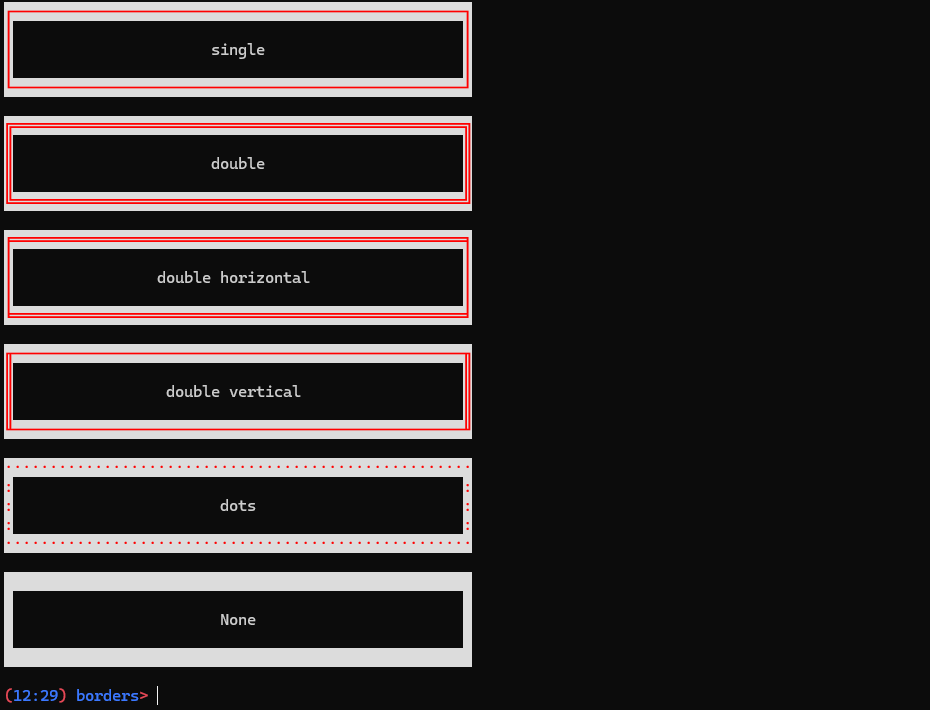 | ||
| <!--- Example 05 ---> | ||
| #### Alignment | ||
@@ -225,3 +251,3 @@ | ||
| # Example 4: Setting lines width equal to 60, | ||
| # Example 5: Setting lines width equal to 60, | ||
| # the general alignment of the text to the right, | ||
@@ -233,7 +259,7 @@ # and the alignment of the second line to the left | ||
| ##### Output 4 | ||
| ##### Output 5 | ||
|  | ||
| 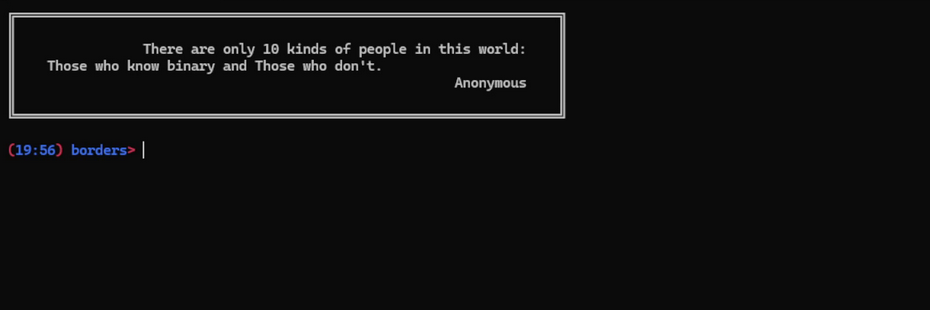 | ||
| <!--- Example 05 ---> | ||
| <!--- Example 06 ---> | ||
| #### Display | ||
@@ -246,3 +272,3 @@ | ||
| # Example 5: Setting the position of the frame in the centre of the terminal | ||
| # Example 6: Setting the position of the frame in the centre of the terminal | ||
| # and the alignment of the text to the right | ||
@@ -253,5 +279,5 @@ output = ["There are only 10 kinds of people in this world:", "Those who know binary and Those who don't.", "Anonymous"] | ||
| ##### Output 5 | ||
| ##### Output 6 | ||
|  | ||
| 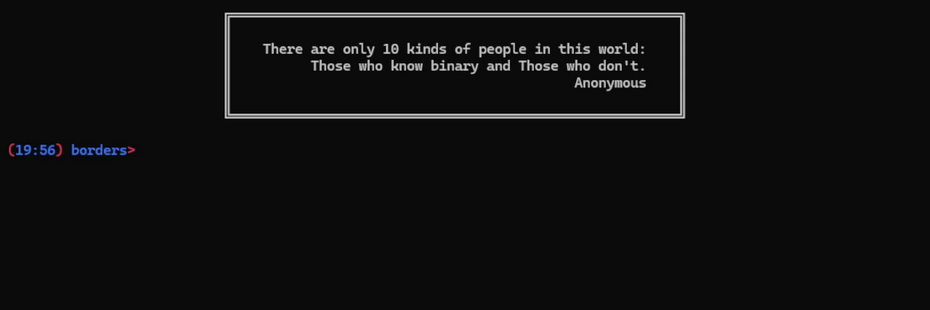 | ||
@@ -262,3 +288,3 @@ #### Spacing | ||
| <!--- Example 06 ---> | ||
| <!--- Example 07 ---> | ||
| ##### spacing=2 | ||
@@ -271,3 +297,3 @@ | ||
| # Example 6: Setting the spacing between the text and the frame equal to 2 | ||
| # Example 7: Setting the spacing between the text and the frame equal to 2 | ||
| output = ["Hello,", "World!"] | ||
@@ -277,7 +303,7 @@ frame(output, spacing=2) | ||
| ##### Output 6 | ||
| ##### Output 7 | ||
|  | ||
| 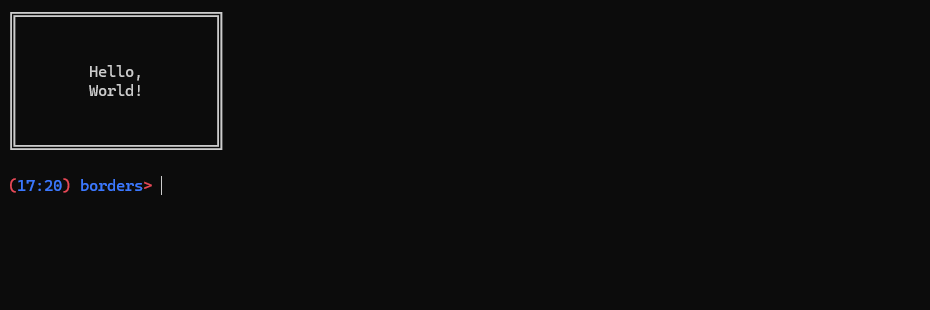 | ||
| <!--- Example 07 ---> | ||
| <!--- Example 08 ---> | ||
| ##### Spacing = 0 | ||
@@ -290,3 +316,3 @@ | ||
| # Example 7: Setting the spacing between the text and the frame equal to 0 | ||
| # Example 8: Setting the spacing between the text and the frame equal to 0 | ||
| output = ["Hello,", "World!"] | ||
@@ -296,7 +322,7 @@ frame(output, spacing=0) | ||
| ##### Output 7 | ||
| ##### Output 8 | ||
|  | ||
| 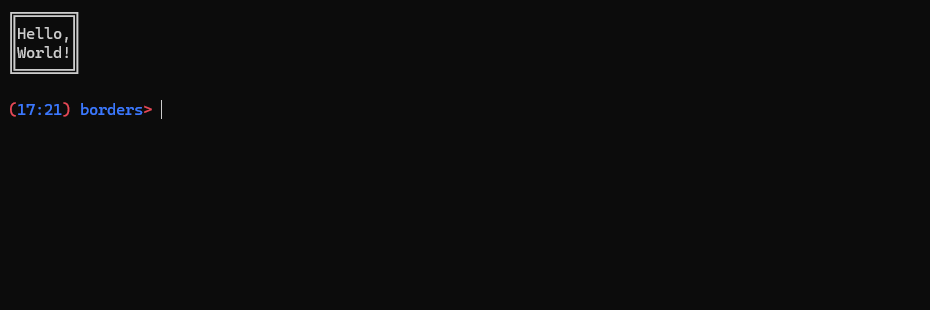 | ||
| <!--- Example 08 ---> | ||
| <!--- Example 09 ---> | ||
| #### Minimum Width | ||
@@ -310,3 +336,3 @@ | ||
| # Example 8: | ||
| # Example 9: | ||
| output = ["Hello,", "World!"] | ||
@@ -316,5 +342,5 @@ frame(output, min_width=30) | ||
| ##### Output 8 | ||
| ##### Output 9 | ||
|  | ||
| 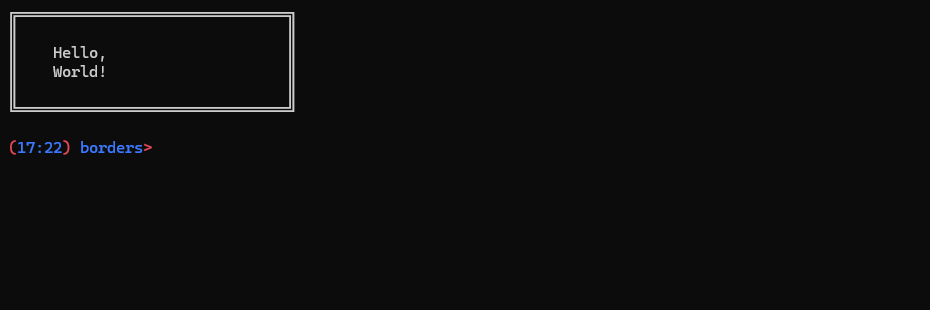 | ||
@@ -326,3 +352,3 @@ #### Maximum Width | ||
| <!--- Example 09 ---> | ||
| <!--- Example 10 ---> | ||
| ##### max_width=100 | ||
@@ -333,3 +359,3 @@ | ||
| # Example 9: | ||
| # Example 10: | ||
| output = ["There are only 10 kinds of people in this world: Those who know binary and Those who don't."] | ||
@@ -339,7 +365,7 @@ frame(output, max_width=100) | ||
| ##### Output 9 | ||
| ##### Output 10 | ||
|  | ||
| 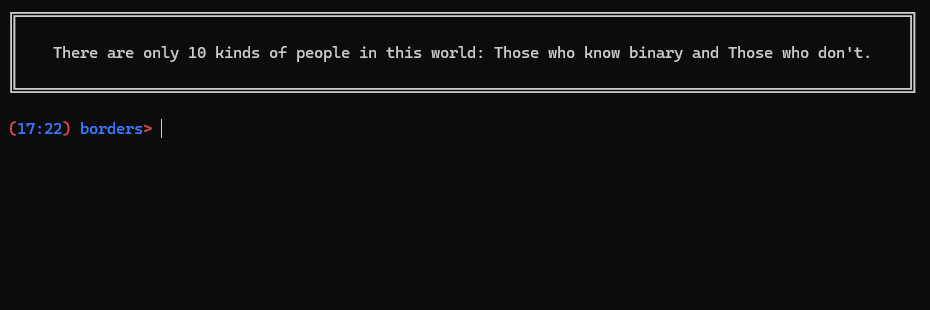 | ||
| <!--- Example 10 ---> | ||
| <!--- Example 11 ---> | ||
| ##### max_width=50 | ||
@@ -350,3 +376,3 @@ | ||
| # Example 10: | ||
| # Example 11: | ||
| output = ["There are only 10 kinds of people in this world: Those who know binary and Those who don't."] | ||
@@ -356,7 +382,7 @@ frame(output, max_width=50) | ||
| ##### Output 10 | ||
| ##### Output 11 | ||
|  | ||
| 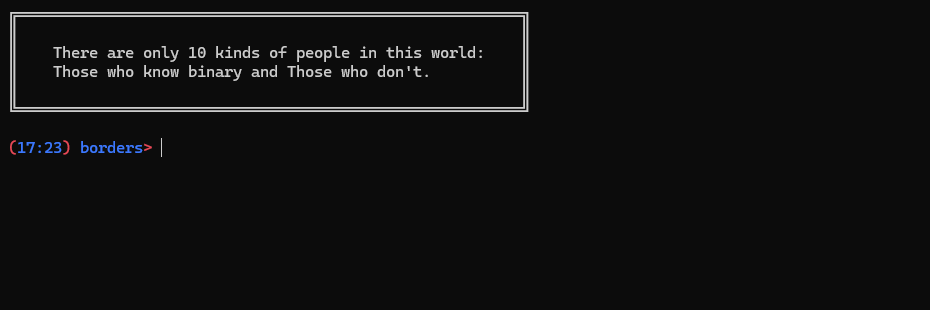 | ||
| <!--- Example 11 ---> | ||
| <!--- Example 12 ---> | ||
| ##### max_width=25 | ||
@@ -367,3 +393,3 @@ | ||
| # Example 11: | ||
| # Example 12: | ||
| output = ["There are only 10 kinds of people in this world: Those who know binary and Those who don't."] | ||
@@ -373,7 +399,7 @@ frame(output, max_width=25) | ||
| ##### Output 11 | ||
| ##### Output 12 | ||
|  | ||
| 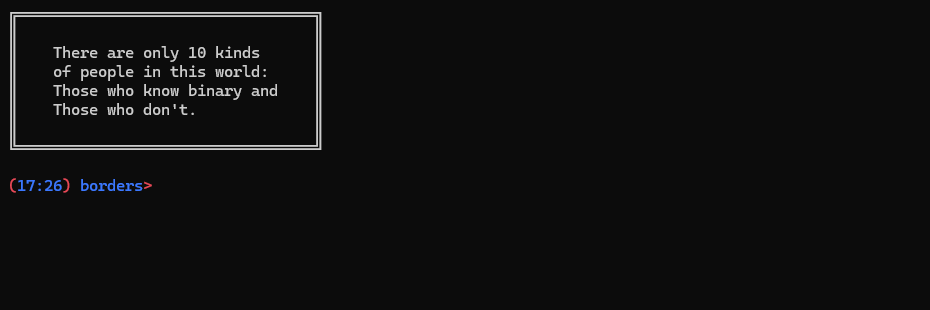 | ||
| <!--- Example 12 ---> | ||
| <!--- Example 13 ---> | ||
| #### Input | ||
@@ -386,3 +412,3 @@ | ||
| # Example 12: Using frame() in place of input() | ||
| # Example 13: Using frame() in place of input() | ||
| num1 = int(frame(["Please,", "enter a number"], window="input")) | ||
@@ -394,5 +420,5 @@ num2 = num1 * 2 | ||
| ##### Output 12 | ||
| ##### Output 13 | ||
|  | ||
| 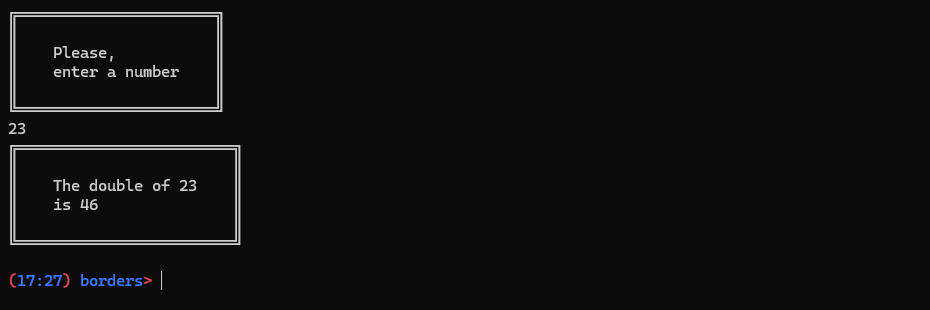 | ||
@@ -399,0 +425,0 @@ ## Contributing |
@@ -0,2 +1,3 @@ | ||
| polychromy>=1.0.2 | ||
| textlinebreaker>=0.1.0 | ||
| colorama |
@@ -7,2 +7,5 @@ LICENSE.md | ||
| borders/borders.py | ||
| borders/ex03.py | ||
| borders/ex04.py | ||
| borders/ex99.py | ||
| borders.egg-info/PKG-INFO | ||
@@ -9,0 +12,0 @@ borders.egg-info/SOURCES.txt |
@@ -1,2 +0,2 @@ | ||
| __version__ = '1.1.2.post1' | ||
| __version__ = "1.2.0" | ||
@@ -3,0 +3,0 @@ __all__ = ["frame"] |
+208
-166
| import os | ||
| from textlinebreaker import split_line | ||
| from polychromy import colorate | ||
| def main(): | ||
| def _demo(): | ||
| menu_1 = [ | ||
@@ -17,3 +19,3 @@ ("This is border.py","Bright White","Bright Black","centre"), | ||
| "a string with text to print,", | ||
| "one or two values (integers or strings) for foreground and background colours of the text,", | ||
| "one or two values (integers or strings) for foreground and background colors of the text,", | ||
| "one string value for the alignment of the line." | ||
@@ -23,26 +25,33 @@ ] | ||
| ("Parameters:","","Bright Red","centre"),"", | ||
| ("colour:","Bright Red","centre"), "allows to change the colour of the text.", | ||
| ("colour:","Bright Red","centre"), "allows to change the color of the text.", | ||
| "default value = 37", | ||
| "allowed values:", | ||
| "0, 30, 31, 32, 33, 34, 35, 36, 37, 90, 91, 92, 93, 94, 95, 96, 97,", | ||
| "'Black', 'Red', 'Green', 'Yellow', 'Blue', 'Magenta', 'Cyan', 'White',", | ||
| "'Bright Black', 'Bright Red', 'Bright Green', 'Bright Yellow', 'Bright Blue', 'Bright Magenta', 'Bright Cyan', 'Bright White'", | ||
| ("text_background:","Bright Red","centre"), "allows to change the background colour of the text.", | ||
| "allowed values: most color names", | ||
| "RGB values [0-255];[0-255];[0-255]", | ||
| "Hex values #[00-FF][00-FF][00-FF]", | ||
| "xterm color number in the format x[0-255]", | ||
| "and ANSI codes 0, [30-37], [90-97]", | ||
| ("text_background:","Bright Red","centre"), "allows to change the background color of the text.", | ||
| "default value = 0", | ||
| "allowed values:", | ||
| "0, 40, 41, 42, 43, 44, 45, 46, 47, 100, 101, 102, 103, 104, 105, 106, 107", | ||
| "'Black', 'Red', 'Green', 'Yellow', 'Blue', 'Magenta', 'Cyan', 'White',", | ||
| "'Bright Black', 'Bright Red', 'Bright Green', 'Bright Yellow', 'Bright Blue', 'Bright Magenta', 'Bright Cyan', 'Bright White'", | ||
| ("frame_colour:","Bright Red","centre"), "allows to change the colour of the frame.", | ||
| "default value = None",("(if not specified get the same colour value of the text)","right"), | ||
| "allowed values:", | ||
| "0, 30, 31, 32, 33, 34, 35, 36, 37, 90, 91, 92, 93, 94, 95, 96, 97", | ||
| "'Black', 'Red', 'Green', 'Yellow', 'Blue', 'Magenta', 'Cyan', 'White',", | ||
| "'Bright Black', 'Bright Red', 'Bright Green', 'Bright Yellow', 'Bright Blue', 'Bright Magenta', 'Bright Cyan', 'Bright White'", | ||
| ("frame_background:","Bright Red","centre"), "allows to change the background colour of the frame.", | ||
| "allowed values: most color names", | ||
| "RGB values [0-255];[0-255];[0-255]", | ||
| "Hex values #[00-FF][00-FF][00-FF]", | ||
| "xterm color number in the format x[0-255]", | ||
| "and ANSI codes 0, [40-47], [100-107]", | ||
| ("frame_colour:","Bright Red","centre"), "allows to change the color of the frame.", | ||
| "default value = None",("(if not specified get the same color value of the text)","right"), | ||
| "allowed values: most color names", | ||
| "RGB values [0-255];[0-255];[0-255]", | ||
| "Hex values #[00-FF][00-FF][00-FF]", | ||
| "xterm color number in the format x[0-255]", | ||
| "and ANSI codes 0, [30-37], [90-97]", | ||
| ("frame_background:","Bright Red","centre"), "allows to change the background color of the frame.", | ||
| "default value = None",("(if not specified get the same value of text_background).","right"), | ||
| "allowed values:", | ||
| "0, 40, 41, 42, 43, 44, 45, 46, 47, 100, 101, 102, 103, 104, 105, 106, 107", | ||
| "'Black', 'Red', 'Green', 'Yellow', 'Blue', 'Magenta', 'Cyan', 'White',", | ||
| "'Bright Black', 'Bright Red', 'Bright Green', 'Bright Yellow', 'Bright Blue', 'Bright Magenta', 'Bright Cyan', 'Bright White'", | ||
| "allowed values: most color names", | ||
| "RGB values [0-255];[0-255];[0-255]", | ||
| "Hex values #[00-FF][00-FF][00-FF]", | ||
| "xterm color number in the format x[0-255]", | ||
| "and ANSI codes 0, [40-47], [100-107]", | ||
| ("frame_style:","Bright Red","centre"), "allows to change the style of the frame", | ||
| "default value = 'double'", | ||
| "allowed values: 'single', 'double', 'double horizontal', 'double vertical', 'dots', None", | ||
| ("alignment:","Bright Red","centre"), "allows to change the alignment of the text inside the frame.", | ||
@@ -75,3 +84,4 @@ "default value = 'left'", | ||
| def frame(menu_list, colour=37, text_background=0, frame_colour=None, frame_background=None, alignment="left", display="left", spacing=1, min_width=42, max_width=70, window="print"): | ||
| # Importable function. | ||
| def frame(menu_list, colour=37, text_background=0, frame_colour=None, frame_background=None, frame_style="double", alignment="left", display="left", spacing=1, min_width=42, max_width=70, window="print"): | ||
| """ | ||
@@ -82,26 +92,37 @@ This function create a frame around the content of a list. | ||
| a string with text to print, | ||
| one or two values (integers or strings) for foreground and background colours of the text, | ||
| one or two values (integers or strings) for foreground and background colors of the text, | ||
| one string value for the alignment of the line. | ||
| Parameters: | ||
| colour: allows to change the colour of the text. | ||
| colour: allows to change the color of the text. | ||
| default value = 37 | ||
| allowed values: 0, 30, 31, 32, 33, 34, 35, 36, 37, 90, 91, 92, 93, 94, 95, 96, 97, | ||
| "Black", "Red", "Green", "Yellow", "Blue", "Magenta", "Cyan", "White", | ||
| "Bright Black", "Bright Red", "Bright Green", "Bright Yellow", "Bright Blue", "Bright Magenta", "Bright Cyan", "Bright White" | ||
| text_background: allows to change the background colour of the text. | ||
| allowed values: "allowed values: most color names" | ||
| "RGB values [0-255];[0-255];[0-255]" | ||
| "Hex values #[00-FF][00-FF][00-FF]" | ||
| "xterm color number in the format x[0-255]" | ||
| "and ANSI codes 0, [30-37], [90-97]" | ||
| text_background: allows to change the background color of the text. | ||
| default value = 0 | ||
| allowed values: 0, 40, 41, 42, 43, 44, 45, 46, 47, 100, 101, 102, 103, 104, 105, 106, 107 | ||
| "Black", "Red", "Green", "Yellow", "Blue", "Magenta", "Cyan", "White", | ||
| "Bright Black", "Bright Red", "Bright Green", "Bright Yellow", "Bright Blue", "Bright Magenta", "Bright Cyan", "Bright White" | ||
| frame_colour: allows to change the colour of the frame. | ||
| default value = None (if not specified get the same colour value of the text). | ||
| allowed values: 0, 30, 31, 32, 33, 34, 35, 36, 37, 90, 91, 92, 93, 94, 95, 96, 97 | ||
| "Black", "Red", "Green", "Yellow", "Blue", "Magenta", "Cyan", "White", | ||
| "Bright Black", "Bright Red", "Bright Green", "Bright Yellow", "Bright Blue", "Bright Magenta", "Bright Cyan", "Bright White" | ||
| frame_background: allows to change the background colour of the frame. | ||
| allowed values: "allowed values: most color names," | ||
| "RGB values [0-255];[0-255];[0-255]," | ||
| "Hex values #[00-FF][00-FF][00-FF]," | ||
| "xterm color number in the format x[0-255]," | ||
| "and ANSI codes 0, [40-47], [100-107]." | ||
| frame_colour: allows to change the color of the frame. | ||
| default value = None (if not specified get the same color value of the text). | ||
| allowed values: "allowed values: most color names" | ||
| "RGB values [0-255];[0-255];[0-255]" | ||
| "Hex values #[00-FF][00-FF][00-FF]" | ||
| "xterm color number in the format x[0-255]" | ||
| "and ANSI codes 0, [30-37], [90-97]" | ||
| frame_background: allows to change the background color of the frame. | ||
| default value = None (if not specified get the same value of text_background). | ||
| allowed values: 0, 40, 41, 42, 43, 44, 45, 46, 47, 100, 101, 102, 103, 104, 105, 106, 107 | ||
| "Black", "Red", "Green", "Yellow", "Blue", "Magenta", "Cyan", "White", | ||
| "Bright Black", "Bright Red", "Bright Green", "Bright Yellow", "Bright Blue", "Bright Magenta", "Bright Cyan", "Bright White" | ||
| allowed values: "allowed values: most color names," | ||
| "RGB values [0-255];[0-255];[0-255]," | ||
| "Hex values #[00-FF][00-FF][00-FF]," | ||
| "xterm color number in the format x[0-255]," | ||
| "and ANSI codes 0, [40-47], [100-107]." | ||
| frame_style: allows to change the style of the frame | ||
| default value = "double" | ||
| allowed values: "single", "double", "double horizontal", "double vertical", "dots", None | ||
| alignment: allows to change the alignment of the text inside the frame. | ||
@@ -129,18 +150,16 @@ default value = "left" | ||
| """ | ||
| # Check validity of the colours. | ||
| colour = _valid_colour(colour) | ||
| text_background = _valid_colour(text_background, "back") | ||
| # Set generic colors for the frame and text elements. | ||
| color = colour | ||
| if frame_colour: | ||
| frame_colour = _valid_colour(frame_colour) | ||
| frame_color = frame_colour | ||
| else: | ||
| frame_colour = colour | ||
| frame_color = color | ||
| if frame_background: | ||
| frame_background = _valid_colour(frame_background, "back") | ||
| pass | ||
| else: | ||
| frame_background = text_background | ||
| t_colour = colour | ||
| t_color = color | ||
| t_background = text_background | ||
@@ -155,3 +174,2 @@ | ||
| # Check the menu spacing and width. | ||
| if spacing < 0: | ||
@@ -183,10 +201,15 @@ spacing = 0 | ||
| max_length = min_width | ||
| for item in menu_list: | ||
| if isinstance(item, tuple): | ||
| new_length = len(item[0]) | ||
| else: | ||
| new_length = len(item) | ||
| if isinstance(menu_list, list): | ||
| for item in menu_list: | ||
| if isinstance(item, tuple): | ||
| new_length = len(item[0]) | ||
| else: | ||
| new_length = len(item) | ||
| if new_length > max_length: | ||
| max_length = new_length | ||
| else: | ||
| new_length = len(menu_list) | ||
| if new_length > max_length: | ||
| max_length = new_length | ||
| max_length = new_length | ||
@@ -197,82 +220,23 @@ # Check if lines are longer than "max_width" | ||
| # Check the lenght of every line and split them if too long. | ||
| # Modified function to split the lines | ||
| # the function split_line is now a stand alone library | ||
| # Modify input text to fit in the frame. | ||
| new_list = [] | ||
| for item in menu_list: | ||
| # Check if item is a tuple, and get values for foreground, and background colours (t_colour, t_background) | ||
| if isinstance(item, tuple): | ||
| parameters = len(item) | ||
| """ | ||
| If True: | ||
| item[0] is the string. | ||
| item[1] is the colour of the text. | ||
| item[2] is the backgroud colour of the text. | ||
| item[3] is the line alignment. | ||
| """ | ||
| if item[0] != "": | ||
| words = item[0].split(" ") | ||
| else: | ||
| words = item[0] | ||
| if isinstance(menu_list, list): | ||
| if parameters == 2: | ||
| if str(item[1]).lower() in ("left","center","centre","right"): | ||
| line_alignment = item[1] | ||
| else: | ||
| if item[1] != "": | ||
| t_colour = _valid_colour(item[1]) | ||
| else: | ||
| t_colour = colour | ||
| line_alignment = alignment | ||
| elif parameters == 3: | ||
| if item[1] != "": | ||
| t_colour = _valid_colour(item[1]) | ||
| else: | ||
| t_colour = colour | ||
| if str(item[2]).lower() in ("left","center","centre","right"): | ||
| line_alignment = item[2] | ||
| else: | ||
| if item[2] != "": | ||
| t_background = _valid_colour(item[2], "back") | ||
| else: | ||
| t_background = text_background | ||
| line_alignment = alignment | ||
| else: | ||
| if item[1] != "": | ||
| t_colour = _valid_colour(item[1]) | ||
| else: | ||
| t_colour = colour | ||
| if item[2] != "": | ||
| t_background = _valid_colour(item[2], "back") | ||
| else: | ||
| t_background = text_background | ||
| if str(item[3]).lower() in ("left","center","centre","right"): | ||
| line_alignment = item[3] | ||
| else: | ||
| line_alignment = alignment | ||
| for item in menu_list: | ||
| # If item is not a tuple, default colours are assigned. | ||
| else: | ||
| if item != "": | ||
| words = item.split(" ") | ||
| else: | ||
| words = item | ||
| #words = item.split(" ") | ||
| t_colour = colour | ||
| t_background = text_background | ||
| line_alignment = alignment | ||
| words, t_color, t_background, line_alignment = _get_settings(item, color, text_background, alignment) | ||
| # The function split_line is applied to every element in "menu_list" | ||
| for line in split_line(words, max_length, line_alignment): | ||
| # Then the colours attributes for foreground, and background are applied | ||
| new_list.append((line,t_colour,t_background)) | ||
| # The function split_line is applied to every element in "menu_list" | ||
| for line in split_line(words, max_length, line_alignment): | ||
| # Then the colors attributes for foreground, and background are applied | ||
| new_list.append((line,t_color,t_background)) | ||
| else: | ||
| # The function split_line is applied directly to "menu_list" | ||
| for line in split_line(menu_list, max_length, line_alignment): | ||
| # Then the colors attributes for foreground, and background are applied | ||
| new_list.append((line,t_color,t_background)) | ||
| # Create the frame. | ||
| # Create the frame. <--Continue from this point--> | ||
| max_width = max([(len(i[0])) for i in new_list]) | ||
@@ -283,7 +247,11 @@ | ||
| or_line = "═" * menu_width | ||
| # Defining the elements of the frame: | ||
| # Top Left Corner, Horizontal line (single element), Top Right Corner, Vertical line, Bottom Left Corner, Bottom Right Corner. | ||
| tl_corner, h_line, tr_corner, v_line, bl_corner, br_corner = _elements(frame_style) | ||
| # Horizontal Line (Full length) | ||
| hor_line = h_line * menu_width | ||
| # Empty line | ||
| filling = " " * menu_width | ||
| # Check the frame positioning. | ||
| if display.lower() == "right": | ||
@@ -298,14 +266,14 @@ positioning = terminal_width - (menu_width+2) | ||
| # Create the frame | ||
| display_menu = adjustment + f"\033[{frame_background};{frame_colour}m" + "╔" + or_line + "╗" + "\033[0m" + "\n" | ||
| display_menu = adjustment + colorate(tl_corner + hor_line + tr_corner, frame_color, frame_background) + "\n" | ||
| for _ in range(round(spacing)): | ||
| display_menu += adjustment + f"\033[{frame_background};{frame_colour}m" + "║" + f"\033[{text_background}m" + filling + f"\033[0m" + f"\033[{frame_background};{frame_colour}m" + "║" +"\033[0m\n" | ||
| display_menu += adjustment + colorate(v_line, frame_color, frame_background) + colorate(filling, 0, text_background) + colorate(v_line, frame_color, frame_background) + "\n" | ||
| for item in new_list: | ||
| display_menu += adjustment + f"\033[{frame_background};{frame_colour}m" + "║" + f"\033[{item[2]}m" + side_space + f"\033[{item[1]}m" + item[0] + side_space + f"\033[0m" + f"\033[{frame_background};{frame_colour}m" + "║" +"\033[0m\n" | ||
| display_menu += adjustment + colorate(v_line, frame_color, frame_background) + colorate(side_space+ item[0] + side_space, item[1], item[2]) + colorate(v_line, frame_color, frame_background) +"\n" | ||
| for _ in range(round(spacing)): | ||
| display_menu += adjustment + f"\033[{frame_background};{frame_colour}m" + "║" + f"\033[{text_background}m" + filling + f"\033[0m" + f"\033[{frame_background};{frame_colour}m" + "║" + "\033[0m\n" | ||
| display_menu += adjustment + colorate(v_line, frame_color, frame_background) + colorate(filling, 0, text_background) + colorate(v_line, frame_color, frame_background) + "\n" | ||
| display_menu += adjustment + f"\033[{frame_background};{frame_colour}m" + "╚" + or_line + "╝" + "\033[0m\n" | ||
| display_menu += adjustment + colorate(bl_corner + hor_line + br_corner, frame_color, frame_background) + "\n" | ||
@@ -319,34 +287,108 @@ # Change the behaviour of the function from 'print' to 'input'. | ||
| # This function check the validity of the colour value. | ||
| def _valid_colour(col, body="body"): | ||
| if body == "back": | ||
| ansi_colours = { | ||
| "Black": 40, "Red": 41, "Green": 42, "Yellow": 43, "Blue": 44, "Magenta": 45, "Cyan": 46, "White": 47, | ||
| "Bright Black": 100, "Bright Red": 101, "Bright Green": 102, "Bright Yellow": 103, "Bright Blue": 104, "Bright Magenta": 105, "Bright Cyan": 106, "Bright White": 107, | ||
| "Reset": 0, | ||
| } | ||
| else: | ||
| ansi_colours = { | ||
| "Black": 30, "Red": 31, "Green": 32, "Yellow": 33, "Blue": 34, "Magenta": 35, "Cyan": 36, "White": 37, | ||
| "Bright Black": 90, "Bright Red": 91, "Bright Green": 92, "Bright Yellow": 93, "Bright Blue": 94, "Bright Magenta": 95, "Bright Cyan": 96, "Bright White": 97, | ||
| "Reset": 0, | ||
| } | ||
| # Defining the elements of the frame | ||
| def _elements(style): | ||
| # According to the given style value, the function returns: | ||
| # Top Left Corner, Horizontal line (single element), Top Right Corner, Vertical line, Bottom Left Corner, Bottom Right Corner. | ||
| if style == "single": | ||
| return "┌", "─", "┐", "│", "└", "┘" # tl_corner, h_line, tr_corner, v_line, bl_corner, br_corner | ||
| elif style == "double horizontal": | ||
| return "╒", "═", "╕", "│", "╘", "╛" # tl_corner, h_line, tr_corner, v_line, bl_corner, br_corner | ||
| try: | ||
| col = int(col) | ||
| except: | ||
| col = col.title().replace("Light","Bright") | ||
| elif style == "double vertical": | ||
| return "╓", "─", "╖", "║", "╙", "╜" # tl_corner, h_line, tr_corner, v_line, bl_corner, br_corner | ||
| elif style == "double": | ||
| return "╔", "═", "╗", "║", "╚", "╝" # tl_corner, h_line, tr_corner, v_line, bl_corner, br_corner | ||
| if col in ansi_colours.values(): | ||
| out_col = col | ||
| elif col in ansi_colours.keys(): | ||
| out_col = ansi_colours[col] | ||
| elif style == "dots": | ||
| return "·", "·", "·", ":", "·", "·" # tl_corner, h_line, tr_corner, v_line, bl_corner, br_corner | ||
| else: | ||
| out_col = "0" | ||
| return (6 * " ") # tl_corner, h_line, tr_corner, v_line, bl_corner, br_corner | ||
| return out_col | ||
| # This function return list of words of the given string and their color and alignment. | ||
| def _get_settings(item, color, text_background, alignment): | ||
| # Check if item is a tuple, and get values for foreground, background colors, and alignment (t_color, t_background, line_alignment). | ||
| if isinstance(item, tuple): | ||
| parameters = len(item) | ||
| """ | ||
| If True: | ||
| item[0] is the string. | ||
| item[1] can be the color of the text or line alignment. | ||
| item[2] is optional and could be the backgroud color or line alignment. | ||
| item[3] is optional and is the line alignment. | ||
| """ | ||
| if item[0] != "": | ||
| words = item[0].split(" ") | ||
| else: | ||
| words = item[0] | ||
| if parameters == 2: | ||
| # Check if first item after string is the text color or the alignment. | ||
| if str(item[1]).lower() in ("left","center","centre","right"): | ||
| line_alignment = item[1] | ||
| t_color = color | ||
| else: | ||
| if item[1] != "": | ||
| t_color = item[1] | ||
| else: | ||
| t_color = color | ||
| line_alignment = alignment | ||
| t_background = text_background | ||
| elif parameters == 3: | ||
| # Get text color from item[1]. | ||
| if item[1] != "": | ||
| t_color = item[1] | ||
| else: | ||
| t_color = color | ||
| # Check if second item after string is the background color or the alignment. | ||
| if str(item[2]).lower() in ("left","center","centre","right"): | ||
| line_alignment = item[2] | ||
| t_background = text_background | ||
| else: | ||
| if item[2] != "": | ||
| t_background = item[2] | ||
| else: | ||
| t_background = text_background | ||
| line_alignment = alignment | ||
| else: | ||
| # Get text color from item[1]. | ||
| if item[1] != "": | ||
| t_color = item[1] | ||
| else: | ||
| t_color = color | ||
| # Get background color from item[2]. | ||
| if item[2] != "": | ||
| t_background = item[2] | ||
| else: | ||
| t_background = text_background | ||
| # Get alignment from item[3]. | ||
| if str(item[3]).lower() in ("left","center","centre","right"): | ||
| line_alignment = item[3] | ||
| else: | ||
| line_alignment = alignment | ||
| # If item is not a tuple, default colors are assigned to the lines. | ||
| else: | ||
| if item != "": | ||
| words = item.split(" ") | ||
| else: | ||
| words = item | ||
| t_color = color | ||
| t_background = text_background | ||
| line_alignment = alignment | ||
| return words, t_color, t_background, line_alignment | ||
| if __name__ == "__main__": | ||
| main() | ||
| _demo() |
+80
-54
| Metadata-Version: 2.1 | ||
| Name: borders | ||
| Version: 1.1.2.post1 | ||
| Version: 1.2.0 | ||
| Summary: A module to create a frame when printing a list of strings, with control on the alignment of the text and frame. In addition can be configured to act as 'input()'. | ||
@@ -19,2 +19,3 @@ Author-email: scalvaruso <calvaruso.simone@gmail.com> | ||
| License-File: LICENSE.md | ||
| Requires-Dist: polychromy>=1.0.2 | ||
| Requires-Dist: textlinebreaker>=0.1.0 | ||
@@ -38,13 +39,15 @@ Requires-Dist: colorama | ||
| [](#borders) is an updated version of **borders**: it enhances the functionality of creating frames around text output adding new features, and improving existing ones. Borders creates a frame around the content of a list, where any item of the list is considered a new line. | ||
| [](#borders) is an updated version of **borders**: it enhances the functionality of creating frames around text output adding new features, and improving existing ones. Borders creates a frame around a string or a list of strings where any item is considered a new line. | ||
| ## Features | ||
| * **Colour Support:** Expanded colour options now accept ANSI colour codes `0, 30 to 37, and 90 to 97` for setting text and frame colours. | ||
| * **Input Functionality:** Provides an option to use the `frame()` function in place of `input()` to create a framed prompt for user input. | ||
| * [Input Functionality](#input): Provides an option to use the `frame()` function in place of `input()` to create a framed prompt for user input. | ||
| * [Spacing Control](#alignment): Customisable alignment for the frame and the text within the frame. | ||
| * [Width Customization](#minimum-width):** Customisable width of frame and text lines. | ||
| ## Latest Version 1.1.2 | ||
| ## Latest Version 1.2.0 | ||
| * **Enhanced Spacing Control:** Added alignment control for the frame and the text within the frame. | ||
| * **Improved Width Customization:** Better control over minimum and maximum width of the frame and text lines. | ||
| * **Now supporting single string input.** | ||
| * [Colour Support](#text-and-frame-colours): Expanded colour options now accept most color names, ***sRGB*** values **[0-255];[0-255];[0-255]**, ***Hex*** values **#[00-FF][00-FF][00-FF]**, ***xterm*** color number in the format **x[0-255]**, and ***ANSI codes* 0, [40-47], [100-107]**. | ||
| * [Frame styles](#frame-style): Six different frame styles now available. | ||
@@ -75,3 +78,3 @@ ## Table of Contents | ||
| This script relies on the Python standard library and```textlinebreaker```library, if your system is ```Windows``` in addition will require```colorama```. | ||
| Borders relies on the Python standard library, [textlinebreaker](https://pypi.org/project/textlinebreaker/) and [polychromy](https://pypi.org/project/polychromy/) libraries, and if your system is ```Windows``` in addition it might require```colorama``` to fix color compatibility. | ||
@@ -120,13 +123,16 @@ ### Installation | ||
| * [colour](#text-and-frame-colours): set the text colour. | ||
| * allowed values: ANSI colour codes `0`, `30 to 37`, and `90 to 97` | ||
| * allowed values: most color names, RGB values [0-255];[0-255];[0-255], Hex values #[00-FF][00-FF][00-FF], xterm color number in the format x[0-255], and ANSI codes 0, [30-37], [90-97]. | ||
| * default value = `37`. | ||
| * [text_background](#text-and-frame-colours): set the background colour of the text. | ||
| * allowed values: ANSI colour codes `0`, `40 to 47`, and `100 to 107` | ||
| * allowed values: most color names, RGB values [0-255];[0-255];[0-255], Hex values #[00-FF][00-FF][00-FF], xterm color number in the format x[0-255], and ANSI codes 0, [40-47], [100-107]. | ||
| * default value = `0`. | ||
| * [frame_colour](#text-and-frame-colours): set the frame colour. | ||
| * allowed values: ANSI colour codes `0`, `30 to 37`, and `90 to 97` | ||
| * allowed values: most color names, RGB values [0-255];[0-255];[0-255], Hex values #[00-FF][00-FF][00-FF], xterm color number in the format x[0-255], and ANSI codes 0, [30-37], [90-97]. | ||
| * default value = `37`. | ||
| * [frame_background](#text-and-frame-colours): set the background colour of the frame. | ||
| * allowed values: ANSI colour codes `0`, `40 to 47`, and `100 to 107` | ||
| * allowed values: most color names, RGB values [0-255];[0-255];[0-255], Hex values #[00-FF][00-FF][00-FF], xterm color number in the format x[0-255], and ANSI codes 0, [40-47], [100-107]. | ||
| * default value = `0`. | ||
| * [frame_style](#frame-style): allows to change the style of the frame | ||
| * allowed values: ```'single'```, ```'double'```, ```'double horizontal'```, ```'double vertical'```, ```'dots'```, ```None``` | ||
| * default value = ```'double'``` | ||
| * [alignment](#alignment): set the alignment of the text inside the frame. | ||
@@ -200,10 +206,12 @@ * allowed values: ```'left'```, ```'centre'```, ```'center'```, ```'right'``` | ||
| output = [ | ||
| "Hello,", | ||
| "World!", | ||
| ("This line is yellow", 33), | ||
| ("This line is green", 32), | ||
| ("This line is highlighted in white", "", 47), | ||
| "This line is back to the general colour" | ||
| "This text's color is Blue (System Color)", | ||
| ("This text's color is Aquamarine", "Aquamarine"), | ||
| ("This text's color is Coral","255;127;80"), | ||
| ("This text's color is Cosmic Latte","#FFF8E7"), | ||
| ("This text is highlighted in Yellow", "", "x226"), | ||
| ("Frame's color is Red (System Color)", 31), | ||
| "This text's color is back to Blue (System Color)" | ||
| ] | ||
| frame(output, colour="34", frame_colour="31") | ||
| frame(output, colour=34, frame_colour=31) | ||
| ``` | ||
@@ -216,2 +224,20 @@ | ||
| <!--- Example 04 ---> | ||
| #### Frame Style | ||
| ```python | ||
| from borders import frame | ||
| # Example 4: Setting a different styles for the frame | ||
| styles = ["single", "double", "double horizontal", "double vertical", "dots", None] | ||
| for s in styles: | ||
| # Print out the name of the style in a frame of that style. | ||
| frame(f"{s}", frame_colour="Red", frame_background="Gainsboro", alignment="centre", frame_style=s) | ||
| ``` | ||
| ##### Output 4 | ||
|  | ||
| <!--- Example 05 ---> | ||
| #### Alignment | ||
@@ -225,3 +251,3 @@ | ||
| # Example 4: Setting lines width equal to 60, | ||
| # Example 5: Setting lines width equal to 60, | ||
| # the general alignment of the text to the right, | ||
@@ -233,7 +259,7 @@ # and the alignment of the second line to the left | ||
| ##### Output 4 | ||
| ##### Output 5 | ||
|  | ||
|  | ||
| <!--- Example 05 ---> | ||
| <!--- Example 06 ---> | ||
| #### Display | ||
@@ -246,3 +272,3 @@ | ||
| # Example 5: Setting the position of the frame in the centre of the terminal | ||
| # Example 6: Setting the position of the frame in the centre of the terminal | ||
| # and the alignment of the text to the right | ||
@@ -253,5 +279,5 @@ output = ["There are only 10 kinds of people in this world:", "Those who know binary and Those who don't.", "Anonymous"] | ||
| ##### Output 5 | ||
| ##### Output 6 | ||
|  | ||
|  | ||
@@ -262,3 +288,3 @@ #### Spacing | ||
| <!--- Example 06 ---> | ||
| <!--- Example 07 ---> | ||
| ##### spacing=2 | ||
@@ -271,3 +297,3 @@ | ||
| # Example 6: Setting the spacing between the text and the frame equal to 2 | ||
| # Example 7: Setting the spacing between the text and the frame equal to 2 | ||
| output = ["Hello,", "World!"] | ||
@@ -277,7 +303,7 @@ frame(output, spacing=2) | ||
| ##### Output 6 | ||
| ##### Output 7 | ||
|  | ||
|  | ||
| <!--- Example 07 ---> | ||
| <!--- Example 08 ---> | ||
| ##### Spacing = 0 | ||
@@ -290,3 +316,3 @@ | ||
| # Example 7: Setting the spacing between the text and the frame equal to 0 | ||
| # Example 8: Setting the spacing between the text and the frame equal to 0 | ||
| output = ["Hello,", "World!"] | ||
@@ -296,7 +322,7 @@ frame(output, spacing=0) | ||
| ##### Output 7 | ||
| ##### Output 8 | ||
|  | ||
|  | ||
| <!--- Example 08 ---> | ||
| <!--- Example 09 ---> | ||
| #### Minimum Width | ||
@@ -310,3 +336,3 @@ | ||
| # Example 8: | ||
| # Example 9: | ||
| output = ["Hello,", "World!"] | ||
@@ -316,5 +342,5 @@ frame(output, min_width=30) | ||
| ##### Output 8 | ||
| ##### Output 9 | ||
|  | ||
|  | ||
@@ -326,3 +352,3 @@ #### Maximum Width | ||
| <!--- Example 09 ---> | ||
| <!--- Example 10 ---> | ||
| ##### max_width=100 | ||
@@ -333,3 +359,3 @@ | ||
| # Example 9: | ||
| # Example 10: | ||
| output = ["There are only 10 kinds of people in this world: Those who know binary and Those who don't."] | ||
@@ -339,7 +365,7 @@ frame(output, max_width=100) | ||
| ##### Output 9 | ||
| ##### Output 10 | ||
|  | ||
|  | ||
| <!--- Example 10 ---> | ||
| <!--- Example 11 ---> | ||
| ##### max_width=50 | ||
@@ -350,3 +376,3 @@ | ||
| # Example 10: | ||
| # Example 11: | ||
| output = ["There are only 10 kinds of people in this world: Those who know binary and Those who don't."] | ||
@@ -356,7 +382,7 @@ frame(output, max_width=50) | ||
| ##### Output 10 | ||
| ##### Output 11 | ||
|  | ||
|  | ||
| <!--- Example 11 ---> | ||
| <!--- Example 12 ---> | ||
| ##### max_width=25 | ||
@@ -367,3 +393,3 @@ | ||
| # Example 11: | ||
| # Example 12: | ||
| output = ["There are only 10 kinds of people in this world: Those who know binary and Those who don't."] | ||
@@ -373,7 +399,7 @@ frame(output, max_width=25) | ||
| ##### Output 11 | ||
| ##### Output 12 | ||
|  | ||
|  | ||
| <!--- Example 12 ---> | ||
| <!--- Example 13 ---> | ||
| #### Input | ||
@@ -386,3 +412,3 @@ | ||
| # Example 12: Using frame() in place of input() | ||
| # Example 13: Using frame() in place of input() | ||
| num1 = int(frame(["Please,", "enter a number"], window="input")) | ||
@@ -394,5 +420,5 @@ num2 = num1 * 2 | ||
| ##### Output 12 | ||
| ##### Output 13 | ||
|  | ||
|  | ||
@@ -399,0 +425,0 @@ ## Contributing |
+2
-2
| [project] | ||
| name = "borders" | ||
| version = "1.1.2.post1" | ||
| dependencies = ["textlinebreaker >= 0.1.0 ","colorama"] | ||
| version = "1.2.0" | ||
| dependencies = ["polychromy >= 1.0.2 ","textlinebreaker >= 0.1.0 ","colorama"] | ||
| requires-python = ">=3.9" | ||
@@ -6,0 +6,0 @@ authors = [ |
+78
-53
@@ -16,13 +16,15 @@ # Borders | ||
| [](#borders) is an updated version of **borders**: it enhances the functionality of creating frames around text output adding new features, and improving existing ones. Borders creates a frame around the content of a list, where any item of the list is considered a new line. | ||
| [](#borders) is an updated version of **borders**: it enhances the functionality of creating frames around text output adding new features, and improving existing ones. Borders creates a frame around a string or a list of strings where any item is considered a new line. | ||
| ## Features | ||
| * **Colour Support:** Expanded colour options now accept ANSI colour codes `0, 30 to 37, and 90 to 97` for setting text and frame colours. | ||
| * **Input Functionality:** Provides an option to use the `frame()` function in place of `input()` to create a framed prompt for user input. | ||
| * [Input Functionality](#input): Provides an option to use the `frame()` function in place of `input()` to create a framed prompt for user input. | ||
| * [Spacing Control](#alignment): Customisable alignment for the frame and the text within the frame. | ||
| * [Width Customization](#minimum-width):** Customisable width of frame and text lines. | ||
| ## Latest Version 1.1.2 | ||
| ## Latest Version 1.2.0 | ||
| * **Enhanced Spacing Control:** Added alignment control for the frame and the text within the frame. | ||
| * **Improved Width Customization:** Better control over minimum and maximum width of the frame and text lines. | ||
| * **Now supporting single string input.** | ||
| * [Colour Support](#text-and-frame-colours): Expanded colour options now accept most color names, ***sRGB*** values **[0-255];[0-255];[0-255]**, ***Hex*** values **#[00-FF][00-FF][00-FF]**, ***xterm*** color number in the format **x[0-255]**, and ***ANSI codes* 0, [40-47], [100-107]**. | ||
| * [Frame styles](#frame-style): Six different frame styles now available. | ||
@@ -53,3 +55,3 @@ ## Table of Contents | ||
| This script relies on the Python standard library and```textlinebreaker```library, if your system is ```Windows``` in addition will require```colorama```. | ||
| Borders relies on the Python standard library, [textlinebreaker](https://pypi.org/project/textlinebreaker/) and [polychromy](https://pypi.org/project/polychromy/) libraries, and if your system is ```Windows``` in addition it might require```colorama``` to fix color compatibility. | ||
@@ -98,13 +100,16 @@ ### Installation | ||
| * [colour](#text-and-frame-colours): set the text colour. | ||
| * allowed values: ANSI colour codes `0`, `30 to 37`, and `90 to 97` | ||
| * allowed values: most color names, RGB values [0-255];[0-255];[0-255], Hex values #[00-FF][00-FF][00-FF], xterm color number in the format x[0-255], and ANSI codes 0, [30-37], [90-97]. | ||
| * default value = `37`. | ||
| * [text_background](#text-and-frame-colours): set the background colour of the text. | ||
| * allowed values: ANSI colour codes `0`, `40 to 47`, and `100 to 107` | ||
| * allowed values: most color names, RGB values [0-255];[0-255];[0-255], Hex values #[00-FF][00-FF][00-FF], xterm color number in the format x[0-255], and ANSI codes 0, [40-47], [100-107]. | ||
| * default value = `0`. | ||
| * [frame_colour](#text-and-frame-colours): set the frame colour. | ||
| * allowed values: ANSI colour codes `0`, `30 to 37`, and `90 to 97` | ||
| * allowed values: most color names, RGB values [0-255];[0-255];[0-255], Hex values #[00-FF][00-FF][00-FF], xterm color number in the format x[0-255], and ANSI codes 0, [30-37], [90-97]. | ||
| * default value = `37`. | ||
| * [frame_background](#text-and-frame-colours): set the background colour of the frame. | ||
| * allowed values: ANSI colour codes `0`, `40 to 47`, and `100 to 107` | ||
| * allowed values: most color names, RGB values [0-255];[0-255];[0-255], Hex values #[00-FF][00-FF][00-FF], xterm color number in the format x[0-255], and ANSI codes 0, [40-47], [100-107]. | ||
| * default value = `0`. | ||
| * [frame_style](#frame-style): allows to change the style of the frame | ||
| * allowed values: ```'single'```, ```'double'```, ```'double horizontal'```, ```'double vertical'```, ```'dots'```, ```None``` | ||
| * default value = ```'double'``` | ||
| * [alignment](#alignment): set the alignment of the text inside the frame. | ||
@@ -178,10 +183,12 @@ * allowed values: ```'left'```, ```'centre'```, ```'center'```, ```'right'``` | ||
| output = [ | ||
| "Hello,", | ||
| "World!", | ||
| ("This line is yellow", 33), | ||
| ("This line is green", 32), | ||
| ("This line is highlighted in white", "", 47), | ||
| "This line is back to the general colour" | ||
| "This text's color is Blue (System Color)", | ||
| ("This text's color is Aquamarine", "Aquamarine"), | ||
| ("This text's color is Coral","255;127;80"), | ||
| ("This text's color is Cosmic Latte","#FFF8E7"), | ||
| ("This text is highlighted in Yellow", "", "x226"), | ||
| ("Frame's color is Red (System Color)", 31), | ||
| "This text's color is back to Blue (System Color)" | ||
| ] | ||
| frame(output, colour="34", frame_colour="31") | ||
| frame(output, colour=34, frame_colour=31) | ||
| ``` | ||
@@ -194,2 +201,20 @@ | ||
| <!--- Example 04 ---> | ||
| #### Frame Style | ||
| ```python | ||
| from borders import frame | ||
| # Example 4: Setting a different styles for the frame | ||
| styles = ["single", "double", "double horizontal", "double vertical", "dots", None] | ||
| for s in styles: | ||
| # Print out the name of the style in a frame of that style. | ||
| frame(f"{s}", frame_colour="Red", frame_background="Gainsboro", alignment="centre", frame_style=s) | ||
| ``` | ||
| ##### Output 4 | ||
|  | ||
| <!--- Example 05 ---> | ||
| #### Alignment | ||
@@ -203,3 +228,3 @@ | ||
| # Example 4: Setting lines width equal to 60, | ||
| # Example 5: Setting lines width equal to 60, | ||
| # the general alignment of the text to the right, | ||
@@ -211,7 +236,7 @@ # and the alignment of the second line to the left | ||
| ##### Output 4 | ||
| ##### Output 5 | ||
|  | ||
|  | ||
| <!--- Example 05 ---> | ||
| <!--- Example 06 ---> | ||
| #### Display | ||
@@ -224,3 +249,3 @@ | ||
| # Example 5: Setting the position of the frame in the centre of the terminal | ||
| # Example 6: Setting the position of the frame in the centre of the terminal | ||
| # and the alignment of the text to the right | ||
@@ -231,5 +256,5 @@ output = ["There are only 10 kinds of people in this world:", "Those who know binary and Those who don't.", "Anonymous"] | ||
| ##### Output 5 | ||
| ##### Output 6 | ||
|  | ||
|  | ||
@@ -240,3 +265,3 @@ #### Spacing | ||
| <!--- Example 06 ---> | ||
| <!--- Example 07 ---> | ||
| ##### spacing=2 | ||
@@ -249,3 +274,3 @@ | ||
| # Example 6: Setting the spacing between the text and the frame equal to 2 | ||
| # Example 7: Setting the spacing between the text and the frame equal to 2 | ||
| output = ["Hello,", "World!"] | ||
@@ -255,7 +280,7 @@ frame(output, spacing=2) | ||
| ##### Output 6 | ||
| ##### Output 7 | ||
|  | ||
|  | ||
| <!--- Example 07 ---> | ||
| <!--- Example 08 ---> | ||
| ##### Spacing = 0 | ||
@@ -268,3 +293,3 @@ | ||
| # Example 7: Setting the spacing between the text and the frame equal to 0 | ||
| # Example 8: Setting the spacing between the text and the frame equal to 0 | ||
| output = ["Hello,", "World!"] | ||
@@ -274,7 +299,7 @@ frame(output, spacing=0) | ||
| ##### Output 7 | ||
| ##### Output 8 | ||
|  | ||
|  | ||
| <!--- Example 08 ---> | ||
| <!--- Example 09 ---> | ||
| #### Minimum Width | ||
@@ -288,3 +313,3 @@ | ||
| # Example 8: | ||
| # Example 9: | ||
| output = ["Hello,", "World!"] | ||
@@ -294,5 +319,5 @@ frame(output, min_width=30) | ||
| ##### Output 8 | ||
| ##### Output 9 | ||
|  | ||
|  | ||
@@ -304,3 +329,3 @@ #### Maximum Width | ||
| <!--- Example 09 ---> | ||
| <!--- Example 10 ---> | ||
| ##### max_width=100 | ||
@@ -311,3 +336,3 @@ | ||
| # Example 9: | ||
| # Example 10: | ||
| output = ["There are only 10 kinds of people in this world: Those who know binary and Those who don't."] | ||
@@ -317,7 +342,7 @@ frame(output, max_width=100) | ||
| ##### Output 9 | ||
| ##### Output 10 | ||
|  | ||
|  | ||
| <!--- Example 10 ---> | ||
| <!--- Example 11 ---> | ||
| ##### max_width=50 | ||
@@ -328,3 +353,3 @@ | ||
| # Example 10: | ||
| # Example 11: | ||
| output = ["There are only 10 kinds of people in this world: Those who know binary and Those who don't."] | ||
@@ -334,7 +359,7 @@ frame(output, max_width=50) | ||
| ##### Output 10 | ||
| ##### Output 11 | ||
|  | ||
|  | ||
| <!--- Example 11 ---> | ||
| <!--- Example 12 ---> | ||
| ##### max_width=25 | ||
@@ -345,3 +370,3 @@ | ||
| # Example 11: | ||
| # Example 12: | ||
| output = ["There are only 10 kinds of people in this world: Those who know binary and Those who don't."] | ||
@@ -351,7 +376,7 @@ frame(output, max_width=25) | ||
| ##### Output 11 | ||
| ##### Output 12 | ||
|  | ||
|  | ||
| <!--- Example 12 ---> | ||
| <!--- Example 13 ---> | ||
| #### Input | ||
@@ -364,3 +389,3 @@ | ||
| # Example 12: Using frame() in place of input() | ||
| # Example 13: Using frame() in place of input() | ||
| num1 = int(frame(["Please,", "enter a number"], window="input")) | ||
@@ -372,5 +397,5 @@ num2 = num1 * 2 | ||
| ##### Output 12 | ||
| ##### Output 13 | ||
|  | ||
|  | ||
@@ -377,0 +402,0 @@ ## Contributing |
Alert delta unavailable
Currently unable to show alert delta for PyPI packages.
Improved metrics
- Total package byte prevSize
63959
13.8%- Number of package files
16
23.08%- Lines of code
361
19.14%