ComfyUI Manager
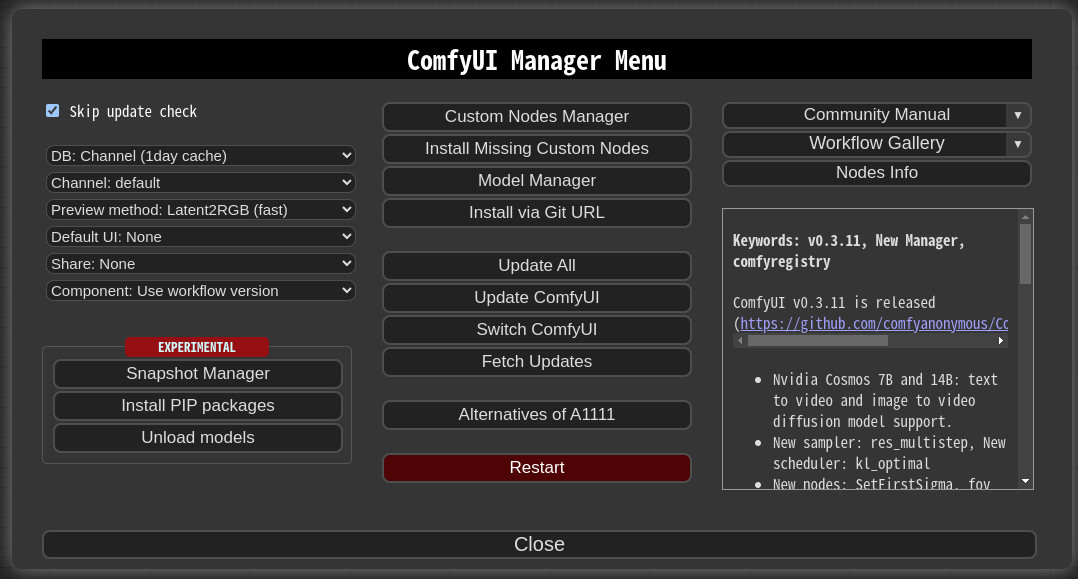
ComfyUI-Manager is an extension designed to enhance the usability of ComfyUI. It offers management functions to install, remove, disable, and enable various custom nodes of ComfyUI. Furthermore, this extension provides a hub feature and convenience functions to access a wide range of information within ComfyUI.
NOTICE
- V4.0: Modify the structure to be installable via pip instead of using git clone.
- V3.16: Support for
uv has been added. Set use_uv in config.ini.
- V3.10:
double-click feature is removed
- V3.3.2: Overhauled. Officially supports https://registry.comfy.org/.
- You can see whole nodes info on ComfyUI Nodes Info page.
Installation
-
When installing the latest ComfyUI, it will be automatically installed as a dependency, so manual installation is no longer necessary.
-
Manual installation of the nightly version:
-
See also: https://github.com/Comfy-Org/comfy-cli
Front-end
- The built-in front-end of ComfyUI-Manager is the legacy front-end. The front-end for ComfyUI-Manager is now provided via ComfyUI Frontend.
- To enable the legacy front-end, set the environment variable
ENABLE_LEGACY_COMFYUI_MANAGER_FRONT to true before running.
How To Use
-
Click "Manager" button on main menu

-
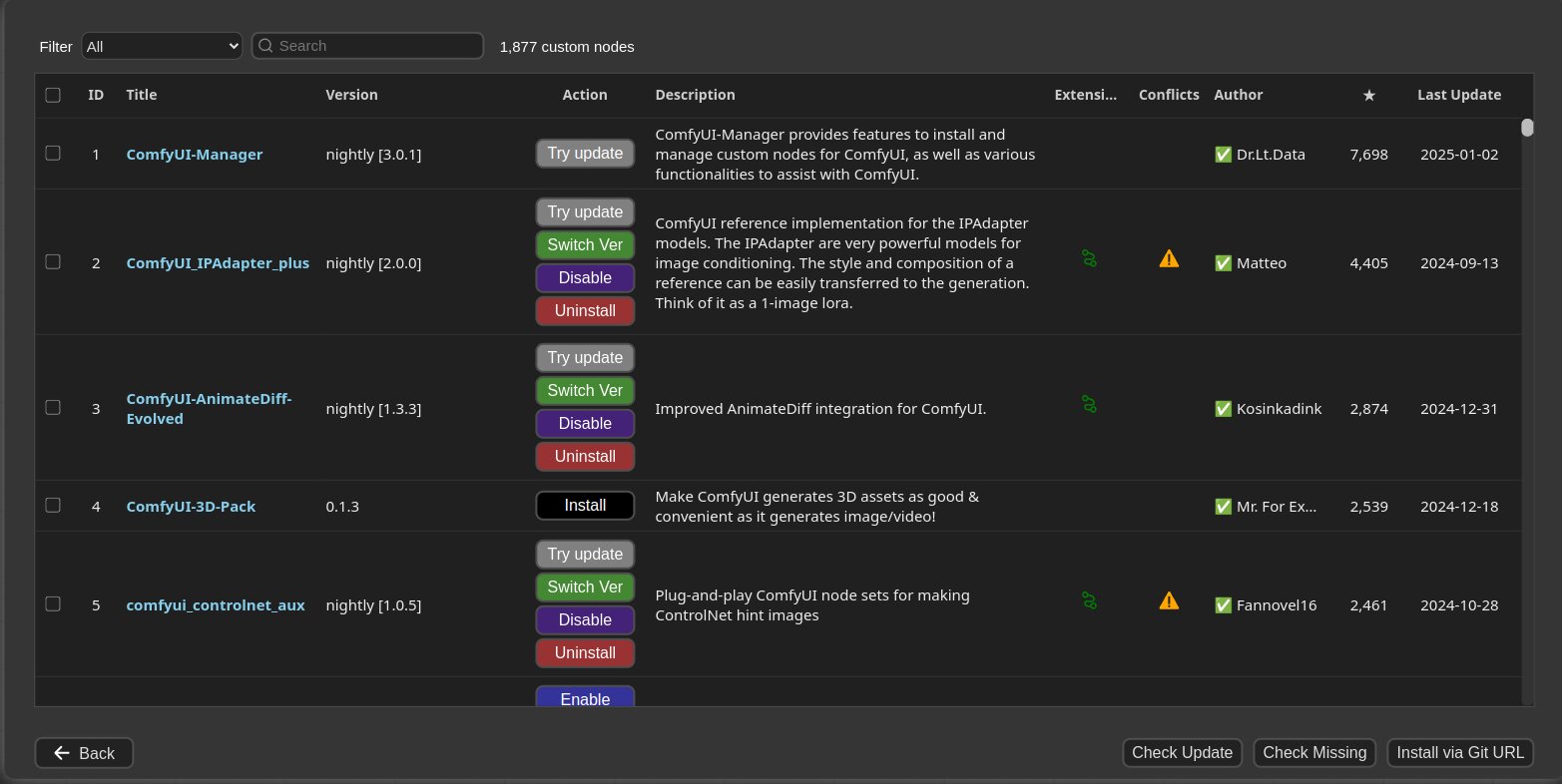
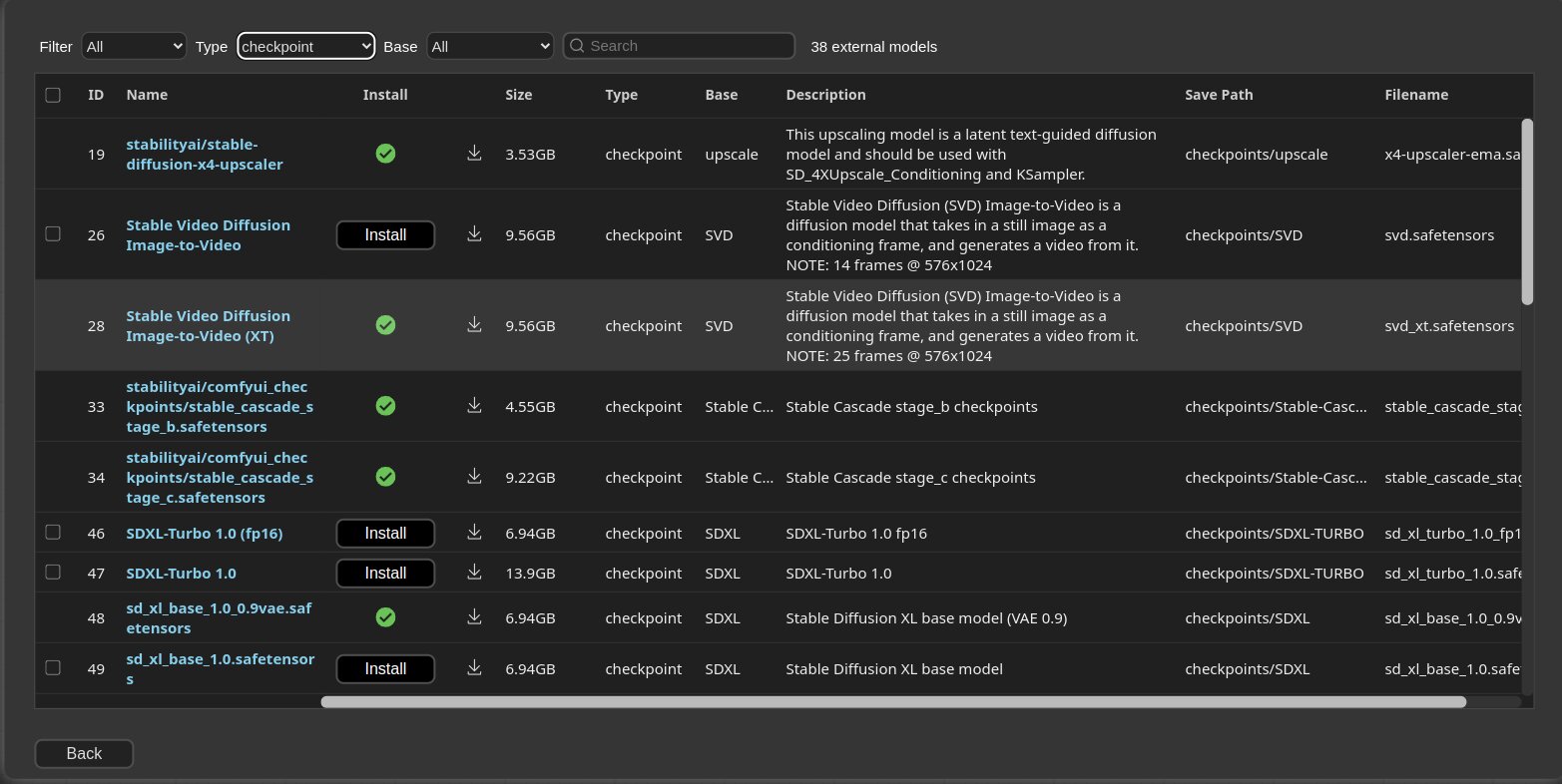
If you click on 'Install Custom Nodes' or 'Install Models', an installer dialog will open.
-
There are three DB modes: DB: Channel (1day cache), DB: Local, and DB: Channel (remote).
Channel (1day cache) utilizes Channel cache information with a validity period of one day to quickly display the list.
- This information will be updated when there is no cache, when the cache expires, or when external information is retrieved through the Channel (remote).
- Whenever you start ComfyUI anew, this mode is always set as the default mode.
Local uses information stored locally in ComfyUI-Manager.
- This information will be updated only when you update ComfyUI-Manager.
- For custom node developers, they should use this mode when registering their nodes in
custom-node-list.json and testing them.
Channel (remote) retrieves information from the remote channel, always displaying the latest list.- In cases where retrieval is not possible due to network errors, it will forcibly use local information.
-
The Fetch Updates menu retrieves update data for custom nodes locally. Actual updates are applied by clicking the Update button in the Install Custom Nodes menu.
-
Click 'Install' or 'Try Install' button.
-
Installed: This item is already installed.
-
Install: Clicking this button will install the item.
-
Try Install: This is a custom node of which installation information cannot be confirmed. Click the button to try installing it.
-
If a red background Channel indicator appears at the top, it means it is not the default channel. Since the amount of information held is different from the default channel, many custom nodes may not appear in this channel state.
- Channel settings have a broad impact, affecting not only the node list but also all functions like "Update all."
-
Conflicted Nodes with a yellow background show a list of nodes conflicting with other extensions in the respective extension. This issue needs to be addressed by the developer, and users should be aware that due to these conflicts, some nodes may not function correctly and may need to be installed accordingly.
-
Share
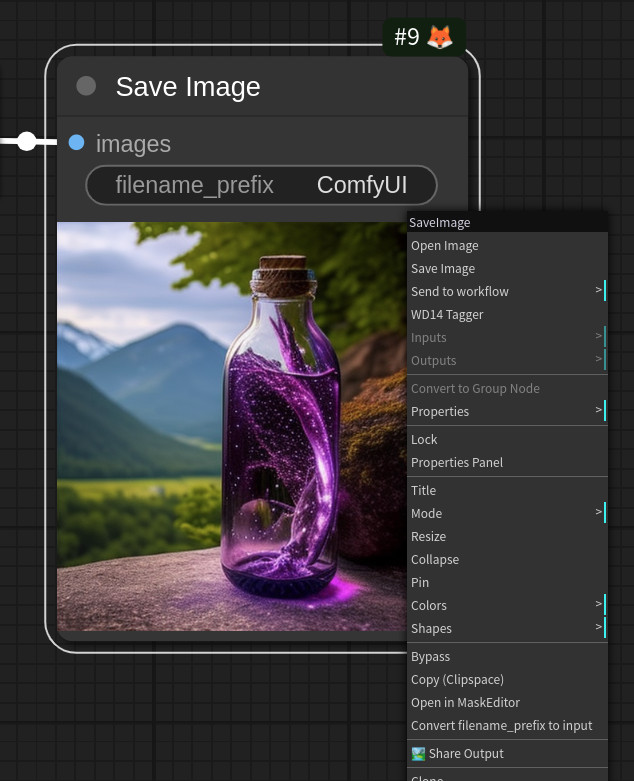
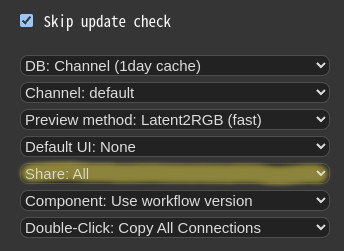
- Through the Share settings in the Manager menu, you can configure the behavior of the Share button in the Main menu or Share Output button on Context Menu.
None: hide from Main menuAll: Show a dialog where the user can select a title for sharing.
Paths
In ComfyUI-Manager V4.0.3b4 and later, configuration files and dynamically generated files are located under <USER_DIRECTORY>/__manager/.
-
<USER_DIRECTORY>
- If executed without any options, the path defaults to ComfyUI/user.
- It can be set using --user-directory <USER_DIRECTORY>.
-
Basic config files: <USER_DIRECTORY>/__manager/config.ini
-
Configurable channel lists: <USER_DIRECTORY>/__manager/channels.ini
-
Configurable pip overrides: <USER_DIRECTORY>/__manager/pip_overrides.json
-
Configurable pip blacklist: <USER_DIRECTORY>/__manager/pip_blacklist.list
-
Configurable pip auto fix: <USER_DIRECTORY>/__manager/pip_auto_fix.list
-
Saved snapshot files: <USER_DIRECTORY>/__manager/snapshots
-
Startup script files: <USER_DIRECTORY>/__manager/startup-scripts
-
Component files: <USER_DIRECTORY>/__manager/components
The following settings are applied based on the section marked as is_default.
custom_nodes: Path for installing custom nodes
- Importing does not need to adhere to the path set as
is_default, but this is the path where custom nodes are installed by the ComfyUI Nodes Manager.
download_model_base: Path for downloading models
Snapshot-Manager
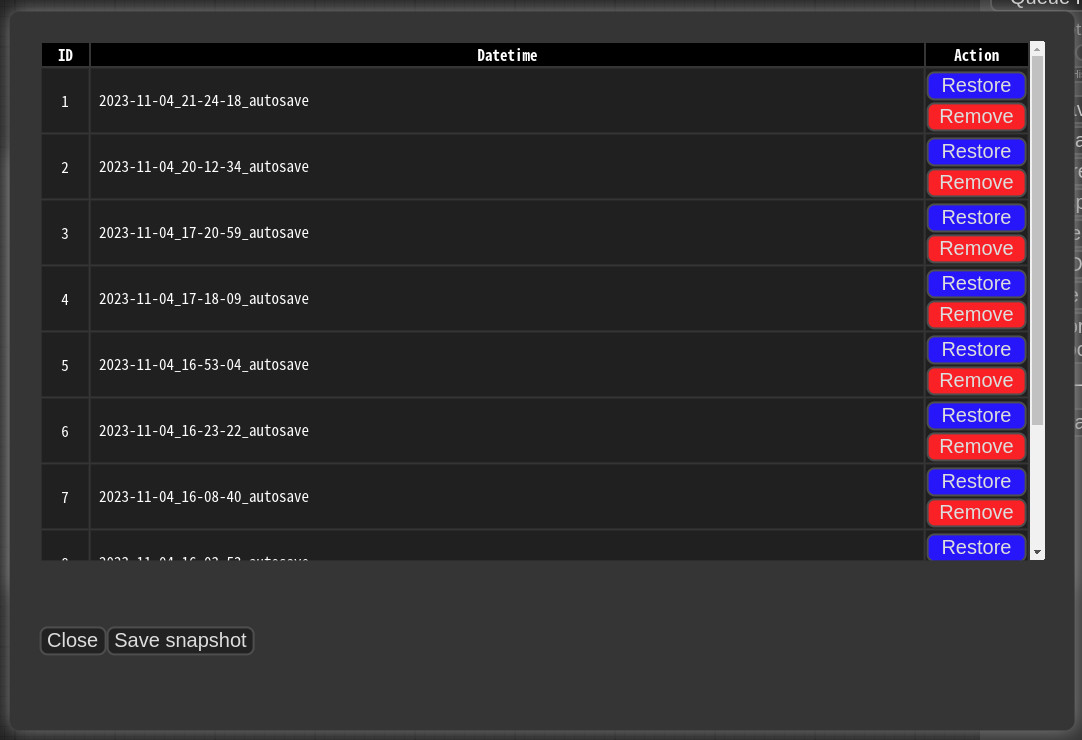
- When you press
Save snapshot or use Update All on Manager Menu, the current installation status snapshot is saved.
- Snapshot file dir:
<USER_DIRECTORY>/__manager/snapshots
- You can rename snapshot file.
- Press the "Restore" button to revert to the installation status of the respective snapshot.
- However, for custom nodes not managed by Git, snapshot support is incomplete.
- When you press
Restore, it will take effect on the next ComfyUI startup.
- The selected snapshot file is saved in
<USER_DIRECTORY>/__manager/startup-scripts/restore-snapshot.json, and upon restarting ComfyUI, the snapshot is applied and then deleted.
cm-cli: command line tools for power users
- A tool is provided that allows you to use the features of ComfyUI-Manager without running ComfyUI.
- For more details, please refer to the cm-cli documentation.
How to register your custom node into ComfyUI-Manager
- Add an entry to
custom-node-list.json located in the root of ComfyUI-Manager and submit a Pull Request.
- NOTE: Before submitting the PR after making changes, please check
Use local DB and ensure that the extension list loads without any issues in the Install custom nodes dialog. Occasionally, missing or extra commas can lead to JSON syntax errors.
- The remaining JSON will be updated through scripts in the future, so you don't need to worry about it.
Custom node support guide
Special purpose files (optional)
pyproject.toml - Spec file for comfyregistry.node_list.json - When your custom nodes pattern of NODE_CLASS_MAPPINGS is not conventional, it is used to manually provide a list of nodes for reference. (example)requirements.txt - When installing, this pip requirements will be installed automaticallyinstall.py - When installing, it is automatically called- All scripts are executed from the root path of the corresponding custom node.
Component Sharing
Support for installing missing nodes
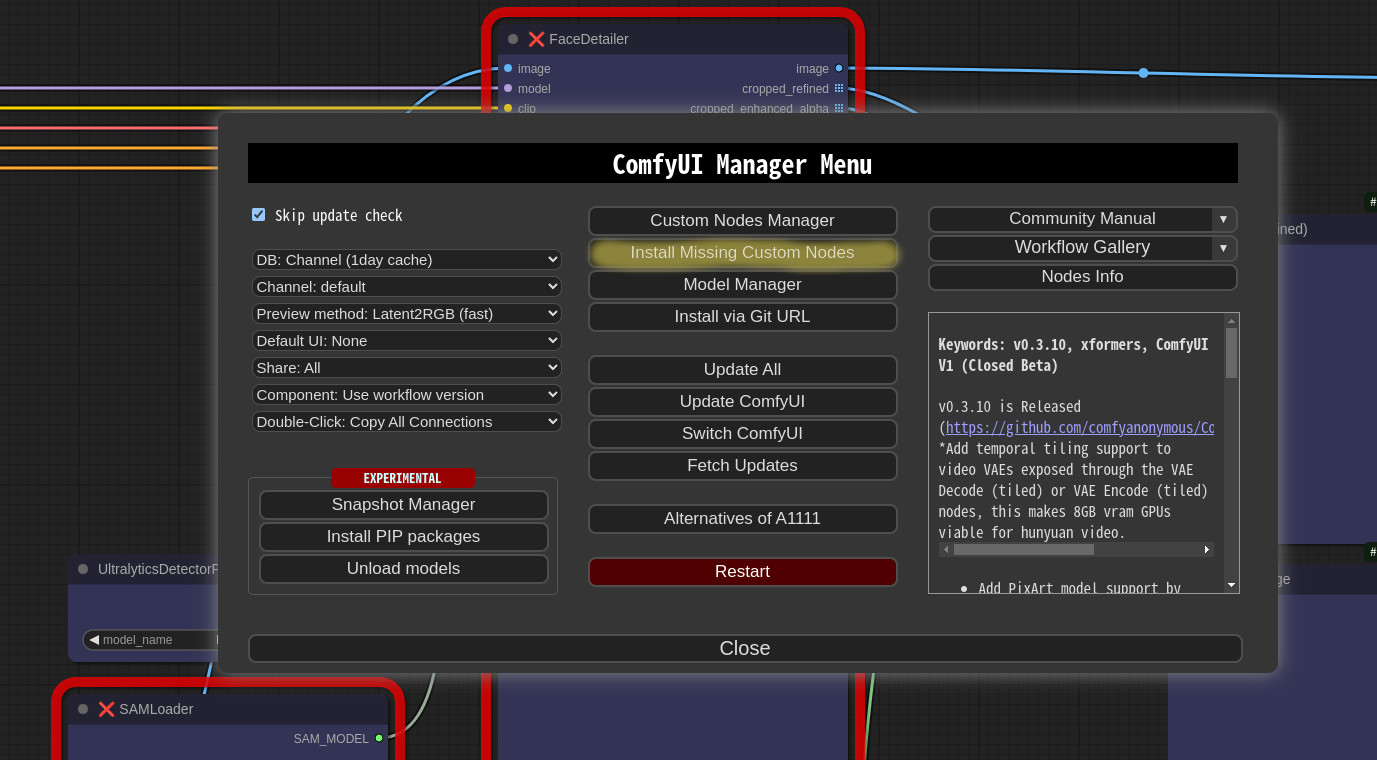
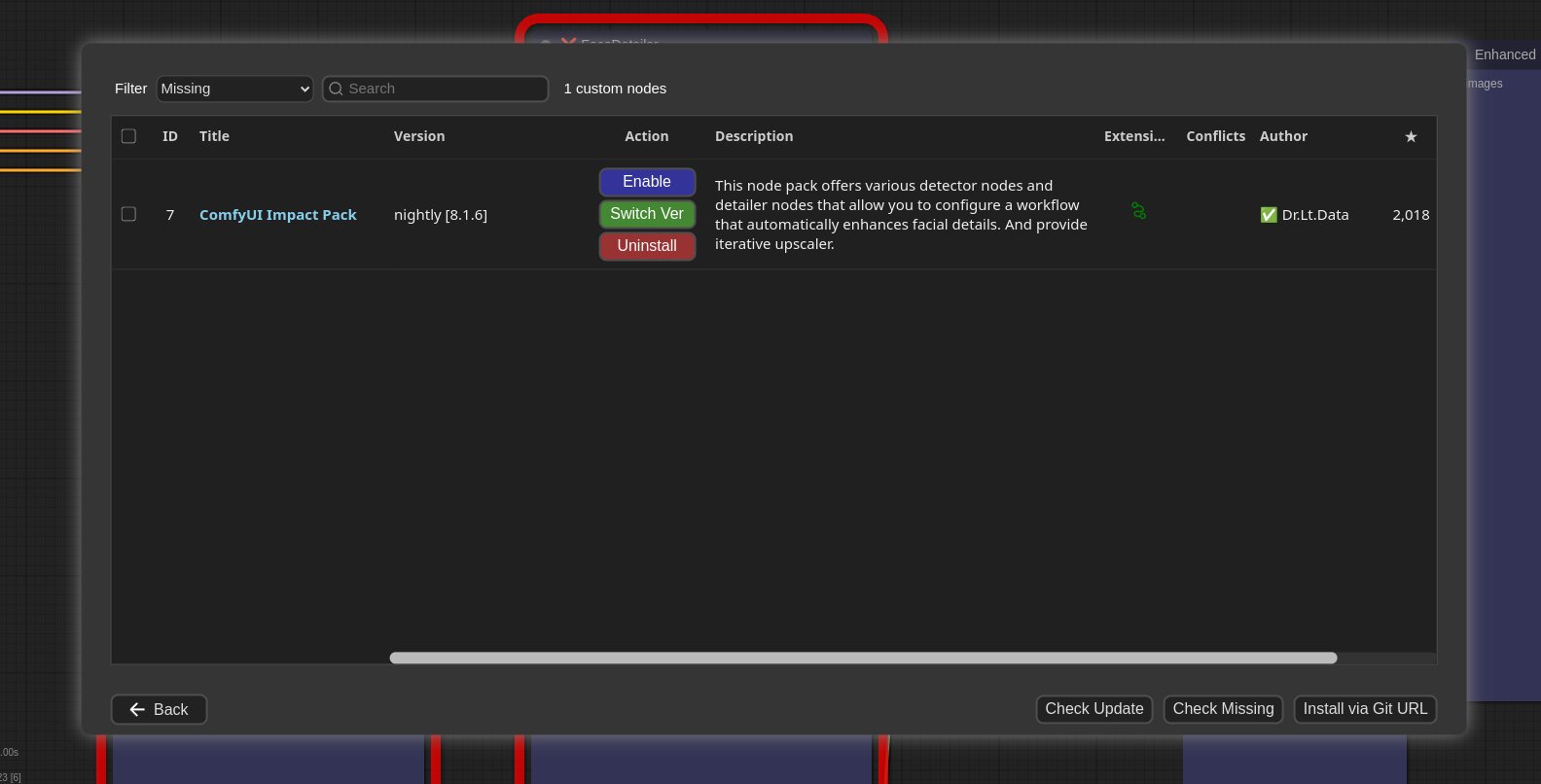
- When you click on the
Install Missing Custom Nodes button in the menu, it displays a list of extension nodes that contain nodes not currently present in the workflow.
Config
-
You can modify the config.ini file to apply the settings for ComfyUI-Manager.
-
Configuration options:
[default]
git_exe = <Manually specify the path to the git executable. If left empty, the default git executable path will be used.>
use_uv = <Use uv instead of pip for dependency installation.>
default_cache_as_channel_url = <Determines whether to retrieve the DB designated as channel_url at startup>
bypass_ssl = <Set to True if SSL errors occur to disable SSL.>
file_logging = <Configure whether to create a log file used by ComfyUI-Manager.>
windows_selector_event_loop_policy = <If an event loop error occurs on Windows, set this to True.>
model_download_by_agent = <When downloading models, use an agent instead of torchvision_download_url.>
downgrade_blacklist = <Set a list of packages to prevent downgrades. List them separated by commas.>
security_level = <Set the security level => strong|normal|normal-|weak>
always_lazy_install = <Whether to perform dependency installation on restart even in environments other than Windows.>
network_mode = <Set the network mode => public|private|offline|personal_cloud>
- network_mode:
- public: An environment that uses a typical public network.
- private: An environment that uses a closed network, where a private node DB is configured via
channel_url. (Uses cache if available)
- offline: An environment that does not use any external connections when using an offline network. (Uses cache if available)
- personal_cloud: Applies relaxed security features in cloud environments such as Google Colab or Runpod, where strong security is not required.
Additional Feature
-
Logging to file feature
- This feature is enabled by default and can be disabled by setting
file_logging = False in the config.ini.
-
Fix node (recreate): When right-clicking on a node and selecting Fix node (recreate), you can recreate the node. The widget's values are reset, while the connections maintain those with the same names.
- It is used to correct errors in nodes of old workflows created before, which are incompatible with the version changes of custom nodes.
-
Double-Click Node Title: You can set the double-click behavior of nodes in the ComfyUI-Manager menu.
Copy All Connections, Copy Input Connections: Double-clicking a node copies the connections of the nearest node.
- This action targets the nearest node within a straight-line distance of 1000 pixels from the center of the node.
- In the case of
Copy All Connections, it duplicates existing outputs, but since it does not allow duplicate connections, the existing output connections of the original node are disconnected.
- This feature copies only the input and output that match the names.
Possible Input Connections: It connects all outputs that match the closest type within the specified range.
- This connection links to the closest outputs among the nodes located on the left side of the target node.
Possible(left) + Copy(right): When you Double-Click on the left half of the title, it operates as Possible Input Connections, and when you Double-Click on the right half, it operates as Copy All Connections.
-
Prevent downgrade of specific packages
-
Custom pip mapping
- When you create the
pip_overrides.json file, it changes the installation of specific pip packages to installations defined by the user.
- Please refer to the
pip_overrides.json.template file.
-
Prevent the installation of specific pip packages
- List the package names one per line in the
pip_blacklist.list file.
-
Automatically Restoring pip Installation
-
If you list pip spec requirements in pip_auto_fix.list, similar to requirements.txt, it will automatically restore the specified versions when starting ComfyUI or when versions get mismatched during various custom node installations.
-
--index-url can be used.
-
Use aria2 as downloader
Environment Variables
The following features can be configured using environment variables:
- COMFYUI_PATH: The installation path of ComfyUI
- GITHUB_ENDPOINT: Reverse proxy configuration for environments with limited access to GitHub
- HF_ENDPOINT: Reverse proxy configuration for environments with limited access to Hugging Face
Example 1:
Redirecting https://github.com/ltdrdata/ComfyUI-Impact-Pack to https://mirror.ghproxy.com/https://github.com/ltdrdata/ComfyUI-Impact-Pack
GITHUB_ENDPOINT=https://mirror.ghproxy.com/https://github.com
Example 2:
Changing https://huggingface.co/path/to/somewhere to https://some-hf-mirror.com/path/to/somewhere
HF_ENDPOINT=https://some-hf-mirror.com
Scanner
When you run the scan.sh script:
-
It updates the extension-node-map.json.
- To do this, it pulls or clones the custom nodes listed in
custom-node-list.json into ~/.tmp/default.
- To skip this step, add the
--skip-update option.
- If you want to specify a different path instead of
~/.tmp/default, run python scanner.py [path] directly instead of scan.sh.
-
It updates the github-stats.json.
- This uses the GitHub API, so set your token with
export GITHUB_TOKEN=your_token_here to avoid quickly reaching the rate limit and malfunctioning.
- To skip this step, add the
--skip-stat-update option.
-
The --skip-all option applies both --skip-update and --skip-stat-update.
Troubleshooting
- If your
git.exe is installed in a specific location other than system git, please install ComfyUI-Manager and run ComfyUI. Then, specify the path including the file name in git_exe = in the <USER_DIRECTORY>/__manager/config.ini file that is generated.
- If updating ComfyUI-Manager itself fails, please go to the ComfyUI-Manager directory and execute the command
git update-ref refs/remotes/origin/main a361cc1 && git fetch --all && git pull.
- If you encounter the error message
Overlapped Object has pending operation at deallocation on ComfyUI Manager load under Windows
- Edit
config.ini file: add windows_selector_event_loop_policy = True
- If the
SSL: CERTIFICATE_VERIFY_FAILED error occurs.
- Edit
config.ini file: add bypass_ssl = True
Security policy
The security settings are applied based on whether the ComfyUI server's listener is non-local and whether the network mode is set to personal_cloud.
- non-local: When the server is launched with
--listen and is bound to a network range other than the local 127. range, allowing remote IP access.
- personal_cloud: When the
network_mode is set to personal_cloud.
Risky Level Table
| high+ | * Install via git url, pip install
* Installation of nodepack registered not in the default channel. |
| high | * Fix nodepack |
| middle+ | * Uninstall/Update
* Installation of nodepack registered in the default channel.
* Restore/Remove Snapshot
* Install model |
| middle | * Restart |
| low | * Update ComfyUI |
Security Level Table
| strong | * Only weak level risky features are allowed | * Only weak level risky features are allowed | * Only weak level risky features are allowed |
| normal | * high+ and high level risky features are not allowed
* middle+ and middle level risky features are available | * high+ and high level risky features are not allowed
* middle+ and middle level risky features are available | * high+, high and middle+ level risky features are not allowed
* middle level risky features are available |
| normal- | * All features are available | * high+ and high level risky features are not allowed
* middle+ and middle level risky features are available | * high+, high and middle+ level risky features are not allowed
* middle level risky features are available |
| weak | * All features are available | * All features are available | * high+ and middle+ level risky features are not allowed
* high, middle and low level risky features are available |
Disclaimer
- This extension simply provides the convenience of installing custom nodes and does not guarantee their proper functioning.
Credit
ComfyUI/ComfyUI - A powerful and modular stable diffusion GUI.
And, for all ComfyUI custom node developers





