corgy
Corgy is a Python library that allows you to create feature rich data
classes using intuitive type annotations.
>>> from typing import List
>>> from typing_extensions import Literal
>>> from corgy import Corgy
>>> from corgy.types import KeyValuePairs
>>> class G(Corgy):
... x: int
... y: Literal["y1", "y2", "y3"]
>>> class C(Corgy):
... x: List[float] = [1.0, 2.0]
... y: KeyValuePairs[str, int]
... g: G
Features
- Type checking:
Corgy instances are type-checked, and support a
number of type modifiers.
>>> from typing import Tuple

>>> class C(Corgy):
...     x: int
...     y: Tuple[int, int]

>>> C(x="1")
Traceback (most recent call last):
    ...
ValueError: error setting `x`: invalid value for type '<class 'int'>': '1'

>>> C(y=(1, 2, 3))
Traceback (most recent call last):
    ...
ValueError: error setting `y`: invalid value for type 'typing.Tuple[int, int]': (1, 2, 3): expected exactly '2' elements
- Dictionary interface:
Corgy instances can be converted to/from
dictionaries.
>>> class G(Corgy):
...     x: int

>>> class C(Corgy):
...     x: int
...     g: G

>>> g = G.from_dict({"x": 1})
>>> g
G(x=1)

>>> c = C(x=2, g=g)
>>> c.as_dict()
{'x': 2, 'g': {'x': 1}}
- Command-line parsing:
Corgy class attributes can be added to an
ArgumentParser instance, and parsed from the command-line. Help
messages can be added to attributes with Annotated, and will be
passed to the command line parser.
>>> from argparse import ArgumentParser
>>> from typing import Optional
>>> from typing_extensions import Annotated
>>> class ArgGroup(Corgy):
... arg1: Annotated[Optional[int], "optional number"]
... arg2: Annotated[bool, "a boolean"]
>>> class MyArgs(Corgy):
... arg1: Annotated[int, "a number"] = 1
... arg2: Annotated[Tuple[float, ...], "at least one float"]
... grp1: Annotated[ArgGroup, "group 1"]
>>> parser = ArgumentParser(usage="")
>>> MyArgs.add_args_to_parser(parser)
>>> parser.print_help()
usage:
optional arguments:
-h, --help show this help message and exit
--arg1 ARG1 a number
--arg2 ARG2 [ARG2 ...]
at least one float
grp1:
group 1
--grp1:arg1 [GRP1:ARG1]
optional number
--grp1:arg2, --no-grp1:arg2
a boolean
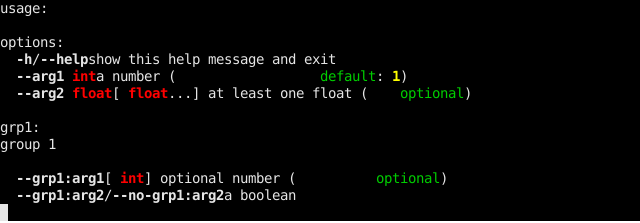
- Enhanced argparse formatting: The
corgy package provides
CorgyHelpFormatter, a formatter class for argparse, with support
for colorized output. It can also be used independent of Corgy
classes.
>>> from corgy import CorgyHelpFormatter
>>>
>>> parser = ArgumentParser(usage="", formatter_class=CorgyHelpFormatter)
>>> MyArgs.add_args_to_parser(parser)
>>> parser.print_help()
- Convenience types:
corgy.types provides a number of types for
converting strings into objects like paths, dictionaries, classes,
etc. These can be used standalone, but are especially useful for
parsing from command line arguments. Refer to the docs for details on
all available types. A small example is shown below.
>>> T = KeyValuePairs[str, int]
>>> m = T("x=1,y=2")
>>> print(m)
{'x': 1, 'y': 2}
Install
corgy is available on PyPI, and can be installed with pip:
pip install corgy
Support for colorized output requires the crayons package, also
available on PyPI. You can pull it as a dependency for corgy by
installing with the colors extra:
pip install corgy[colors]
Parsing Corgy objects from toml files requires the tomli package
on Python versions below 3.11. This can be installed automatically with
the toml extra:
pip install corgy[toml]





