
deepflash2
Advanced tools

deepflash2 - pypi Package Compare versions
+104
-113
| Metadata-Version: 2.1 | ||
| Name: deepflash2 | ||
| Version: 0.1.3 | ||
| Version: 0.1.4 | ||
| Summary: A Deep learning pipeline for segmentation of fluorescent labels in microscopy images | ||
@@ -9,114 +9,2 @@ Home-page: https://github.com/matjesg/deepflash2 | ||
| License: Apache Software License 2.0 | ||
| Description: # Welcome to | ||
|  | ||
| Official repository of deepflash2 - a deep learning pipeline for segmentation of fluorescent labels in microscopy images. | ||
|  | ||
| [](https://pypi.org/project/deepflash2/#description) | ||
| [](https://pypistats.org/packages/deepflash2) | ||
| [](https://anaconda.org/matjesg/deepflash2) | ||
| [](https://github.com/matjesg/deepflash2) | ||
| [](https://github.com/matjesg/deepflash2/) | ||
| [](https://github.com/matjesg/deepflash2/) | ||
| *** | ||
| ## Quick Start in 30 seconds | ||
| [](https://colab.research.google.com/github/matjesg/deepflash2/blob/master/deepflash2_GUI.ipynb) | ||
| 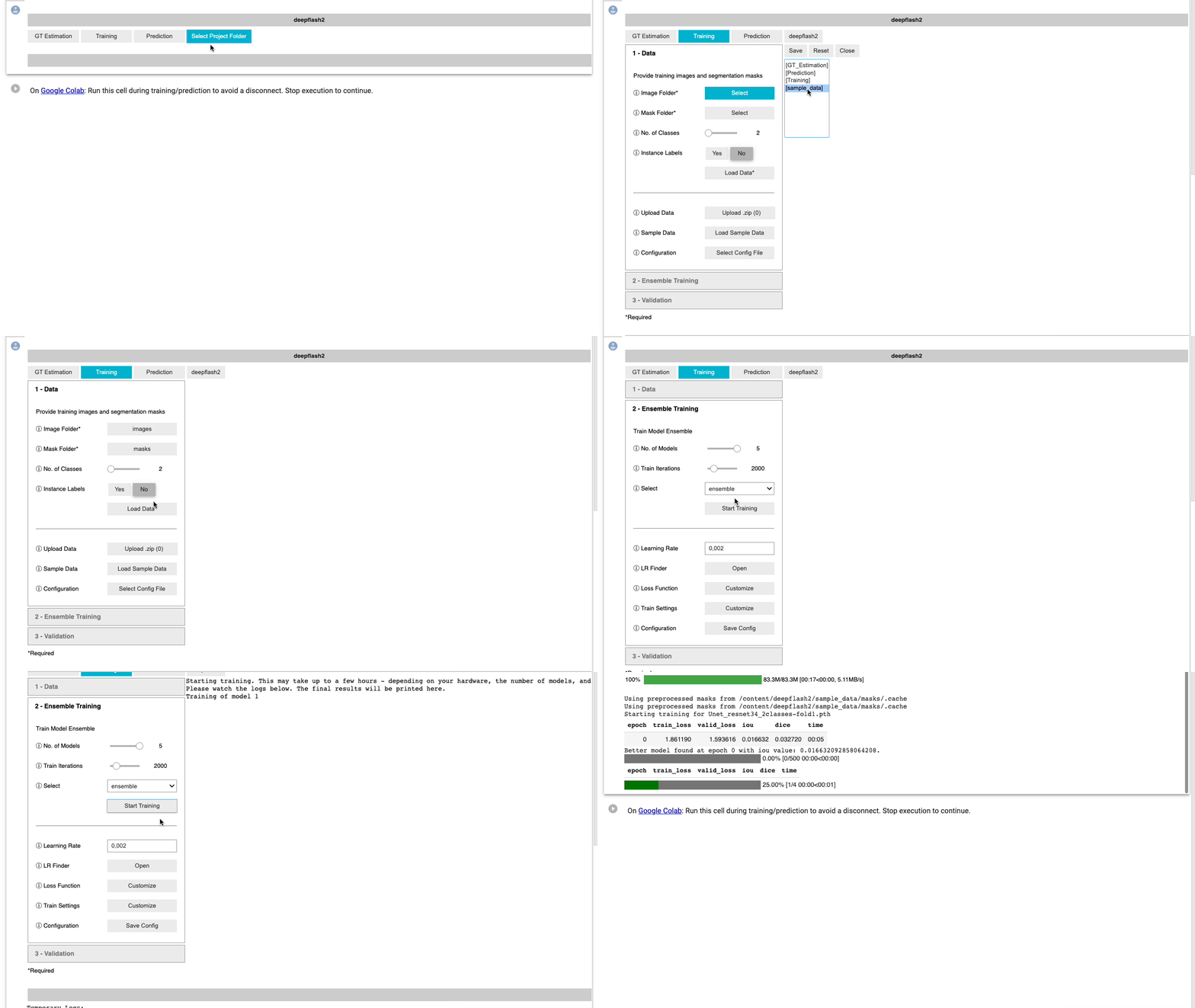 | ||
| Examplary training workflow. | ||
| ## Why using deepflash2? | ||
| __The best of two worlds:__ | ||
| Combining state of the art deep learning with a barrier free environment for life science researchers. | ||
| - End-to-end process for life science researchers | ||
| - graphical user interface - no coding skills required | ||
| - free usage on _Google Colab_ at no costs | ||
| - easy deployment on own hardware | ||
| - Rigorously evaluated deep learning models | ||
| - Model Library | ||
| - easy integration new (*pytorch*) models | ||
| - Best practices model training | ||
| - leveraging the _fastai_ library | ||
| - mixed precision training | ||
| - learning rate finder and fit one cycle policy | ||
| - advanced augementation | ||
| - Reliable prediction on new data | ||
| - leveraging Bayesian Uncertainties | ||
| **Kaggle Gold Medal and Innovation Price Winner** | ||
| *deepflash2* does not only work on fluorescent labels. The *deepflash2* API built the foundation for winning the [Innovation Award](https://hubmapconsortium.github.io/ccf/pages/kaggle.html) a Kaggle Gold Medal in the [HuBMAP - Hacking the Kidney](https://www.kaggle.com/c/hubmap-kidney-segmentation) challenge. | ||
| Have a look at our [solution](https://www.kaggle.com/matjes/hubmap-deepflash2-judge-price) | ||
|  | ||
| ## Citing | ||
| We're working on a peer reviewed publication. Until than, the preliminary citation is: | ||
| ``` | ||
| @misc{griebel2021deepflash2, | ||
| author = {Matthias Griebel}, | ||
| title = {DeepFLasH2 - a deep learning pipeline for segmentation of fluorescent labels in microscopy images}, | ||
| year = {2021}, | ||
| publisher = {GitHub}, | ||
| journal = {GitHub repository}, | ||
| howpublished = {\url{https://github.com/matjesg/deepflash2}} | ||
| } | ||
| ``` | ||
| ## Workflow | ||
| tbd | ||
| ## Installing | ||
| You can use **deepflash2** by using [Google Colab](colab.research.google.com). You can run every page of the [documentation](matjesg.github.io/deepflash2/) as an interactive notebook - click "Open in Colab" at the top of any page to open it. | ||
| - Be sure to change the Colab runtime to "GPU" to have it run fast! | ||
| - Use Firefox or Google Chrome if you want to upload your images. | ||
| You can install **deepflash2** on your own machines with conda (highly recommended): | ||
| ```bash | ||
| conda install -c fastai -c pytorch -c matjesg deepflash2 | ||
| ``` | ||
| To install with pip, use | ||
| ```bash | ||
| pip install deepflash2 | ||
| ``` | ||
| If you install with pip, you should install PyTorch first by following the PyTorch [installation instructions](https://pytorch.org/get-started/locally/). | ||
| ## Using Docker | ||
| Docker images for __deepflash2__ are built on top of [the latest pytorch image](https://hub.docker.com/r/pytorch/pytorch/) and [fastai](https://github.com/fastai/docker-containers) images. **You must install [Nvidia-Docker](https://github.com/NVIDIA/nvidia-docker) to enable gpu compatibility with these containers.** | ||
| - CPU only | ||
| > `docker run -p 8888:8888 matjesg/deepflash` | ||
| - With GPU support ([Nvidia-Docker](https://github.com/NVIDIA/nvidia-docker) must be installed.) | ||
| has an editable install of fastai and fastcore. | ||
| > `docker run --gpus all -p 8888:8888 matjesg/deepflash` | ||
| All docker containers are configured to start a jupyter server. **deepflash2** notebooks are available in the `deepflash2_notebooks` folder. | ||
| For more information on how to run docker see [docker orientation and setup](https://docs.docker.com/get-started/) and [fastai docker](https://github.com/fastai/docker-containers). | ||
| ## Creating segmentation masks with Fiji/ImageJ | ||
| If you don't have labelled training data available, you can use this [instruction manual](https://github.com/matjesg/DeepFLaSH/raw/master/ImageJ/create_maps_howto.pdf) for creating segmentation maps. | ||
| The ImagJ-Macro is available [here](https://raw.githubusercontent.com/matjesg/DeepFLaSH/master/ImageJ/Macro_create_maps.ijm). | ||
| ## Acronym | ||
| A Deep-learning pipeline for Fluorescent Label Segmentation that learns from Human experts | ||
| Keywords: unet,deep learning,semantic segmentation,microscopy,fluorescent labels | ||
@@ -133,1 +21,104 @@ Platform: UNKNOWN | ||
| Description-Content-Type: text/markdown | ||
| License-File: LICENSE | ||
| # Welcome to | ||
|  | ||
| Official repository of deepflash2 - a deep-learning pipeline for segmentation of ambiguous microscopic images. | ||
|  | ||
| [](https://pypi.org/project/deepflash2/#description) | ||
| [](https://pypistats.org/packages/deepflash2) | ||
| [](https://anaconda.org/matjesg/deepflash2) | ||
| [](https://github.com/matjesg/deepflash2) | ||
| [](https://github.com/matjesg/deepflash2/) | ||
| [](https://github.com/matjesg/deepflash2/) | ||
| *** | ||
| ## Quick Start in 30 seconds | ||
| [](https://colab.research.google.com/github/matjesg/deepflash2/blob/master/deepflash2_GUI.ipynb) | ||
| <video src="https://user-images.githubusercontent.com/13711052/139820660-79514f0d-f075-4e8f-9c84-debbce4355da.mov" controls width="100%"></video> | ||
| ## Why using deepflash2? | ||
| __The best of two worlds:__ | ||
| Combining state of the art deep learning with a barrier free environment for life science researchers. | ||
| <img src="https://raw.githubusercontent.com/matjesg/deepflash2/master/nbs/media/workflow.png" width="100%" style="max-width: 100%px"> | ||
| - End-to-end process for life science researchers | ||
| - graphical user interface - no coding skills required | ||
| - free usage on _Google Colab_ at no costs | ||
| - easy deployment on own hardware | ||
| - Reliable prediction on new data | ||
| - Quality assurance and out-of-distribution detection | ||
| **Kaggle Gold Medal and Innovation Price Winner** | ||
| *deepflash2* does not only work on fluorescent labels. The *deepflash2* API built the foundation for winning the [Innovation Award](https://hubmapconsortium.github.io/ccf/pages/kaggle.html) a Kaggle Gold Medal in the [HuBMAP - Hacking the Kidney](https://www.kaggle.com/c/hubmap-kidney-segmentation) challenge. | ||
| Have a look at our [solution](https://www.kaggle.com/matjes/hubmap-deepflash2-judge-price) | ||
|  | ||
| ## Citing | ||
| We're working on a peer reviewed publication. Until than, the preliminary citation is: | ||
| ``` | ||
| @misc{griebel2021deepflash2, | ||
| author = {Matthias Griebel}, | ||
| title = {DeepFLasH2 - a deep learning pipeline for segmentation of fluorescent labels in microscopy images}, | ||
| year = {2021}, | ||
| publisher = {GitHub}, | ||
| journal = {GitHub repository}, | ||
| howpublished = {\url{https://github.com/matjesg/deepflash2}} | ||
| } | ||
| ``` | ||
| ## Installing | ||
| You can use **deepflash2** by using [Google Colab](colab.research.google.com). You can run every page of the [documentation](matjesg.github.io/deepflash2/) as an interactive notebook - click "Open in Colab" at the top of any page to open it. | ||
| - Be sure to change the Colab runtime to "GPU" to have it run fast! | ||
| - Use Firefox or Google Chrome if you want to upload your images. | ||
| You can install **deepflash2** on your own machines with conda (highly recommended): | ||
| ```bash | ||
| conda install -c fastchan -c matjesg deepflash2 | ||
| ``` | ||
| To install with pip, use | ||
| ```bash | ||
| pip install deepflash2 | ||
| ``` | ||
| If you install with pip, you should install PyTorch first by following the installation instructions of [pytorch](https://pytorch.org/get-started/locally/) or [fastai](https://docs.fast.ai/#Installing). | ||
| ## Using Docker | ||
| Docker images for __deepflash2__ are built on top of [the latest pytorch image](https://hub.docker.com/r/pytorch/pytorch/) and [fastai](https://github.com/fastai/docker-containers) images. **You must install [Nvidia-Docker](https://github.com/NVIDIA/nvidia-docker) to enable gpu compatibility with these containers.** | ||
| - CPU only | ||
| > `docker run -p 8888:8888 matjesg/deepflash` | ||
| - With GPU support ([Nvidia-Docker](https://github.com/NVIDIA/nvidia-docker) must be installed.) | ||
| has an editable install of fastai and fastcore. | ||
| > `docker run --gpus all -p 8888:8888 matjesg/deepflash` | ||
| All docker containers are configured to start a jupyter server. **deepflash2** notebooks are available in the `deepflash2_notebooks` folder. | ||
| For more information on how to run docker see [docker orientation and setup](https://docs.docker.com/get-started/) and [fastai docker](https://github.com/fastai/docker-containers). | ||
| ## Creating segmentation masks with Fiji/ImageJ | ||
| If you don't have labelled training data available, you can use this [instruction manual](https://github.com/matjesg/DeepFLaSH/raw/master/ImageJ/create_maps_howto.pdf) for creating segmentation maps. | ||
| The ImagJ-Macro is available [here](https://raw.githubusercontent.com/matjesg/DeepFLaSH/master/ImageJ/Macro_create_maps.ijm). | ||
| ## Acronym | ||
| A Deep-learning pipeline for Fluorescent Label Segmentation that learns from Human experts | ||
@@ -10,3 +10,3 @@ pip | ||
| albumentations>=1.0.0 | ||
| opencv-python>=4.0 | ||
| segmentation_models_pytorch>=0.2 | ||
| opencv-python>=4.0 |
@@ -30,2 +30,3 @@ # AUTOGENERATED BY NBDEV! DO NOT EDIT! | ||
| "unzip": "06_utils.ipynb", | ||
| "download_sample_data": "06_utils.ipynb", | ||
| "install_package": "06_utils.ipynb", | ||
@@ -40,5 +41,3 @@ "import_package": "06_utils.ipynb", | ||
| "label_mask": "06_utils.ipynb", | ||
| "get_candidates": "06_utils.ipynb", | ||
| "iou_mapping": "06_utils.ipynb", | ||
| "calculate_roi_measures": "06_utils.ipynb", | ||
| "get_instance_segmentation_metrics": "06_utils.ipynb", | ||
| "export_roi_set": "06_utils.ipynb", | ||
@@ -61,2 +60,6 @@ "calc_iterations": "06_utils.ipynb", | ||
| "GRID_COLS": "08_gui.ipynb", | ||
| "COLS_PRED_KEEP": "08_gui.ipynb", | ||
| "COLS_PRED_KEEP_DS": "08_gui.ipynb", | ||
| "COLS_PRED_KEEP_CP": "08_gui.ipynb", | ||
| "SAMPLE_DATA_URL": "08_gui.ipynb", | ||
| "set_css_in_cell_output": "08_gui.ipynb", | ||
@@ -71,2 +74,3 @@ "tooltip_css": "08_gui.ipynb", | ||
| "PathConfig": "08_gui.ipynb", | ||
| "ResultWidget": "08_gui.ipynb", | ||
| "GTDataSB": "08_gui.ipynb", | ||
@@ -73,0 +77,0 @@ "GTEstSB": "08_gui.ipynb", |
+35
-33
@@ -131,3 +131,3 @@ # AUTOGENERATED! DO NOT EDIT! File to edit: nbs/02_data.ipynb (unless otherwise specified). | ||
| # adapted from Falk, Thorsten, et al. "U-Net: deep learning for cell counting, detection, and morphometry." Nature methods 16.1 (2019): 67-70. | ||
| def preprocess_mask(clabels=None, instlabels=None, ignore=None, remove_overlap=True, n_dims = 2): | ||
| def preprocess_mask(clabels=None, instlabels=None, remove_connectivity=True, n_classes = 2): | ||
| "Calculates the weights from the given mask (classlabels `clabels` or `instlabels`)." | ||
@@ -143,3 +143,3 @@ | ||
| if remove_overlap: | ||
| if remove_connectivity: | ||
| # Initialize label and weights arrays with background | ||
@@ -167,3 +167,3 @@ labels = np.zeros_like(clabels) | ||
| # of that class, avoid overlapping instances | ||
| dil = cv2.morphologyEx(il, cv2.MORPH_CLOSE, kernel=np.ones((3,) * n_dims)) | ||
| dil = cv2.morphologyEx(il, cv2.MORPH_CLOSE, kernel=np.ones((3,) * n_classes)) | ||
| overlap_cand = np.unique(np.where(dil!=il, dil, 0)) | ||
@@ -173,3 +173,3 @@ labels[np.isin(il, overlap_cand, invert=True)] = c | ||
| for instance in overlap_cand[1:]: | ||
| objectMaskDil = cv2.dilate((labels == c).astype('uint8'), kernel=np.ones((3,) * n_dims),iterations = 1) | ||
| objectMaskDil = cv2.dilate((labels == c).astype('uint8'), kernel=np.ones((3,) * n_classes),iterations = 1) | ||
| labels[(instlabels == instance) & (objectMaskDil == 0)] = c | ||
@@ -272,3 +272,3 @@ else: | ||
| # Cell | ||
| def _read_msk(path, n_classes=2, instance_labels=False, **kwargs): | ||
| def _read_msk(path, n_classes=2, instance_labels=False, remove_connectivity=True, **kwargs): | ||
| "Read image and check classes" | ||
@@ -279,5 +279,8 @@ if path.suffix == '.zarr': | ||
| msk = imageio.imread(path, **kwargs) | ||
| if not instance_labels: | ||
| if np.max(msk)>n_classes: | ||
| msk = msk//np.iinfo(msk.dtype).max | ||
| if instance_labels: | ||
| msk = preprocess_mask(clabels=None, instlabels=msk, remove_connectivity=remove_connectivity, n_classes=n_classes) | ||
| else: | ||
| # handle binary labels that are scaled different from 0 and 1 | ||
| if n_classes==2 and np.max(msk)>1 and len(np.unique(msk))==2: | ||
| msk = msk//np.max(msk) | ||
| # Remove channels if no extra information given | ||
@@ -288,10 +291,11 @@ if len(msk.shape)==3: | ||
| # Mask check | ||
| # assert len(np.unique(msk))<=n_classes, 'Check n_classes and provided mask' | ||
| return msk | ||
| assert len(np.unique(msk))<=n_classes, f'Expected mask with {n_classes} classes but got mask with {len(np.unique(msk))} classes {np.unique(msk)} . Are you using instance labels?' | ||
| assert len(msk.shape)==2, 'Currently, only masks with a single channel are supported.' | ||
| return msk.astype('uint8') | ||
| # Cell | ||
| class BaseDataset(Dataset): | ||
| def __init__(self, files, label_fn=None, instance_labels = False, n_classes=2, ignore={},remove_overlap=False,stats=None,normalize=True, | ||
| tile_shape=(512,512), padding=(0,0),preproc_dir=None, verbose=1, scale=1, pdf_reshape=512, **kwargs): | ||
| store_attr('files, label_fn, instance_labels, n_classes, ignore, tile_shape, remove_overlap, padding, normalize, scale, pdf_reshape') | ||
| def __init__(self, files, label_fn=None, instance_labels = False, n_classes=2, ignore={},remove_connectivity=True,stats=None,normalize=True, | ||
| tile_shape=(512,512), padding=(0,0),preproc_dir=None, verbose=1, scale=1, pdf_reshape=512, use_preprocessed_labels=False, **kwargs): | ||
| store_attr('files, label_fn, instance_labels, n_classes, ignore, tile_shape, remove_connectivity, padding, normalize, scale, pdf_reshape, use_preprocessed_labels') | ||
| self.c = n_classes | ||
@@ -340,10 +344,4 @@ | ||
| label_path = self.label_fn(file) | ||
| if self.instance_labels: | ||
| clabels = None | ||
| instlabels = self.read_mask(label_path, self.c, instance_labels=True) | ||
| else: | ||
| clabels = self.read_mask(label_path, self.c) | ||
| instlabels = None | ||
| ign = self.ignore[file.name] if file.name in self.ignore else None | ||
| lbl = preprocess_mask(clabels, instlabels, n_dims=self.c, remove_overlap=self.remove_overlap) | ||
| lbl = self.read_mask(label_path, n_classes=self.c, instance_labels=self.instance_labels, remove_connectivity=self.remove_connectivity) | ||
| self.labels[file.name] = lbl | ||
@@ -355,12 +353,15 @@ self.pdfs[file.name] = self._create_cdf(lbl, ignore=ign) | ||
| for f in self.files: | ||
| try: | ||
| #lbl, wgt, pdf = _get_cached_data(self._cache_fn(f.name)) | ||
| self.labels[f.name] | ||
| self.pdfs[f.name] | ||
| if not using_cache: | ||
| if verbose>0: print(f'Using preprocessed masks from {self.preproc_dir}') | ||
| using_cache = True | ||
| except: | ||
| if self.use_preprocessed_labels: | ||
| try: | ||
| self.labels[f.name] | ||
| self.pdfs[f.name] | ||
| if not using_cache: | ||
| if verbose>0: print(f'Using preprocessed masks from {self.preproc_dir}') | ||
| using_cache = True | ||
| except: | ||
| if verbose>0: print('Preprocessing', f.name) | ||
| self._preproc_file(f) | ||
| else: | ||
| if verbose>0: print('Preprocessing', f.name) | ||
| self._preproc_file(f) | ||
@@ -427,3 +428,4 @@ def get_data(self, files=None, max_n=None, mask=False): | ||
| n_inp = 1 | ||
| def __init__(self, *args, sample_mult=None, flip=True, rotation_range_deg=(0, 360), scale_range=(0, 0), albumentations_tfms=[A.RandomGamma()], **kwargs): | ||
| def __init__(self, *args, sample_mult=None, flip=True, rotation_range_deg=(0, 360), scale_range=(0, 0), | ||
| albumentations_tfms=[A.RandomGamma()], min_length=400, **kwargs): | ||
| super().__init__(*args, **kwargs) | ||
@@ -434,8 +436,8 @@ store_attr('sample_mult, flip, rotation_range_deg, scale_range, albumentations_tfms') | ||
| if self.sample_mult is None: | ||
| tile_shape = np.array(self.tile_shape)-np.array(self.padding) | ||
| msk_shape = np.array(self.get_data(max_n=1)[0].shape[:-1]) | ||
| #tile_shape = np.array(self.tile_shape)-np.array(self.padding) | ||
| #msk_shape = np.array(self.get_data(max_n=1)[0].shape[:-1]) | ||
| #msk_shape = np.array(lbl.shape[-2:]) | ||
| self.sample_mult = int(np.product(np.floor(msk_shape/tile_shape))) | ||
| #sample_mult = int(np.product(np.floor(msk_shape/tile_shape))) | ||
| self.sample_mult = max(1, min_length//len(self.files)) | ||
| tfms = self.albumentations_tfms | ||
@@ -442,0 +444,0 @@ if self.normalize: |
+37
-15
@@ -15,3 +15,3 @@ # AUTOGENERATED! DO NOT EDIT! File to edit: nbs/09_gt.ipynb (unless otherwise specified). | ||
| from .learner import Config | ||
| from .utils import save_mask, dice_score, install_package | ||
| from .utils import save_mask, dice_score, install_package, get_instance_segmentation_metrics | ||
@@ -103,3 +103,6 @@ # Cell | ||
| for i, exp in enumerate(exps): | ||
| msk = _read_msk(self.mask_fn(exp,m)) | ||
| try: | ||
| msk = _read_msk(self.mask_fn(exp,m), instance_labels=self.instance_labels) | ||
| except: | ||
| raise ValueError('Ground truth estimation currently only suppports two classes (binary masks or instance labels)') | ||
| msk_show(axs[i], msk, exp, cmap=self.cmap) | ||
@@ -116,3 +119,3 @@ fig.text(0, .5, m, ha='center', va='center', rotation=90) | ||
| for m, exps in progress_bar(self.masks.items()): | ||
| masks = [_read_msk(self.mask_fn(exp,m)) for exp in exps] | ||
| masks = [_read_msk(self.mask_fn(exp,m), instance_labels=self.instance_labels) for exp in exps] | ||
| if method=='STAPLE': | ||
@@ -125,2 +128,10 @@ ref = staple(masks, self.staple_fval, self.staple_thres) | ||
| df_tmp = pd.DataFrame({'method': method, 'file' : m, 'exp' : exps, 'dice_score': [dice_score(ref, msk) for msk in masks]}) | ||
| if self.instance_segmentation_metrics: | ||
| mAP, AP = [],[] | ||
| for msk in masks: | ||
| ap, tp, fp, fn = get_instance_segmentation_metrics(ref, msk, is_binary=True, **kwargs) | ||
| mAP.append(ap.mean()) | ||
| AP.append(ap[0]) | ||
| df_tmp['mean_average_precision'] = mAP | ||
| df_tmp['average_precision_at_iou_50'] = AP | ||
| res.append(df_tmp) | ||
@@ -134,2 +145,9 @@ if save_dir: | ||
| self.df_agg = self.df_res.groupby('exp').agg(average_dice_score=('dice_score', 'mean'), std_dice_score=('dice_score', 'std')) | ||
| if self.instance_segmentation_metrics: | ||
| self.df_agg = self.df_res.groupby('exp').agg(average_dice_score=('dice_score', 'mean'), | ||
| std_dice_score=('dice_score', 'std'), | ||
| average_mean_average_precision=('mean_average_precision', 'mean'), | ||
| std_mean_average_precision=('mean_average_precision', 'std'), | ||
| average_average_precision_at_iou_50=('average_precision_at_iou_50', 'mean'), | ||
| std_average_precision_at_iou_50=('average_precision_at_iou_50', 'std')) | ||
| if save_dir: | ||
@@ -142,22 +160,26 @@ self.df_res.to_csv(path.parent/f'{method}_vs_experts.csv', index=False) | ||
| def show_gt(self, method='STAPLE', max_n=6, files=None, figsize=(15,5), **kwargs): | ||
| if not files: files = list(t.masks.keys())[:max_n] | ||
| def show_gt(self, method='STAPLE', max_n=6, files=None, figsize=(15,7), **kwargs): | ||
| from IPython.display import Markdown, display | ||
| if not files: files = list(self.masks.keys())[:max_n] | ||
| for f in files: | ||
| fig, ax = plt.subplots(ncols=3, figsize=figsize, **kwargs) | ||
| fig, ax = plt.subplots(ncols=2, figsize=figsize, **kwargs) | ||
| # GT | ||
| msk_show(ax[0], self.gt[method][f], f'{method} (binary mask)', cbar='', cmap=self.cmap) | ||
| # Experts | ||
| masks = [_read_msk(self.mask_fn(exp,f)) for exp in self.masks[f]] | ||
| masks = [_read_msk(self.mask_fn(exp,f), instance_labels=self.instance_labels) for exp in self.masks[f]] | ||
| masks_av = np.array(masks).sum(axis=0)#/len(masks) | ||
| msk_show(ax[1], masks_av, 'Expert Overlay', cbar='plot', ticks=len(masks), cmap=plt.cm.get_cmap(self.cmap, len(masks)+1)) | ||
| # Results | ||
| av_df = pd.DataFrame([self.df_res[self.df_res.file==f][['dice_score']].mean()], index=['average'], columns=['dice_score']) | ||
| plt_df = self.df_res[self.df_res.file==f].set_index('exp')[['dice_score']].append(av_df) | ||
| plt_df.columns = [f'Similarity (Dice Score)'] | ||
| tbl = pd.plotting.table(ax[2], np.round(plt_df,3), loc='center', colWidths=[.5]) | ||
| tbl.set_fontsize(14) | ||
| tbl.scale(1, 2) | ||
| ax[2].set_axis_off() | ||
| metrics = ['dice_score', 'mean_average_precision', 'average_precision_at_iou_50'] if self.instance_segmentation_metrics else ['dice_score'] | ||
| av_df = pd.DataFrame([self.df_res[self.df_res.file==f][metrics].mean()], index=['average'], columns=metrics) | ||
| plt_df = self.df_res[self.df_res.file==f].set_index('exp')[metrics].append(av_df) | ||
| #plt_df.columns = [f'Similarity (Dice Score)'] | ||
| #tbl = pd.plotting.table(ax[2], np.round(plt_df,3), loc='center', colWidths=[.5]) | ||
| #tbl.set_fontsize(14) | ||
| #tbl.scale(1, 2) | ||
| #ax[2].set_axis_off() | ||
| fig.text(0, .5, f, ha='center', va='center', rotation=90) | ||
| plt.tight_layout() | ||
| plt.show() | ||
| plt.show() | ||
| display(plt_df) | ||
| display(Markdown('---')) |
+88
-36
@@ -7,2 +7,3 @@ # AUTOGENERATED! DO NOT EDIT! File to edit: nbs/00_learner.ipynb (unless otherwise specified). | ||
| import shutil, gc, joblib, json, zarr, numpy as np, pandas as pd | ||
| import time | ||
| import tifffile, cv2 | ||
@@ -29,2 +30,3 @@ import torch, torch.nn as nn, torch.nn.functional as F | ||
| from fastai.callback.tracker import SaveModelCallback | ||
| from fastai.callback.progress import CSVLogger | ||
| from fastai.data.core import DataLoaders | ||
@@ -39,3 +41,3 @@ from fastai.data.transforms import get_image_files, get_files | ||
| from .data import TileDataset, RandomTileDataset, _read_img, _read_msk | ||
| from .utils import dice_score, plot_results, get_label_fn, calc_iterations, save_mask, save_unc, export_roi_set | ||
| from .utils import dice_score, plot_results, get_label_fn, calc_iterations, save_mask, save_unc, export_roi_set, get_instance_segmentation_metrics | ||
| from .utils import compose_albumentations as _compose_albumentations | ||
@@ -50,3 +52,3 @@ import deepflash2.tta as tta | ||
| # Project | ||
| project_dir:str = 'deepflash2' | ||
| project_dir:str = '.' | ||
@@ -81,3 +83,3 @@ # GT Estimation Settings | ||
| n_iter:int = 2500 | ||
| sample_mult:int = 1 | ||
| sample_mult:int = 0 | ||
@@ -110,6 +112,7 @@ # Validation and Prediction Settings | ||
| # Cellpose Settings | ||
| # Instance Segmentation Settings | ||
| cellpose_model:str='nuclei' | ||
| cellpose_diameter:int=0 | ||
| cellpose_export_class:int=1 | ||
| instance_segmentation_metrics:bool=False | ||
@@ -120,3 +123,3 @@ # Folder Structure | ||
| pred_dir:str = 'Prediction' | ||
| ens_dir:str = 'ensemble' | ||
| ens_dir:str = 'models' | ||
| val_dir:str = 'valid' | ||
@@ -137,6 +140,7 @@ | ||
| 'Save configuration to path' | ||
| path = Path(path) | ||
| with open(path.with_suffix('.json'), 'w') as config_file: | ||
| path = Path(path).with_suffix('.json') | ||
| with open(path, 'w') as config_file: | ||
| json.dump(asdict(self), config_file) | ||
| print(f'Saved current configuration to {path}.json') | ||
| return path | ||
@@ -331,3 +335,3 @@ def load(self, path): | ||
| _default = 'config' | ||
| def __init__(self, image_dir='images', mask_dir=None, config=None, path=None, ensemble_dir=None, item_tfms=None, | ||
| def __init__(self, image_dir='images', mask_dir=None, config=None, path=None, ensemble_path=None, item_tfms=None, | ||
| label_fn=None, metrics=None, cbs=None, ds_kwargs={}, dl_kwargs={}, model_kwargs={}, stats=None, files=None): | ||
@@ -346,3 +350,7 @@ | ||
| self.cbs = cbs or [SaveModelCallback(monitor='dice' if self.n_classes==2 else 'dice_multi')] #ShowGraphCallback | ||
| self.ensemble_dir = ensemble_dir or self.path/'ensemble' | ||
| self.ensemble_dir = ensemble_path or self.path/self.ens_dir | ||
| if ensemble_path is not None: | ||
| ensemble_path.mkdir(exist_ok=True, parents=True) | ||
| self.load_ensemble(path=ensemble_path) | ||
| else: self.models = {} | ||
@@ -363,11 +371,12 @@ self.files = L(files) or get_image_files(self.path/image_dir, recurse=False) | ||
| self.n_splits=min(len(self.files), self.max_splits) | ||
| self.models = {} | ||
| self.recorder = {} | ||
| self._set_splits() | ||
| self.ds = RandomTileDataset(self.files, label_fn=self.label_fn, stats=self.stats, n_classes=self.n_classes, | ||
| sample_mult=self.sample_mult, verbose=0) | ||
| self.ds = RandomTileDataset(self.files, label_fn=self.label_fn, | ||
| stats=self.stats, | ||
| instance_labels=self.instance_labels, | ||
| n_classes=self.n_classes, | ||
| sample_mult=self.sample_mult if self.sample_mult>0 else None, verbose=0) | ||
| self.stats = stats or self.ds.stats | ||
| self.in_channels = self.ds.get_data(max_n=1)[0].shape[-1] | ||
| self.df_val, self.df_ens, self.df_model, self.ood = None,None,None,None | ||
| self.recorder = {} | ||
@@ -388,2 +397,4 @@ def _set_splits(self): | ||
| ds_kwargs = self.add_ds_kwargs.copy() | ||
| ds_kwargs['use_preprocessed_labels']= True | ||
| ds_kwargs['instance_labels']= self.instance_labels | ||
| ds_kwargs['tile_shape']= (self.tile_shape,)*2 | ||
@@ -400,2 +411,4 @@ ds_kwargs['n_classes']= self.n_classes | ||
| # Settings from config | ||
| ds_kwargs['use_preprocessed_labels']= True | ||
| ds_kwargs['instance_labels']= self.instance_labels | ||
| ds_kwargs['stats']= self.stats | ||
@@ -453,3 +466,12 @@ ds_kwargs['tile_shape']= (self.tile_shape,)*2 | ||
| dls = self._get_dls(files_train, files_val) | ||
| self.learn = Learner(dls, model, metrics=self.metrics, wd=self.weight_decay, loss_func=self.loss_fn, opt_func=_optim_dict[self.optim], cbs=self.cbs) | ||
| log_name = f'{name.name}_{time.strftime("%Y%m%d-%H%M%S")}.csv' | ||
| log_dir = self.ensemble_dir/'logs' | ||
| log_dir.mkdir(exist_ok=True, parents=True) | ||
| cbs = self.cbs.append(CSVLogger(fname=log_dir/log_name)) | ||
| self.learn = Learner(dls, model, | ||
| metrics=self.metrics, | ||
| wd=self.weight_decay, | ||
| loss_func=self.loss_fn, | ||
| opt_func=_optim_dict[self.optim], | ||
| cbs=self.cbs) | ||
| self.learn.model_dir = self.ensemble_dir.parent/'.tmp' | ||
@@ -506,3 +528,3 @@ if self.mixed_precision_training: self.learn.to_fp16() | ||
| #'mean_energy': np.mean(g_eng[f.name][:][pred>0]), | ||
| 'mean_uncertainty': np.mean(g_std[f.name][:][pred>0]) if g_std is not None else None, | ||
| 'uncertainty_score': np.mean(g_std[f.name][:][pred>0]) if g_std is not None else None, | ||
| 'image_path': f, | ||
@@ -543,9 +565,12 @@ 'mask_path': self.label_fn(f), | ||
| models = sorted(get_files(path, extensions='.pth', recurse=False)) | ||
| assert len(models)>0, f'No models found in {path}' | ||
| self.models = {} | ||
| for i, m in enumerate(models,1): | ||
| if i==0: self.n_classes = int(m.name.split('_')[2][0]) | ||
| else: assert self.n_classes==int(m.name.split('_')[2][0]), 'Check models. Models are trained on different number of classes.' | ||
| self.models[i] = m | ||
| if len(self.models)>0: self.set_n(len(self.models)) | ||
| print(f'Found {len(self.models)} models in folder {path}') | ||
| print(self.models) | ||
| print([m.name for m in self.models.values()]) | ||
| def get_ensemble_results(self, files, zarr_store=None, export_dir=None, filetype='.png', **kwargs): | ||
@@ -572,3 +597,3 @@ ep = EnsemblePredict(models_paths=self.models.values(), zarr_store=zarr_store) | ||
| #'mean_energy': np.mean(g_eng[f.name][:][pred>0]), | ||
| 'mean_uncertainty': np.mean(g_std[f.name][:][pred>0]) if g_std is not None else None, | ||
| 'uncertainty_score': np.mean(g_std[f.name][:][pred>0]) if g_std is not None else None, | ||
| 'image_path': f, | ||
@@ -590,13 +615,16 @@ 'softmax_path': f'{chunk_store}/{g_smx.path}/{f.name}', | ||
| def score_ensemble_results(self, mask_dir=None, label_fn=None): | ||
| if not label_fn: | ||
| if mask_dir is not None and label_fn is None: | ||
| label_fn = get_label_fn(self.df_ens.image_path[0], self.path/mask_dir) | ||
| for idx, r in self.df_ens.iterrows(): | ||
| msk_path = self.label_fn(r.image_path) | ||
| msk = _read_msk(msk_path, n_classes=self.n_classes) | ||
| self.df_ens.loc[idx, 'mask_path'] = msk_path | ||
| for i, r in self.df_ens.iterrows(): | ||
| if label_fn is not None: | ||
| msk_path = self.label_fn(r.image_path) | ||
| msk = _read_msk(msk_path, n_classes=self.n_classes, instance_labels=self.instance_labels) | ||
| self.df_ens.loc[i, 'mask_path'] = msk_path | ||
| else: | ||
| msk = self.ds.labels[r.file][:] | ||
| pred = np.argmax(zarr.load(r.softmax_path), axis=-1).astype('uint8') | ||
| self.df_ens.loc[idx, 'dice_score'] = dice_score(msk, pred) | ||
| self.df_ens.loc[i, 'dice_score'] = dice_score(msk, pred) | ||
| return self.df_ens | ||
| def show_ensemble_results(self, files=None, unc=True, unc_metric=None): | ||
| def show_ensemble_results(self, files=None, unc=True, unc_metric=None, metric_name='dice_score'): | ||
| assert self.df_ens is not None, "Please run `get_ensemble_results` first." | ||
@@ -608,4 +636,6 @@ df = self.df_ens | ||
| imgs.append(_read_img(r.image_path)[:]) | ||
| if 'dice_score' in r.index: | ||
| imgs.append(_read_msk(r.mask_path, n_classes=self.n_classes)) | ||
| if metric_name in r.index: | ||
| try: msk = self.ds.labels[r.file][:] | ||
| except: msk = _read_msk(r.mask_path, n_classes=self.n_classes, instance_labels=self.instance_labels) | ||
| imgs.append(msk) | ||
| hastarget=True | ||
@@ -616,3 +646,3 @@ else: | ||
| if unc: imgs.append(zarr.load(r.uncertainty_path)) | ||
| plot_results(*imgs, df=r, hastarget=hastarget, unc_metric=unc_metric) | ||
| plot_results(*imgs, df=r, hastarget=hastarget, metric_name=metric_name, unc_metric=unc_metric) | ||
@@ -643,3 +673,3 @@ def get_cellpose_results(self, export_dir=None): | ||
| for idx, r in self.df_ens.iterrows(): | ||
| tifffile.imwrite(cp_path/f'{r.name}_class{cl}.tif', cp_masks[idx], compress=6) | ||
| tifffile.imwrite(cp_path/f'{r.file}_class{cl}.tif', cp_masks[idx], compress=6) | ||
@@ -649,3 +679,21 @@ self.cellpose_masks = cp_masks | ||
| def show_cellpose_results(self, files=None, unc=True, unc_metric=None): | ||
| def score_cellpose_results(self, mask_dir=None, label_fn=None): | ||
| assert self.cellpose_masks is not None, 'Run get_cellpose_results() first' | ||
| if mask_dir is not None and label_fn is None: | ||
| label_fn = get_label_fn(self.df_ens.image_path[0], self.path/mask_dir) | ||
| for i, r in self.df_ens.iterrows(): | ||
| if label_fn is not None: | ||
| msk_path = self.label_fn(r.image_path) | ||
| msk = _read_msk(msk_path, n_classes=self.n_classes, instance_labels=self.instance_labels) | ||
| self.df_ens.loc[i, 'mask_path'] = msk_path | ||
| else: | ||
| msk = self.ds.labels[r.file][:] | ||
| _, msk = cv2.connectedComponents(msk, connectivity=4) | ||
| pred = self.cellpose_masks[i] | ||
| ap, tp, fp, fn = get_instance_segmentation_metrics(msk, pred, is_binary=False, min_pixel=self.min_pixel_export) | ||
| self.df_ens.loc[i, 'mean_average_precision'] = ap.mean() | ||
| self.df_ens.loc[i, 'average_precision_at_iou_50'] = ap[0] | ||
| return self.df_ens | ||
| def show_cellpose_results(self, files=None, unc=True, unc_metric=None, metric_name='mean_average_precision'): | ||
| assert self.df_ens is not None, "Please run `get_ensemble_results` first." | ||
@@ -657,4 +705,7 @@ df = self.df_ens.reset_index() | ||
| imgs.append(_read_img(r.image_path)[:]) | ||
| if 'dice_score' in r.index: | ||
| mask = _read_msk(r.mask_path, n_classes=self.n_classes) | ||
| if metric_name in r.index: | ||
| try: | ||
| mask = self.ds.labels[idx][:] | ||
| except: | ||
| mask = _read_msk(r.mask_path, n_classes=self.n_classes, instance_labels=self.instance_labels) | ||
| _, comps = cv2.connectedComponents((mask==self.cellpose_export_class).astype('uint8'), connectivity=4) | ||
@@ -667,3 +718,3 @@ imgs.append(label2rgb(comps, bg_label=0)) | ||
| if unc: imgs.append(zarr.load(r.uncertainty_path)) | ||
| plot_results(*imgs, df=r, hastarget=hastarget, unc_metric=unc_metric) | ||
| plot_results(*imgs, df=r, hastarget=hastarget, metric_name=metric_name, unc_metric=unc_metric) | ||
@@ -715,7 +766,8 @@ def lr_find(self, files=None, **kwargs): | ||
| get_ensemble_results="Get models and ensemble results", | ||
| score_ensemble_results="Compare ensemble results (Intersection over the Union) to given segmentation masks.", | ||
| score_ensemble_results="Compare ensemble results to given segmentation masks.", | ||
| show_ensemble_results="Show result of ensemble or `model_no`", | ||
| load_ensemble="Get models saved at `path`", | ||
| get_cellpose_results='Get instance segmentation results using the cellpose integration', | ||
| show_cellpose_results='Show instance segmentation results from cellpose predictions', | ||
| score_cellpose_results="Compare cellpose nstance segmentation results to given masks.", | ||
| show_cellpose_results='Show instance segmentation results from cellpose predictions.', | ||
| #compose_albumentations="Helper function to compose albumentations augmentations", | ||
@@ -722,0 +774,0 @@ #get_dls="Create datasets and dataloaders from files", |
@@ -12,2 +12,3 @@ # AUTOGENERATED! DO NOT EDIT! File to edit: nbs/01_models.ipynb (unless otherwise specified). | ||
| import subprocess, sys | ||
| from pathlib import Path | ||
| from pip._internal.operations import freeze | ||
@@ -49,14 +50,17 @@ | ||
| # Cell | ||
| def save_smp_model(model, arch, file, stats=None, pickle_protocol=2): | ||
| def save_smp_model(model, arch, path, stats=None, pickle_protocol=2): | ||
| 'Save smp model, optionally including stats' | ||
| path = Path(path) | ||
| state = model.state_dict() | ||
| save_dict = {'model': state, 'arch': arch, 'stats': stats, **model.kwargs} | ||
| torch.save(save_dict, file, pickle_protocol=pickle_protocol, _use_new_zipfile_serialization=False) | ||
| torch.save(save_dict, path, pickle_protocol=pickle_protocol, _use_new_zipfile_serialization=False) | ||
| return path | ||
| # Cell | ||
| def load_smp_model(file, device=None, strict=True, **kwargs): | ||
| def load_smp_model(path, device=None, strict=True, **kwargs): | ||
| 'Loads smp model from file ' | ||
| path = Path(path) | ||
| if isinstance(device, int): device = torch.device('cuda', device) | ||
| elif device is None: device = 'cpu' | ||
| model_dict = torch.load(file, map_location=device) | ||
| model_dict = torch.load(path, map_location=device) | ||
| state = model_dict.pop('model') | ||
@@ -63,0 +67,0 @@ stats = model_dict.pop('stats') |
+42
-55
| # AUTOGENERATED! DO NOT EDIT! File to edit: nbs/06_utils.ipynb (unless otherwise specified). | ||
| __all__ = ['unzip', 'install_package', 'import_package', 'compose_albumentations', 'ensemble_results', 'plot_results', | ||
| 'iou', 'dice_score', 'label_mask', 'get_candidates', 'iou_mapping', 'calculate_roi_measures', | ||
| __all__ = ['unzip', 'download_sample_data', 'install_package', 'import_package', 'compose_albumentations', | ||
| 'ensemble_results', 'plot_results', 'iou', 'dice_score', 'label_mask', 'get_instance_segmentation_metrics', | ||
| 'export_roi_set', 'calc_iterations', 'get_label_fn', 'save_mask', 'save_unc'] | ||
@@ -24,3 +24,6 @@ | ||
| from fastai.learner import Recorder | ||
| from fastdownload import download_url | ||
| from .models import check_cellpose_installation | ||
| # Cell | ||
@@ -39,2 +42,11 @@ def unzip(path, zip_file): | ||
| # Cell | ||
| def download_sample_data(base_url, name, dest, extract=False, timeout=4, show_progress=True): | ||
| dest = Path(dest) | ||
| dest.mkdir(exist_ok=True, parents=True) | ||
| file = download_url(f'{base_url}{name}', dest, show_progress=show_progress, timeout=timeout) | ||
| if extract: | ||
| unzip(dest, file) | ||
| file.unlink() | ||
| # Cell | ||
| #from https://stackoverflow.com/questions/12332975/installing-python-module-within-code | ||
@@ -85,3 +97,3 @@ def install_package(package, version=None): | ||
| # Cell | ||
| def plot_results(*args, df, hastarget=False, model=None, unc_metric=None, figsize=(20, 20), **kwargs): | ||
| def plot_results(*args, df, hastarget=False, model=None, metric_name='dice_score', unc_metric=None, figsize=(20, 20), **kwargs): | ||
| "Plot images, (masks), predictions and uncertainties side-by-side." | ||
@@ -112,3 +124,3 @@ if len(args)==4: | ||
| axs[2].set_axis_off() | ||
| axs[2].set_title(f'{pred_title} \n Dice Score: {df.dice_score:.2f}') | ||
| axs[2].set_title(f'{pred_title} \n {metric_name}: {df[metric_name]:.2f}') | ||
| axs[3].imshow(pred_std) | ||
@@ -130,3 +142,3 @@ axs[3].set_axis_off() | ||
| axs[2].set_axis_off() | ||
| axs[2].set_title(f'{pred_title} \n Dice Score: {df.dice_score:.2f}') | ||
| axs[2].set_title(f'{pred_title} \n {metric_name}: {df[metric_name]:.2f}') | ||
| elif len(args)==2: | ||
@@ -181,3 +193,3 @@ axs[1].imshow(pred) | ||
| # Cell | ||
| def label_mask(mask, threshold=0.5, min_pixel=15, do_watershed=False, exclude_border=False): | ||
| def label_mask(mask, threshold=0.5, connectivity=4, min_pixel=0, do_watershed=False, exclude_border=False): | ||
| '''Analyze regions and return labels''' | ||
@@ -189,6 +201,7 @@ if mask.ndim == 3: | ||
| # bw = closing(mask > threshold, square(2)) | ||
| bw = (mask > threshold).astype(int) | ||
| bw = (mask > threshold).astype('uint8') | ||
| # label image regions | ||
| label_image = label(bw, connectivity=2) # Falk p.13, 8-“connectivity”. | ||
| # label_image = label(bw, connectivity=2) # Falk p.13, 8-“connectivity”. | ||
| _, label_image = cv2.connectedComponents(bw, connectivity=connectivity) | ||
@@ -218,57 +231,30 @@ # Watershed: Separates objects in image by generate the markers | ||
| return (label_image) | ||
| return label_image | ||
| # Cell | ||
| def get_candidates(labels_a, labels_b): | ||
| '''Get candiate masks for ROI-wise analysis''' | ||
| def get_instance_segmentation_metrics(a, b, is_binary=False, thresholds=None, **kwargs): | ||
| ''' | ||
| Computes instance segmentation metric based on cellpose/stardist implementation. | ||
| https://cellpose.readthedocs.io/en/latest/api.html#cellpose.metrics.average_precision | ||
| ''' | ||
| try: | ||
| from cellpose import metrics | ||
| except: | ||
| check_cellpose_installation() | ||
| from cellpose import metrics | ||
| label_stack = np.dstack((labels_a, labels_b)) | ||
| cadidates = np.unique(label_stack.reshape(-1, label_stack.shape[2]), axis=0) | ||
| # Remove Zero Entries | ||
| cadidates = cadidates[np.prod(cadidates, axis=1) > 0] | ||
| return(cadidates) | ||
| # Find connected components in binary mask | ||
| if is_binary: | ||
| a = label_mask(a, **kwargs) | ||
| b = label_mask(b, **kwargs) | ||
| # Cell | ||
| def iou_mapping(labels_a, labels_b): | ||
| '''Compare masks using ROI-wise analysis''' | ||
| if thresholds is None: | ||
| #https://github.com/cocodataset/cocoapi/blob/master/PythonAPI/pycocotools/cocoeval.py | ||
| thresholds = np.linspace(.5, 0.95, int(np.round((0.95 - .5) / .05)) + 1, endpoint=True) | ||
| candidates = get_candidates(labels_a, labels_b) | ||
| ap, tp, fp, fn = metrics.average_precision(a, b, threshold=thresholds) | ||
| if candidates.size > 0: | ||
| # create a similarity matrix | ||
| dim_a = np.max(candidates[:,0])+1 | ||
| dim_b = np.max(candidates[:,1])+1 | ||
| similarity_matrix = np.zeros((dim_a, dim_b)) | ||
| return ap, tp, fp, fn | ||
| for x,y in candidates: | ||
| roi_a = (labels_a == x).astype(np.uint8).flatten() | ||
| roi_b = (labels_b == y).astype(np.uint8).flatten() | ||
| similarity_matrix[x,y] = 1-jaccard(roi_a, roi_b) | ||
| row_ind, col_ind = linear_sum_assignment(-similarity_matrix) | ||
| return(similarity_matrix[row_ind,col_ind], | ||
| row_ind, col_ind, | ||
| np.max(labels_a), | ||
| np.max(labels_b) | ||
| ) | ||
| else: | ||
| return([], | ||
| np.nan, np.nan, | ||
| np.max(labels_a), | ||
| np.max(labels_b) | ||
| ) | ||
| # Cell | ||
| def calculate_roi_measures(*masks, iou_threshold=.5, **kwargs): | ||
| "Calculates precision, recall, and f1_score on ROI-level" | ||
| labels = [label_mask(m, **kwargs) for m in masks] | ||
| matches_iou, _,_, count_a, count_b = iou_mapping(*labels) | ||
| matches = np.sum(np.array(matches_iou) > iou_threshold) | ||
| precision = matches/count_a | ||
| recall = matches/count_b | ||
| f1_score = 2 * (precision * recall) / (precision + recall) | ||
| return recall, precision, f1_score | ||
| # Cell | ||
| def export_roi_set(mask, intensity_image=None, instance_labels=False, name='RoiSet', path=Path('.'), ascending=True, min_pixel=0): | ||
@@ -302,2 +288,3 @@ "EXPERIMENTAL: Export mask regions to imageJ ROI Set" | ||
| i += 1 | ||
| return path/f'{name}.zip' | ||
@@ -304,0 +291,0 @@ # Cell |
+104
-113
| Metadata-Version: 2.1 | ||
| Name: deepflash2 | ||
| Version: 0.1.3 | ||
| Version: 0.1.4 | ||
| Summary: A Deep learning pipeline for segmentation of fluorescent labels in microscopy images | ||
@@ -9,114 +9,2 @@ Home-page: https://github.com/matjesg/deepflash2 | ||
| License: Apache Software License 2.0 | ||
| Description: # Welcome to | ||
|  | ||
| Official repository of deepflash2 - a deep learning pipeline for segmentation of fluorescent labels in microscopy images. | ||
|  | ||
| [](https://pypi.org/project/deepflash2/#description) | ||
| [](https://pypistats.org/packages/deepflash2) | ||
| [](https://anaconda.org/matjesg/deepflash2) | ||
| [](https://github.com/matjesg/deepflash2) | ||
| [](https://github.com/matjesg/deepflash2/) | ||
| [](https://github.com/matjesg/deepflash2/) | ||
| *** | ||
| ## Quick Start in 30 seconds | ||
| [](https://colab.research.google.com/github/matjesg/deepflash2/blob/master/deepflash2_GUI.ipynb) | ||
|  | ||
| Examplary training workflow. | ||
| ## Why using deepflash2? | ||
| __The best of two worlds:__ | ||
| Combining state of the art deep learning with a barrier free environment for life science researchers. | ||
| - End-to-end process for life science researchers | ||
| - graphical user interface - no coding skills required | ||
| - free usage on _Google Colab_ at no costs | ||
| - easy deployment on own hardware | ||
| - Rigorously evaluated deep learning models | ||
| - Model Library | ||
| - easy integration new (*pytorch*) models | ||
| - Best practices model training | ||
| - leveraging the _fastai_ library | ||
| - mixed precision training | ||
| - learning rate finder and fit one cycle policy | ||
| - advanced augementation | ||
| - Reliable prediction on new data | ||
| - leveraging Bayesian Uncertainties | ||
| **Kaggle Gold Medal and Innovation Price Winner** | ||
| *deepflash2* does not only work on fluorescent labels. The *deepflash2* API built the foundation for winning the [Innovation Award](https://hubmapconsortium.github.io/ccf/pages/kaggle.html) a Kaggle Gold Medal in the [HuBMAP - Hacking the Kidney](https://www.kaggle.com/c/hubmap-kidney-segmentation) challenge. | ||
| Have a look at our [solution](https://www.kaggle.com/matjes/hubmap-deepflash2-judge-price) | ||
|  | ||
| ## Citing | ||
| We're working on a peer reviewed publication. Until than, the preliminary citation is: | ||
| ``` | ||
| @misc{griebel2021deepflash2, | ||
| author = {Matthias Griebel}, | ||
| title = {DeepFLasH2 - a deep learning pipeline for segmentation of fluorescent labels in microscopy images}, | ||
| year = {2021}, | ||
| publisher = {GitHub}, | ||
| journal = {GitHub repository}, | ||
| howpublished = {\url{https://github.com/matjesg/deepflash2}} | ||
| } | ||
| ``` | ||
| ## Workflow | ||
| tbd | ||
| ## Installing | ||
| You can use **deepflash2** by using [Google Colab](colab.research.google.com). You can run every page of the [documentation](matjesg.github.io/deepflash2/) as an interactive notebook - click "Open in Colab" at the top of any page to open it. | ||
| - Be sure to change the Colab runtime to "GPU" to have it run fast! | ||
| - Use Firefox or Google Chrome if you want to upload your images. | ||
| You can install **deepflash2** on your own machines with conda (highly recommended): | ||
| ```bash | ||
| conda install -c fastai -c pytorch -c matjesg deepflash2 | ||
| ``` | ||
| To install with pip, use | ||
| ```bash | ||
| pip install deepflash2 | ||
| ``` | ||
| If you install with pip, you should install PyTorch first by following the PyTorch [installation instructions](https://pytorch.org/get-started/locally/). | ||
| ## Using Docker | ||
| Docker images for __deepflash2__ are built on top of [the latest pytorch image](https://hub.docker.com/r/pytorch/pytorch/) and [fastai](https://github.com/fastai/docker-containers) images. **You must install [Nvidia-Docker](https://github.com/NVIDIA/nvidia-docker) to enable gpu compatibility with these containers.** | ||
| - CPU only | ||
| > `docker run -p 8888:8888 matjesg/deepflash` | ||
| - With GPU support ([Nvidia-Docker](https://github.com/NVIDIA/nvidia-docker) must be installed.) | ||
| has an editable install of fastai and fastcore. | ||
| > `docker run --gpus all -p 8888:8888 matjesg/deepflash` | ||
| All docker containers are configured to start a jupyter server. **deepflash2** notebooks are available in the `deepflash2_notebooks` folder. | ||
| For more information on how to run docker see [docker orientation and setup](https://docs.docker.com/get-started/) and [fastai docker](https://github.com/fastai/docker-containers). | ||
| ## Creating segmentation masks with Fiji/ImageJ | ||
| If you don't have labelled training data available, you can use this [instruction manual](https://github.com/matjesg/DeepFLaSH/raw/master/ImageJ/create_maps_howto.pdf) for creating segmentation maps. | ||
| The ImagJ-Macro is available [here](https://raw.githubusercontent.com/matjesg/DeepFLaSH/master/ImageJ/Macro_create_maps.ijm). | ||
| ## Acronym | ||
| A Deep-learning pipeline for Fluorescent Label Segmentation that learns from Human experts | ||
| Keywords: unet,deep learning,semantic segmentation,microscopy,fluorescent labels | ||
@@ -133,1 +21,104 @@ Platform: UNKNOWN | ||
| Description-Content-Type: text/markdown | ||
| License-File: LICENSE | ||
| # Welcome to | ||
|  | ||
| Official repository of deepflash2 - a deep-learning pipeline for segmentation of ambiguous microscopic images. | ||
|  | ||
| [](https://pypi.org/project/deepflash2/#description) | ||
| [](https://pypistats.org/packages/deepflash2) | ||
| [](https://anaconda.org/matjesg/deepflash2) | ||
| [](https://github.com/matjesg/deepflash2) | ||
| [](https://github.com/matjesg/deepflash2/) | ||
| [](https://github.com/matjesg/deepflash2/) | ||
| *** | ||
| ## Quick Start in 30 seconds | ||
| [](https://colab.research.google.com/github/matjesg/deepflash2/blob/master/deepflash2_GUI.ipynb) | ||
| <video src="https://user-images.githubusercontent.com/13711052/139820660-79514f0d-f075-4e8f-9c84-debbce4355da.mov" controls width="100%"></video> | ||
| ## Why using deepflash2? | ||
| __The best of two worlds:__ | ||
| Combining state of the art deep learning with a barrier free environment for life science researchers. | ||
| <img src="https://raw.githubusercontent.com/matjesg/deepflash2/master/nbs/media/workflow.png" width="100%" style="max-width: 100%px"> | ||
| - End-to-end process for life science researchers | ||
| - graphical user interface - no coding skills required | ||
| - free usage on _Google Colab_ at no costs | ||
| - easy deployment on own hardware | ||
| - Reliable prediction on new data | ||
| - Quality assurance and out-of-distribution detection | ||
| **Kaggle Gold Medal and Innovation Price Winner** | ||
| *deepflash2* does not only work on fluorescent labels. The *deepflash2* API built the foundation for winning the [Innovation Award](https://hubmapconsortium.github.io/ccf/pages/kaggle.html) a Kaggle Gold Medal in the [HuBMAP - Hacking the Kidney](https://www.kaggle.com/c/hubmap-kidney-segmentation) challenge. | ||
| Have a look at our [solution](https://www.kaggle.com/matjes/hubmap-deepflash2-judge-price) | ||
|  | ||
| ## Citing | ||
| We're working on a peer reviewed publication. Until than, the preliminary citation is: | ||
| ``` | ||
| @misc{griebel2021deepflash2, | ||
| author = {Matthias Griebel}, | ||
| title = {DeepFLasH2 - a deep learning pipeline for segmentation of fluorescent labels in microscopy images}, | ||
| year = {2021}, | ||
| publisher = {GitHub}, | ||
| journal = {GitHub repository}, | ||
| howpublished = {\url{https://github.com/matjesg/deepflash2}} | ||
| } | ||
| ``` | ||
| ## Installing | ||
| You can use **deepflash2** by using [Google Colab](colab.research.google.com). You can run every page of the [documentation](matjesg.github.io/deepflash2/) as an interactive notebook - click "Open in Colab" at the top of any page to open it. | ||
| - Be sure to change the Colab runtime to "GPU" to have it run fast! | ||
| - Use Firefox or Google Chrome if you want to upload your images. | ||
| You can install **deepflash2** on your own machines with conda (highly recommended): | ||
| ```bash | ||
| conda install -c fastchan -c matjesg deepflash2 | ||
| ``` | ||
| To install with pip, use | ||
| ```bash | ||
| pip install deepflash2 | ||
| ``` | ||
| If you install with pip, you should install PyTorch first by following the installation instructions of [pytorch](https://pytorch.org/get-started/locally/) or [fastai](https://docs.fast.ai/#Installing). | ||
| ## Using Docker | ||
| Docker images for __deepflash2__ are built on top of [the latest pytorch image](https://hub.docker.com/r/pytorch/pytorch/) and [fastai](https://github.com/fastai/docker-containers) images. **You must install [Nvidia-Docker](https://github.com/NVIDIA/nvidia-docker) to enable gpu compatibility with these containers.** | ||
| - CPU only | ||
| > `docker run -p 8888:8888 matjesg/deepflash` | ||
| - With GPU support ([Nvidia-Docker](https://github.com/NVIDIA/nvidia-docker) must be installed.) | ||
| has an editable install of fastai and fastcore. | ||
| > `docker run --gpus all -p 8888:8888 matjesg/deepflash` | ||
| All docker containers are configured to start a jupyter server. **deepflash2** notebooks are available in the `deepflash2_notebooks` folder. | ||
| For more information on how to run docker see [docker orientation and setup](https://docs.docker.com/get-started/) and [fastai docker](https://github.com/fastai/docker-containers). | ||
| ## Creating segmentation masks with Fiji/ImageJ | ||
| If you don't have labelled training data available, you can use this [instruction manual](https://github.com/matjesg/DeepFLaSH/raw/master/ImageJ/create_maps_howto.pdf) for creating segmentation maps. | ||
| The ImagJ-Macro is available [here](https://raw.githubusercontent.com/matjesg/DeepFLaSH/master/ImageJ/Macro_create_maps.ijm). | ||
| ## Acronym | ||
| A Deep-learning pipeline for Fluorescent Label Segmentation that learns from Human experts | ||
+8
-20
@@ -5,5 +5,5 @@ # Welcome to | ||
|  | ||
|  | ||
| Official repository of deepflash2 - a deep learning pipeline for segmentation of fluorescent labels in microscopy images. | ||
| Official repository of deepflash2 - a deep-learning pipeline for segmentation of ambiguous microscopic images. | ||
@@ -23,6 +23,4 @@  | ||
|  | ||
| <video src="https://user-images.githubusercontent.com/13711052/139820660-79514f0d-f075-4e8f-9c84-debbce4355da.mov" controls width="100%"></video> | ||
| Examplary training workflow. | ||
| ## Why using deepflash2? | ||
@@ -32,2 +30,4 @@ | ||
| Combining state of the art deep learning with a barrier free environment for life science researchers. | ||
| <img src="https://raw.githubusercontent.com/matjesg/deepflash2/master/nbs/media/workflow.png" width="100%" style="max-width: 100%px"> | ||
@@ -38,12 +38,4 @@ - End-to-end process for life science researchers | ||
| - easy deployment on own hardware | ||
| - Rigorously evaluated deep learning models | ||
| - Model Library | ||
| - easy integration new (*pytorch*) models | ||
| - Best practices model training | ||
| - leveraging the _fastai_ library | ||
| - mixed precision training | ||
| - learning rate finder and fit one cycle policy | ||
| - advanced augementation | ||
| - Reliable prediction on new data | ||
| - leveraging Bayesian Uncertainties | ||
| - Quality assurance and out-of-distribution detection | ||
@@ -73,6 +65,2 @@ **Kaggle Gold Medal and Innovation Price Winner** | ||
| ## Workflow | ||
| tbd | ||
| ## Installing | ||
@@ -87,3 +75,3 @@ | ||
| ```bash | ||
| conda install -c fastai -c pytorch -c matjesg deepflash2 | ||
| conda install -c fastchan -c matjesg deepflash2 | ||
| ``` | ||
@@ -95,3 +83,3 @@ To install with pip, use | ||
| ``` | ||
| If you install with pip, you should install PyTorch first by following the PyTorch [installation instructions](https://pytorch.org/get-started/locally/). | ||
| If you install with pip, you should install PyTorch first by following the installation instructions of [pytorch](https://pytorch.org/get-started/locally/) or [fastai](https://docs.fast.ai/#Installing). | ||
@@ -98,0 +86,0 @@ ## Using Docker |
+6
-5
@@ -11,3 +11,3 @@ [DEFAULT] | ||
| branch = master | ||
| version = 0.1.3 | ||
| version = 0.1.4 | ||
| min_python = 3.6 | ||
@@ -19,5 +19,5 @@ audience = Developers | ||
| status = 2 | ||
| requirements = fastai>=2.1.7 zarr>=2.0 scikit-image imageio ipywidgets openpyxl albumentations>=1.0.0 segmentation_models_pytorch>=0.2 | ||
| pip_requirements = opencv-python>=4.0 | ||
| conda_requirements = opencv>=4.0 | ||
| requirements = fastai>=2.1.7 zarr>=2.0 scikit-image imageio ipywidgets openpyxl albumentations>=1.0.0 | ||
| pip_requirements = opencv-python>=4.0 segmentation_models_pytorch>=0.2 | ||
| conda_requirements = opencv>=4.0 segmentation-models-pytorch>=0.2 | ||
| nbs_path = nbs | ||
@@ -32,2 +32,3 @@ doc_path = docs | ||
| tst_flags = slow | ||
| cell_spacing = 1 | ||
| cell_spacing = 1 | ||
Sorry, the diff of this file is too big to display
Alert delta unavailable
Currently unable to show alert delta for PyPI packages.
Improved metrics
- Total package byte prevSize
209123
4.53%- Lines of code
3509
5.25%