Directory Tree Package





About
Want to Display your Project / Current Working Directory as a Neat Tree? No Worries!
Directory Tree is a simple python utility package that displays out the Tree Structure of a User Defined Directory.
Currently Available for All Platforms.
Installation
Run the Following Command on your Terminal to Install directory_tree:
1 . Installing the Package using pip:
pip install directory_tree
OR
pip3 install directory_tree
2 . Cloning the Repository:
git clone https://github.com/rahulbordoloi/Directory-Tree/
cd Directory-Tree
pip install -e .
You can use either of the above methods to install directory_tree.
Usage
Function Signature
DisplayTree(
    dirPath: str='',
    stringRep: bool=False,
    header: bool=False,
    maxDepth: float=float('inf'),
    showHidden: bool=False,
    ignoreList: List[str]=None,
    onlyFiles: bool=False,
    onlyDirs: bool=False,
    sortBy: int=0
) -> Union[str, None]:
Arguments Description
| dirPath | directory | Root Path of Operation. By Default, Refers to the Current Working Directory. |
| stringRep | N/A | Boolean Flag for Direct Console Output or a String Return of the Same. By Default, It Gives out Console Output. |
| header | --header | Boolean Flag for Displaying [OS & Directory Path] Info in the Console. Not Applicable if stringRep=True. |
| maxDepth | -L, --max-depth | Max Depth of the Directory Tree. By Default, It goes upto the Deepest Directory/File. |
| showHidden | -a, --show-hidden | Boolean Flag for Returning/Displaying Hidden Files/Directories if Value Set to True. |
| ignoreList | -I, --ignore-list | List of File and Directory Names or Patterns to Ignore. |
| onlyFiles | -f, --only-files | Boolean Flag to Display Only Files |
| onlyDirs | -d, --only-dirs | Boolean Flag to Display Only Directories |
| sortBy | --sort-by | Sorting order. Possible Options: 0 - Default, 1 - Files First, 2 - Directories First |
| raiseException | --raise-exception | Boolean Flag to Raise Exception. By Default, It Doesn't Raise Exception |
| printErrorTraceback | --print-error-traceback | Boolean Flag to Print Error Traceback. By Default, It Doesn't Print Error Traceback |
Command Line
- Treating the Cloned Directory as Executable -
(Works if you've cloning privileges but not of installation. You can clone the repo, go to its root and run the below)
python directory_tree
OR
python -m directory_tree
Use the inline help for command-line options:
python directory_tree --help
- Treating the Package as Module -
(You would need to install (pip) the Python Package in your system for the below to work)
directory_tree
Use the inline help for command-line options:
directory_tree --help
In Code
Example Script to Print out the Tree Structure of a User-Defined Directory directoryPath!
from directory_tree import DisplayTree
if __name__ == '__main__':
DisplayTree(directoryPath)
- Here by default, the
directoryPath is the current working directory (CWD) unless specified by the user.
Output Examples
Sample Directory Tree -
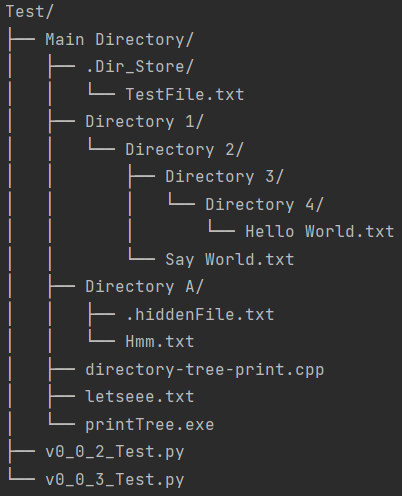
NOTE - Here, letseee.txt (File) and Directory 4/ (Directory) are HIDDEN in Nature.
- For Current Working Directory with Argument [Header Info =
False]
from directory_tree import DisplayTree

DisplayTree(header=True)

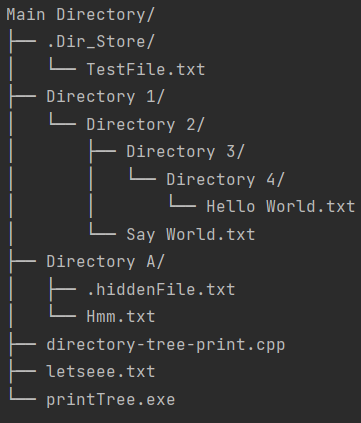
- For User Specified Directory with Arguments [String Representation =
True, Show Hidden Entities = True]
from directory_tree import DisplayTree

customPath: str = 'Users/rahulbordoloi/Work/Python Packages Maintainence/Directory-Tree/Test/Main Directory'
stringRepresentation: str = DisplayTree(customPath, stringRep=True, showHidden=True)
print(stringRepresentation)
- For Current Working Directory with Argument [Max Depth =
2]
from directory_tree import DisplayTree

DisplayTree(maxDepth=2)

Developing Directory Tree
To install directory_tree, along with the tools you need to develop and run tests, use any of the following commands in your virtualenv:
pip install -e .[dev]
OR
pip install -e ".[dev]"
Deprecation Notice
The display_tree function is deprecated and will be removed in a future release. Please use DisplayTree instead. The end-of-life date for display_tree is December 31, 2024.
Parameters Mapping Table -
| dirPath | dir_path |
| stringRep | string_rep |
| maxDepth | max_depth |
| showHidden | show_hidden |
| ignoreList | ignore_list |
| onlyFiles | only_files |
| onlyDirs | only_dirs |
| sortBy | sort_by |
| raiseException | raise_exception |
| printErrorTraceback | print_error_traceback |
Security & Probable Bugs
Directory Tree uses recursion. It will raise a RecursionError on really deep directory trees.- As the tree is lazily evaluated, it should behave well on really wide directory trees. Immediate children of a given directory are not lazily evaluated, though. It would be prompted to the last.
- If you're a Windows user, it is always advised to use
\\ instead of \ in the address as using \ might catchup escape sequences and corrupt the address string.
Contact Author
Name : Rahul Bordoloi
Website : https://rahulbordoloi.me
Email : rahulbordoloi24@gmail.com
Made with ♥ in Python!





