
execsql
Advanced tools

execsql - pypi Package Compare versions
| Metadata-Version: 2.1 | ||
| Name: execsql | ||
| Version: 1.127.0 | ||
| Version: 1.128.0 | ||
| Summary: Runs a SQL script against a PostgreSQL, SQLite, MariaDB/MySQL, DuckDB, Firebird, MS-Access, MS-SQL-Server, or Oracle database, or an ODBC DSN. Provides metacommands to import and export data, copy data between databases, conditionally execute SQL and metacommands, and dynamically alter SQL and metacommands with substitution variables. Data can be exported in 18 different formats, including CSV, TSV, ODS, HTML, JSON, LaTeX, and Markdown tables, and using custom templates. | ||
@@ -118,2 +118,81 @@ Home-page: https://osdn.net/project/execsql/ | ||
| An Illustration | ||
| ================= | ||
| The following code illustrates the use of metacommands and substitution variables. | ||
| Lines starting with "\-\- !x!" are metacommands that implement *execsql*-specific features. | ||
| Identifiers enclosed in pairs of exclamation points (!!) are substitution variables | ||
| that have been defined with the SUB metacommand. The "$date_tag" variable is | ||
| a substitution variable that is defined by *execsql* itself rather than by the user. | ||
| -- ==== Configuration ==== | ||
| -- Put the (date-tagged) logfile name in the 'inputfile' substitution variable. | ||
| -- !x! SUB inputfile logs/errors_!!$date_tag!! | ||
| -- Ensure that the export directory will be created if necessary. | ||
| -- !x! CONFIG MAKE_EXPORT_DIRS Yes | ||
| -- ==== Display Fatal Errors ==== | ||
| -- !x! IF(file_exists(!!inputfile!!)) | ||
| -- Import the data to a staging table. | ||
| -- !x! IMPORT TO REPLACEMENT staging.errorlog FROM !!inputfile!! | ||
| -- Create a view to display only fatal errors. | ||
| create temporary view fatals as | ||
| select user, run_time, process | ||
| from staging.errorlog | ||
| where severity = 'FATAL'; | ||
| -- !x! IF(HASROWS(fatals)) | ||
| -- Export the fatal errors to a dated report. | ||
| -- !x! EXPORT fatals TO reports/error_report_!!$date_tag!! AS CSV | ||
| -- Also display it to the user in a GUI. | ||
| -- !x! PROMPT MESSAGE "Fatal errors in !!inputfile!!:" DISPLAY fatals | ||
| -- !x! ELSE | ||
| -- !x! WRITE "There are no fatal errors." | ||
| -- !x! ENDIF | ||
| -- !x! ELSE | ||
| -- !x! WRITE "There is no error log." | ||
| -- !x! ENDIF | ||
| drop table if exists staging.errorlog cascade; | ||
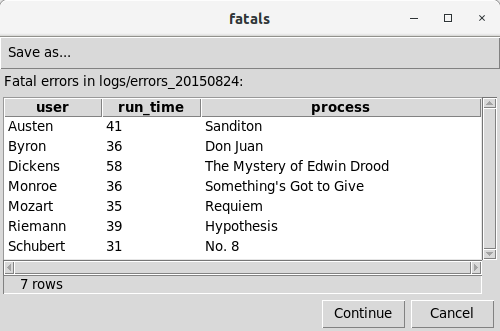
| The IMPORT metacommand reads the specified file and loads the data into | ||
| the target (staging) table, automatically choosing appropriate data types | ||
| for each column. The EXPORT metacommand saves the data in a CSV file | ||
| that can be used by other applications. The PROMPT metacommand produces | ||
| a GUI display of the data as follows: | ||
|  | ||
| The complete documentation includes additional examples. | ||
| Requirements | ||
| =========================== | ||
| The *execsql* program uses third-party Python libraries to communicate with | ||
| different database and spreadsheet software. These libraries must be | ||
| installed to use those programs with *execsql*. Only those libraries that | ||
| are needed, based on the command line arguments and metacommands, must | ||
| be installed. The libraries required for each database or spreadsheet | ||
| application are: | ||
| * PosgreSQL: psycopg2. | ||
| * MariaDB or MySQL: pymysql. | ||
| * SQL Server: pydobc. | ||
| * DuckDB: duckdb. | ||
| * Firebird: fdb. | ||
| * MS-Access: pydobc and pywin32. | ||
| * Oracle: cx-Oracle. | ||
| * DSN connections: pyodbc. | ||
| * OpenDocument spreadsheets: odfpy. | ||
| * Excel spreadsheets (read only): xlrd and openpyxl. | ||
| Connections to SQLite databases are made using Python's standard library, | ||
| so no additional software is needed. | ||
| If the Jinja or Airspeed template processors will be used, those software | ||
| libraries must also be installed. | ||
| All of these libraries can be installed from the Python Package Index (PyPI) | ||
| using *pip*. | ||
| Syntax and Options | ||
@@ -227,81 +306,3 @@ ======================== | ||
| Requirements | ||
| =========================== | ||
| The *execsql* program uses third-party Python libraries to communicate with | ||
| different database and spreadsheet software. These libraries must be | ||
| installed to use those programs with *execsql*. Only those libraries that | ||
| are needed, based on the command line arguments and metacommands, must | ||
| be installed. The libraries required for each database or spreadsheet | ||
| application are: | ||
| * PosgreSQL: psycopg2. | ||
| * MariaDB or MySQL: pymysql. | ||
| * SQL Server: pydobc. | ||
| * DuckDB: duckdb. | ||
| * Firebird: fdb. | ||
| * MS-Access: pydobc and pywin32. | ||
| * Oracle: cx-Oracle. | ||
| * DSN connections: pyodbc. | ||
| * OpenDocument spreadsheets: odfpy. | ||
| * Excel spreadsheets (read only): xlrd and openpyxl. | ||
| Connections to SQLite databases are made using Python's standard library, | ||
| so no additional software is needed. | ||
| If the Jinja or Airspeed template processors will be used, those software | ||
| libraries must also be installed. | ||
| All of these libraries can be installed from the Python Package Index (PyPI) | ||
| using *pip*. | ||
| An Illustration | ||
| ================= | ||
| The following code illustrates the use of metacommands and substitution variables. | ||
| Lines starting with "\-\- !x!" are metacommands that implement *execsql*-specific features. | ||
| Identifiers enclosed in pairs of exclamation points (!!) are substitution variables | ||
| that have been defined with the SUB metacommand. The "$date_tag" variable is | ||
| a substitution variable that is defined by *execsql* itself rather than by the user. | ||
| -- ==== Configuration ==== | ||
| -- Put the (date-tagged) logfile name in the 'inputfile' substitution variable. | ||
| -- !x! SUB inputfile logs/errors_!!$date_tag!! | ||
| -- Ensure that the export directory will be created if necessary. | ||
| -- !x! CONFIG MAKE_EXPORT_DIRS Yes | ||
| -- ==== Display Fatal Errors ==== | ||
| -- !x! IF(file_exists(!!inputfile!!)) | ||
| -- Import the data to a staging table. | ||
| -- !x! IMPORT TO REPLACEMENT staging.errorlog FROM !!inputfile!! | ||
| -- Create a view to display only fatal errors. | ||
| create temporary view fatals as | ||
| select user, run_time, process | ||
| from staging.errorlog | ||
| where severity = 'FATAL'; | ||
| -- !x! IF(HASROWS(fatals)) | ||
| -- Export the fatal errors to a dated report. | ||
| -- !x! EXPORT fatals TO reports/error_report_!!$date_tag!! AS CSV | ||
| -- Also display it to the user in a GUI. | ||
| -- !x! PROMPT MESSAGE "Fatal errors in !!inputfile!!:" DISPLAY fatals | ||
| -- !x! ELSE | ||
| -- !x! WRITE "There are no fatal errors." | ||
| -- !x! ENDIF | ||
| -- !x! ELSE | ||
| -- !x! WRITE "There is no error log." | ||
| -- !x! ENDIF | ||
| drop table if exists staging.errorlog cascade; | ||
| The IMPORT metacommand reads the specified file and loads the data into | ||
| the target (staging) table, automatically choosing appropriate data types | ||
| for each column. The EXPORT metacommand saves the data in a CSV file | ||
| that can be used by other applications. The PROMPT metacommand produces | ||
| a GUI display of the data as follows: | ||
|  | ||
| The complete documentation includes additional examples. | ||
| Documentation, Tools, and Templates | ||
@@ -312,6 +313,6 @@ =========================================== | ||
| Three tools that illustrate the use of execsql, and that are useful in their | ||
| Tools that are installed with *execsql*, that illustrate various uses, and that are useful in their | ||
| own right, are: | ||
| * [Upsert scripts](https://execsql-upsert.osdn.io): A set of *execsql* scripts for | ||
| * Upsert scripts): A set of *execsql* scripts for | ||
| Postgres, MariaDB/MySQL, and SQL Server that will perform a merge (upsert) operation | ||
@@ -322,3 +323,3 @@ on multiple tables simultaneously, automatically ordering the tables according to | ||
| on any set of tables in any supported DBMS without customization. | ||
| * [Staging table comparison scripts](https://execsql-compare.osdn.io): A set of *execsql* | ||
| * Staging table comparison scripts: A set of *execsql* | ||
| scripts for Postgres, MariaDB/MySQL, and SQL Server that will perform various comparisons | ||
@@ -328,9 +329,7 @@ of the data in a staging table to the data in the corresponding base table. These scripts | ||
| without customization. | ||
| * [Glossary creation script](https://execsql-glossary.osdn.io): An *execsql* script that | ||
| * Glossary creation script: An *execsql* script that | ||
| will produce a table of terms (e.g., column names) and definitions, and that may be useful | ||
| to accompany a database export. | ||
| The set of [execsql script templates](https://osdn.net/projects/execsql/releases/p16640) | ||
| available from OSDN includes several types of templates that may be useful in conjunction | ||
| with execsql.py. These are: | ||
| The set of script templates that are also installed include several types of templates that may be useful in conjunction with *execsql.py*. These are: | ||
@@ -344,4 +343,3 @@ * *execsql.conf*: An annotated version of the configuration file that includes all | ||
| specifications for all settings configurable with the CONFIG metacommand, in the form | ||
| used by the PROMPT ENTRY_FORM metacommand, and a SQL script illustrating how this database | ||
| can be used to prompt the user for some or all of the configuration settings. | ||
| used by the PROMPT ENTRY_FORM metacommand, and a SQL script illustrating how this database can be used to prompt the user for some or all of the configuration settings. | ||
@@ -354,3 +352,3 @@ | ||
| Copyright (c) 2007-2023 R.Dreas Nielsen | ||
| Copyright (c) 2007-2024 R.Dreas Nielsen | ||
@@ -357,0 +355,0 @@ This program is free software: you can redistribute it and/or modify it under |
+87
-89
| Metadata-Version: 2.1 | ||
| Name: execsql | ||
| Version: 1.127.0 | ||
| Version: 1.128.0 | ||
| Summary: Runs a SQL script against a PostgreSQL, SQLite, MariaDB/MySQL, DuckDB, Firebird, MS-Access, MS-SQL-Server, or Oracle database, or an ODBC DSN. Provides metacommands to import and export data, copy data between databases, conditionally execute SQL and metacommands, and dynamically alter SQL and metacommands with substitution variables. Data can be exported in 18 different formats, including CSV, TSV, ODS, HTML, JSON, LaTeX, and Markdown tables, and using custom templates. | ||
@@ -118,2 +118,81 @@ Home-page: https://osdn.net/project/execsql/ | ||
| An Illustration | ||
| ================= | ||
| The following code illustrates the use of metacommands and substitution variables. | ||
| Lines starting with "\-\- !x!" are metacommands that implement *execsql*-specific features. | ||
| Identifiers enclosed in pairs of exclamation points (!!) are substitution variables | ||
| that have been defined with the SUB metacommand. The "$date_tag" variable is | ||
| a substitution variable that is defined by *execsql* itself rather than by the user. | ||
| -- ==== Configuration ==== | ||
| -- Put the (date-tagged) logfile name in the 'inputfile' substitution variable. | ||
| -- !x! SUB inputfile logs/errors_!!$date_tag!! | ||
| -- Ensure that the export directory will be created if necessary. | ||
| -- !x! CONFIG MAKE_EXPORT_DIRS Yes | ||
| -- ==== Display Fatal Errors ==== | ||
| -- !x! IF(file_exists(!!inputfile!!)) | ||
| -- Import the data to a staging table. | ||
| -- !x! IMPORT TO REPLACEMENT staging.errorlog FROM !!inputfile!! | ||
| -- Create a view to display only fatal errors. | ||
| create temporary view fatals as | ||
| select user, run_time, process | ||
| from staging.errorlog | ||
| where severity = 'FATAL'; | ||
| -- !x! IF(HASROWS(fatals)) | ||
| -- Export the fatal errors to a dated report. | ||
| -- !x! EXPORT fatals TO reports/error_report_!!$date_tag!! AS CSV | ||
| -- Also display it to the user in a GUI. | ||
| -- !x! PROMPT MESSAGE "Fatal errors in !!inputfile!!:" DISPLAY fatals | ||
| -- !x! ELSE | ||
| -- !x! WRITE "There are no fatal errors." | ||
| -- !x! ENDIF | ||
| -- !x! ELSE | ||
| -- !x! WRITE "There is no error log." | ||
| -- !x! ENDIF | ||
| drop table if exists staging.errorlog cascade; | ||
| The IMPORT metacommand reads the specified file and loads the data into | ||
| the target (staging) table, automatically choosing appropriate data types | ||
| for each column. The EXPORT metacommand saves the data in a CSV file | ||
| that can be used by other applications. The PROMPT metacommand produces | ||
| a GUI display of the data as follows: | ||
|  | ||
| The complete documentation includes additional examples. | ||
| Requirements | ||
| =========================== | ||
| The *execsql* program uses third-party Python libraries to communicate with | ||
| different database and spreadsheet software. These libraries must be | ||
| installed to use those programs with *execsql*. Only those libraries that | ||
| are needed, based on the command line arguments and metacommands, must | ||
| be installed. The libraries required for each database or spreadsheet | ||
| application are: | ||
| * PosgreSQL: psycopg2. | ||
| * MariaDB or MySQL: pymysql. | ||
| * SQL Server: pydobc. | ||
| * DuckDB: duckdb. | ||
| * Firebird: fdb. | ||
| * MS-Access: pydobc and pywin32. | ||
| * Oracle: cx-Oracle. | ||
| * DSN connections: pyodbc. | ||
| * OpenDocument spreadsheets: odfpy. | ||
| * Excel spreadsheets (read only): xlrd and openpyxl. | ||
| Connections to SQLite databases are made using Python's standard library, | ||
| so no additional software is needed. | ||
| If the Jinja or Airspeed template processors will be used, those software | ||
| libraries must also be installed. | ||
| All of these libraries can be installed from the Python Package Index (PyPI) | ||
| using *pip*. | ||
| Syntax and Options | ||
@@ -227,81 +306,3 @@ ======================== | ||
| Requirements | ||
| =========================== | ||
| The *execsql* program uses third-party Python libraries to communicate with | ||
| different database and spreadsheet software. These libraries must be | ||
| installed to use those programs with *execsql*. Only those libraries that | ||
| are needed, based on the command line arguments and metacommands, must | ||
| be installed. The libraries required for each database or spreadsheet | ||
| application are: | ||
| * PosgreSQL: psycopg2. | ||
| * MariaDB or MySQL: pymysql. | ||
| * SQL Server: pydobc. | ||
| * DuckDB: duckdb. | ||
| * Firebird: fdb. | ||
| * MS-Access: pydobc and pywin32. | ||
| * Oracle: cx-Oracle. | ||
| * DSN connections: pyodbc. | ||
| * OpenDocument spreadsheets: odfpy. | ||
| * Excel spreadsheets (read only): xlrd and openpyxl. | ||
| Connections to SQLite databases are made using Python's standard library, | ||
| so no additional software is needed. | ||
| If the Jinja or Airspeed template processors will be used, those software | ||
| libraries must also be installed. | ||
| All of these libraries can be installed from the Python Package Index (PyPI) | ||
| using *pip*. | ||
| An Illustration | ||
| ================= | ||
| The following code illustrates the use of metacommands and substitution variables. | ||
| Lines starting with "\-\- !x!" are metacommands that implement *execsql*-specific features. | ||
| Identifiers enclosed in pairs of exclamation points (!!) are substitution variables | ||
| that have been defined with the SUB metacommand. The "$date_tag" variable is | ||
| a substitution variable that is defined by *execsql* itself rather than by the user. | ||
| -- ==== Configuration ==== | ||
| -- Put the (date-tagged) logfile name in the 'inputfile' substitution variable. | ||
| -- !x! SUB inputfile logs/errors_!!$date_tag!! | ||
| -- Ensure that the export directory will be created if necessary. | ||
| -- !x! CONFIG MAKE_EXPORT_DIRS Yes | ||
| -- ==== Display Fatal Errors ==== | ||
| -- !x! IF(file_exists(!!inputfile!!)) | ||
| -- Import the data to a staging table. | ||
| -- !x! IMPORT TO REPLACEMENT staging.errorlog FROM !!inputfile!! | ||
| -- Create a view to display only fatal errors. | ||
| create temporary view fatals as | ||
| select user, run_time, process | ||
| from staging.errorlog | ||
| where severity = 'FATAL'; | ||
| -- !x! IF(HASROWS(fatals)) | ||
| -- Export the fatal errors to a dated report. | ||
| -- !x! EXPORT fatals TO reports/error_report_!!$date_tag!! AS CSV | ||
| -- Also display it to the user in a GUI. | ||
| -- !x! PROMPT MESSAGE "Fatal errors in !!inputfile!!:" DISPLAY fatals | ||
| -- !x! ELSE | ||
| -- !x! WRITE "There are no fatal errors." | ||
| -- !x! ENDIF | ||
| -- !x! ELSE | ||
| -- !x! WRITE "There is no error log." | ||
| -- !x! ENDIF | ||
| drop table if exists staging.errorlog cascade; | ||
| The IMPORT metacommand reads the specified file and loads the data into | ||
| the target (staging) table, automatically choosing appropriate data types | ||
| for each column. The EXPORT metacommand saves the data in a CSV file | ||
| that can be used by other applications. The PROMPT metacommand produces | ||
| a GUI display of the data as follows: | ||
|  | ||
| The complete documentation includes additional examples. | ||
| Documentation, Tools, and Templates | ||
@@ -312,6 +313,6 @@ =========================================== | ||
| Three tools that illustrate the use of execsql, and that are useful in their | ||
| Tools that are installed with *execsql*, that illustrate various uses, and that are useful in their | ||
| own right, are: | ||
| * [Upsert scripts](https://execsql-upsert.osdn.io): A set of *execsql* scripts for | ||
| * Upsert scripts): A set of *execsql* scripts for | ||
| Postgres, MariaDB/MySQL, and SQL Server that will perform a merge (upsert) operation | ||
@@ -322,3 +323,3 @@ on multiple tables simultaneously, automatically ordering the tables according to | ||
| on any set of tables in any supported DBMS without customization. | ||
| * [Staging table comparison scripts](https://execsql-compare.osdn.io): A set of *execsql* | ||
| * Staging table comparison scripts: A set of *execsql* | ||
| scripts for Postgres, MariaDB/MySQL, and SQL Server that will perform various comparisons | ||
@@ -328,9 +329,7 @@ of the data in a staging table to the data in the corresponding base table. These scripts | ||
| without customization. | ||
| * [Glossary creation script](https://execsql-glossary.osdn.io): An *execsql* script that | ||
| * Glossary creation script: An *execsql* script that | ||
| will produce a table of terms (e.g., column names) and definitions, and that may be useful | ||
| to accompany a database export. | ||
| The set of [execsql script templates](https://osdn.net/projects/execsql/releases/p16640) | ||
| available from OSDN includes several types of templates that may be useful in conjunction | ||
| with execsql.py. These are: | ||
| The set of script templates that are also installed include several types of templates that may be useful in conjunction with *execsql.py*. These are: | ||
@@ -344,4 +343,3 @@ * *execsql.conf*: An annotated version of the configuration file that includes all | ||
| specifications for all settings configurable with the CONFIG metacommand, in the form | ||
| used by the PROMPT ENTRY_FORM metacommand, and a SQL script illustrating how this database | ||
| can be used to prompt the user for some or all of the configuration settings. | ||
| used by the PROMPT ENTRY_FORM metacommand, and a SQL script illustrating how this database can be used to prompt the user for some or all of the configuration settings. | ||
@@ -354,3 +352,3 @@ | ||
| Copyright (c) 2007-2023 R.Dreas Nielsen | ||
| Copyright (c) 2007-2024 R.Dreas Nielsen | ||
@@ -357,0 +355,0 @@ This program is free software: you can redistribute it and/or modify it under |
+86
-88
@@ -86,2 +86,81 @@  *Multi-DBMS SQL script processor.* | ||
| An Illustration | ||
| ================= | ||
| The following code illustrates the use of metacommands and substitution variables. | ||
| Lines starting with "\-\- !x!" are metacommands that implement *execsql*-specific features. | ||
| Identifiers enclosed in pairs of exclamation points (!!) are substitution variables | ||
| that have been defined with the SUB metacommand. The "$date_tag" variable is | ||
| a substitution variable that is defined by *execsql* itself rather than by the user. | ||
| -- ==== Configuration ==== | ||
| -- Put the (date-tagged) logfile name in the 'inputfile' substitution variable. | ||
| -- !x! SUB inputfile logs/errors_!!$date_tag!! | ||
| -- Ensure that the export directory will be created if necessary. | ||
| -- !x! CONFIG MAKE_EXPORT_DIRS Yes | ||
| -- ==== Display Fatal Errors ==== | ||
| -- !x! IF(file_exists(!!inputfile!!)) | ||
| -- Import the data to a staging table. | ||
| -- !x! IMPORT TO REPLACEMENT staging.errorlog FROM !!inputfile!! | ||
| -- Create a view to display only fatal errors. | ||
| create temporary view fatals as | ||
| select user, run_time, process | ||
| from staging.errorlog | ||
| where severity = 'FATAL'; | ||
| -- !x! IF(HASROWS(fatals)) | ||
| -- Export the fatal errors to a dated report. | ||
| -- !x! EXPORT fatals TO reports/error_report_!!$date_tag!! AS CSV | ||
| -- Also display it to the user in a GUI. | ||
| -- !x! PROMPT MESSAGE "Fatal errors in !!inputfile!!:" DISPLAY fatals | ||
| -- !x! ELSE | ||
| -- !x! WRITE "There are no fatal errors." | ||
| -- !x! ENDIF | ||
| -- !x! ELSE | ||
| -- !x! WRITE "There is no error log." | ||
| -- !x! ENDIF | ||
| drop table if exists staging.errorlog cascade; | ||
| The IMPORT metacommand reads the specified file and loads the data into | ||
| the target (staging) table, automatically choosing appropriate data types | ||
| for each column. The EXPORT metacommand saves the data in a CSV file | ||
| that can be used by other applications. The PROMPT metacommand produces | ||
| a GUI display of the data as follows: | ||
|  | ||
| The complete documentation includes additional examples. | ||
| Requirements | ||
| =========================== | ||
| The *execsql* program uses third-party Python libraries to communicate with | ||
| different database and spreadsheet software. These libraries must be | ||
| installed to use those programs with *execsql*. Only those libraries that | ||
| are needed, based on the command line arguments and metacommands, must | ||
| be installed. The libraries required for each database or spreadsheet | ||
| application are: | ||
| * PosgreSQL: psycopg2. | ||
| * MariaDB or MySQL: pymysql. | ||
| * SQL Server: pydobc. | ||
| * DuckDB: duckdb. | ||
| * Firebird: fdb. | ||
| * MS-Access: pydobc and pywin32. | ||
| * Oracle: cx-Oracle. | ||
| * DSN connections: pyodbc. | ||
| * OpenDocument spreadsheets: odfpy. | ||
| * Excel spreadsheets (read only): xlrd and openpyxl. | ||
| Connections to SQLite databases are made using Python's standard library, | ||
| so no additional software is needed. | ||
| If the Jinja or Airspeed template processors will be used, those software | ||
| libraries must also be installed. | ||
| All of these libraries can be installed from the Python Package Index (PyPI) | ||
| using *pip*. | ||
| Syntax and Options | ||
@@ -195,81 +274,3 @@ ======================== | ||
| Requirements | ||
| =========================== | ||
| The *execsql* program uses third-party Python libraries to communicate with | ||
| different database and spreadsheet software. These libraries must be | ||
| installed to use those programs with *execsql*. Only those libraries that | ||
| are needed, based on the command line arguments and metacommands, must | ||
| be installed. The libraries required for each database or spreadsheet | ||
| application are: | ||
| * PosgreSQL: psycopg2. | ||
| * MariaDB or MySQL: pymysql. | ||
| * SQL Server: pydobc. | ||
| * DuckDB: duckdb. | ||
| * Firebird: fdb. | ||
| * MS-Access: pydobc and pywin32. | ||
| * Oracle: cx-Oracle. | ||
| * DSN connections: pyodbc. | ||
| * OpenDocument spreadsheets: odfpy. | ||
| * Excel spreadsheets (read only): xlrd and openpyxl. | ||
| Connections to SQLite databases are made using Python's standard library, | ||
| so no additional software is needed. | ||
| If the Jinja or Airspeed template processors will be used, those software | ||
| libraries must also be installed. | ||
| All of these libraries can be installed from the Python Package Index (PyPI) | ||
| using *pip*. | ||
| An Illustration | ||
| ================= | ||
| The following code illustrates the use of metacommands and substitution variables. | ||
| Lines starting with "\-\- !x!" are metacommands that implement *execsql*-specific features. | ||
| Identifiers enclosed in pairs of exclamation points (!!) are substitution variables | ||
| that have been defined with the SUB metacommand. The "$date_tag" variable is | ||
| a substitution variable that is defined by *execsql* itself rather than by the user. | ||
| -- ==== Configuration ==== | ||
| -- Put the (date-tagged) logfile name in the 'inputfile' substitution variable. | ||
| -- !x! SUB inputfile logs/errors_!!$date_tag!! | ||
| -- Ensure that the export directory will be created if necessary. | ||
| -- !x! CONFIG MAKE_EXPORT_DIRS Yes | ||
| -- ==== Display Fatal Errors ==== | ||
| -- !x! IF(file_exists(!!inputfile!!)) | ||
| -- Import the data to a staging table. | ||
| -- !x! IMPORT TO REPLACEMENT staging.errorlog FROM !!inputfile!! | ||
| -- Create a view to display only fatal errors. | ||
| create temporary view fatals as | ||
| select user, run_time, process | ||
| from staging.errorlog | ||
| where severity = 'FATAL'; | ||
| -- !x! IF(HASROWS(fatals)) | ||
| -- Export the fatal errors to a dated report. | ||
| -- !x! EXPORT fatals TO reports/error_report_!!$date_tag!! AS CSV | ||
| -- Also display it to the user in a GUI. | ||
| -- !x! PROMPT MESSAGE "Fatal errors in !!inputfile!!:" DISPLAY fatals | ||
| -- !x! ELSE | ||
| -- !x! WRITE "There are no fatal errors." | ||
| -- !x! ENDIF | ||
| -- !x! ELSE | ||
| -- !x! WRITE "There is no error log." | ||
| -- !x! ENDIF | ||
| drop table if exists staging.errorlog cascade; | ||
| The IMPORT metacommand reads the specified file and loads the data into | ||
| the target (staging) table, automatically choosing appropriate data types | ||
| for each column. The EXPORT metacommand saves the data in a CSV file | ||
| that can be used by other applications. The PROMPT metacommand produces | ||
| a GUI display of the data as follows: | ||
|  | ||
| The complete documentation includes additional examples. | ||
| Documentation, Tools, and Templates | ||
@@ -280,6 +281,6 @@ =========================================== | ||
| Three tools that illustrate the use of execsql, and that are useful in their | ||
| Tools that are installed with *execsql*, that illustrate various uses, and that are useful in their | ||
| own right, are: | ||
| * [Upsert scripts](https://execsql-upsert.osdn.io): A set of *execsql* scripts for | ||
| * Upsert scripts): A set of *execsql* scripts for | ||
| Postgres, MariaDB/MySQL, and SQL Server that will perform a merge (upsert) operation | ||
@@ -290,3 +291,3 @@ on multiple tables simultaneously, automatically ordering the tables according to | ||
| on any set of tables in any supported DBMS without customization. | ||
| * [Staging table comparison scripts](https://execsql-compare.osdn.io): A set of *execsql* | ||
| * Staging table comparison scripts: A set of *execsql* | ||
| scripts for Postgres, MariaDB/MySQL, and SQL Server that will perform various comparisons | ||
@@ -296,9 +297,7 @@ of the data in a staging table to the data in the corresponding base table. These scripts | ||
| without customization. | ||
| * [Glossary creation script](https://execsql-glossary.osdn.io): An *execsql* script that | ||
| * Glossary creation script: An *execsql* script that | ||
| will produce a table of terms (e.g., column names) and definitions, and that may be useful | ||
| to accompany a database export. | ||
| The set of [execsql script templates](https://osdn.net/projects/execsql/releases/p16640) | ||
| available from OSDN includes several types of templates that may be useful in conjunction | ||
| with execsql.py. These are: | ||
| The set of script templates that are also installed include several types of templates that may be useful in conjunction with *execsql.py*. These are: | ||
@@ -312,4 +311,3 @@ * *execsql.conf*: An annotated version of the configuration file that includes all | ||
| specifications for all settings configurable with the CONFIG metacommand, in the form | ||
| used by the PROMPT ENTRY_FORM metacommand, and a SQL script illustrating how this database | ||
| can be used to prompt the user for some or all of the configuration settings. | ||
| used by the PROMPT ENTRY_FORM metacommand, and a SQL script illustrating how this database can be used to prompt the user for some or all of the configuration settings. | ||
@@ -322,3 +320,3 @@ | ||
| Copyright (c) 2007-2023 R.Dreas Nielsen | ||
| Copyright (c) 2007-2024 R.Dreas Nielsen | ||
@@ -325,0 +323,0 @@ This program is free software: you can redistribute it and/or modify it under |
+1
-1
@@ -8,3 +8,3 @@ import setuptools | ||
| setuptools.setup(name='execsql', | ||
| version='1.127.0', | ||
| version='1.128.0', | ||
| description="Runs a SQL script against a PostgreSQL, SQLite, MariaDB/MySQL, DuckDB, Firebird, MS-Access, MS-SQL-Server, or Oracle database, or an ODBC DSN. Provides metacommands to import and export data, copy data between databases, conditionally execute SQL and metacommands, and dynamically alter SQL and metacommands with substitution variables. Data can be exported in 18 different formats, including CSV, TSV, ODS, HTML, JSON, LaTeX, and Markdown tables, and using custom templates.", | ||
@@ -11,0 +11,0 @@ author='Dreas Nielsen', |
Sorry, the diff of this file is too big to display
Alert delta unavailable
Currently unable to show alert delta for PyPI packages.
Improved metrics
- Lines of code
15669
0.01%Worsened metrics
- Total package byte prevSize
767013
-0.04%