fastquadtree
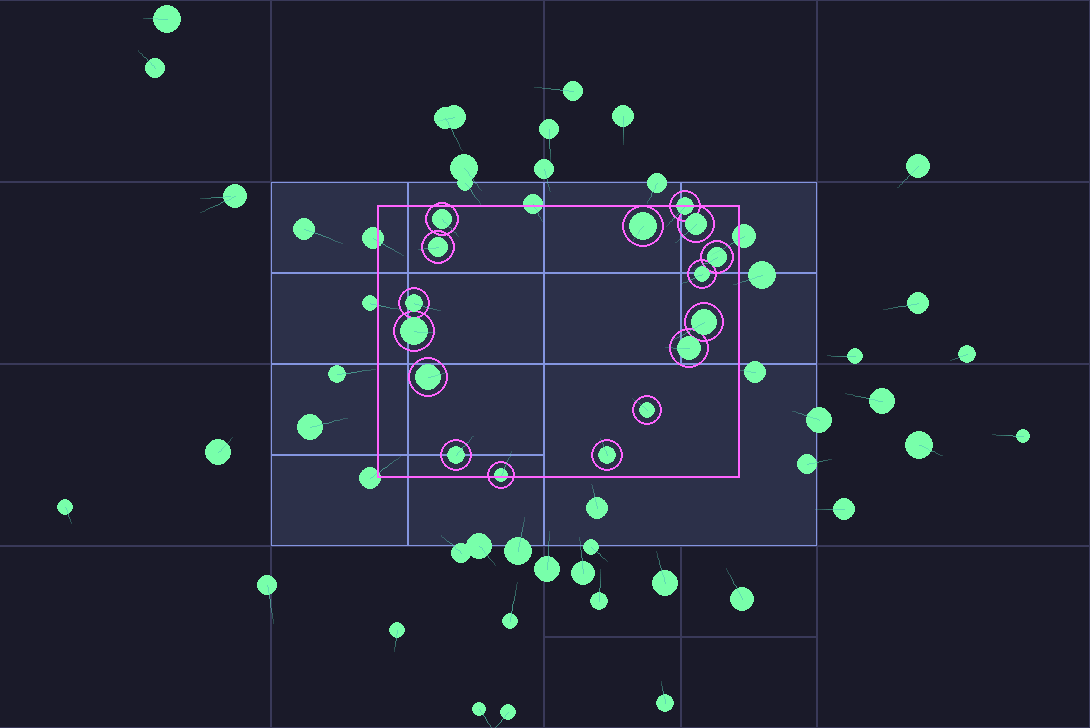
Rust-optimized quadtree with a clean Python API
👉 Check out the Docs: https://elan456.github.io/fastquadtree/









Why use fastquadtree
- Just pip install: prebuilt wheels for Windows, macOS, and Linux (no Rust or compiler needed)
- The fastest quadtree Python package (>10x faster than pyqtree)
- Clean Python API with no external dependencies and modern typing hints
- Support for inserting bounding boxes or points
- Fast KNN and range queries
- Optional object tracking for id ↔ object mapping
- Fast serialization to/from bytes
- Support for multiple data types (f32, f64, i32, i64) for coordinates
- 100% test coverage and CI on GitHub Actions
- Offers a drop-in pyqtree shim that is ~6.5x faster while keeping the same API
Examples
See examples of how fastquadtree can be used in the runnables section.
Install
pip install fastquadtree
from fastquadtree import QuadTree
from fastquadtree import RectQuadTree
from fastquadtree import QuadTreeObjects
from fastquadtree import RectQuadTreeObjects
from fastquadtree.pyqtree import Index
Benchmarks
fastquadtree outperforms all other quadtree Python packages, including the Rtree spatial index.
Library comparison
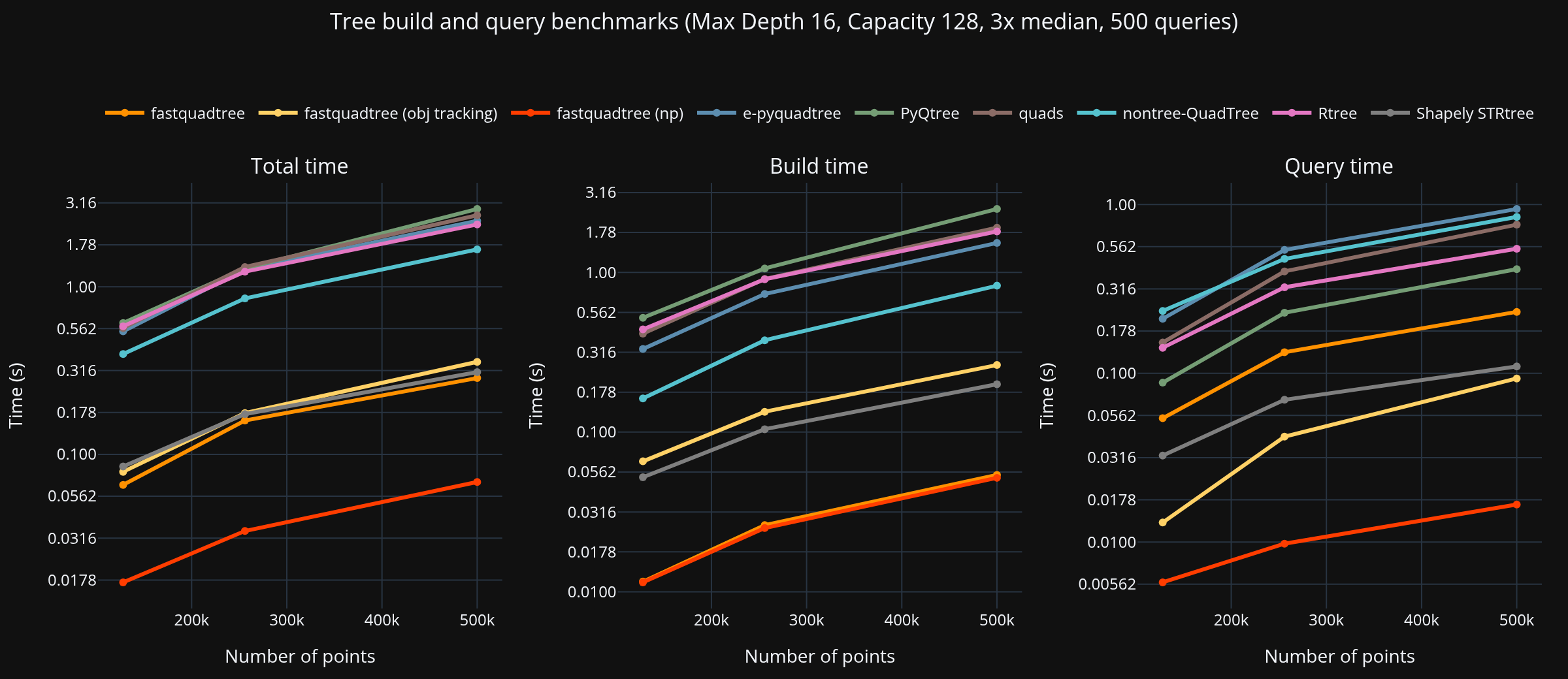
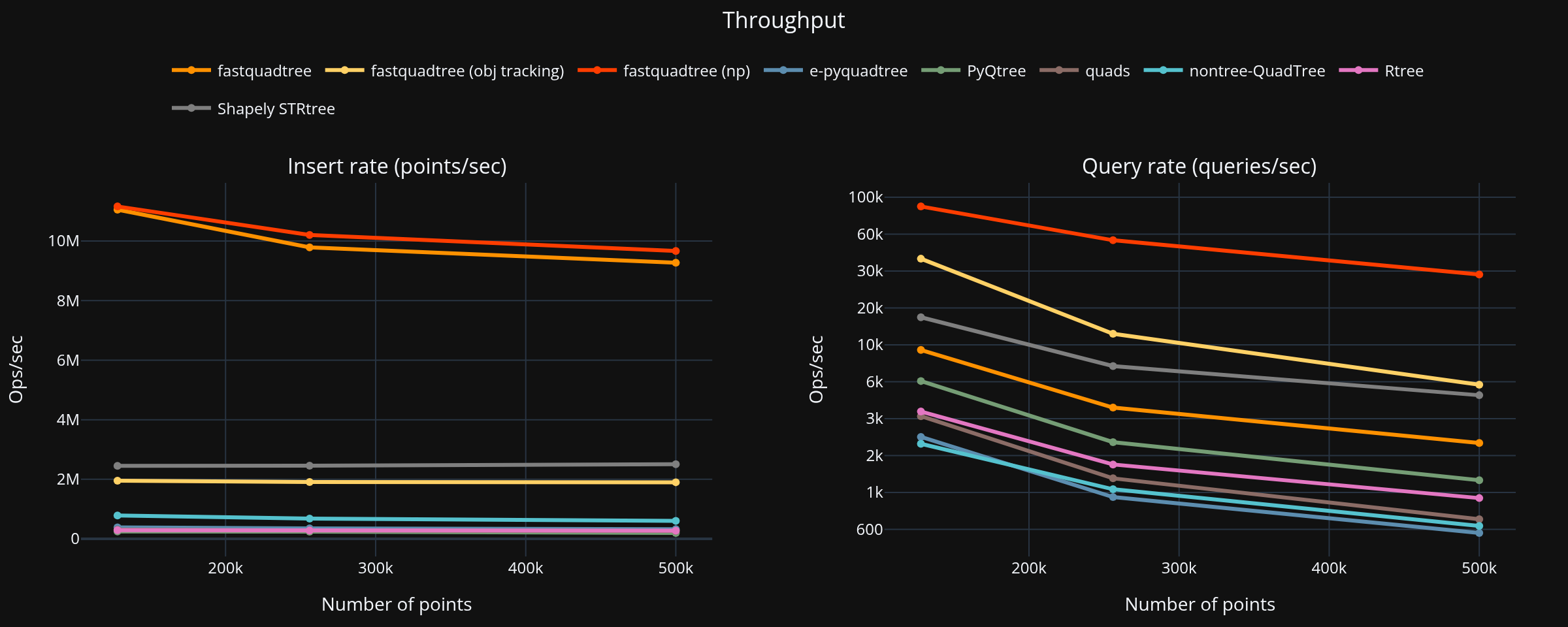
Summary (largest dataset, PyQtree baseline)
- Points: 500,000, Queries: 500
- Fastest total: fastquadtree at 0.067 s
| fastquadtree | 0.063 | 0.026 | 0.089 | 48.99× |
| Shapely STRtree | 0.314 | 0.178 | 0.492 | 8.90× |
| fastquadtree (obj tracking) | 0.388 | 0.244 | 0.632 | 6.93× |
| nontree-QuadTree | 1.180 | 1.287 | 2.467 | 1.77× |
| Rtree | 1.905 | 0.622 | 2.527 | 1.73× |
| e-pyquadtree | 2.083 | 1.479 | 3.562 | 1.23× |
| quads | 3.058 | 1.140 | 4.198 | 1.04× |
| PyQtree | 3.775 | 0.603 | 4.378 | 1.00× |
See the benchmark section for details, including configurations, system info, and native vs shim benchmarks.
Quickstart
See the quickstart guide
API
See the full API
QuadTree(bounds, capacity, max_depth=None, dtype="f32")
bounds — tuple (min_x, min_y, max_x, max_y) defines the 2D area covered by the quadtreecapacity — max number of points kept in a leaf before splittingmax_depth — optional depth cap. If omitted, the tree can keep splitting as neededdtype — data type for coordinates, e.g., "f32", "f64", "i32", "i64"
Key Methods
-
insert(xy, id_=None) -> int
-
query(rect) -> list[tuple[int, float, float]]
-
nearest_neighbor(xy) -> tuple[int, float, float] | None
-
delete(id, x, y) -> bool
For object tracking, use QuadTreeObjects instead. See the docs for more methods.
Geometric conventions
- Rectangles are
(min_x, min_y, max_x, max_y).
- Containment rule is closed on the min edge and open on the max edge
(x >= min_x and x < max_x and y >= min_y and y < max_y).
This only matters for points exactly on edges.
Performance tips
- Choose
capacity so that leaves keep a small batch of points. Typical values are 8 to 64.
- If your data is very skewed, set a
max_depth to prevent long chains.
- For fastest local runs, use
maturin develop --release.
- Use
QuadTree when you only need spatial indexing. Use QuadTreeObjects when you need to store Python objects with your points.
- Refer to the Native vs Shim Benchmark for overhead details.
Pygame Ball Pit Demo

A simple demo of moving objects with collision detection using fastquadtree.
You can toggle between quadtree mode and brute-force mode to see the performance difference.
See the runnables guide for setup instructions.
FAQ
Can I delete items from the quadtree?
Yes! Use delete(id, x, y) to remove specific items. You must provide both the ID and exact location for precise deletion. This handles cases where multiple items exist at the same location. If you're using QuadTreeObjects, you can also use delete_by_object(obj) for convenient object-based deletion with O(1) lookup. The tree automatically merges nodes when item counts drop below capacity.
Can I store rectangles or circles?
Yes, you can store rectangles using the RectQuadTree class. Circles can be approximated with bounding boxes. See the RectQuadTree docs for details.
Do I need NumPy installed?
No, NumPy is a fully optional dependency. If you do have NumPy installed, you can use methods such as query_np and insert_many_np for better performance. Note that insert_many raises TypeError on NumPy input—you must use insert_many_np explicitly for NumPy arrays. The Rust core is able to handle NumPy arrays faster than Python lists, so there's a lot of time savings in utilizing the NumPy functions. See the Native vs Shim benchmark for details on how returing NumPy arrays can speed up queries.
qt.insert_many([(10, 20), (30, 40), (50, 60)])
import numpy as np
points = np.array([[10, 20], [30, 40], [50, 60]])
qt.insert_many_np(points)
Does fastquadtree support multiprocessing?
Yes, fastquadtree objects can be serialized to bytes using the to_bytes() method and deserialized back using from_bytes(). This allows you to share quadtree data across processes and even cache prebuilt trees to disk. When using QuadTreeObjects or RectQuadTreeObjects, you must pass include_objects=True to to_bytes() to serialize Python objects, and allow_objects=True to from_bytes() when loading. By default, objects are skipped for safety, as deserializing untrusted Python objects can be unsafe. See the interactive v2 demo for an example of saving and loading a quadtree, and the QuadTreeObjects API docs for full details on the serialization methods.
License
MIT. See LICENSE.
Acknowledgments





