
🔥 FIRE-EYE 🔥
A next-generation Firewall, CDN & WAF Fingerprinting Framework for Security Researchers, Bug Hunters, and Penetration Testers.
Built with ❤️ by BLACK ZERO
🚀 Powered by BANGLADESH CYBER SQUAD and TEAM SHADOW STRIKER
📆 Year: 2025
---
Over View
FIRE-EYE (fire-eye.py) is a Python3-based advanced security analysis framework that detects and fingerprints Web Application Firewalls (WAFs), CDNs, Load Balancers, and related security layers.
It provides flexible control through user-supplied signatures, regex header matching, and custom request headers — making it suitable for professional pentesters, SOC analysts, and researchers.
Core Features
- 🔍 WAF / CDN / Load Balancer Detection
- 🧩 User-Supplied Signature Merging (
--user-list, --user-vendors-list)
- 🔎 Regex Header/Cookie/Body Matching (
--header-search)
- ⚙️ Custom HTTP Headers (
--headers)
- 🧠 Smart User-Agent Rotation (disable with
--no-rotate-ua)
- 📦 Automatic Report Generation (.txt / .md)
- 💡 Proxy and JSON Output Support
Command-Line Usage
python3 fire-eye.py <target> [options]
Example Options:
target | Target domain or URL (e.g., https://example.com) |
--headers "Key:Val;Key2:Val2" | Send custom request headers |
--header-search "<regex>" | Search for evidence in headers, cookies, or body |
--user-list <file> | Custom WAF/CDN/token signature list (JSON/simple format) |
--user-vendors-list <file> | Custom vendor list to merge with default |
--proxy <file> | File containing proxies (HTTP/SOCKS) |
--show-headers | Displays raw HTTP headers via curl |
--no-rotate-ua | Disable User-Agent rotation |
--report <path> | Save the output report to a custom file |
--json | Output in JSON format |
--debug | Enable debug logging |
Installation
📲 Termux / Linux
pkg update && pkg install python3 git curl -y
git clone https://github.com/TEAMBCS/Fire-Eye.git
cd Fire-Eye
chmod +x *
pip3 install -r requirements.txt
python3 fire-eye.py -h
After installation, simply run:
python3 fire-eye.py --help
JSON Formet Examples
### 1️⃣ **user-list.json**
{
  "MyCustomWAF": {
    "manufacturer": "MyCompany",
    "type": "WAF",
    "headers": ["x-mycompany-id", "mycompany-waf"],
    "cookies": ["MYCOMP_SESSION"],
    "body": ["Access denied by MyCompany WAF"],
    "server": ["mycompany"]
  }
}
2️⃣ user-vendors-list.json
{
  "vendors": [
    "Cloudflare",
    "Akamai",
    "Fastly",
    "AWS CloudFront",
    "Imperva"
  ]
}
🔧 How --headers and --header-search Work
-
--headers
Format: "Key:Val;Key2:Val2"
Example:
--headers "User-Agent:Mozilla/5.0;Referer:https://google.com;Accept:*/*"
➤ The tool parses and attaches these headers to all requests.
-
--header-search
Searches inside headers, cookies, and response body for specific patterns using regex.
Example:
--header-search "(?i)cf-ray|x-amz-cf-id|incap_ses"
➤ Matches are displayed and logged in the report.
Usage Examples
1️⃣ Basic Scan
python3 fire-eye.py https://example.com
2️⃣ With Custom Headers and Regex Search
python3 fire-eye.py https://example.com \
  --headers "User-Agent:MyCustomAgent;Referer:https://google.com" \
  --header-search "(?i)cf-ray|x-amz-cf-id|fastly"
3️⃣ With Custom Signature Lists
python3 fire-eye.py https://target.com \
  --user-list user-list.json \
  --user-vendors-list user-vendors-list.json
4️⃣ With Proxy Support
python3 fire-eye.py https://example.com --proxy proxy.txt --debug
5️⃣ JSON Output Mode
python3 fire-eye.py https://example.com --json > result.json
6️⃣ REPORT Save Mode
python3 fire-eye.py https://example.com --report fire-eye.txt
Sample Output pic
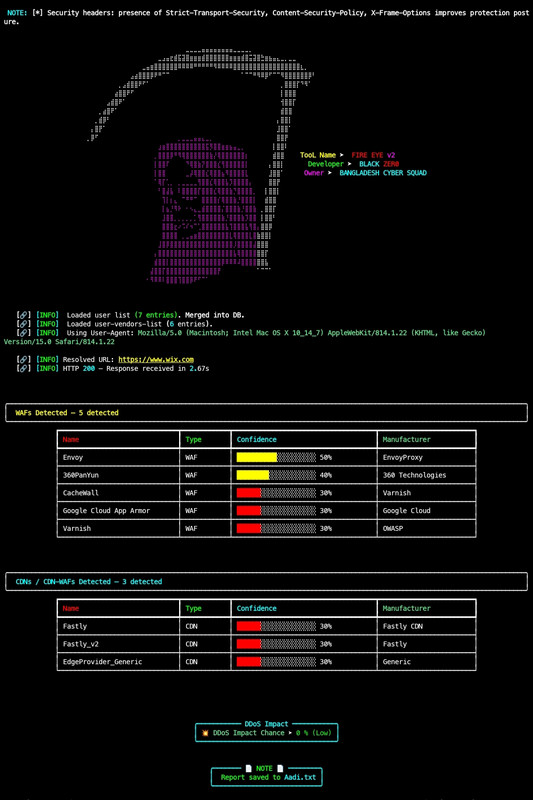
⚙️ Auto Report Save as :
example_com_fireeye_<timestamp>.txt
🧰 Dependencies
requests | HTTP requests |
rich | Console styling |
pyfiglet | ASCII banners |
colorama | Terminal color support |
Install manually:
pip install requests rich pyfiglet colorama
⚠️ Disclaimer
This tool is for educational and authorized security testing only.
Do not use it against any system or domain without proper permission.
Unauthorized scanning may violate laws or regulations.
👨💻 Author
📜 License
MIT License
Use responsibly and only for ethical security research.





