


Product
Introducing Supply Chain Attack Campaigns Tracking in the Socket Dashboard
Campaign-level threat intelligence in Socket now shows when active supply chain attacks affect your repositories and packages.
By Philipp Burckhardt - Jan 21, 2026
hypatie
Advanced tools
Author: Behrouz Safari
License: MIT
A python package for astronomical calculations
Install the latest version of hypatie from PyPI:
pip install hypatie
Requirements are numpy, pandas and matplotlib.
Let's get the positions of the sun between two times:
import hypatie as hp

t1 = '2021-03-20 08:00:00'
t2 = '2021-03-20 10:00:00'
If you want the apparent RA and DEC of the Sun with respect to Earth's center (geocentric):
obs = hp.Observer('sun', t1, t2, step=5)
Now you can access the time intervals with .time attribute:
print(obs.time)

[datetime.datetime(2021, 3, 20, 8, 0)
 datetime.datetime(2021, 3, 20, 8, 24)
 datetime.datetime(2021, 3, 20, 8, 48)
 datetime.datetime(2021, 3, 20, 9, 12)
 datetime.datetime(2021, 3, 20, 9, 36)
 datetime.datetime(2021, 3, 20, 10, 0)]
To acces the position you can use obs.pos, obs.ra, or obs.dec:
print(obs.pos)

[[ 3.59938235e+02 -2.66803120e-02]
 [ 3.59953431e+02 -2.00920520e-02]
 [ 3.59968627e+02 -1.35038600e-02]
 [ 3.59983823e+02 -6.91573600e-03]
 [ 3.59999018e+02 -3.27680000e-04]
 [ 1.42132560e-02  6.26030600e-03]]
The first column in the above array is RA and the second column is DEC.
It is possible to get the apparent RA & DEC of a targer with respect to a specified location on the surface of a body. For example, if you want to get the apparent RA & DEC of the Sun for the Eiffel Tower :
obs = hp.Observer('sun', t1, t2, step=5, center='2.2945,48.8584,300@399')
Note that 2.2945 is the longtitude, 48.8584 is the latitude and 300 (meters) is the elevation of the Eiffel Tower. We have specified '@399' at the end which means that this coordinates is situated on the Earth (399 is the Earth's code).
You can request the cartesian positions (x,y,z) of a target with Vector class.
vec = hp.Vector('sun', t1, t2, step=5)
As with the Observer class, there are two attributes .time and .pos for Vector class. Note that when creating a Vector class, you have .x, .y and .z attributes instead of .ra and .dec.
For both Vector and Observer classes you can pass a single time to get position/state of a body at a single time:
vec = hp.Vector('sun', t1)
Both Vector and Observer classes have .plot() method.
# plot polar coordinates
obs.plot()
# plot cartesian coordinates
vec.plot()
In addition to .plot() method of Vector and Observer classes, there's a play() function that you can pass it a list of Vector objects as well as some other lists as shown in the example below:
import hypatie as hp
import matplotlib.pyplot as plt

t1 = '2018-10-01 14:18:00'
t2 = '2024-12-31 12:18:00'

# get positions with respect to the barycenter of earth-moon
earth = hp.Vector('399', t1, t2, center='500@3', step=1000)
moon = hp.Vector('301', t1, t2, center='500@3', step=1000)
jwst = hp.Vector('-170', t1, t2, center='500@3', step=1000)

bodies = [earth, moon, jwst]
names = ['Earth', 'Moon', 'James Webb']
colors = ['b','g','r']
sizes = [20, 8, 3]

# play the animation
anim = hp.play(bodies, names, colors, sizes)
plt.show()
There are several functions in hypatie.transform module. As an example, let's use the to_tete function which transforms the GCRS coordinates to True Equator True Equinox (of date):
from hypatie.transform import to_tete
import numpy as np
from datetime import datetime

t = datetime(2022, 3, 18)

# GCRS coordinates
pos = np.array([0.73859258, 0.13935437, 0.65959182])

# True Equator and True equinox of t
pos_tete = to_tete(pos, t)

print(pos_tete)
#[0.73649269 0.14295327 0.66116782]
You can download data from astronomical catalogues:
from hypatie.catalogues import Catalogue

cat = Catalogue('gaia3')
data, meta = cat.download()
or, plot the star chart for your location:
from hypatie.plots import star_chart

fig, ax = star_chart(lon=2.2945, lat=48.8584)
plt.show()
or, use a virtual telescope:
from hypatie.plots import Telescope

target = (10.6847,41.2687) # az,alt of a point in the sky
paris = (2.2945, 48.8584)  # location of observer

# get image with 3 degrees field of view
tel = Telescope(target_loc=target, obs_loc=paris, fov=3)
tel.show()
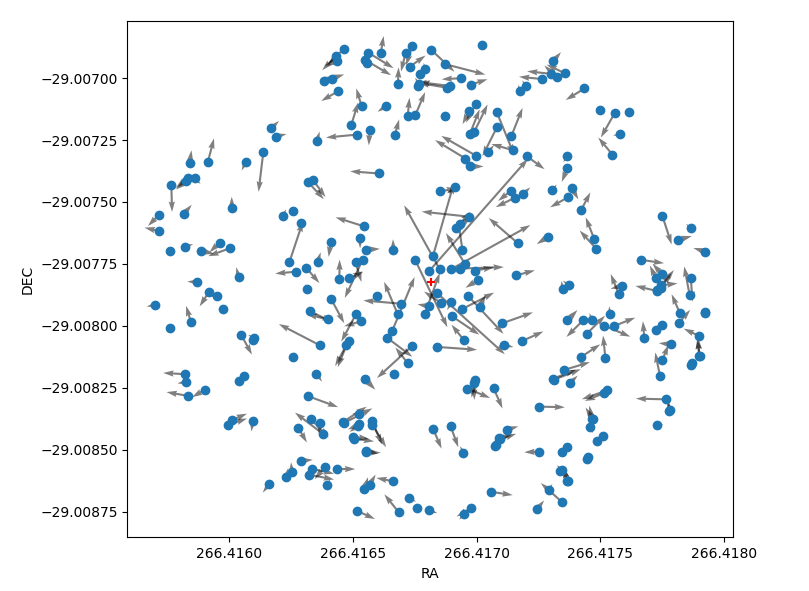
Let's create a chart showing the proper motion of stars near the Sgr A* (Milky Way's central supermassive black hole). The coordinates of the black hole are given and shown with the red '+' in the chart.
from hypatie.plots import explore_pm
import matplotlib.pyplot as plt

ra = 266.41681662499997
dec = -29.00782497222222

df, fig, ax = explore_pm(ra, dec, r=0.001, otype='star')
plt.show()
See more examples at astrodatascience.net
FAQs
A python package for astronomical calculations
We found that hypatie demonstrated a healthy version release cadence and project activity because the last version was released less than a year ago. It has 1 open source maintainer collaborating on the project.
Did you know?

Socket for GitHub automatically highlights issues in each pull request and monitors the health of all your open source dependencies. Discover the contents of your packages and block harmful activity before you install or update your dependencies.
Product
Campaign-level threat intelligence in Socket now shows when active supply chain attacks affect your repositories and packages.

Research
Malicious PyPI package sympy-dev targets SymPy users, a Python symbolic math library with 85 million monthly downloads.

Security News
Node.js 25.4.0 makes require(esm) stable, formalizing CommonJS and ESM compatibility across supported Node versions.