


Product
Introducing Supply Chain Attack Campaigns Tracking in the Socket Dashboard
Campaign-level threat intelligence in Socket now shows when active supply chain attacks affect your repositories and packages.
By Philipp Burckhardt - Jan 21, 2026
matplotx
Advanced tools

Some useful extensions for Matplotlib.









This package includes some useful or beautiful extensions to Matplotlib. Most of those features could be in Matplotlib itself, but I haven't had time to PR yet. If you're eager, let me know and I'll support the effort.
Install with
pip install matplotx[all]
and use in Python with
import matplotx
See below for what matplotx can do.
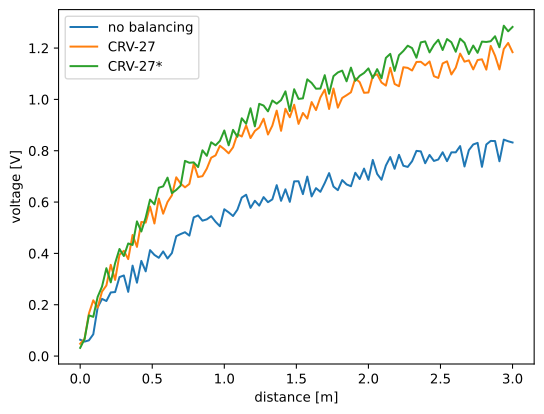 | 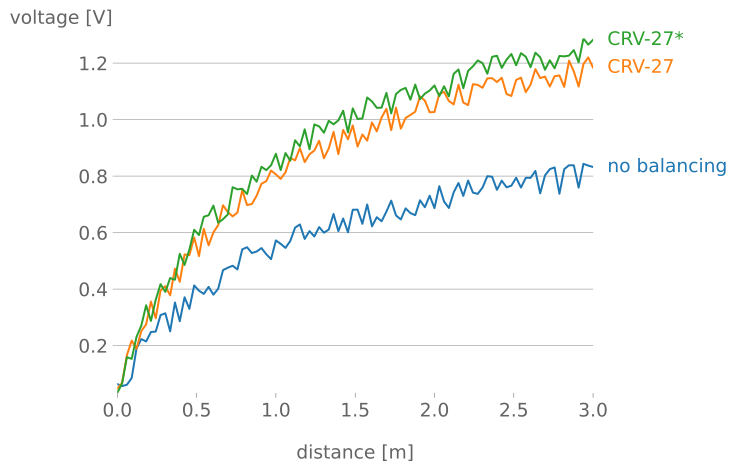 | 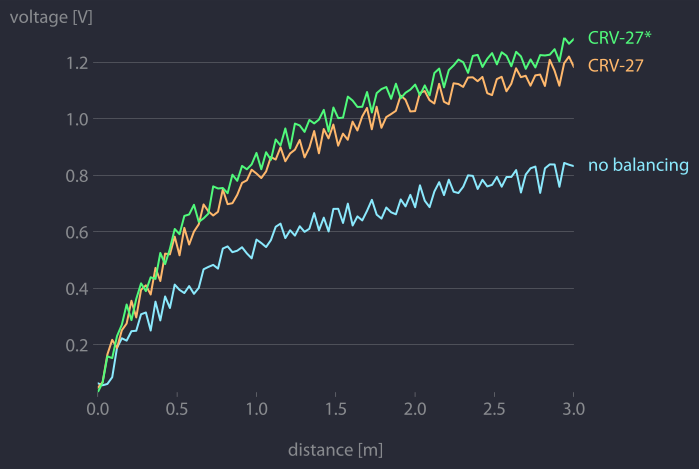 |
| matplotlib |
matplotx.styles.dufte,
matplotx.ylabel_top,
matplotx.line_labels
|
matplotx.styles.duftify(matplotx.styles.dracula)
|
The middle plot is created with
import matplotlib.pyplot as plt
import matplotx
import numpy as np

# create data
rng = np.random.default_rng(0)
offsets = [1.0, 1.50, 1.60]
labels = ["no balancing", "CRV-27", "CRV-27*"]
x0 = np.linspace(0.0, 3.0, 100)
y = [offset * x0 / (x0 + 1) + 0.1 * rng.random(len(x0)) for offset in offsets]

# plot
with plt.style.context(matplotx.styles.dufte):
    for yy, label in zip(y, labels):
        plt.plot(x0, yy, label=label)
    plt.xlabel("distance [m]")
    matplotx.ylabel_top("voltage [V]")  # move ylabel to the top, rotate
    matplotx.line_labels()  # line labels to the right
    plt.show()
The three matplotx ingredients are:
matplotx.styles.dufte: A minimalistic stylematplotx.ylabel_top: Rotate and move the the y-labelmatplotx.line_labels: Show line labels to the right, with the line colorYou can also "duftify" any other style (see below) with
matplotx.styles.duftify(matplotx.styles.dracula)
Further reading and other styles:
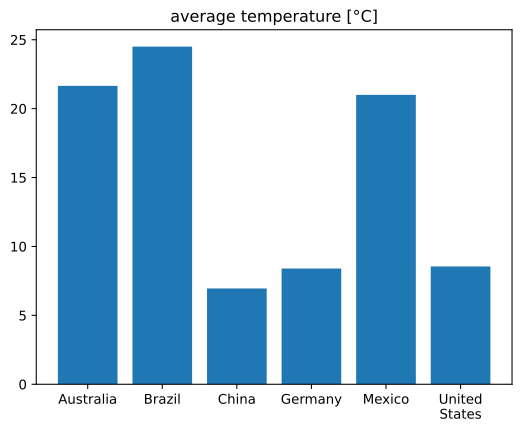 | 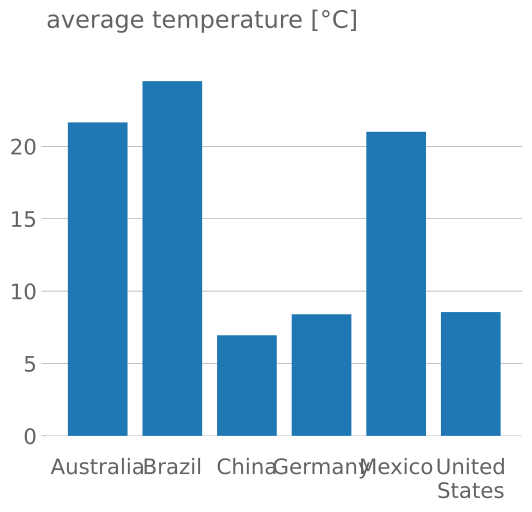 | 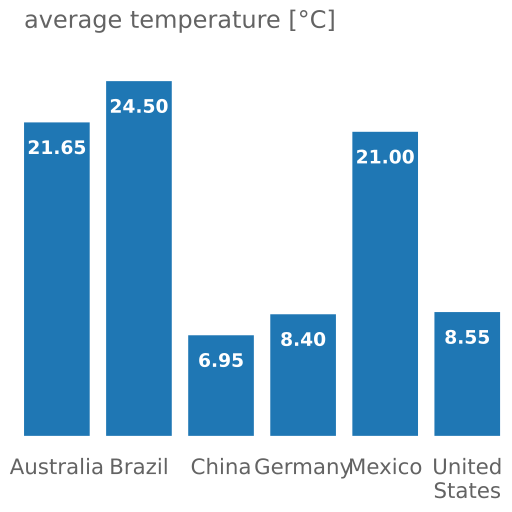 |
| matplotlib | dufte | dufte with matplotx.show_bar_values() |
The right plot is created with
import matplotlib.pyplot as plt
import matplotx

labels = ["Australia", "Brazil", "China", "Germany", "Mexico", "United\nStates"]
vals = [21.65, 24.5, 6.95, 8.40, 21.00, 8.55]
xpos = range(len(vals))

with plt.style.context(matplotx.styles.dufte_bar):
    plt.bar(xpos, vals)
    plt.xticks(xpos, labels)
    matplotx.show_bar_values("{:.2f}")
    plt.title("average temperature [°C]")
    plt.show()
The two matplotx ingredients are:
matplotx.styles.dufte_bar: A minimalistic style for bar plotsmatplotx.show_bar_values: Show bar values directly at the barsmatplotx contains numerous extra color schemes, e.g., Dracula, Nord, gruvbox, and Solarized, the revised Tableau colors.
import matplotlib.pyplot as plt
import matplotx

# use everywhere:
plt.style.use(matplotx.styles.dracula)

# use with context:
with plt.style.context(matplotx.styles.dracula):
    pass
See here for a full list of extra styles
 |
|---|
 |
 |
 |
Other styles:
 |  |
|---|---|
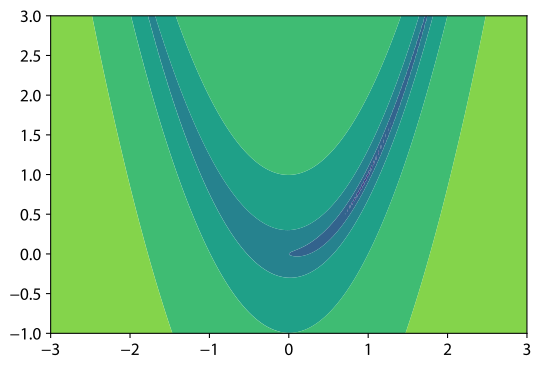
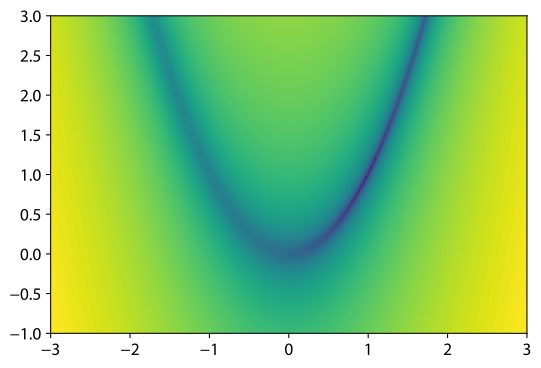
plt.contourf | matplotx.contours() |
Sometimes, the sharp edges of contour[f] plots don't accurately represent the
smoothness of the function in question. Smooth contours, contours(), serves as a drop-in replacement.
import matplotlib.pyplot as plt
import matplotx


def rosenbrock(x):
    return (1.0 - x[0]) ** 2 + 100.0 * (x[1] - x[0] ** 2) ** 2


im = matplotx.contours(
    rosenbrock,
    (-3.0, 3.0, 200),
    (-1.0, 3.0, 200),
    log_scaling=True,
    cmap="viridis",
    outline="white",
)
plt.gca().set_aspect("equal")
plt.colorbar(im)
plt.show()
 |  |
|---|---|
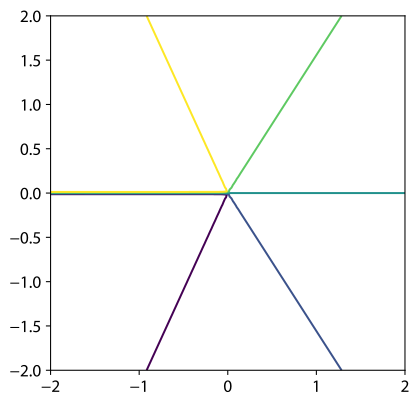
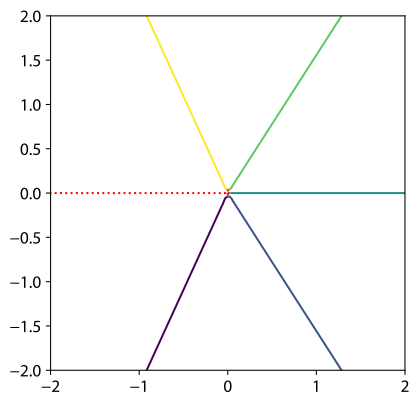
plt.contour | matplotx.contour(max_jump=1.0) |
Matplotlib has problems with contour plots of functions that have discontinuities. The software has no way to tell discontinuities and very sharp, but continuous cliffs apart, and contour lines will be drawn along the discontinuity.
matplotx improves upon this by adding the parameter max_jump. If the difference between
two function values in the grid is larger than max_jump, a discontinuity is assumed
and no line is drawn. Similarly, min_jump can be used to highlight the discontinuity.
As an example, take the function imag(log(Z)) for complex values Z. Matplotlib's
contour lines along the negative real axis are wrong.
import matplotlib.pyplot as plt
import numpy as np

import matplotx

x = np.linspace(-2.0, 2.0, 100)
y = np.linspace(-2.0, 2.0, 100)

X, Y = np.meshgrid(x, y)
Z = X + 1j * Y

vals = np.imag(np.log(Z))

# plt.contour(X, Y, vals, levels=[-2.0, -1.0, 0.0, 1.0, 2.0])  # draws wrong lines

matplotx.contour(X, Y, vals, levels=[-2.0, -1.0, 0.0, 1.0, 2.0], max_jump=1.0)
matplotx.discontour(X, Y, vals, min_jump=1.0, linestyle=":", color="r")

plt.gca().set_aspect("equal")
plt.show()
Relevant discussions:
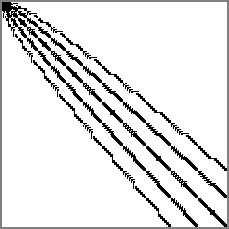
Show sparsity patterns of sparse matrices or write them to image files.
Example:
import matplotx
from scipy import sparse

A = sparse.rand(20, 20, density=0.1)

# show the matrix
plt = matplotx.spy(
    A,
    # border_width=2,
    # border_color="red",
    # colormap="viridis"
)
plt.show()

# or save it as png
matplotx.spy(A, filename="out.png")
 | 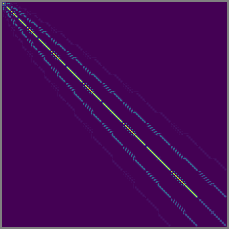 |
|---|---|
| no colormap | viridis |
There is a command-line tool that can be used to show matrix-market or Harwell-Boeing files:
matplotx spy msc00726.mtx [out.png]
See matplotx spy -h for all options.
This software is published under the MIT license.
FAQs
Useful styles and extensions for Matplotlib
We found that matplotx demonstrated a healthy version release cadence and project activity because the last version was released less than a year ago. It has 1 open source maintainer collaborating on the project.
Did you know?

Socket for GitHub automatically highlights issues in each pull request and monitors the health of all your open source dependencies. Discover the contents of your packages and block harmful activity before you install or update your dependencies.
Product
Campaign-level threat intelligence in Socket now shows when active supply chain attacks affect your repositories and packages.

Research
Malicious PyPI package sympy-dev targets SymPy users, a Python symbolic math library with 85 million monthly downloads.

Security News
Node.js 25.4.0 makes require(esm) stable, formalizing CommonJS and ESM compatibility across supported Node versions.