.. image:: https://raw.githubusercontent.com/hyriver/HyRiver-examples/main/notebooks/_static/pynhd_logo.png
:target: https://github.com/hyriver/HyRiver
|
.. image:: https://joss.theoj.org/papers/b0df2f6192f0a18b9e622a3edff52e77/status.svg
:target: https://joss.theoj.org/papers/b0df2f6192f0a18b9e622a3edff52e77
:alt: JOSS
|
.. |pygeohydro| image:: https://github.com/hyriver/pygeohydro/actions/workflows/test.yml/badge.svg
:target: https://github.com/hyriver/pygeohydro/actions/workflows/test.yml
:alt: Github Actions
.. |pygeoogc| image:: https://github.com/hyriver/pygeoogc/actions/workflows/test.yml/badge.svg
:target: https://github.com/hyriver/pygeoogc/actions/workflows/test.yml
:alt: Github Actions
.. |pygeoutils| image:: https://github.com/hyriver/pygeoutils/actions/workflows/test.yml/badge.svg
:target: https://github.com/hyriver/pygeoutils/actions/workflows/test.yml
:alt: Github Actions
.. |pynhd| image:: https://github.com/hyriver/pynhd/actions/workflows/test.yml/badge.svg
:target: https://github.com/hyriver/pynhd/actions/workflows/test.yml
:alt: Github Actions
.. |py3dep| image:: https://github.com/hyriver/py3dep/actions/workflows/test.yml/badge.svg
:target: https://github.com/hyriver/py3dep/actions/workflows/test.yml
:alt: Github Actions
.. |pydaymet| image:: https://github.com/hyriver/pydaymet/actions/workflows/test.yml/badge.svg
:target: https://github.com/hyriver/pydaymet/actions/workflows/test.yml
:alt: Github Actions
.. |pygridmet| image:: https://github.com/hyriver/pygridmet/actions/workflows/test.yml/badge.svg
:target: https://github.com/hyriver/pygridmet/actions/workflows/test.yml
:alt: Github Actions
.. |pynldas2| image:: https://github.com/hyriver/pynldas2/actions/workflows/test.yml/badge.svg
:target: https://github.com/hyriver/pynldas2/actions/workflows/test.yml
:alt: Github Actions
.. |async| image:: https://github.com/hyriver/async-retriever/actions/workflows/test.yml/badge.svg
:target: https://github.com/hyriver/async-retriever/actions/workflows/test.yml
:alt: Github Actions
.. |signatures| image:: https://github.com/hyriver/hydrosignatures/actions/workflows/test.yml/badge.svg
:target: https://github.com/hyriver/hydrosignatures/actions/workflows/test.yml
:alt: Github Actions
================ ====================================================================
Package Description
================ ====================================================================
PyNHD_ Navigate and subset NHDPlus (MR and HR) using web services
Py3DEP_ Access topographic data through National Map's 3DEP web service
PyGeoHydro_ Access NWIS, NID, WQP, eHydro, NLCD, CAMELS, and SSEBop databases
PyDaymet_ Access daily, monthly, and annual climate data via Daymet
PyGridMET_ Access daily climate data via GridMET
PyNLDAS2_ Access hourly NLDAS-2 data via web services
HydroSignatures_ A collection of tools for computing hydrological signatures
AsyncRetriever_ High-level API for asynchronous requests with persistent caching
PyGeoOGC_ Send queries to any ArcGIS RESTful-, WMS-, and WFS-based services
PyGeoUtils_ Utilities for manipulating geospatial, (Geo)JSON, and (Geo)TIFF data
================ ====================================================================
.. _PyGeoHydro: https://github.com/hyriver/pygeohydro
.. _AsyncRetriever: https://github.com/hyriver/async-retriever
.. _PyGeoOGC: https://github.com/hyriver/pygeoogc
.. _PyGeoUtils: https://github.com/hyriver/pygeoutils
.. _PyNHD: https://github.com/hyriver/pynhd
.. _Py3DEP: https://github.com/hyriver/py3dep
.. _PyDaymet: https://github.com/hyriver/pydaymet
.. _PyGridMET: https://github.com/hyriver/pygridmet
.. _PyNLDAS2: https://github.com/hyriver/pynldas2
.. _HydroSignatures: https://github.com/hyriver/hydrosignatures
PyNHD: Navigate and subset NHDPlus database
.. image:: https://img.shields.io/pypi/v/pynhd.svg
:target: https://pypi.python.org/pypi/pynhd
:alt: PyPi
.. image:: https://img.shields.io/conda/vn/conda-forge/pynhd.svg
:target: https://anaconda.org/conda-forge/pynhd
:alt: Conda Version
.. image:: https://codecov.io/gh/hyriver/pynhd/branch/main/graph/badge.svg
:target: https://codecov.io/gh/hyriver/pynhd
:alt: CodeCov
.. image:: https://img.shields.io/pypi/pyversions/pynhd.svg
:target: https://pypi.python.org/pypi/pynhd
:alt: Python Versions
.. image:: https://static.pepy.tech/badge/pynhd
:target: https://pepy.tech/project/pynhd
:alt: Downloads
|
.. image:: https://www.codefactor.io/repository/github/hyriver/pynhd/badge
:target: https://www.codefactor.io/repository/github/hyriver/pynhd
:alt: CodeFactor
.. image:: https://img.shields.io/endpoint?url=https://raw.githubusercontent.com/astral-sh/ruff/main/assets/badge/v2.json
:target: https://github.com/astral-sh/ruff
:alt: Ruff
.. image:: https://img.shields.io/badge/pre--commit-enabled-brightgreen?logo=pre-commit&logoColor=white
:target: https://github.com/pre-commit/pre-commit
:alt: pre-commit
.. image:: https://mybinder.org/badge_logo.svg
:target: https://mybinder.org/v2/gh/hyriver/HyRiver-examples/main?urlpath=lab/tree/notebooks
:alt: Binder
|
Features
PyNHD is a part of HyRiver <https://github.com/hyriver/HyRiver>__ software stack that
is designed to aid in hydroclimate analysis through web services.
This package provides access to several hydro-linked datasets:
StreamCat <https://www.epa.gov/national-aquatic-resource-surveys/streamcat-dataset>__WaterData <https://api.water.usgs.gov/>__NHDPlus MR <https://hydro.nationalmap.gov/arcgis/rest/services/nhd/MapServer>__NHDPlus HR <https://hydro.nationalmap.gov/arcgis/rest/services/NHDPlus_HR/MapServer>__NLDI <https://api.water.usgs.gov/>__PyGeoAPI <https://api.water.usgs.gov/>__GeoConnex <https://geoconnex.internetofwater.dev/>__Mainstems <https://www.sciencebase.gov/catalog/item/63cb38b2d34e06fef14f40ad>__HUC12 Pour Points <https://www.sciencebase.gov/catalog/item/60cb5edfd34e86b938a373f4>__
These web services can be used to navigate and extract vector data from NHDPlus V2 (both mid-
and high-resolution) database such as catchments, HUC8, HUC12, GagesII, flowlines, and water
bodies.
Moreover, the PyGeoAPI service provides four functionalities:
flow_trace: Trace flow from a starting point to up/downstream direction.split_catchment: Split the local catchment of a point of interest at the point's
location.elevation_profile: Extract elevation profile along a flow path between two points.cross_section: Extract cross-section at a point of interest along a flow line.
PyNHD also provides access to the entire NHDPlus dataset for CONUS (L48) via
nhdplus_l48 function. You can get any of the 31 layers that are available in the
NHDPlus dataset. You can also get NHDPlus Value Added Attributes on
Hydroshare <https://www.hydroshare.org/resource/6092c8a62fac45be97a09bfd0b0bf726/>__
and ENHD <https://www.sciencebase.gov/catalog/item/60c92503d34e86b9389df1c9>__.
These datasets that do not have geometries, include slope and roughness, among other
attributes, for all NHD flowlines. You can use nhdplus_vaa and enhd_attrs
functions to get these datasets.
Additionally, you can get many more derived attributes at NHD catchment-level
through two sources:
- Select Attributes for NHDPlus Version 2.1 Reach Catchments from an item on
ScienceBase <https://sciencebase.usgs.gov>__
- EPA's
StreamCat <https://www.epa.gov/national-aquatic-resource-surveys/streamcat-dataset>__
dataset.
They both include hundreds of attributes such as hydroclimate properties, water quality,
urbanization, and population. In addition to NHD catchment summaries, they also have
their network-accumulated values (both upstream and divergence-routed). You can use
nhdplus_attrs, epa_nhd_catchments, streamcat functions to get these datasets.
Additionally, PyNHD offers some extra utilities for processing the NHD flowlines:
flowline_xsection and network_xsection: Get cross-section lines along a flowline
at a given spacing or a network of flowlines at a given spacing.flowline_resample and network_resample:
Resample a flowline or network of flowlines based on a given spacing. This is
useful for smoothing jagged flowlines similar to those in the NHDPlus database.prepare_nhdplus: For cleaning up the data frame by, for example, removing tiny networks,
adding a to_comid column, and finding terminal flowlines if it doesn't exist.topoogical_sort: For sorting the river network topologically which is useful for routing
and flow accumulation.vector_accumulation: For computing flow accumulation in a river network. This function
is generic, and any routing method can be plugged in.
These utilities are developed based on an R package called
nhdplusTools <https://github.com/USGS-R/nhdplusTools>__ and a Python package
called nldi-xstool <https://code.usgs.gov/wma/nhgf/toolsteam/nldi-xstool>__.
All functions and classes that request data from web services use async-retriever
that offers response caching. By default, the expiration time is set to never expire.
All these functions and classes have two optional parameters for controlling the cache:
expire_after and disable_caching. You can use expire_after to set the expiration
time in seconds. If expire_after is set to -1, the cache will never expire (default).
You can use disable_caching if you don't want to use the cached responses. The cached
responses are stored in the ./cache/aiohttp_cache.sqlite file.
You can find some example notebooks here <https://github.com/hyriver/HyRiver-examples>__.
Moreover, under the hood, PyNHD uses
PyGeoOGC <https://github.com/hyriver/pygeoogc>__ and
AsyncRetriever <https://github.com/hyriver/async-retriever>__ packages
for making requests in parallel and storing responses in chunks. This improves the
reliability and speed of data retrieval significantly.
You can control the request/response caching behavior and verbosity of the package
by setting the following environment variables:
HYRIVER_CACHE_NAME: Path to the caching SQLite database for asynchronous HTTP
requests. It defaults to ./cache/aiohttp_cache.sqliteHYRIVER_CACHE_NAME_HTTP: Path to the caching SQLite database for HTTP requests.
It defaults to ./cache/http_cache.sqliteHYRIVER_CACHE_EXPIRE: Expiration time for cached requests in seconds. It defaults to
one week.HYRIVER_CACHE_DISABLE: Disable reading/writing from/to the cache. The default is false.HYRIVER_SSL_CERT: Path to a SSL certificate file.
For example, in your code before making any requests you can do:
.. code-block:: python
import os

os.environ["HYRIVER_CACHE_NAME"] = "path/to/aiohttp_cache.sqlite"
os.environ["HYRIVER_CACHE_NAME_HTTP"] = "path/to/http_cache.sqlite"
os.environ["HYRIVER_CACHE_EXPIRE"] = "3600"
os.environ["HYRIVER_CACHE_DISABLE"] = "true"
os.environ["HYRIVER_SSL_CERT"] = "path/to/cert.pem"
You can also try using PyNHD without installing
it on your system by clicking on the binder badge. A Jupyter Lab
instance with the HyRiver stack pre-installed will be launched in your web browser, and you
can start coding!
Moreover, requests for additional functionalities can be submitted via
issue tracker <https://github.com/hyriver/pynhd/issues>__.
Citation
If you use any of HyRiver packages in your research, we appreciate citations:
.. code-block:: bibtex
@article{Chegini_2021,
    author = {Chegini, Taher and Li, Hong-Yi and Leung, L. Ruby},
    doi = {10.21105/joss.03175},
    journal = {Journal of Open Source Software},
    month = {10},
    number = {66},
    pages = {1--3},
    title = {{HyRiver: Hydroclimate Data Retriever}},
    volume = {6},
    year = {2021}
}
Installation
You can install PyNHD using pip after installing libgdal on your system
(for example, in Ubuntu run sudo apt install libgdal-dev):
.. code-block:: console
$ pip install pynhd
Alternatively, PyNHD can be installed from the conda-forge repository
using Conda <https://docs.conda.io/en/latest/>__
or Mamba <https://github.com/conda-forge/miniforge>__:
.. code-block:: console
$ conda install -c conda-forge pynhd
Quick start
Let's explore the capabilities of NLDI. We need to instantiate the class first:
.. code-block:: python
from pynhd import NLDI, WaterData, NHDPlusHR
import pynhd as nhd
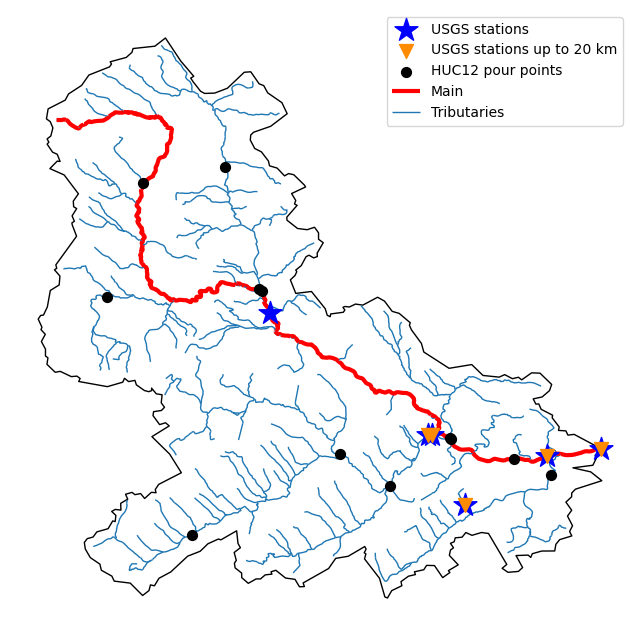
First, let's get the watershed geometry of the contributing basin of a
USGS station using NLDI:
.. code-block:: python
nldi = NLDI()
station_id = "01031500"

basin = nldi.get_basins(station_id)
The navigate_byid class method can be used to navigate NHDPlus in
both upstream and downstream of any point in the database. Let's get the ComIDs and flowlines
of the tributaries and the main river channel upstream of the station.
.. code-block:: python
flw_main = nldi.navigate_byid(
    fsource="nwissite",
    fid=f"USGS-{station_id}",
    navigation="upstreamMain",
    source="flowlines",
    distance=1000,
)

flw_trib = nldi.navigate_byid(
    fsource="nwissite",
    fid=f"USGS-{station_id}",
    navigation="upstreamTributaries",
    source="flowlines",
    distance=1000,
)
We can get other USGS stations upstream (or downstream) of the station
and even set a distance limit (in km):
.. code-block:: python
st_all = nldi.navigate_byid(
    fsource="nwissite",
    fid=f"USGS-{station_id}",
    navigation="upstreamTributaries",
    source="nwissite",
    distance=1000,
)

st_d20 = nldi.navigate_byid(
    fsource="nwissite",
    fid=f"USGS-{station_id}",
    navigation="upstreamTributaries",
    source="nwissite",
    distance=20,
)
We can get more information about these stations using GeoConnex:
.. code-block:: python
gcx = GeoConnex("gauges")
stations = st_all.identifier.str.split("-").str[1].unique()
gauges = gpd.GeoDataFrame(
    pd.concat(gcx.query({"provider_id": sid}) for sid in stations),
    crs=4326,
)
Instead, we can carry out a spatial query within the basin of interest:
.. code-block:: python
gauges = pynhd.geoconnex(
    item="gauges",
    query={"geometry": basin.geometry.iloc[0]},
)
Now, let's get the
HUC12 pour points <https://www.sciencebase.gov/catalog/item/5762b664e4b07657d19a71ea>__:
.. code-block:: python
pp = nldi.navigate_byid(
    fsource="nwissite",
    fid=f"USGS-{station_id}",
    navigation="upstreamTributaries",
    source="huc12pp",
    distance=1000,
)
.. image:: https://raw.githubusercontent.com/hyriver/HyRiver-examples/main/notebooks/_static/nhdplus_navigation.png
:target: https://github.com/hyriver/HyRiver-examples/blob/main/notebooks/nhdplus.ipynb
:align: center
Also, we can get the slope data for each river segment from the NHDPlus VAA database:
.. code-block:: python
vaa = nhd.nhdplus_vaa("input_data/nhdplus_vaa.parquet")

flw_trib["comid"] = pd.to_numeric(flw_trib.nhdplus_comid)
slope = gpd.GeoDataFrame(
    pd.merge(flw_trib, vaa[["comid", "slope"]], left_on="comid", right_on="comid"),
    crs=flw_trib.crs,
)
slope[slope.slope < 0] = np.nan
Additionally, we can obtain cross-section lines along the main river channel with 4 km spacing
and width of 2 km using network_xsection as follows:
.. code-block:: python
from pynhd import NHD

distance = 4000  # in meters
width = 2000  # in meters
nhd = NHD("flowline_mr")
main_nhd = nhd.byids("COMID", flw_main.index)
main_nhd = pynhd.prepare_nhdplus(main_nhd, 0, 0, 0, purge_non_dendritic=True)
main_nhd = main_nhd.to_crs("ESRI:102003")
cs = pynhd.network_xsection(main_nhd, distance, width)
Then, we can use Py3DEP <https://github.com/hyriver/py3dep>__
to obtain the elevation profile along the cross-section lines.
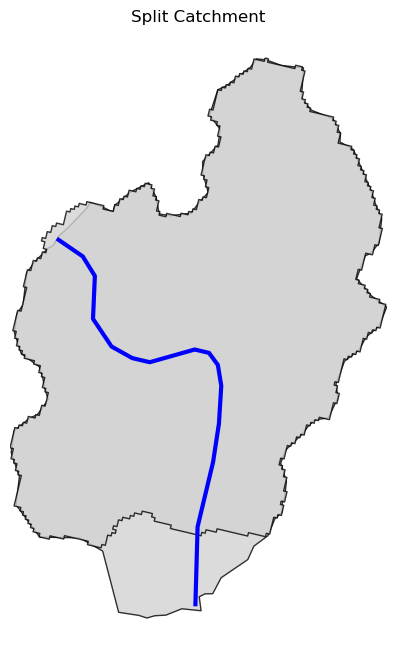
Now, let's explore the PyGeoAPI capabilities. There are two ways that you can access
PyGeoAPI: PyGeoAPI class and pygeoapi function. The PyGeoAPI class
is for querying the database for a single location using tuples and list while the
pygeoapi function is for querying the database for multiple locations at once
and accepts a geopandas.GeoDataFrame as input. The pygeoapi function
is more efficient than the PyGeoAPI class and has a simpler interface. In future
versions, the PyGeoAPI class will be deprecated and the pygeoapi function
will be the only way to access the database. Let's compare the two, starting by
PyGeoAPI:
.. code-block:: python
pygeoapi = PyGeoAPI()

trace = pygeoapi.flow_trace((1774209.63, 856381.68), crs="ESRI:102003", direction="none")

split = pygeoapi.split_catchment((-73.82705, 43.29139), crs=4326, upstream=False)

profile = pygeoapi.elevation_profile(
    [(-103.801086, 40.26772), (-103.80097, 40.270568)],
    numpts=101,
    dem_res=1,
    crs=4326,
)

section = pygeoapi.cross_section((-103.80119, 40.2684), width=1000.0, numpts=101, crs=4326)
Now, let's do the same operations using pygeoapi:
.. code-block:: python
import geopandas as gpd
import shapely.geometry as sgeom
import pynhd as nhd

coords = gpd.GeoDataFrame(
    {
        "direction": ["up", "down"],
        "upstream": [True, False],
        "width": [1000.0, 500.0],
        "numpts": [101, 55],
    },
    geometry=[
        sgeom.Point(-73.82705, 43.29139),
        sgeom.Point(-103.801086, 40.26772),
    ],
    crs=4326,
)
trace = nhd.pygeoapi(coords, "flow_trace")
split = nhd.pygeoapi(coords, "split_catchment")
section = nhd.pygeoapi(coords, "cross_section")

coords = gpd.GeoDataFrame(
    {
        "direction": ["up", "down"],
        "upstream": [True, False],
        "width": [1000.0, 500.0],
        "numpts": [101, 55],
        "dem_res": [1, 10],
    },
    geometry=[
        sgeom.MultiPoint([(-103.801086, 40.26772), (-103.80097, 40.270568)]),
        sgeom.MultiPoint([(-102.801086, 39.26772), (-102.80097, 39.270568)]),
    ],
    crs=4326,
)
profile = nhd.pygeoapi(coords, "elevation_profile")
.. image:: https://raw.githubusercontent.com/hyriver/HyRiver-examples/main/notebooks/_static/split_catchment.png
:target: https://github.com/hyriver/HyRiver-examples/blob/main/notebooks/pygeoapi.ipynb
:align: center
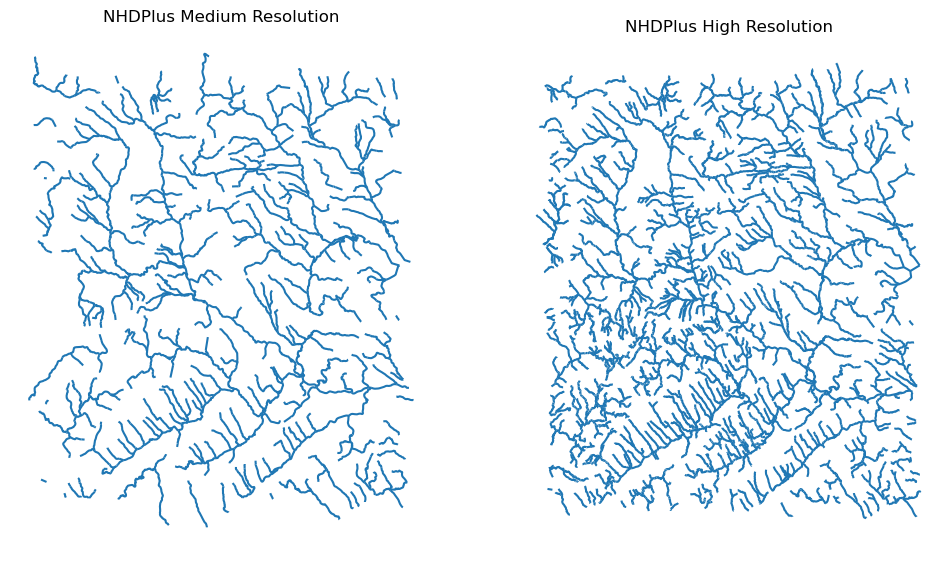
Next, we retrieve mid- and high-resolution flowlines within the bounding box of our
watershed and compare them using WaterData for mid-resolution, NHDPlusHR for
high-resolution.
.. code-block:: python
mr = WaterData("nhdflowline_network")
nhdp_mr = mr.bybox(basin.geometry[0].bounds)

hr = NHDPlusHR("flowline")
nhdp_hr = hr.bygeom(basin.geometry[0].bounds)
.. image:: https://raw.githubusercontent.com/hyriver/HyRiver-examples/main/notebooks/_static/hr_mr.png
:target: https://github.com/hyriver/HyRiver-examples/blob/main/notebooks/nhdplus.ipynb
:align: center
An alternative to WaterData and NHDPlusHR is the NHD class that
supports both the mid- and high-resolution NHDPlus V2 data:
.. code-block:: python
mr = NHD("flowline_mr")
nhdp_mr = mr.bygeom(basin.geometry[0].bounds)

hr = NHD("flowline_hr")
nhdp_hr = hr.bygeom(basin.geometry[0].bounds)
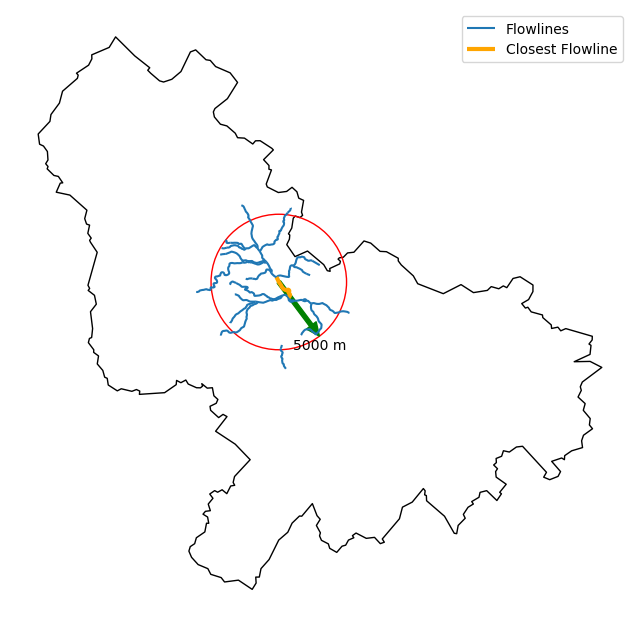
Moreover, WaterData can find features within a given radius (in meters) of a point:
.. code-block:: python
eck4 = "+proj=eck4 +lon_0=0 +x_0=0 +y_0=0 +datum=WGS84 +units=m +no_defs"
coords = (-5727797.427596455, 5584066.49330473)
rad = 5e3
flw_rad = mr.bydistance(coords, rad, loc_crs=eck4)
flw_rad = flw_rad.to_crs(eck4)
Instead of getting all features within a radius of the coordinate, we can snap to the closest
feature ID using NLDI:
.. code-block:: python
comid_closest = nldi.comid_byloc((x, y), eck4)
flw_closest = nhdp_mr.byid("comid", comid_closest.comid.values[0])
.. image:: https://raw.githubusercontent.com/hyriver/HyRiver-examples/main/notebooks/_static/nhdplus_radius.png
:target: https://github.com/hyriver/HyRiver-examples/blob/main/notebooks/nhdplus.ipynb
:align: center
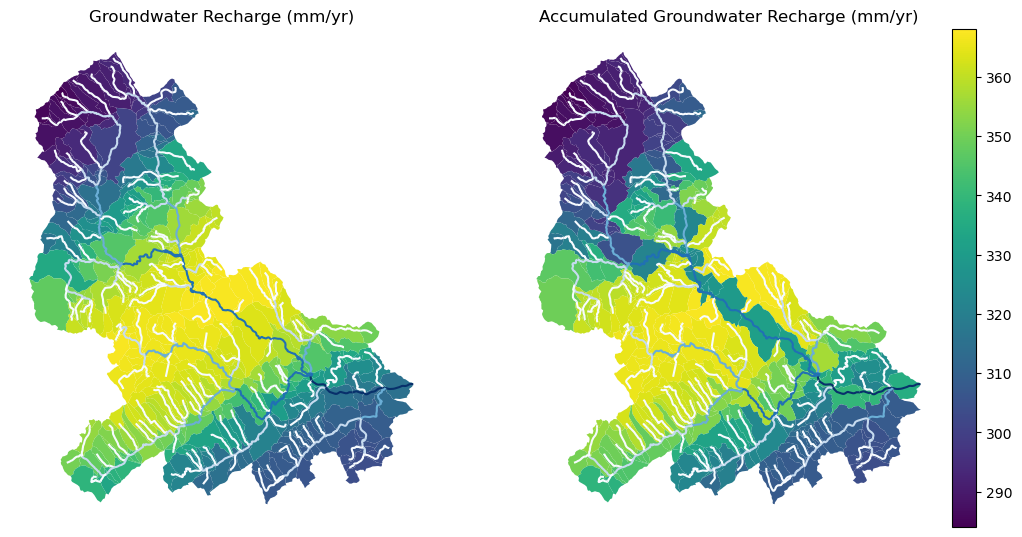
Since NHDPlus HR is still at the pre-release stage let's use the MR flowlines to
demonstrate the vector-based accumulation. Based on a topological sorted river network
pynhd.vector_accumulation computes flow accumulation in the network.
It returns a data frame that is sorted from upstream to downstream that
shows the accumulated flow in each node.
PyNHD has a utility called prepare_nhdplus that identifies such
relationships among other things such as fixing some common issues with
NHDPlus flowlines. But first, we need to get all the NHDPlus attributes
for each ComID since NLDI only provides the flowlines' geometries
and ComIDs which is useful for navigating the vector river network data.
For getting the NHDPlus database we use WaterData. Let's use the
nhdflowline_network layer to get required info.
.. code-block:: python
wd = WaterData("nhdflowline_network")

comids = flw_trib.nhdplus_comid.to_list()
nhdp_trib = wd.byid("comid", comids)
flw = nhd.prepare_nhdplus(nhdp_trib, 0, 0, purge_non_dendritic=False)
To demonstrate the use of routing, let's use nhdplus_attrs function to get a list of available
NHDPlus attributes
.. code-block:: python
char = "CAT_RECHG"
area = "areasqkm"

local = nldi.getcharacteristic_byid(comids, "local", char_ids=char)
flw = flw.merge(local[char], left_on="comid", right_index=True)


def runoff_acc(qin, q, a):
    return qin + q * a


flw_r = flw[["comid", "tocomid", char, area]]
runoff = nhd.vector_accumulation(flw_r, runoff_acc, char, [char, area])


def area_acc(ain, a):
    return ain + a


flw_a = flw[["comid", "tocomid", area]]
areasqkm = nhd.vector_accumulation(flw_a, area_acc, area, [area])

runoff /= areasqkm
Since these are catchment-scale characteristics, let's get the catchments
then add the accumulated characteristic as a new column and plot the
results.
.. code-block:: python
wd = WaterData("catchmentsp")
catchments = wd.byid("featureid", comids)

c_local = catchments.merge(local, left_on="featureid", right_index=True)
c_acc = catchments.merge(runoff, left_on="featureid", right_index=True)
.. image:: https://raw.githubusercontent.com/hyriver/HyRiver-examples/main/notebooks/_static/flow_accumulation.png
:target: https://github.com/hyriver/HyRiver-examples/blob/main/notebooks/nhdplus.ipynb
:align: center
More examples can be found here <https://pygeohydro.readthedocs.io/en/latest/examples.html>__.
Contributing
Contributions are very welcomed. Please read
CONTRIBUTING.rst <https://github.com/hyriver/pynhd/blob/main/CONTRIBUTING.rst>__
file for instructions.