


Research
/Security News
Fake imToken Chrome Extension Steals Seed Phrases via Phishing Redirects
Mixed-script homoglyphs and a lookalike domain mimic imToken’s import flow to capture mnemonics and private keys.
By Kirill Boychenko - Mar 05, 2026
qtconsole
Advanced tools


A rich Qt-based console for working with Jupyter kernels, supporting rich media output, session export, and more.
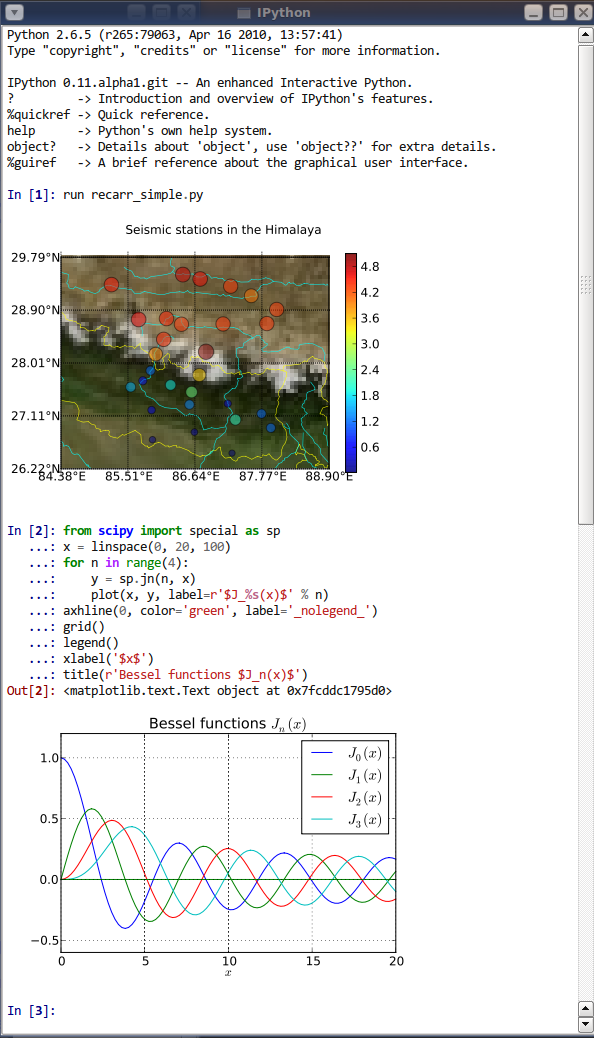
The Qtconsole is a very lightweight application that largely feels like a terminal, but provides a number of enhancements only possible in a GUI, such as inline figures, proper multiline editing with syntax highlighting, graphical calltips, and more.
This project is maintained by the Spyder development team and part of its organization.
The Qtconsole requires Python bindings for Qt, such as PyQt6, PySide6, PyQt5 or PySide2.
Although pip and conda may be used to install the Qtconsole, conda is simpler to use since it automatically installs PyQt5. Alternatively, the Qtconsole installation with pip needs additional steps since pip doesn't install the Qt requirement.
To install:
conda install qtconsole
Note: If the Qtconsole is installed using conda, it will automatically install the Qt requirement as well.
To install:
pip install qtconsole
Note: Make sure that Qt is installed. Unfortunately, Qt is not installed when using pip. The next section gives instructions on doing it.
You can install PyQt5 with pip using the following command:
pip install pyqt5
or with a system package manager on Linux. For Windows, PyQt binary packages may be used.
Note: Additional information about using a system package manager may be found in the qtconsole documentation.
To run the Qtconsole:
jupyter qtconsole
FAQs
Jupyter Qt console
We found that qtconsole demonstrated a healthy version release cadence and project activity because the last version was released less than a year ago. It has 3 open source maintainers collaborating on the project.
Did you know?

Socket for GitHub automatically highlights issues in each pull request and monitors the health of all your open source dependencies. Discover the contents of your packages and block harmful activity before you install or update your dependencies.
Research
/Security News
Mixed-script homoglyphs and a lookalike domain mimic imToken’s import flow to capture mnemonics and private keys.

Security News
Latio’s 2026 report recognizes Socket as a Supply Chain Innovator and highlights our work in 0-day malware detection, SCA, and auto-patching.

Company News
Join Socket for live demos, rooftop happy hours, and one-on-one meetings during BSidesSF and RSA 2026 in San Francisco.