




WebAuthn-RP is a Python 3 library to manage credentials that conform to the
Web Authentication specification.
The following is an overview and some highlights of the library. To see the autogenerated docs and
the getting started guide (which covers the Flask example under /examples/flask)
please visit the readthedocs page.
Overview
The aim of this project is to enable Relying Parties to easily use public key credentials
in Python backend web applications. Support is only for Python 3.x considering that
Python 2.x reached its end of life in early 2020. This allows for the use of many
features of Python 3 such as built-in type hinting and static type checking with mypy.
The general flow diagram for web authentication is shown in the diagrams below (from the spec):
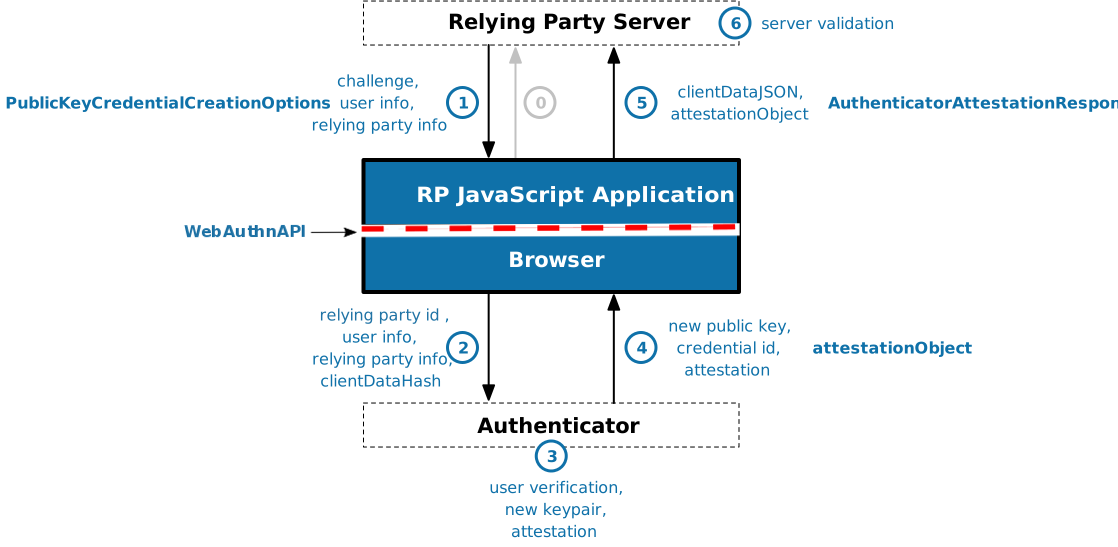
WebAuthn Registration Flow (Figure 1 of WebAuthn Standard)
In the case of registration, the Relying Party server must send a challenge along with
information about the user that is to be registered and the specific Relying Party to
which that user is associated. This library is meant to aid in the generation of messages
used in step 1 and the validation performed in step 6. Steps 0 and 5 are typically
handled by an application-specific client library while the routing and parsing operations
of steps 1 and 6 will need to be managed by the application-specific backend although
some utilities are provided. Steps 2, 3, and 4, however, are completely managed by the
browser and authenticator and are not part of this library. In fact, they are
mostly covered by a different specification (the Client To Authenticator Protocol, or CTAP).
Authentication is very much like registration, however some of the message formats are
different and consequently the parsing and validation operations as well. The steps
and how they are handled mirror those of the registration flow:
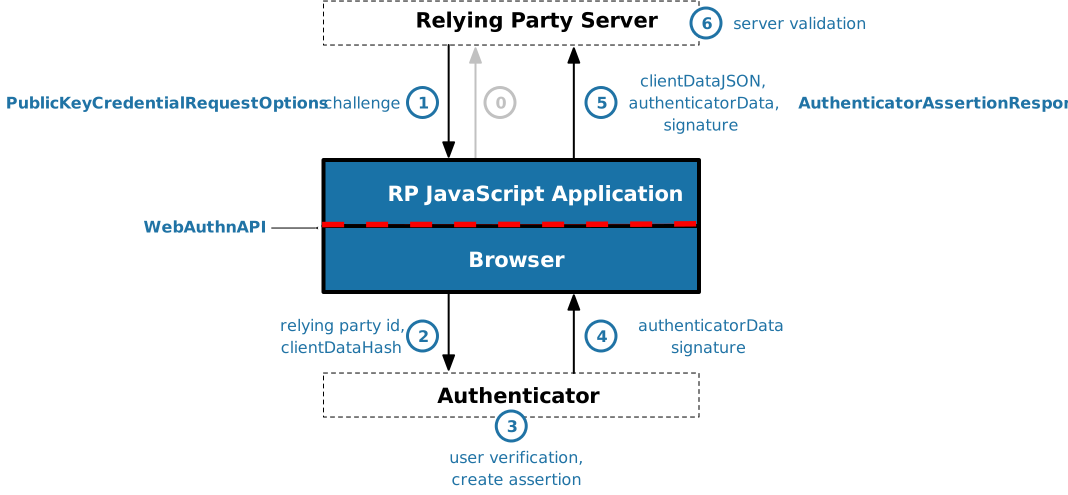
WebAuthn Authentication Flow (Figure 2 of WebAuthn Standard)
The WebAuthn specification is designed for modern browsers and so most of the data
types and functions have JavaScript and JSON in mind. Although all of the necessary
data types are provided as Python objects in the types module, these objects need
to be convertable into JSON for use in the browser. The jsonify function provided
in the converters module does this for all available data types and
allows one to work directly with typed Python objects. There is also a parsers module that provides functions
that can take JSON objects of specific types of data and parse them into their
Python object counterparts. Note that given JSON cannot represent raw bytes
directly, bytes are base64 encoded when converted into JSON and base64 decoded
when being parsed from JSON. This becomes important when passing data
to the browser API functions described below because there, JavaScript ArrayBuffers
are expected in place of base64 encoded strings.
Both the registration and authentication ceremonies have corresponding API functions
available in the browser as part of the Navigator interface. The available
functions are navigator.credentials.create and navigator.credentials.get
respectively. These functions take a single options argument which corresponds to
the data types CredentialCreationOptions and CredentialRequestOptions
respectively. These data types have a number of configurable options that may
need to be set using nested objects. To simply their construction there are
builder classes available which can also provide a way to encapsulate
shared options across different users (see the builders module).
All of this is summarized in the following two tables which describe
some of the different functions and types that'll need to be considered
when performing user registration and user authentication.
User Registration Ceremony| WebAuthn Browser API Function | navigator.credentials.create |
| WebAuthn-RP Options Python Data Type | webauthn_rp.types.CredentialCreationOptions |
| WebAuthn-RP Options Builder | webauthn_rp.builders.CredentialCreationOptionsBuilder |
| WebAuthn-RP Options JSON Converter | webauthn_rp.converters.jsonify |
| WebAuthn-RP Public Key Credential Parser | webauthn_rp.parsers.parse_public_key_credential |
User Authentication Ceremony| WebAuthn Browser API Function | navigator.credentials.get |
| WebAuthn-RP Options Python Data Type | webauthn_rp.types.CredentialRequestOptions |
| WebAuthn-RP Options Builder | webauthn_rp.builders.CredentialRequestOptionsBuilder |
| WebAuthn-RP Options JSON Converter | webauthn_rp.converters.jsonify |
| WebAuthn-RP Public Key Credential Parser | webauthn_rp.parsers.parse_public_key_credential |
Note that parse_public_key_credential takes a Dict type corresponding to
a JSON-encoded version of the public key credential JavaScript object returned by the
WebAuthn browser function. Data that was originally bytes is expected to have been
encoded using standard base64. Please see the Flask example app.html file to
see how this conversion is done in JavaScript.
Examples
As mentioned, the readthedocs page has
a getting started guide that goes into depth with the Flask example, however, if you want
to be able to directly run the example from this GitHub repository follow these steps
after cloning this project locally:
-
Make sure you have a version of Python >= 3.6.1.
-
Install poetry by following the guide.
-
Open a poetry shell and install the dependencies from the project root using:
$ poetry shell
$ poetry install
$ pip install Flask Flask-SQLAlchemy
-
Run the Flask example from the root using::
$ python -m examples.flask.app
-
Open a browser to localhost:5000 and register a credential to a username.
-
Authenticate using the same username and credential.
-
Exit the example program.
References





