



Research
/Security News
Fake imToken Chrome Extension Steals Seed Phrases via Phishing Redirects
Mixed-script homoglyphs and a lookalike domain mimic imToken’s import flow to capture mnemonics and private keys.
By Kirill Boychenko - Mar 05, 2026
ydiff
Advanced tools
View colored, incremental diff in a workspace or from stdin, in side-by-side or unified moded, and auto paged.
.. image:: https://github.com/ymattw/ydiff/actions/workflows/test.yml/badge.svg :alt: Tests status :target: https://github.com/ymattw/ydiff/actions
Ydiff is a terminal-based tool to view colored, incremental diffs in
a version-controlled workspace or from stdin, in side-by-side (similar to
diff -y) or unified mode, and auto-paged. It only requires Python >= 3.3
without external dependencies and less as a pager.
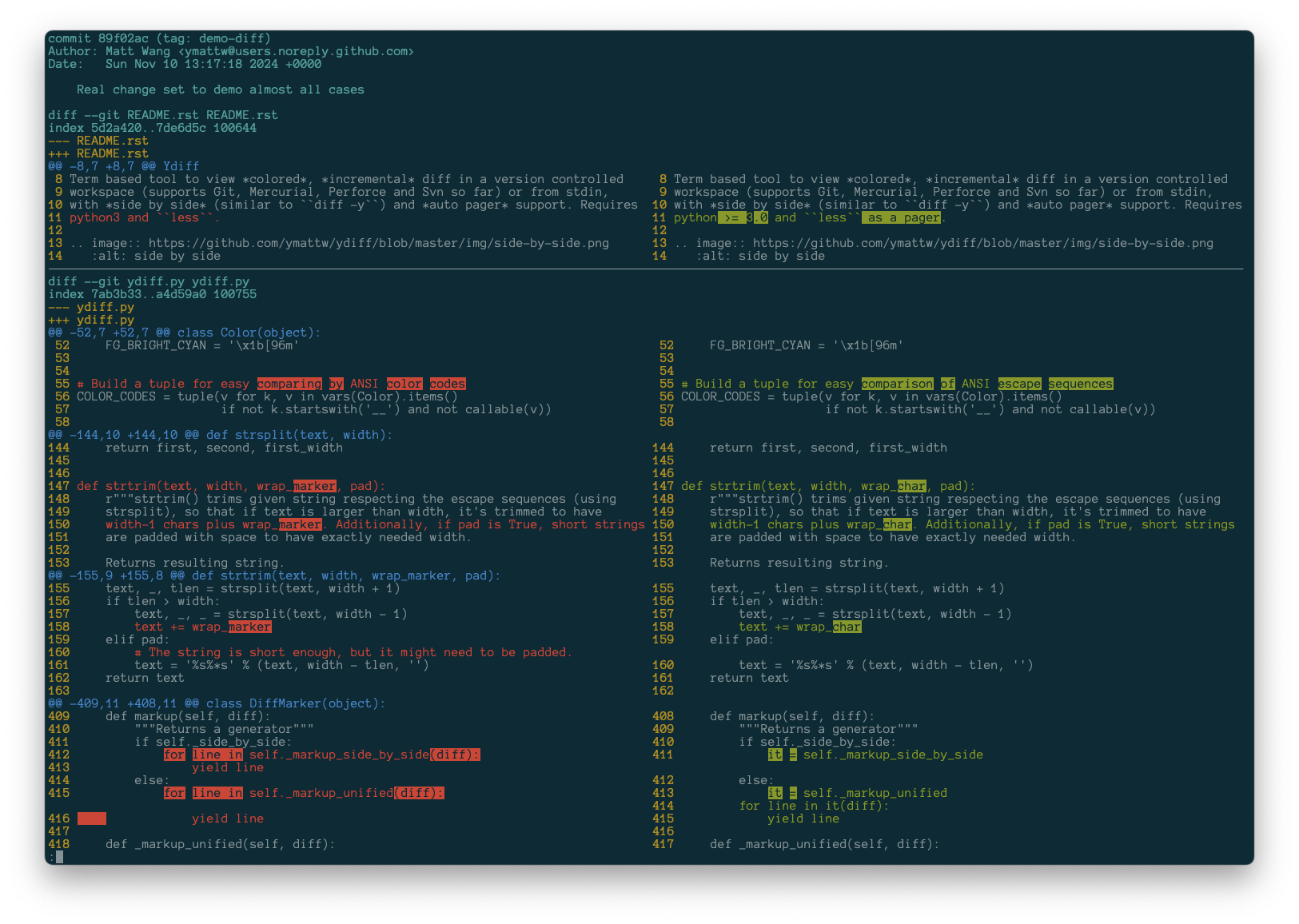
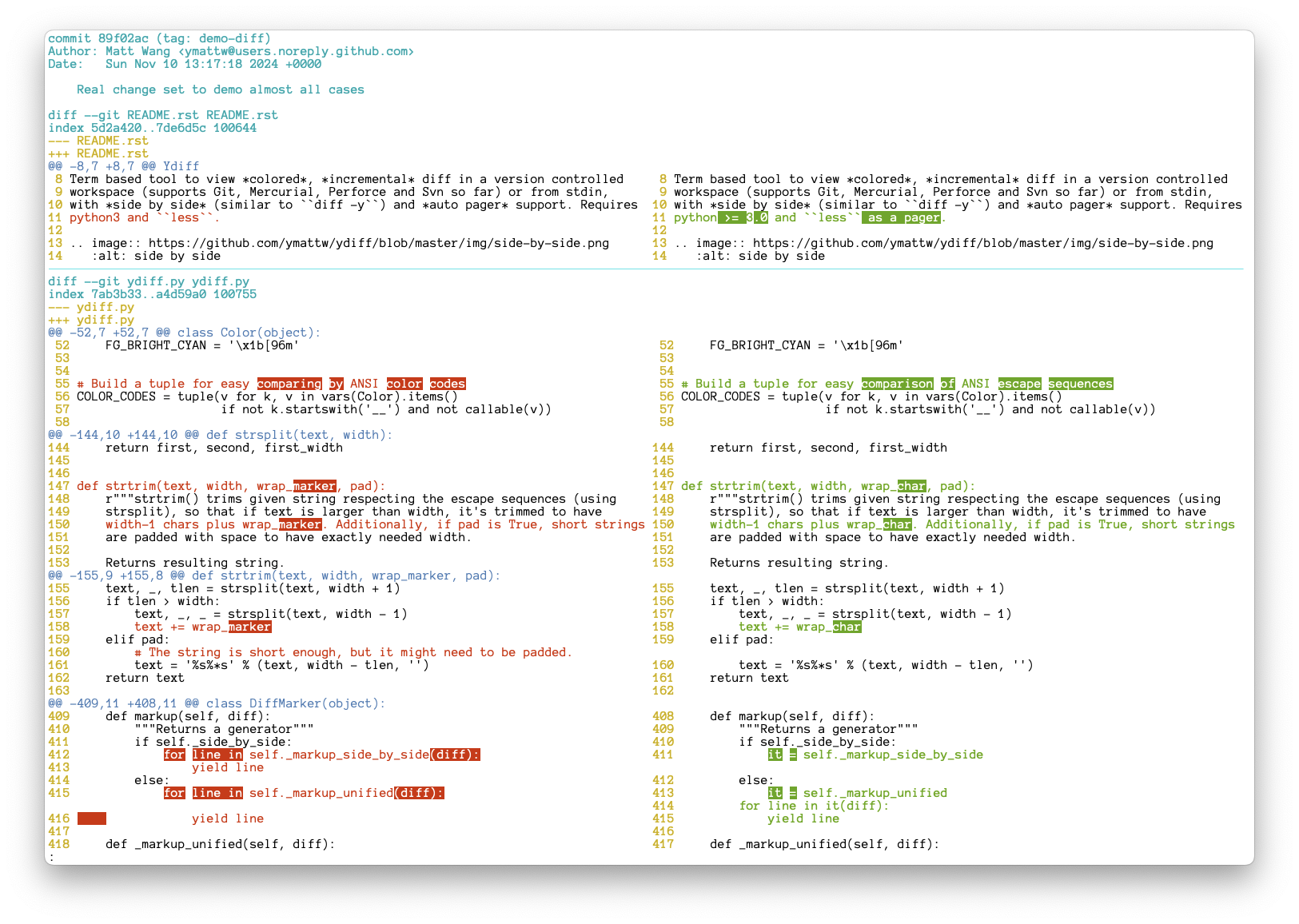
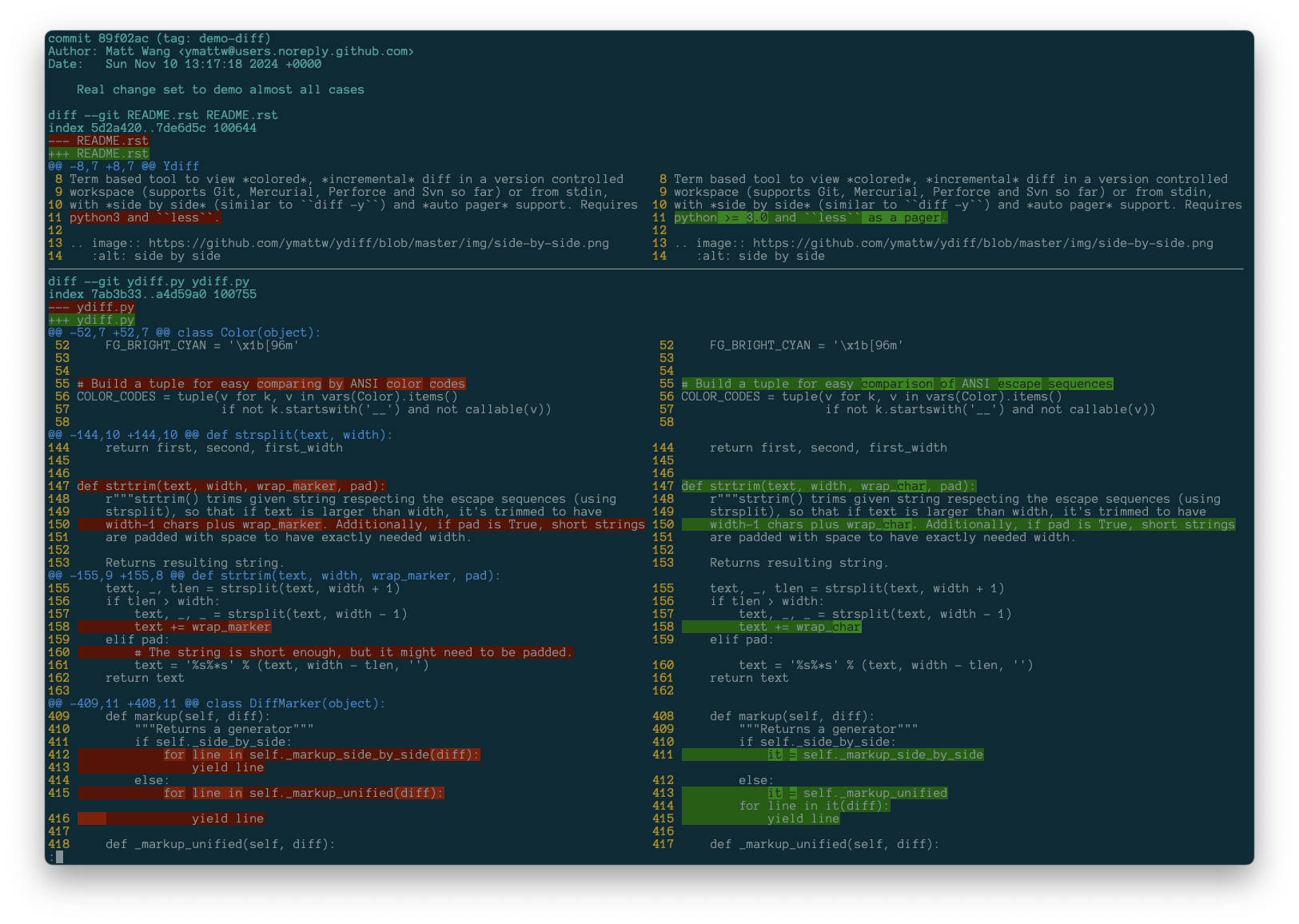
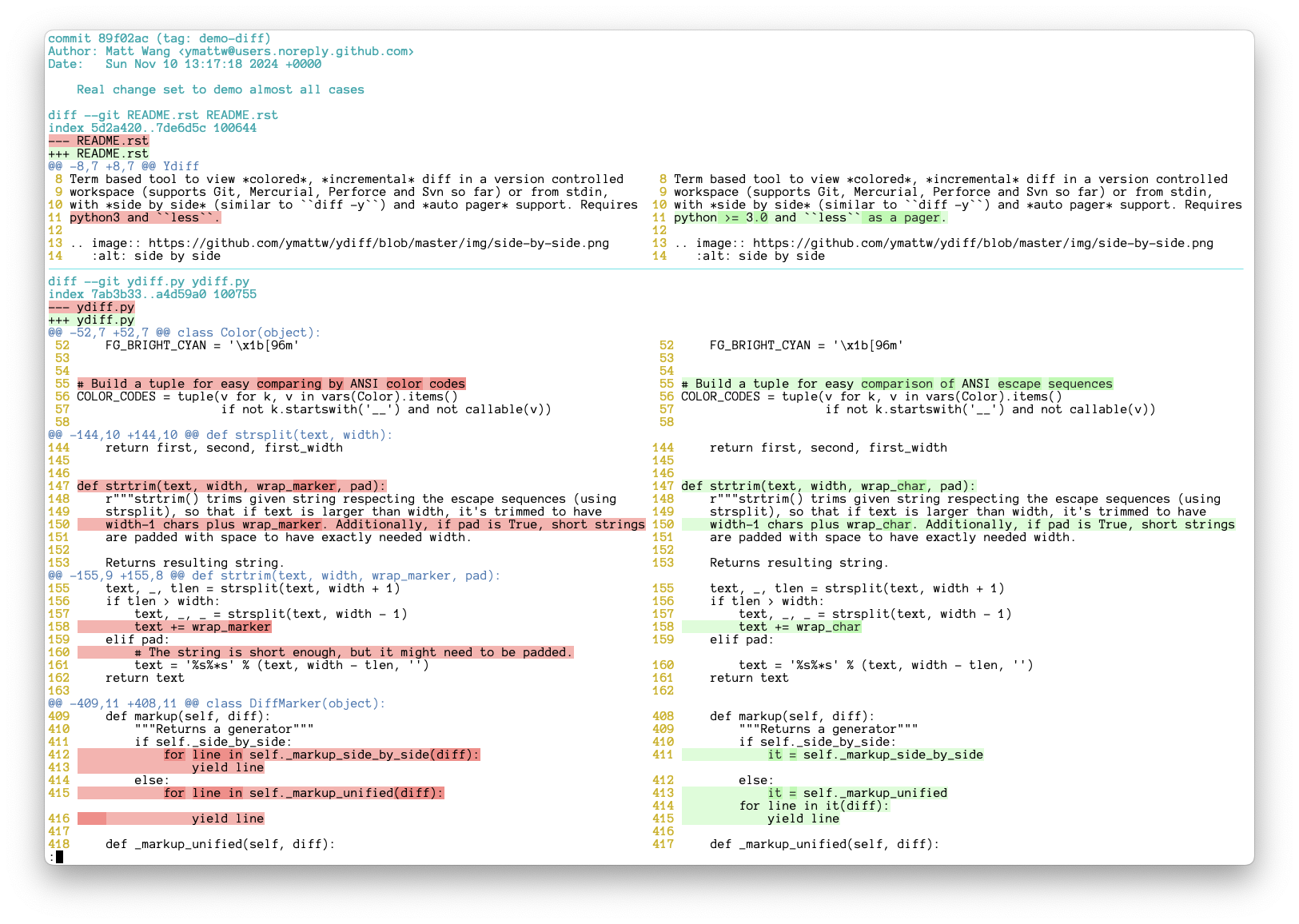
The diffs in side-by-side mode appear below. See also the screenshots_ of the
unified mode.
.. _screenshots: https://github.com/ymattw/ydiff/tree/26857b8/img
Theme "default" on a dark terminal background:
.. image:: https://raw.githubusercontent.com/ymattw/ydiff/26857b8/img/darkbg-side-by-side-default.png :alt: side by side, theme 'default' on a dark background :align: center :height: 300 px
Theme "default" on a light terminal background:
.. image:: https://raw.githubusercontent.com/ymattw/ydiff/26857b8/img/lightbg-side-by-side-default.png :alt: side by side, theme 'default' on a light background :align: center :height: 300 px
Theme "dark" on a dark terminal background:
.. image:: https://raw.githubusercontent.com/ymattw/ydiff/26857b8/img/darkbg-side-by-side-dark.png :alt: side by side, theme 'dark' on a dark background :align: center :height: 300 px
Theme "light" on a light terminal background:
.. image:: https://raw.githubusercontent.com/ymattw/ydiff/26857b8/img/lightbg-side-by-side-light.png :alt: side by side, theme 'light' on a light background :align: center :height: 300 px
Ydiff only depends on Python built-in libraries, so you can just download the
source and run without worrying about any installation. Git tagged_ revisions
will be packaged and uploaded to PyPI_ timely, however, packages hosted
elsewhere are not (please note they are not managed by the author @ymattw_).
.. _tagged: https://github.com/ymattw/ydiff/tags
.. _PyPI: http://pypi.python.org/pypi/ydiff
.. _@ymattw: https://github.com/ymattw
To run from source directly, just save ydiff.py_ as ydiff to whatever
directory which is in your $PATH, for example, $HOME/bin:
.. _ydiff.py: https://raw.github.com/ymattw/ydiff/master/ydiff.py
.. code-block:: bash
curl -L https://raw.github.com/ymattw/ydiff/master/ydiff.py > ~/bin/ydiff
chmod +x ~/bin/ydiff
To install from PyPI_:
.. code-block:: bash
pip install --upgrade ydiff
To install with Homebrew (Formula_) on macOS:
.. _Formula: https://github.com/Homebrew/homebrew-core/blob/master/Formula/y/ydiff.rb
.. code-block:: bash
brew install ydiff
To install on Fedora:
.. code-block:: bash
dnf install ydiff
To install on FreeBSD:
.. code-block:: bash
pkg install ydiff
Type ydiff -h to show usage::
$ ydiff -h
Usage: ydiff [options] [file|dir ...]

View colored, incremental diff in a workspace or from stdin, with side by side
and auto pager support.

Options:
  --version             show program's version number and exit
  -h, --help            show this help message and exit
  -s, --side-by-side    enable side-by-side mode (default True; DEPRECATED)
  -u, --unified         show diff in unified mode (disables side-by-side mode)
  -w N, --width=N       set text width for side-by-side mode, 0 (default) for
                        auto detection and fallback to 80 when not possible
  -l, --log             show log with changes from revision control
  -c WHEN, --color=WHEN
                        colorize mode 'auto' (default), 'always', or 'never'
  -t N, --tab-width=N   convert tab chars to this many spaces (default: 8)
  --wrap                wrap long lines in side-by-side mode (default True;
                        DEPRECATED)
  --nowrap, --no-wrap   do not wrap long lines in side-by-side mode
  -p PAGER, --pager=PAGER
                        pager application to feed output to, default is 'less'
  -o OPT, --pager-options=OPT
                        options to supply to pager application
  --theme=THEME         option to pick a color theme (one of dark, default,
                        light)

  Note:
    Option parser will stop on first unknown option and pass them down to
    underneath revision control. Environment variable YDIFF_OPTIONS may be
    used to specify default options that will be placed at the beginning
    of the argument list.
Read diff from local modification in a Git/Mercurial/Perforce/Svn workspace
(output from e.g. git diff, svn diff):
.. code-block:: bash
cd proj-workspace
ydiff                       # view colored side by side diff, auto set text
                            # width based on terminal size
ydiff -u                    # view colored incremental diff in unified mode
ydiff -w 90                 # use text width 90, wrap long lines
ydiff --no-wrap             # auto set text width but do not wrap long lines
ydiff file1 dir2            # view modification of given files/dirs only
ydiff -w90 -U10             # pass '-U10' to underneath revision diff tool
ydiff --cached              # show git staged diff (git diff --cached)
ydiff -r1234                # show svn diff to revision 1234
Read log with changes in a Git/Mercurial/Svn workspace (output from e.g.
git log -p, svn log --diff), note --diff option is new in svn 1.7.0:
.. code-block:: bash
cd proj-workspace
ydiff -l                    # read log along with changes, side by side
ydiff -lu                   # equivalent to ydiff -l -u, unified mode
ydiff -l -w90 --no-wrap     # set text width 90 and disable wrapping
ydiff -l file1 dir2         # see log with changes of given files/dirs only
Utilize a specific pager application:
.. code-block:: bash
ydiff -p more                   # use "more" as a pager
ydiff -p cat                    # when neither less nor more is avilable
ydiff -o "-FRSX --shift 2"      # customized option (pager defaults to less)
Pipe in a diff:
.. code-block:: bash
git log -p -2 | ydiff       # view git log with changes of last 2 commits
git show 15bfa | ydiff      # view a given git commit, side by side
svn diff -r1234 | ydiff     # view svn diff comparing to given revision
diff -u file1 file2 | ydiff # view diff between two files (note the '-u')
diff -ur dir1 dir2 | ydiff  # view diff between two dirs

# View diff in a GitHub pull request, side by side
curl https://github.com/ymattw/ydiff/pull/11.diff | ydiff

# View a patch file in colored unified format.
ydiff -u < foo.patch
Redirect output to another patch file is safe even without -u:
.. code-block:: bash
svn diff -r PREV | ydiff > my.patch
You can define your own themes in ~/.config/ydiff/themes.ini. Check out the
built-in themes_ for examples.
.. _built-in themes: https://github.com/search?q=repo%3Aymattw%2Fydiff+%2F_BUILTIN_THEMES+%3D%2F&type=code
The section names are theme names. Undeclared theme keys will inherit values from the same-named built-in theme or from the "default" theme otherwise.
Ydiff only supports diffs in Unified Format_. Diffs in other format may be
converted to Unified Format via tool filterdiff (usually offered by
package patchutils.)
.. _Unified Format: https://en.wikipedia.org/wiki/Diff#Unified_format
Environment variable YDIFF_OPTIONS may be used to specify default
options that will be placed at the beginning of the argument list, for
example:
.. code-block:: bash
export YDIFF_OPTIONS='-w100' ydiff foo # equivalent to "ydiff -w100 foo"
If you feel more comfortable with a command such as git d to trigger the
ydiff command, you may symlink the executable to one named git-d, or
configure an alias:
.. code-block:: bash
D=$(dirname $(which ydiff)); ln -s ydiff $D/git-d
git config --global alias.d '!ydiff'
reset can fix it)... vim:set ft=rst et sw=4 sts=4 tw=79:
Version 1.5 (2025-12-06)
- Support customized themes in INI format
- Only read stdin when redirected from a regular file or pipe
- Apply --color=never option to git diff and git log
- Release both source and wheel packages
Version 1.4.2 (2024-11-18)
- Compatibility Fix: Ensure ydiff works properly with Python 3.3 and later.
Version 1.4.1 (2024-11-13)
Version 1.4 (2024-11-13) Revoked due to #123
--theme option for selecting different themes--side-by-side, --width 0, and --wrap become default
(use --unified/--nowrap for legacy behavior)Version 1.3 (2024-04-02)
Version 1.2 (2020-08-08)
less which is offered by git-bash)Version 1.1 (2018-06-05)
cdiff to ydiff to avoid binary name conflict on major
distributions, CDIFF_OPTIONS still works but will be deprepated soon--wrap to wrap long lines in side-by-side viewVersion 1.0 (2016-12-31)
CDIFF_OPTIONS to hold default optionsVersion 0.9.8 (2016-01-16)
Version 0.9.7 (2015-04-24)
Version 0.9.6 (2014-06-20)
Version 0.9.5 (2014-06-19)
--width 0 now fits terminal size automatically--shift 1Version 0.9.4 (2014-06-04)
LESS environment variableVersion 0.9.3 (2013-09-28)
Version 0.9.2 (2013-06-21)
cdiff --cached, cdiff -U5 directlyVersion 0.9.1 (2013-05-20)
--no-ext-diff to disable GIT_EXTERNAL_DIFF and diff.external which
might break cdiff outputVersion 0.9 (2013-03-23)
filterdiff (patchutils)Version 0.8 (2013-03-13)
Version 0.7.1 (2013-02-25)
Version 0.7 (2013-02-23)
diff -ru dir1 dir2Version 0.6 (2013-02-20)
Version 0.5.1 (2013-02-19)
Version 0.5 (2013-02-18)
svn diff --log and hg log -p--log (-l) option to read revision control diff log (thanks to
Steven Myint_)Version 0.4 (2013-02-16)
Version 0.3 (2013-02-07)
Version 0.2 (2013-02-06)
Version 0.1 (2013-02-05)
Version 0.0.4 (2013-02-04)
Version 0.0.3 (2013-02-04)
Steven Myint_).. _Steven Myint: https://github.com/myint
.. vim:set ft=rst et sw=4 sts=4 tw=79:
FAQs
View colored, incremental diff in a workspace or from stdin, in side-by-side or unified moded, and auto paged.
We found that ydiff demonstrated a healthy version release cadence and project activity because the last version was released less than a year ago. It has 1 open source maintainer collaborating on the project.
Did you know?

Socket for GitHub automatically highlights issues in each pull request and monitors the health of all your open source dependencies. Discover the contents of your packages and block harmful activity before you install or update your dependencies.
Research
/Security News
Mixed-script homoglyphs and a lookalike domain mimic imToken’s import flow to capture mnemonics and private keys.

Security News
Latio’s 2026 report recognizes Socket as a Supply Chain Innovator and highlights our work in 0-day malware detection, SCA, and auto-patching.

Company News
Join Socket for live demos, rooftop happy hours, and one-on-one meetings during BSidesSF and RSA 2026 in San Francisco.