





Security News
Feross on TBPN: How North Korea Hijacked Axios
Socket CEO Feross Aboukhadijeh breaks down how North Korea hijacked Axios and what it means for the future of software supply chain security.
By Sarah Gooding - Apr 08, 2026
@sourceloop/bpmn-service
Advanced tools
-@2x.png)
A Microservice for handling BPMN workflows using engines like Camunda.
NOTE: The microservice currently works with only one workflow definition for a single diagram. It provides -
The sandbox example provides a use of this microservice with the Camunda BPMN engine.
It uses camunda-external-task-client-js to implement external task workers, that are triggered on executing a workflow. The flow of control is shown in the diagram below -

npm i @sourceloop/bpmn-service
lb4 testappnpm i @sourceloop/bpmn-serviceWorkflowServiceBindings.Config key-
this.bind(WorkflowServiceBindings.Config).to({
  useCustomSequence: true,
  workflowEngineBaseUrl: process.env.CAMUNDA_URL, // url for the rest engine in case of Camunda
});
WorkflowProvider (refer this) and bind it to WorkflowServiceBindings.WorkflowManager key -
this.bind(WorkflowServiceBindings.WorkflowManager).toProvider(
  WorkflowProvider,
);
WorkflowServiceComponent to your Loopback4 Application (in application.ts).
// import WorkflowServiceComponent
import {WorkflowServiceComponent} from '@sourceloop/bpmn-service';
// add Component for WorkflowService
this.component(WorkflowServiceComponent);
dataSourceName property set to
WorkflowCacheSourceName. You can see an example datasource here.npm startThis service supports Sequelize as the underlying ORM using @loopback/sequelize extension. And in order to use it, you'll need to do following changes.
To use Sequelize in your application, add following to application.ts along with other config specific to the service:
this.bind(WorkflowServiceBindings.Config).to({
  useCustomSequence: false,
  useSequelize: true,
});
Use the SequelizeDataSource in your audit datasource as the parent class. Refer this for more.
DataSourceHere is a sample Implementation DataSource implementation using environment variables and PostgreSQL as the data source.
import {inject, lifeCycleObserver, LifeCycleObserver} from '@loopback/core';
import {juggler} from '@loopback/repository';
import {WorkflowCacheSourceName} from '../types';

const config = {
  name: WorkflowCacheSourceName,
  connector: 'postgresql',
  host: process.env.DB_HOST,
  port: process.env.DB_PORT,
  user: process.env.DB_USER,
  password: process.env.DB_PASSWORD,
  database: process.env.DB_DATABASE,
  schema: process.env.DB_SCHEMA,
};

@lifeCycleObserver('datasource')
export class BpmnDbDataSource
  extends juggler.DataSource
  implements LifeCycleObserver
{
  static dataSourceName = WorkflowCacheSourceName;
  static readonly defaultConfig = config;

  constructor(
    @inject('datasources.config.BpmnDb', {optional: true})
    dsConfig: object = config,
  ) {
    super(dsConfig);
  }
}
If you are using asymmetric token signing and verification, you should have auth datasource present in the service and auth redis datasource on the facade level. Example datasource file for auth database is:-
Auth DB datasource :-
import {inject, lifeCycleObserver, LifeCycleObserver} from '@loopback/core';
import {juggler} from '@loopback/repository';
import {AuthDbSourceName} from '@sourceloop/core';
const DEFAULT_MAX_CONNECTIONS = 25;
const DEFAULT_DB_IDLE_TIMEOUT_MILLIS = 60000;
const DEFAULT_DB_CONNECTION_TIMEOUT_MILLIS = 2000;

const config = {
  name: 'auth',
  connector: 'postgresql',
  host: process.env.DB_HOST,
  port: process.env.DB_PORT,
  user: process.env.DB_USER,
  schema: process.env.DB_SCHEMA,
  password: process.env.DB_PASSWORD,
  database: process.env.AUTH_DB,
};

// Observe application's life cycle to disconnect the datasource when
// application is stopped. This allows the application to be shut down
// gracefully. The `stop()` method is inherited from `juggler.DataSource`.
// Learn more at https://loopback.io/doc/en/lb4/Life-cycle.html
@lifeCycleObserver('datasource')
export class AuthDataSource
  extends juggler.DataSource
  implements LifeCycleObserver
{
  static dataSourceName = AuthDbSourceName;

  static readonly defaultConfig = config;

  constructor(
    @inject('datasources.config.auth', {optional: true})
    dsConfig: object = config,
  ) {
    if (!!+(process.env.ENABLE_DB_CONNECTION_POOLING ?? 0)) {
      const dbPool = {
        max: +(process.env.DB_MAX_CONNECTIONS ?? DEFAULT_MAX_CONNECTIONS),
        idleTimeoutMillis: +(
          process.env.DB_IDLE_TIMEOUT_MILLIS ?? DEFAULT_DB_IDLE_TIMEOUT_MILLIS
        ),
        connectionTimeoutMillis: +(
          process.env.DB_CONNECTION_TIMEOUT_MILLIS ??
          DEFAULT_DB_CONNECTION_TIMEOUT_MILLIS
        ),
      };

      dsConfig = {...dsConfig, ...dbPool};
    }

    super(dsConfig);
  }
}
Auth Cache Redis Datasource:-
import {inject, lifeCycleObserver, LifeCycleObserver} from '@loopback/core';
import {AnyObject, juggler} from '@loopback/repository';
import {readFileSync} from 'fs';
import {AuthCacheSourceName} from '@sourceloop/core';

const config = {
  name: process.env.REDIS_NAME,
  connector: 'kv-redis',
  host: process.env.REDIS_HOST,
  port: process.env.REDIS_PORT,
  password: process.env.REDIS_PASSWORD,
  db: process.env.REDIS_DATABASE,
  url: process.env.REDIS_URL,
  tls:
    +process.env.REDIS_TLS_ENABLED! && process.env.REDIS_TLS_CERT
      ? {
          ca: readFileSync(process.env.REDIS_TLS_CERT),
        }
      : undefined,
  sentinels:
    +process.env.REDIS_HAS_SENTINELS! && process.env.REDIS_SENTINELS
      ? JSON.parse(process.env.REDIS_SENTINELS)
      : undefined,
  sentinelPassword:
    +process.env.REDIS_HAS_SENTINELS! && process.env.REDIS_SENTINEL_PASSWORD
      ? process.env.REDIS_SENTINEL_PASSWORD
      : undefined,
  role:
    +process.env.REDIS_HAS_SENTINELS! && process.env.REDIS_SENTINEL_ROLE
      ? process.env.REDIS_SENTINEL_ROLE
      : undefined,
};

@lifeCycleObserver('datasource')
export class RedisDataSource
  extends juggler.DataSource
  implements LifeCycleObserver
{
  static readonly dataSourceName = AuthCacheSourceName;
  static readonly defaultConfig = config;

  constructor(
    @inject(`datasources.config.${process.env.REDIS_NAME}`, {optional: true})
    dsConfig: AnyObject = config,
  ) {
    if (
      +process.env.REDIS_HAS_SENTINELS! &&
      !!process.env.REDIS_SENTINEL_HOST &&
      !!process.env.REDIS_SENTINEL_PORT
    ) {
      dsConfig.sentinels = [
        {
          host: process.env.REDIS_SENTINEL_HOST,
          port: +process.env.REDIS_SENTINEL_PORT,
        },
      ];
    }
    super(dsConfig);
  }
}
The service comes with a default DataSource using PostgreSQL, if you intend to use this, you have to provide the following variables in the environment -
| Name | Required | Default Value | Description |
|---|---|---|---|
DB_HOST | Y | Hostname for the database server. | |
DB_PORT | Y | Port for the database server. | |
DB_USER | Y | User for the database. | |
DB_PASSWORD | Y | Password for the database user. | |
DB_DATABASE | Y | Database to connect to on the database server. | |
DB_SCHEMA | Y | Database schema used for the data source. In PostgreSQL, this will be public unless a schema is made explicitly for the service. |
DataSourceA sample implementation of a DataSource using environment variables and PostgreSQL is included with the service, you can provide your own using the BpmnDbSourceName variable. Implementation of the sample DataSource can be seen here.
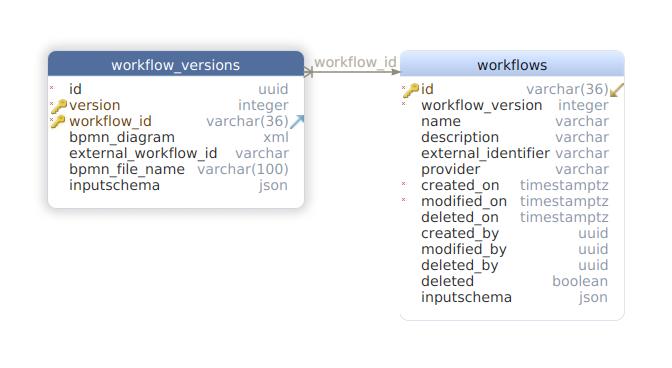
BPMNProvider
To use the services, you need to implement a provider and bind it to the BPMNBindings.BPMNProvider key. The provider returns a value containing the 5 methods - getWorkflowById, startWorkflow, createWorkflow, updateWorkflow and deleteWorkflowById. These methods are responsible for performing their respective tasks in the workflow engine. Here is the default implementation of this provider -
import {bind, /* inject, */ BindingScope, Provider} from '@loopback/core';
import {HttpErrors} from '@loopback/rest';
import {WorflowManager} from '../types';

@bind({scope: BindingScope.TRANSIENT})
export class WorkflowProvider implements Provider<WorflowManager> {
  value() {
    return {
      getWorkflowById: async () => {
        throw new HttpErrors.BadRequest(
          'getWorkflowId function not implemented',
        );
      },
      startWorkflow: async () => {
        throw new HttpErrors.BadRequest(
          'startWorkflow function not implemented',
        );
      },
      createWorkflow: async () => {
        throw new HttpErrors.BadRequest(
          'createWorkflow function not implemented',
        );
      },
      updateWorkflow: async () => {
        throw new HttpErrors.BadRequest(
          'updateWorkflow function not implemented',
        );
      },
      deleteWorkflowById: async () => {
        throw new HttpErrors.BadRequest(
          'deleteWorkflowById function not implemented',
        );
      },
    };
  }
}
WorkerImplementationProvider
Your workers are automatically initiated once a workflow is executed, to provide the implementation details of workers, you need to give an implementation template of one such worker using the WorkflowServiceBindings.WorkerImplementationFunction, a default implementation is provided here. You also need to register individual worker commands using the WorkflowServiceBindings.RegisterWorkerFunction function;
ExecutionInputValidationProvider
If you need to validate the inputs of a workflow execution, you can bind a custom validation provider using WorkflowServiceBindings.ExecutionInputValidatorFn key. The microservice comes with a default implementation using AJV.
The migrations required for this service are processed during the installation automatically if you set the WORKFLOW_MIGRATION or SOURCELOOP_MIGRATION env variable. The migrations use db-migrate with db-migrate-pg driver for migrations, so you will have to install these packages to use auto-migration. Please note that if you are using some pre-existing migrations or databases, they may be affected. In such a scenario, it is advised that you copy the migration files in your project root, using the WORKFLOW_MIGRATION_COPY or SOURCELOOP_MIGRATION_COPY env variables. You can customize or cherry-pick the migrations in the copied files according to your specific requirements and then apply them to the DB.
This migration script supports both MySQL and PostgreSQL databases, controlled by environment variables. By setting MYSQL_MIGRATION to 'true', the script runs migrations using MySQL configuration files; otherwise, it defaults to PostgreSQL. .
This project includes no migrations to seed your BPMN engine. If you are using Camunda BPM Run, you can use either the resources folder to seed a model, or you can config it to use a custom DB where you can seed your data. The steps to config Platform Run are given here.
Additionally, there is now an option to choose between SQL migration or PostgreSQL migration.
NOTE: For @sourceloop/cli users, this choice can be specified during the scaffolding process by selecting the "type of datasource" option.
Authorization: Bearer where is a JWT token signed using JWT issuer and secret.
Content-Type: application/json in the response and in request if the API method is NOT GET
{version}: Defines the API Version
200: Successful Response. Response body varies w.r.t API 401: Unauthorized: The JWT token is missing or invalid 403: Forbidden : Not allowed to execute the concerned API 404: Entity Not Found 400: Bad Request (Error message varies w.r.t API) 201: No content: Empty Response
Visit the OpenAPI spec docs
FAQs
BPMN microservice.
The npm package @sourceloop/bpmn-service receives a total of 234 weekly downloads. As such, @sourceloop/bpmn-service popularity was classified as not popular.
We found that @sourceloop/bpmn-service demonstrated a healthy version release cadence and project activity because the last version was released less than a year ago. It has 8 open source maintainers collaborating on the project.
Did you know?

Socket for GitHub automatically highlights issues in each pull request and monitors the health of all your open source dependencies. Discover the contents of your packages and block harmful activity before you install or update your dependencies.
Security News
Socket CEO Feross Aboukhadijeh breaks down how North Korea hijacked Axios and what it means for the future of software supply chain security.

Security News
OpenSSF has issued a high-severity advisory warning open source developers of an active Slack-based campaign using impersonation to deliver malware.

Research
/Security News
Malicious packages published to npm, PyPI, Go Modules, crates.io, and Packagist impersonate developer tooling to fetch staged malware, steal credentials and wallets, and enable remote access.