3dsvg
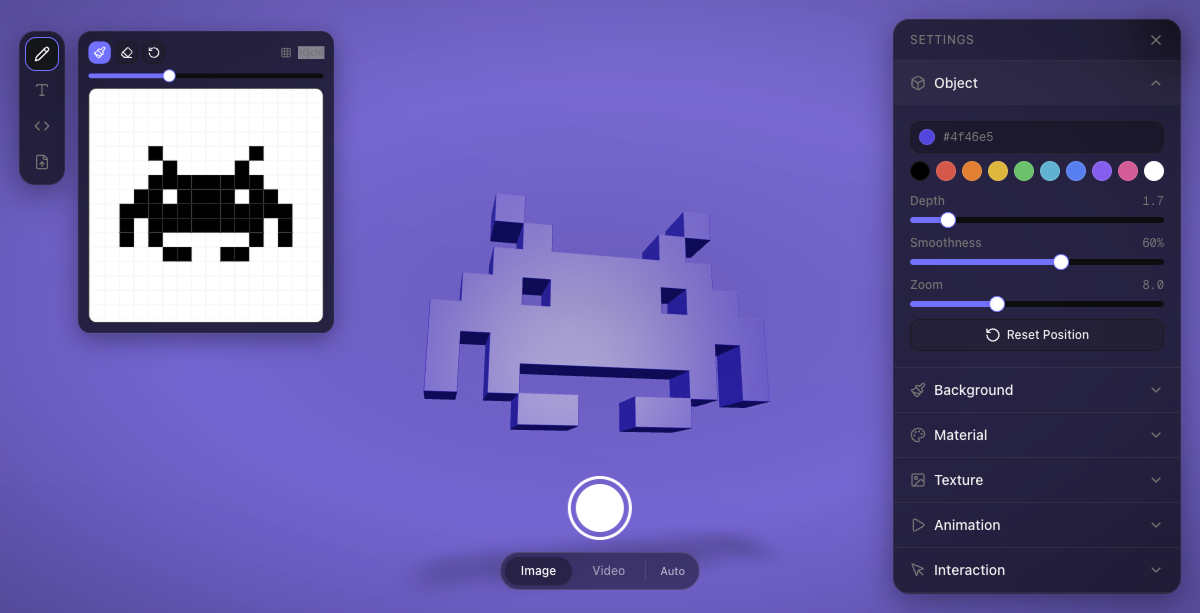
The easiest way to turn SVGs into interactive React 3D components.



Install
npm install 3dsvg
Peer dependencies: react, react-dom, three, @react-three/fiber, @react-three/drei
Quick Start
import { SVG3D } from "3dsvg";
<SVG3D text="Hello" animate="spin" />
<SVG3D svg="/logo.svg" material="gold" animate="float" />
<SVG3D svg='<svg viewBox="0 0 24 24"><path d="M12 2L2 7l10 5 10-5z"/></svg>' />
<SVG3D svg="https://cdn.example.com/icon.svg" material="metal" />
Next.js — wrap with next/dynamic for SSR safety:
const SVG3D = dynamic(
  () => import("3dsvg").then((m) => ({ default: m.SVG3D })),
  { ssr: false }
);
Demo & Editor
Design 3D objects visually and export embed code at 3dsvg.design.
Props
Content
Provide either text or svg. If both are given, svg takes priority.
text | string | — | Text to render in 3D |
font | string | "DM Sans" | Google Font name (see available fonts) |
svg | string | — | SVG markup or URL (/logo.svg, https://..., ./path.svg) |
Shape
depth | number | 1 | Extrusion depth (0.5 = flat, 10 = very deep) |
smoothness | number | 0.2 | Curve and bevel quality, 0–1 |
color | string | "#ffffff" | Base color (hex) |
Material
material | MaterialPreset | "default" | Material preset (see below) |
metalness | number | — | Override preset metalness (0–1) |
roughness | number | — | Override preset roughness (0–1) |
opacity | number | — | Override preset opacity (0–1) |
wireframe | boolean | false | Wireframe rendering mode |
Material presets:
default | 0.15 | 0.35 | Balanced starting point |
plastic | 0.0 | 0.3 | Smooth, non-reflective |
metal | 0.9 | 0.2 | Brushed metal |
glass | 0.1 | 0.05 | Transparent with refraction |
rubber | 0.0 | 0.9 | Matte, soft |
chrome | 1.0 | 0.05 | Mirror-like reflections |
gold | 1.0 | 0.25 | Gold tint applied automatically |
clay | 0.0 | 1.0 | Fully matte |
emissive | 0.0 | 0.5 | Self-illuminated glow |
holographic | 0.8 | 0.1 | Transparent with clearcoat |
Texture
texture | string | — | Image URL to map onto the 3D surface |
textureRepeat | number | 1 | How many times the texture tiles |
textureRotation | number | 0 | Texture rotation in radians |
textureOffset | [number, number] | [0, 0] | UV offset [x, y] |
When a texture is set, the base color is overridden to white so the texture renders at full fidelity.
Lighting
lightPosition | [number, number, number] | [5, 8, 5] | Key light position [x, y, z] |
lightIntensity | number | 1.2 | Key light brightness |
ambientIntensity | number | 0.3 | Ambient fill light |
shadow | boolean | true | Show contact shadows |
Camera
rotationX | number | 0 | Initial X rotation (radians) |
rotationY | number | 0 | Initial Y rotation (radians) |
zoom | number | 8 | Camera distance |
fov | number | 50 | Field of view (degrees) |
The camera automatically adjusts on narrow/portrait viewports — it zooms out proportionally so the 3D object always fits within the visible area.
Interaction
interactive | boolean | true | Master toggle — false disables drag, zoom, and orbit |
cursorOrbit | boolean | true | Object subtly follows the cursor |
orbitStrength | number | 0.15 | How strongly the object follows the cursor (radians) |
draggable | boolean | true | Allow drag to rotate |
scrollZoom | boolean | false | Allow scroll to zoom (off by default so embeds don't hijack page scroll) |
resetOnIdle | boolean | false | Return to default position after inactivity |
resetDelay | number | 2 | Seconds before reset triggers |
Animation
animate | AnimationType | "none" | Loop animation type (see below) |
animateSpeed | number | 1 | Speed multiplier |
animateReverse | boolean | false | Reverse direction |
Animation types: none · spin · float · pulse · wobble · spinFloat · swing
Intro
intro | string | "zoom" | Intro animation: zoom · fade · none |
introDuration | number | 2.5 | Duration in seconds |
introFrom | object | { zoom: 18, opacity: 0 } | Starting state |
introTo | object | { zoom: 8, opacity: 1 } | Ending state |
Layout
width | string | number | "100%" | Container width |
height | string | number | "100%" | Container height |
background | string | "transparent" | Canvas background color |
className | string | — | CSS class on the wrapper div |
Events
onReady | () => void | Fires when WebGL context is ready and first frame is rendered |
onAnimationComplete | () => void | Fires when the intro animation finishes |
onLoadingChange | (loading: boolean, progress: number) => void | Fires during geometry processing with loading state and progress (0-100). Use this to show custom loading UI. |
Geometry processing is asynchronous — complex SVGs are processed in batches to keep the browser responsive. The onLoadingChange callback lets you track progress and show a loading indicator:
<SVG3D
  svgString={complexSvg}
  onLoadingChange={(loading, progress) => {
    if (loading) console.log(`Processing: ${progress}%`);
    else console.log("Done");
  }}
/>
Available Fonts
DM Sans · Bebas Neue · Playfair Display · Righteous · Black Ops One · Permanent Marker · Rubik Mono One · Pacifico · Oswald · Archivo Black
License
MIT — Renato Costa
Made in Blueberry 🫐





