



Security News
/Research
node-ipc npm Package Compromised in Supply Chain Attack
Socket detected malicious node-ipc versions with obfuscated stealer/backdoor behavior in a developing npm supply chain attack.
By Socket Research Team - May 14, 2026
@activewidgets/jquery
Advanced tools



ActiveWidgets is a multi-framework UI component library. This package provides datagrid component for jQuery.
Live demo / Developer guide / API reference
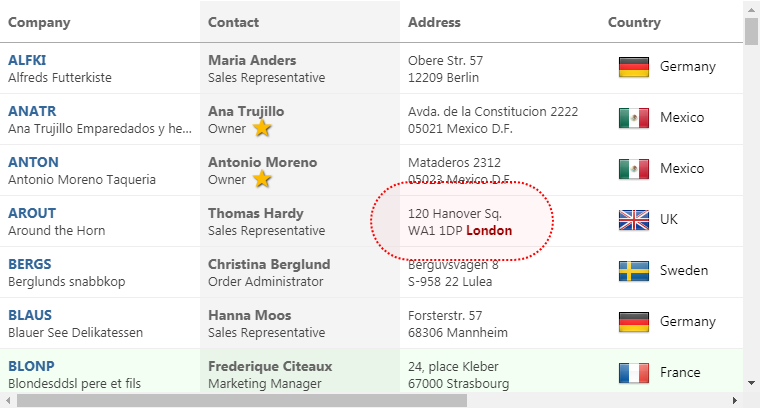
Add @activewidgets/jquery to your project dependencies -
> npm i --save @activewidgets/jquery
Import the library into your app -
import "@activewidgets/jquery";
It will add mount function to jQuery. Now, assuming that you've added a placeholder ax-datagrid tag to the page
<ax-datagrid>Loading...</ax-datagrid>
Assign properties and mount an actual ActiveWidgets component at the placeholder position -
const rows = [
    { message: 'Hello, World!' }
];

$('ax-datagrid')
    .prop('rows', rows)
    .mount();
Live example | Source on github | Edit on stackblitz
For quick prototyping the package is also available over ActiveWidgets CDN -
<script src="https://cdn.activewidgets.com/jquery"></script>
Live example | Source on github | Edit on stackblitz
The mount function does not require any arguments - it uses element tagName as a component ID.
<ax-datagrid id="my-grid-1"> ... </ax-datagrid>
You can apply any selector to find the placeholder element (but the tag must be ax-datagrid)
$('#my-grid-1')
    .prop('rows', rows)
    .mount();
You have to provide columns and rows properties to the datagrid to show some data. The properties of each column object define how the data will be rendered -
The style (string|object) or className properties allow to change the styling of the column and cell elements.
const columns = [
  {header: 'Code', field: 'customerID', width: 80, style: 'background:#def', fixed: true},
  {header: 'Company Name', field: 'companyName', width: 160},
  {header: 'Contact', field: 'contactName', width: 120},
  {header: 'Title', field: 'contactTitle', width: 120},
  {header: 'Address', field: 'address', width: 120, align: 'right'}
];

const rows = northwind.customers;

$('ax-datagrid')
    .prop({ columns, rows })  // use $.prop() to assign properties
    .mount();
Live example | Source on github | Edit on stackblitz
In addition to the standard DOM keyboard and mouse events the datagrid emits composite mouse event which makes it easier to find the elements affected by the user action.
function onMouse({row}){
    alert(`row ${row.key} clicked!`);
}

$('ax-datagrid')
    .prop({ columns, rows })
    .on('mouse', event => onMouse(event.detail))  // pass event.detail to your handler
    .mount();
Live example | Source on github | Edit on stackblitz
When assigning an event handler, note that the event data is passed in the event.detail property (we are using DOM CustomEvent class).
ActiveWidgets custom events do not bubble, so you should always add an event handler at the component itself, not at some parent element.

FAQs
Datagrid component for jQuery
The npm package @activewidgets/jquery receives a total of 35 weekly downloads. As such, @activewidgets/jquery popularity was classified as not popular.
We found that @activewidgets/jquery demonstrated a not healthy version release cadence and project activity because the last version was released a year ago. It has 1 open source maintainer collaborating on the project.
Did you know?

Socket for GitHub automatically highlights issues in each pull request and monitors the health of all your open source dependencies. Discover the contents of your packages and block harmful activity before you install or update your dependencies.
Security News
/Research
Socket detected malicious node-ipc versions with obfuscated stealer/backdoor behavior in a developing npm supply chain attack.

Security News
TeamPCP and BreachForums are promoting a Shai-Hulud supply chain attack contest with a $1,000 prize for the biggest package compromise.

Security News
Packagist urges PHP projects to update Composer after a GitHub token format change exposed some GitHub Actions tokens in CI logs.