


Security News
Crates.io Users Targeted by Phishing Emails
The Rust Security Response WG is warning of phishing emails from rustfoundation.dev targeting crates.io users.
By Sarah Gooding - Sep 12, 2025
@commonshost/short
Advanced tools
Run your own free URL shortener with 🐑 Commons Host.
Deploy to Commons Host for a free, low latency CDN with global coverage. Or run your own server, it's 100% free and open source.
*.commons.host subdomain or your own custom domain name. All for free.Using a tiny command line tool, appending your Commons Host static site configuration with URL redirects, an interstitial HTML page, and a custom HTTP response header rule.
Let's break that down.
short command line tool and stored as redirect rules in a Commons Host configuration file for your site.?url=... query parameter.Refresh header to the HTML page. This redirect the browser to the long URL after a brief delay, giving enough time for the browser to run some client side tracking.You could use an existing Commons Host site but this tutorial shows how to get started from scratch. These instructions are intended for Mac OS or Linux.
Start by creating the following project directory structure, then locally installing the Commons Host CLI and short tools with NPM.
short/                 // Project directory
| CNAME                // File
| commonshost.json     // File
| package.json         // File
\ public/              // Directory
  \ redirect/          // Directory
    \ index.html       // File
The project directory is self contained and does not make any global changes to your system. Create it anywhere you prefer, for example in your home directory (~).
Run these commands from a terminal to create the project directory.
$ mkdir -p short/public/redirect
$ cd short
$ touch CNAME commonshost.json public/redirect/index.html
$ npm init -y
$ npm install -D @commonshost/cli @commonshost/short
Set up your domain name.
Use either a free Commons Host subdomain, or your own registered custom domain name.
*.commons.host subdomainEdit the CNAME file with your free Commons Host subdomain.
$ echo "your-sub-domain.commons.host" >| CNAME
Replace your-sub-domain.commons.host with any subdomain you like. This tutorial uses short.commons.host, so choose a unique name for your own URL shortening service.
No additional DNS configuration is required with a Commons Host subdomain. The DNS setup for all *.commons.host subdomains already has a wildcard CNAME record pointing to commons.host.
Edit the CNAME file with your registered custom domain name.
$ echo "your-name.example" >| CNAME
Replace your-name.example with your actual registered custom domain name.
You must also create a CNAME record pointing from your-name.example to commons.host at your DNS provider's dashboard. That CNAME record will direct users to their nearest Commons Host edge server.
Note: With Cloudflare DNS you may encounter a redirect loop when using Flexible SSL (the default setting). Commons Host enforces full TLS and never serves unencrypted content. To solve this you can either:
Save this JSON boilerplate as: commonshost.json
This contains the necessary custom header rule and a placeholder for the URL redirects.
{
  "hosts": [
    {
      "headers": [
        {
          "uri": "/redirect/{?url,}",
          "fields": {
            "Refresh": "2; {url}"
          }
        }
      ],
      "redirects": []
    }
  ]
}
Save this HTML boilerplate as: public/redirect/index.html
To set up Google Analytics replace GA_TRACKING_ID in the code below with your Google Analytics tracking ID (e.g. UA-12345678-1). See the Google Analytics documentation for details.
Feel free to customise or remove any Commons Host branding. You have full control over your website.
<!DOCTYPE html>
<html>
  <head>
    <script async src="https://www.googletagmanager.com/gtag/js?id=GA_TRACKING_ID"></script>
    <script>
      window.dataLayer = window.dataLayer || []
      function gtag(){dataLayer.push(arguments)}
      gtag('js', new Date())
      gtag('config', 'GA_TRACKING_ID')
    </script>
    <title>Redirecting</title>
    <meta name="viewport" content="width=device-width, initial-scale=1">
    <style>
      body { text-align: center; font-family: sans-serif; }
      a { color: black; }
    </style>
  </head>
  <body>
    <main>
      <h1>Redirecting</h1>
      <p id="location"></p>
    </main>
    <footer>
      Powered by 🐑 <a href="https://commons.host" rel="noopener">Commons Host</a>.
    </footer>
    <script>
      if ('URLSearchParams' in window) {
        const params = new URLSearchParams(location.search)
        if (params.has('url')) {
          const to = document.createElement('a')
          const url = params.get('url')
          to.href = url
          to.textContent = url
          document.querySelector('#location').appendChild(to)
        }
      }
    </script>
  </body>
</html>
Create a Commons Host account via the CLI tool. This saves a token in ~/.commonshost that keeps you authenticated on this machine.
$ npx commonshost signup
Enter an email address, username, and password to create your account.
? Email address: sebdeckers83@gmail.com
? Username: seb
? Password: [hidden]
  ✔ Registering account
  ✔ Creating new authentication token
  ✔ Saving credentials
The short command creates a new redirect rule and prints the resulting short URL.
$ npx short https://en.wikipedia.org/wiki/Longest_words
🔗 https://short.commons.host/1302
The redirects section of your commonshost.json configuration file should now contain something like this:
"redirects": [
  {
    "from": "/1302",
    "to": "/redirect/?url=https%3A%2F%2Fen.wikipedia.org%2Fwiki%2FLongest_words"
  }
]
Tip: Run npx short --help to see more advanced options. For example the --emoji option will generate random emoji for shortened URLs. 🤨
$ npx commonshost deploy
To cancel, press Ctrl+C.

Detected options file: commonshost.json
To override, use: --options "path"

Deploying:

  Directory: 	~/short
  File count:	1
  Total size:	1.84 kB
  URL:		https://short.commons.host
  Options:	~/short/commonshost.json

  ✔ Uploading
Finished! Enjoy your personal URL shortener powered by Commons Host.
To shorten another URL, just repeat the final two commands from within the project directory:
npx short https://some.really.long.url.example/foo/bar.htmlnpx commonshost deploy --confirmCheck the server documentation to learn how to customise your Commons Host site further, like setting up a 404 fallback HTML page.
Thanks to @donavon for the feedback on this tutorial.
shortUsage: short url [name] [options]
... without installing:
$ npx @commonshost/short url [name] [options]
... installed locally to a project:
$ npm install @commonshost/short
$ npx short url [name] [options]
... installed globally on the system:
$ npm install --global @commonshost/short
$ short url [name] [options]
The name is optional. If omitted, a random sequence of decimals, hexadecimals,
or emoji is generated as the shortened URL pathname.
Options:
url
An absolute http: or https: URL. Be careful with query strings containing
ampersants or hash fragments. Your shell may interpret them as operators.
It is safest to wrap the URL in single or double quotes.
name
Custom string sequence for the shortened URL.
Default: undefined
--decimal, -d
Generates a random decimal number sequence.
Default: true
--emoji, -e
Generates a random emoji sequence.
Default: false
--hex, -x
Generates a random hexadecimal sequence.
Default: false
--help, -h
Print this message.
--version, -v
Print current package version.
Examples:
$ short "https://example.com/very/long/url"
Long: https://example.com/very/long/url
Short: https://mysite.example/5981
$ short "https://example.com/very/long/url" --emoji
Long: https://example.com/very/long/url
Short: https://mysite.example/🦄🌈
$ short "https://example.com/very/long/url" --hex
Long: https://example.com/very/long/url
Short: https://mysite.example/8e3b
const { short } = require('@commonshost/short')
const result = await short(options)
options is an Object with properties:
url - The URL to shorten. Required.configuration - Valid Commons Host configuration object. Optional.file - Path to a Commons Host configuration. Optional.cwd - Path to a directory where a Commons Host configuration can be auto-detected. Optional.name - Custom string sequence for the shortened URL. Default: ""emoji - Generates a random emoji sequence. Default: falsehex - Generates a random hexadecimal sequence. Default: falsedecimal - Generates a random decimal number sequence. Default: falseNotes:
configuration, file, or cwd is required.name, emoji, hex, or decimal is required.result is an Object with properties:
configuration - The edited configuration.host - The edited host (within the configuration).redirect - Object with the generated to and from properties (within the host).file - File path of the configuration.Credit goes to netlify-shortener project by Kent C. Dodds and the other smart people on that very clever project.
I love their idea of using redirect rules and extended with the custom header and interstitial Google Analytics page.
I made it for Commons Host, instead of Netlify, because that is another project of mine. I recently implemented support for custom headers and redirect rules so this URL shortener became a nice demo. Even helped me find & fix a few bugs.
All content in this repository is published under the ISC License.
Made with ❤️ by Sebastiaan Deckers for 🐑 Commons Host.
FAQs
URL shortener for Commons Host
We found that @commonshost/short demonstrated a not healthy version release cadence and project activity because the last version was released a year ago. It has 3 open source maintainers collaborating on the project.
Did you know?

Socket for GitHub automatically highlights issues in each pull request and monitors the health of all your open source dependencies. Discover the contents of your packages and block harmful activity before you install or update your dependencies.
Security News
The Rust Security Response WG is warning of phishing emails from rustfoundation.dev targeting crates.io users.
Product
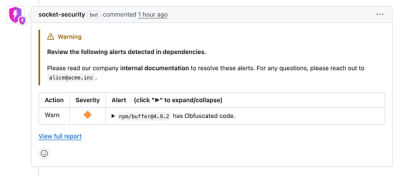
Socket now lets you customize pull request alert headers, helping security teams share clear guidance right in PRs to speed reviews and reduce back-and-forth.
Product
Socket's Rust support is moving to Beta: all users can scan Cargo projects and generate SBOMs, including Cargo.toml-only crates, with Rust-aware supply chain checks.