
AICommit2
A Reactive CLI that generates git commit messages with Ollama, ChatGPT, Gemini, Claude, Mistral and other AI
Introduction
aicommit2 is a reactive CLI tool that automatically generates Git commit messages using various AI models. It supports simultaneous requests to multiple AI providers, allowing users to select the most suitable commit message. The core functionalities and architecture of this project are inspired by AICommits.
Key Features
- Multi-AI Support: Integrates with OpenAI, Anthropic Claude, Google Gemini, Mistral AI, Cohere, Groq, Huggingface, and Ollama for local models.
- Local Model Support: Use local AI models via Ollama.
- Reactive CLI: Enables simultaneous requests to multiple AIs and selection of the best commit message.
- Git Hook Integration: Can be used as a prepare-commit-msg hook.
- Custom Prompts: Supports user-defined prompt templates.
Supported Providers
Remote
Local
Setup
The minimum supported version of Node.js is the v18. Check your Node.js version with node --version.
npm install -g aicommit2
- Retrieve and set API keys or Cookie you intend to use:
It is not necessary to set all keys. But at least one key must be set up.
aicommit2 config set OPENAI_KEY=<your key>
aicommit2 config set ANTHROPIC_KEY=<your key>
aicommit2 config set GEMINI_KEY=<your key>
aicommit2 config set MISTRAL_KEY=<your key>
aicommit2 config set CODESTRAL_KEY=<your key>
aicommit2 config set COHERE_KEY=<your key>
aicommit2 config set GROQ_KEY=<your key>
# Please be cautious of Escape characters(\", \') in browser cookie string
aicommit2 config set HUGGINGFACE_COOKIE="<your browser cookie>"
This will create a .aicommit2 file in your home directory.
You may need to create an account and set up billing.
- Run aicommit2 with your staged files in git repository:
git add <files...>
aicommit2
Using Locally
You can also use your model for free with Ollama and it is available to use both Ollama and remote providers simultaneously.
ollama run llama3 # model you want use. ex) codellama, deepseek-coder
aicommit2 config set OLLAMA_MODEL=<your model>
If you want to use ollama, you must set OLLAMA_MODEL.
- Run aicommit2 with your staged in git repository
git add <files...>
aicommit2
👉 Tip: Ollama can run LLMs in parallel from v0.1.33. Please see this section.
How it works
This CLI tool runs git diff to grab all your latest code changes, sends them to configured AI, then returns the AI generated commit message.
If the diff becomes too large, AI will not function properly. If you encounter an error saying the message is too long or it's not a valid commit message, try reducing the commit unit.
Usage
CLI mode
You can call aicommit2 directly to generate a commit message for your staged changes:
git add <files...>
aicommit2
aicommit2 passes down unknown flags to git commit, so you can pass in commit flags.
For example, you can stage all changes in tracked files with as you commit:
aicommit2 --all
👉 Tip: Use the aic2 alias if aicommit2 is too long for you.
CLI Options
--locale or -l
- Locale to use for the generated commit messages (default: en)
aicommit2 --locale <s>
--generate or -g
- Number of messages to generate (Warning: generating multiple costs more) (default: 1)
- Sometimes the recommended commit message isn't the best so you want it to generate a few to pick from. You can generate multiple commit messages at once by passing in the
--generate <i> flag, where 'i' is the number of generated messages:
aicommit2 --generate <i>
Warning: this uses more tokens, meaning it costs more.
--all or -a
- Automatically stage changes in tracked files for the commit (default: false)
aicommit2 --all
--type or -t
- Automatically stage changes in tracked files for the commit (default: conventional)
- it supports
conventional and gitmoji
aicommit2 --type conventional
aicommit2 --type gitmoji
--confirm or -y
- Skip confirmation when committing after message generation (default: false)
aicommit2 --confirm
--clipboard or -c
- Copy the selected message to the clipboard (default: false)
- This is a useful option when you don't want to commit through aicommit2.
- If you give this option, aicommit2 will not commit.
aicommit2 --clipboard
--promptPath or -p
- Allow users to specify a custom file path for their own prompt template
- Enable users to define and use their own prompts instead of relying solely on the default prompt
- Please see Custom Prompt Template
aicommit2 --promptPath <s>
Git hook
You can also integrate aicommit2 with Git via the prepare-commit-msg hook. This lets you use Git like you normally would, and edit the commit message before committing.
Install
In the Git repository you want to install the hook in:
aicommit2 hook install
Uninstall
In the Git repository you want to uninstall the hook from:
aicommit2 hook uninstall
Usage
- Stage your files and commit:
git add <files...>
git commit
If you ever want to write your own message instead of generating one, you can simply pass one in: git commit -m "My message"
Configuration
Reading a configuration value
To retrieve a configuration option, use the command:
aicommit2 config get <key>
For example, to retrieve the API key, you can use:
aicommit2 config get OPENAI_KEY
You can also retrieve multiple configuration options at once by separating them with spaces:
aicommit2 config get OPENAI_KEY OPENAI_MODEL GEMINI_KEY
Setting a configuration value
To set a configuration option, use the command:
aicommit2 config set <key>=<value>
For example, to set the API key, you can use:
aicommit2 config set OPENAI_KEY=<your-api-key>
You can also set multiple configuration options at once by separating them with spaces, like
aicommit2 config set OPENAI_KEY=<your-api-key> generate=3 locale=en
Options
OPENAI_KEY | N/A | The OpenAI API key |
OPENAI_MODEL | gpt-3.5-turbo | The OpenAI Model to use |
OPENAI_URL | https://api.openai.com | The OpenAI URL |
OPENAI_PATH | /v1/chat/completions | The OpenAI request pathname |
ANTHROPIC_KEY | N/A | The Anthropic API key |
ANTHROPIC_MODEL | claude-3-haiku-20240307 | The Anthropic Model to use |
GEMINI_KEY | N/A | The Gemini API key |
GEMINI_MODEL | gemini-1.5-pro-latest | The Gemini Model |
MISTRAL_KEY | N/A | The Mistral API key |
MISTRAL_MODEL | mistral-tiny | The Mistral Model to use |
CODESTRAL_KEY | N/A | The Codestral API key |
CODESTRAL_MODEL | codestral-latest | The Codestral Model to use |
COHERE_KEY | N/A | The Cohere API Key |
COHERE_MODEL | command | The identifier of the Cohere model |
GROQ_KEY | N/A | The Groq API Key |
GROQ_MODEL | gemma-7b-it | The Groq model name to use |
HUGGINGFACE_COOKIE | N/A | The HuggingFace Cookie string |
HUGGINGFACE_MODEL | mistralai/Mixtral-8x7B-Instruct-v0.1 | The HuggingFace Model to use |
OLLAMA_MODEL | N/A | The Ollama Model. It should be downloaded your local |
OLLAMA_HOST | http://localhost:11434 | The Ollama Host |
OLLAMA_TIMEOUT | 100_000 ms | Request timeout for the Ollama |
locale | en | Locale for the generated commit messages |
generate | 1 | Number of commit messages to generate |
type | conventional | Type of commit message to generate |
proxy | N/A | Set a HTTP/HTTPS proxy to use for requests(only OpenAI) |
timeout | 10_000 ms | Network request timeout |
max-length | 50 | Maximum character length of the generated commit message(Subject) |
max-tokens | 1024 | The maximum number of tokens that the AI models can generate (for Open AI, Anthropic, Gemini, Mistral, Codestral) |
temperature | 0.7 | The temperature (0.0-2.0) is used to control the randomness of the output (for Open AI, Anthropic, Gemini, Mistral, Codestral) |
promptPath | N/A | Allow users to specify a custom file path for their own prompt template |
logging | false | Whether to log AI responses for debugging (true or false) |
ignoreBody | false | Whether the commit message includes body (true or false) |
Currently, options are set universally. However, there are plans to develop the ability to set individual options in the future.
Available Options by Model
| OpenAI | ✓ | ✓ | ✓ | ✓ | ✓ | ✓ | ✓ | ✓ | ✓ |
| Anthropic Claude | ✓ | ✓ | ✓ | | | ✓ | ✓ | ✓ | ✓ |
| Gemini | ✓ | ✓ | ✓ | | | ✓ | ✓ | ✓ | ✓ |
| Mistral AI | ✓ | ✓ | ✓ | | ✓ | ✓ | ✓ | ✓ | ✓ |
| Codestral | ✓ | ✓ | ✓ | | ✓ | ✓ | ✓ | ✓ | ✓ |
| Cohere | ✓ | ✓ | ✓ | | | ✓ | ✓ | ✓ | ✓ |
| Groq | ✓ | ✓ | ✓ | | ✓ | ✓ | | | ✓ |
| Huggingface | ✓ | ✓ | ✓ | | | ✓ | | | ✓ |
| Ollama | ✓ | ✓ | ✓ | | ⚠
(OLLAMA_TIMEOUT) | ✓ | | ✓ | ✓ |
Common Options
locale
Default: en
The locale to use for the generated commit messages. Consult the list of codes in: https://wikipedia.org/wiki/List_of_ISO_639_language_codes.
generate
Default: 1
The number of commit messages to generate to pick from.
Note, this will use more tokens as it generates more results.
proxy
Set a HTTP/HTTPS proxy to use for requests.
To clear the proxy option, you can use the command (note the empty value after the equals sign):
Only supported within the OpenAI
aicommit2 config set proxy=
timeout
The timeout for network requests to the OpenAI API in milliseconds.
Default: 10_000 (10 seconds)
aicommit2 config set timeout=20000
max-length
The maximum character length of the generated commit message.
Default: 50
aicommit2 config set max-length=100
type
Default: conventional
Supported: conventional, gitmoji
The type of commit message to generate. Set this to "conventional" to generate commit messages that follow the Conventional Commits specification:
aicommit2 config set type=conventional
You can clear this option by setting it to an empty string:
aicommit2 config set type=
max-tokens
The maximum number of tokens that the AI models can generate.
Default: 1024
aicommit2 config set max-tokens=3000
temperature
The temperature (0.0-2.0) is used to control the randomness of the output
Default: 0.7
aicommit2 config set temperature=0
promptPath
- Allow users to specify a custom file path for their own prompt template
- Enable users to define and use their own prompts instead of relying solely on the default prompt
- Please see Custom Prompt Template
aicommit2 config set promptPath="/path/to/user/prompt.txt"
logging
Default: false
Option that allows users to decide whether to generate a log file capturing the responses.
The log files will be stored in the ~/.aicommit2_log directory(user's home).
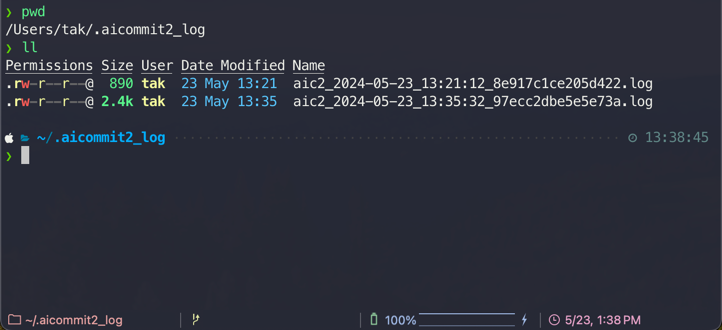
aicommit2 config set logging="true"
- You can remove all logs below comamnd.
aicommit2 log removeAll
ignoreBody
Default: false
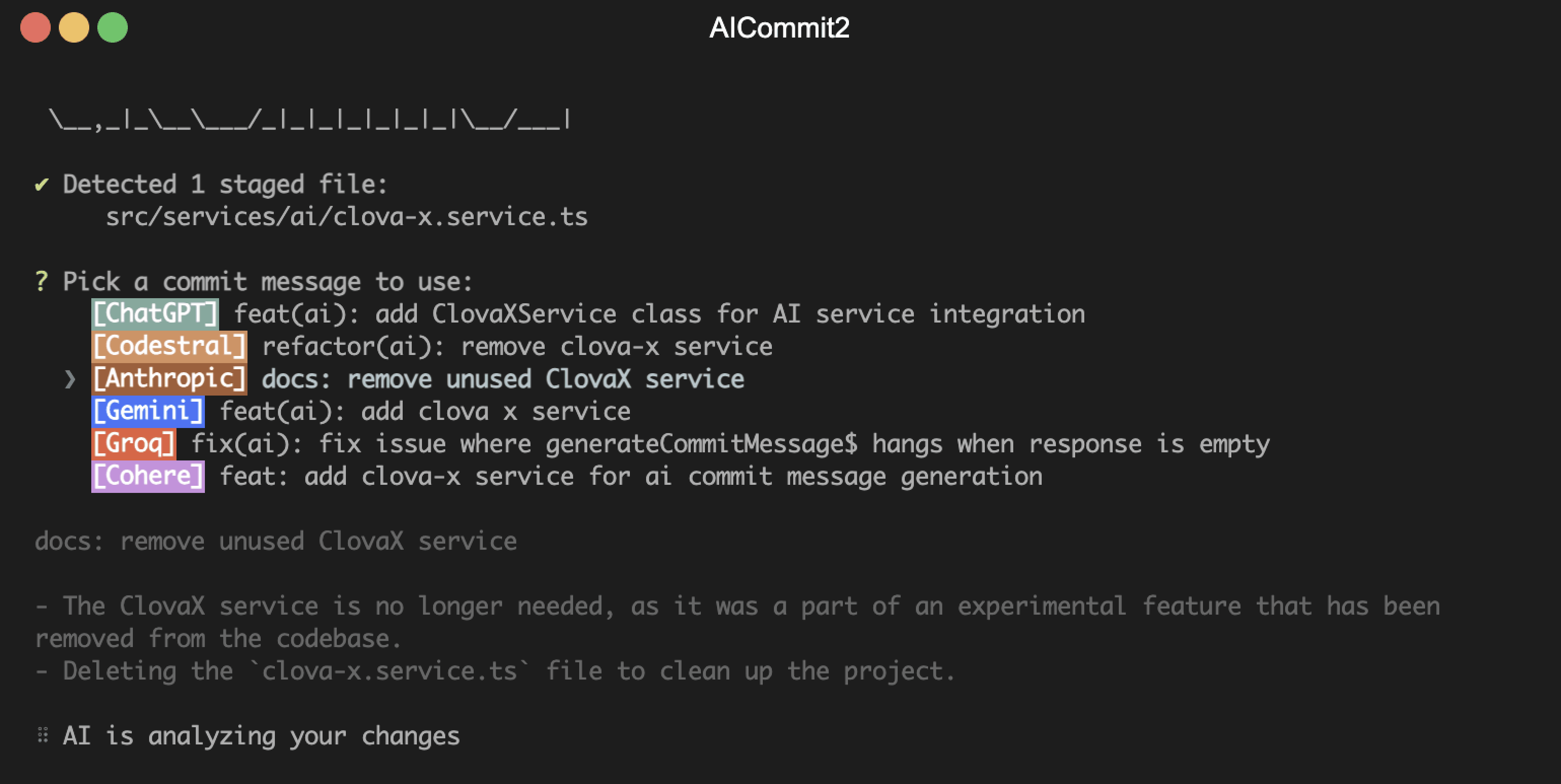
This option determines whether the commit message includes body. If you don't want to include body in message, you can set it to true.
aicommit2 config set ignoreBody="true"
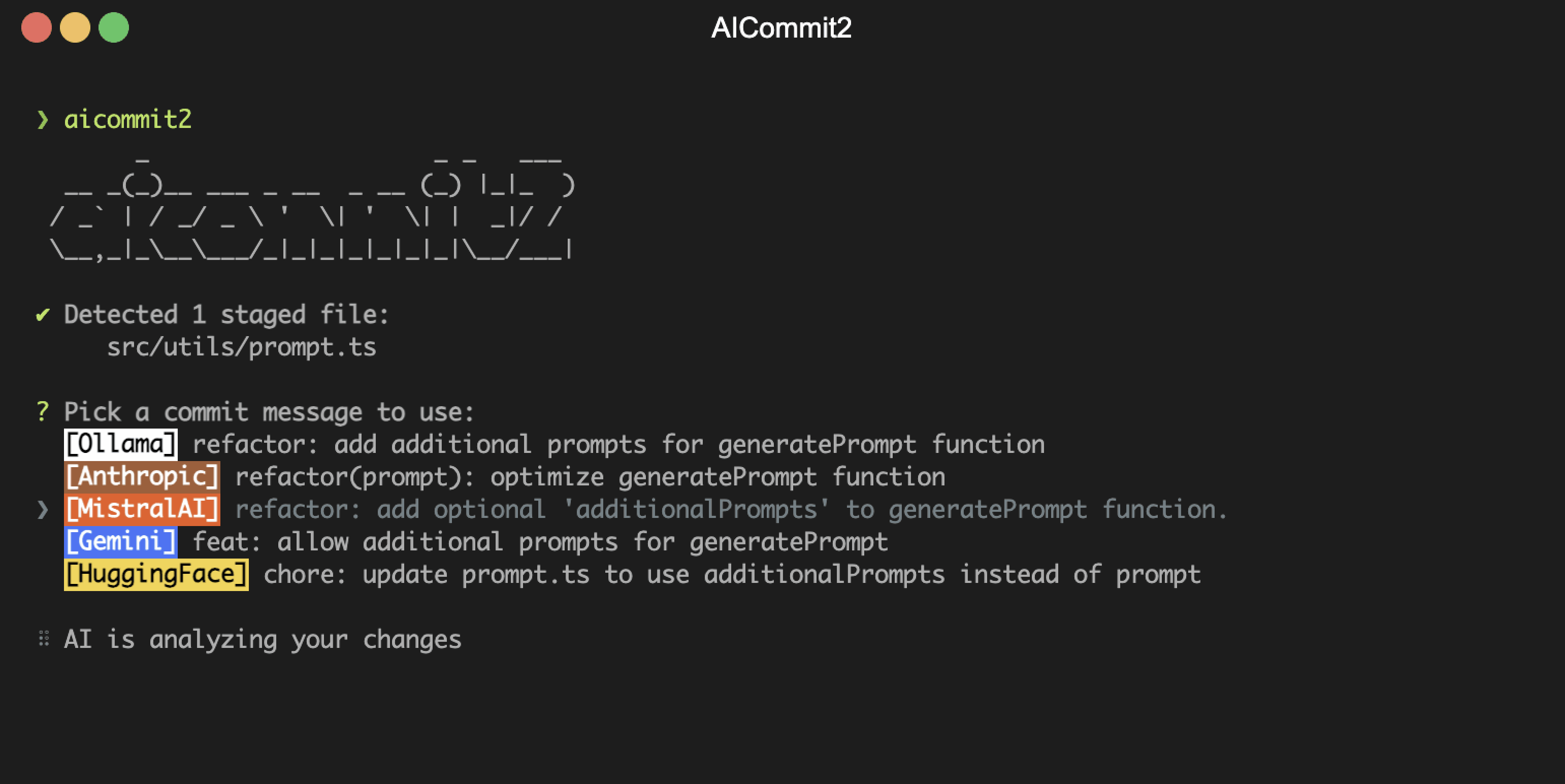
aicommit2 config set ignoreBody="false"
Ollama
OLLAMA_MODEL
The Ollama Model. Please see a list of models available
aicommit2 config set OLLAMA_MODEL="llama3"
aicommit2 config set OLLAMA_MODEL="llama3,codellama"
OLLAMA_HOST
Default: http://localhost:11434
The Ollama host
aicommit2 config set OLLAMA_HOST=<host>
OLLAMA_TIMEOUT
Default: 100_000 (100 seconds)
Request timeout for the Ollama. Default OLLAMA_TIMEOUT is 100 seconds because it can take a long time to run locally.
aicommit2 config set OLLAMA_TIMEOUT=<timout>
OPEN AI
OPENAI_KEY
The OpenAI API key. You can retrieve it from OpenAI API Keys page.
OPENAI_MODEL
Default: gpt-3.5-turbo
The Chat Completions (/v1/chat/completions) model to use. Consult the list of models available in the OpenAI Documentation.
Tip: If you have access, try upgrading to gpt-4 for next-level code analysis. It can handle double the input size, but comes at a higher cost. Check out OpenAI's website to learn more.
aicommit2 config set OPENAI_MODEL=gpt-4
OPENAI_URL
Default: https://api.openai.com
The OpenAI URL. Both https and http protocols supported. It allows to run local OpenAI-compatible server.
OPENAI_PATH
Default: /v1/chat/completions
The OpenAI Path.
Anthropic Claude
ANTHROPIC_KEY
The Anthropic API key. To get started with Anthropic Claude, request access to their API at anthropic.com/earlyaccess.
ANTHROPIC_MODEL
Default: claude-3-haiku-20240307
Supported:
claude-3-haiku-20240307claude-3-sonnet-20240229claude-3-opus-20240229claude-2.1claude-2.0claude-instant-1.2
aicommit2 config set ANTHROPIC_MODEL=claude-instant-1.2
GEMINI
GEMINI_KEY
The Gemini API key. If you don't have one, create a key in Google AI Studio.
GEMINI_MODEL
Default: gemini-1.5-pro-latest
Supported:
gemini-1.5-pro-latestgemini-1.5-flash-latest
The models mentioned above are subject to change.
MISTRAL
MISTRAL_KEY
The Mistral API key. If you don't have one, please sign up and subscribe in Mistral Console.
MISTRAL_MODEL
Default: mistral-tiny
Supported:
open-mistral-7bmistral-tiny-2312mistral-tinyopen-mixtral-8x7bmistral-small-2312mistral-smallmistral-small-2402mistral-small-latestmistral-medium-latestmistral-medium-2312mistral-mediummistral-large-latestmistral-large-2402mistral-embed
The models mentioned above are subject to change.
CODESTRAL
CODESTRAL_KEY
The Codestral API key. If you don't have one, please sign up and subscribe in Mistral Console.
CODESTRAL_MODEL
Default: codestral-latest
Supported:
codestral-latestcodestral-2405
The models mentioned above are subject to change.
Cohere
COHERE_KEY
The Cohere API key. If you don't have one, please sign up and get the API key in Cohere Dashboard.
COHERE_MODEL
Default: command
Supported:
commandcommand-nightlycommand-lightcommand-light-nightly
The models mentioned above are subject to change.
Groq
GROQ_KEY
The Groq API key. If you don't have one, please sign up and get the API key in Groq Console.
GROQ_MODEL
Default: gemma-7b-it
Supported:
llama3-8b-8192- 'llama3-70b-8192'
mixtral-8x7b-32768gemma-7b-it
The models mentioned above are subject to change.
HuggingFace Chat
HUGGINGFACE_COOKIE
The Huggingface Chat Cookie. Please check how to get cookie
HUGGINGFACE_MODEL
Default: CohereForAI/c4ai-command-r-plus
Supported:
CohereForAI/c4ai-command-r-plusmeta-llama/Meta-Llama-3-70B-InstructHuggingFaceH4/zephyr-orpo-141b-A35b-v0.1mistralai/Mixtral-8x7B-Instruct-v0.1NousResearch/Nous-Hermes-2-Mixtral-8x7B-DPO01-ai/Yi-1.5-34B-Chatmistralai/Mistral-7B-Instruct-v0.2microsoft/Phi-3-mini-4k-instruct
The models mentioned above are subject to change.
Upgrading
Check the installed version with:
aicommit2 --version
If it's not the latest version, run:
npm update -g aicommit2
Custom Prompt Template
aicommit2 supports custom prompt templates through the promptPath option. This feature allows you to define your own prompt structure, giving you more control over the commit message generation process.
Using the promptPath Option
To use a custom prompt template, specify the path to your template file when running the tool:
aicommit2 config set promptPath="/path/to/user/prompt.txt"
Template Format
Your custom template can include placeholders for various commit options.
Use curly braces {} to denote these placeholders for options. The following placeholders are supported:
- {locale}: The language for the commit message (string)
- {maxLength}: The maximum length for the commit message (number)
- {type}: The type of the commit (conventional or gitmoji)
- {generate}: The number of commit messages to generate (number)
Example Template
Here's an example of how your custom template might look:
Generate a {type} commit message in {locale}.
The message should not exceed {maxLength} characters.
Please provide {generate} messages.

Remember to follow these guidelines:
1. Use the imperative mood
2. Be concise and clear
3. Explain the 'why' behind the change
Appended Text
Please note that the following text will always be appended to the end of your custom prompt:
Provide your response as a JSON array where each element is an object with "subject", "body", and "footer" keys.
The "subject" should include the type, optional scope, and description . If there's no body or footer, use an empty string for those fields.
Example response format:
[
  {
    "subject": "string",
    "body": "string",
    "footer": "string"
  },
]
This ensures that the output is consistently formatted as a JSON array, regardless of the custom template used.
Notes
If the specified file cannot be read or parsed, aicommit2 will fall back to using the default prompt generation logic.
Ensure your template includes all necessary instructions for generating appropriate commit messages.
You can still use all other command-line options in conjunction with promptPath.
By using custom templates, you can tailor the commit message generation to your team's specific needs or coding standards.
NOTE: For the promptPath option, set the template path, not the template content
Loading Multiple Ollama Models

You can load and make simultaneous requests to multiple models using Ollama's experimental feature, the OLLAMA_MAX_LOADED_MODELS option.
OLLAMA_MAX_LOADED_MODELS: Load multiple models simultaneously
Setup Guide
Follow these steps to set up and utilize multiple models simultaneously:
1. Running Ollama Server
First, launch the Ollama server with the OLLAMA_MAX_LOADED_MODELS environment variable set. This variable specifies the maximum number of models to be loaded simultaneously.
For example, to load up to 3 models, use the following command:
OLLAMA_MAX_LOADED_MODELS=3 ollama serve
Refer to configuration for detailed instructions.
2. Configuring aicommit2
Next, set up aicommit2 to specify multiple models. You can assign a list of models, separated by commas(,), to the OLLAMA_MODEL environment variable. Here's how you do it:
aicommit2 config set OLLAMA_MODEL="mistral,dolphin-llama3"
With this command, aicommit2 is instructed to utilize both the "mistral" and "dolphin-llama3" models when making requests to the Ollama server.
3. Run aicommit2
aicommit2
Note that this feature is available starting from Ollama version 0.1.33 and aicommit2 version 1.9.5.
How to get Cookie(Unofficial API)
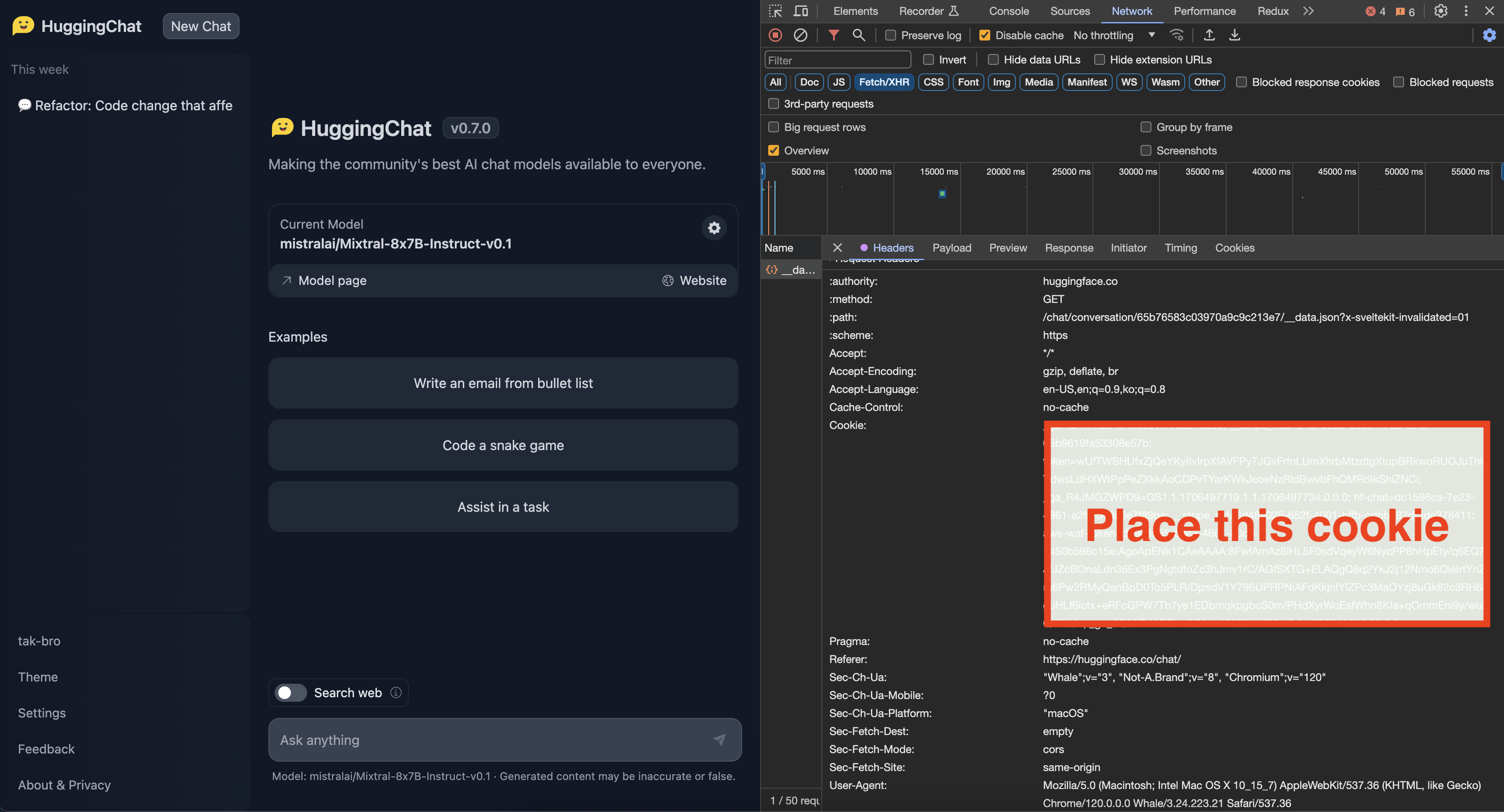
- Login to the site you want
- You can get cookie from the browser's developer tools network tab
- See for any requests check out the Cookie, Copy whole value
- Check below image for the format of cookie
When setting cookies with long string values, ensure to escape characters like ", ', and others properly.
- For double quotes ("), use \"
- For single quotes ('), use \'
Disclaimer
This project utilizes certain functionalities or data from external APIs, but it is important to note that it is not officially affiliated with or endorsed by the providers of those APIs. The use of external APIs is at the sole discretion and risk of the user.
Risk Acknowledgment
Users are responsible for understanding and abiding by the terms of use, rate limits, and policies set forth by the respective API providers. The project maintainers cannot be held responsible for any misuse, downtime, or issues arising from the use of the external APIs.
It is recommended that users thoroughly review the API documentation and adhere to best practices to ensure a positive and compliant experience.
Please Star ⭐️
If this project has been helpful to you, I would greatly appreciate it if you could click the Star⭐️ button on this repository!
Maintainers
Contributing
If you want to help fix a bug or implement a feature in Issues, checkout the Contribution Guide to learn how to setup and test the project.
Contributors ✨
Thanks goes to these wonderful people (emoji key):






