@futurejj/react-native-visibility-sensor
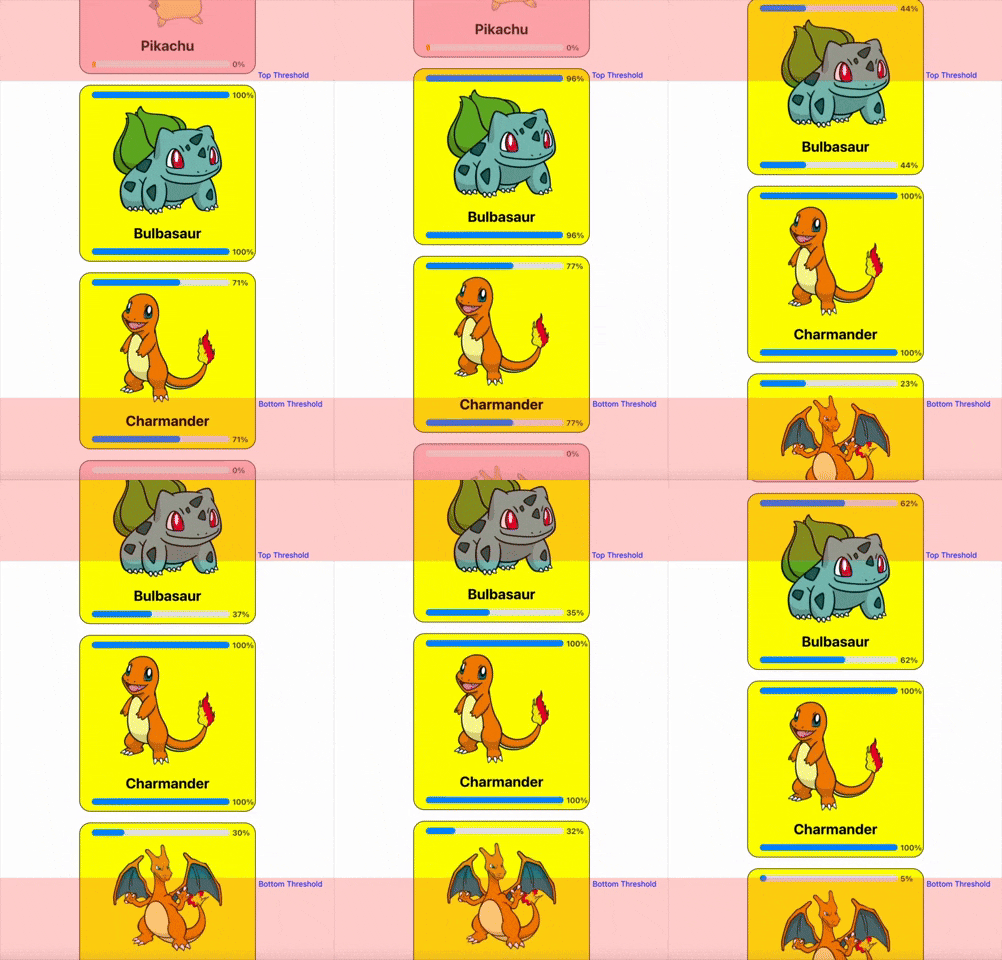
🔍 Component visibility sensor wrapper to sense whether or not a component is in viewport with configurable inset thresholds & percent visibility callback.






Use Cases
- Lazy Loading: Load images/content only when visible to optimize performance in feeds, galleries, charts or webviews.
- Scroll Animations: Trigger animations (e.g., fade-ins, slides) for components entering the viewport.
- Analytics Tracking: Log impressions for ads/banners when visible for a set duration or percentage.
- Dynamic UI & Optimization: Pause/resume videos, cleanup out of screen components or timers based on component visibility in feeds or carousels.
Installation
Using yarn
yarn add @futurejj/react-native-visibility-sensor
using npm:
npm install @futurejj/react-native-visibility-sensor
Usage
import React, { useState } from 'react';
import { ScrollView, Text } from 'react-native';
import { VisibilitySensor } from '@futurejj/react-native-visibility-sensor';

export default function VisibilitySensorExample() {
  const [isVisible, setIsVisible] = useState(false);
  const [percentVisible, setPercentVisible] = useState<number>(0);

  return (
    <ScrollView>
      <VisibilitySensor
        onChange={setIsVisible}
        onPercentChange={setPercentVisible} // optional callback for % change
        threshold={{ top: 100, bottom: 100 }}
        style={[styles.item, { backgroundColor: isVisible ? 'green' : 'red' }]}>

        {/* Visibility state */}
        <Text>This View is currently visible? {isVisible ? 'yes' : 'no'}</Text>

        {/* Percent visibility state */}
        <Text>{`Percent visible: ${percentVisible}%`}</Text>
      </VisibilitySensor>
    </ScrollView>
  );
}
Properties
VisibilitySensorProps extends ViewProps from React Native, which includes common properties for all views, such as style, onLayout, etc.
onChange | (visible: boolean) => void | Yes | Callback function that fires when visibility changes. |
onPercentChange | (percentVisible: number) => void | No | Callback function that fires when visibility % changes. |
disabled | boolean | No | If true, disables the sensor. |
triggerOnce | boolean | No | If true, the sensor will only trigger once. |
delay | number or undefined | No | The delay in milliseconds before the sensor triggers. |
threshold | VisibilitySensorThreshold | No | Defines the part of the view that must be visible for the sensor to trigger. |
Additionally, all properties from ViewProps are also applicable.
VisibilitySensorThreshold
top | number | No | The top threshold value for visibility. |
bottom | number | No | The bottom threshold value for visibility. |
left | number | No | The left threshold value for visibility. |
right | number | No | The right threshold value for visibility. |
Notes
Contributing
See the contributing guide to learn how to contribute to the repository and the development workflow.
License
MIT
Support the project


❤️ Thanks to