title: inlang CLI - Localization Automation for CI/CD
description: Automate translation workflows with machine translation, validation, and CI/CD integration. Supports JSON, i18next, next-intl, and more.
og:image: https://cdn.jsdelivr.net/gh/opral/inlang@latest/packages/cli/assets/cli-banner.svg
@inlang/cli
Automate localization tasks in your CI/CD pipeline.
npx @inlang/cli [command]
Features
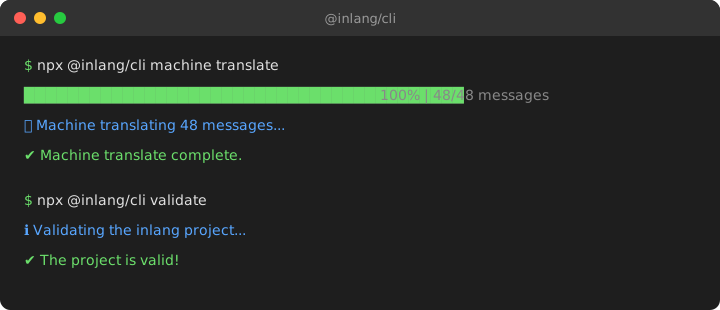
- Machine Translation — Translate missing messages automatically via Google Cloud Translation or the free inlang translation service
- Validation — Verify your project config is correct before committing
- CI/CD Ready — Run non-interactively with
--force for pipelines
- Plugin System — Supports JSON, i18next, next-intl, ICU message format, and more
Getting Started
The CLI requires an inlang project — a folder containing a settings.json that defines your locales and translation file paths.
my-app/
├── project.inlang/
│   └── settings.json      # CLI reads this config
├── messages/
│   ├── en.json            # Source language
│   └── de.json            # Translations
└── src/
Setup in 2 minutes
1. Create the project folder and settings file
mkdir project.inlang
Create project.inlang/settings.json:
{
  "$schema": "https://inlang.com/schema/project-settings",
  "baseLocale": "en",
  "locales": ["en", "de", "fr"],
  "modules": [
    "https://cdn.jsdelivr.net/npm/@inlang/plugin-json@latest/dist/index.js"
  ],
  "plugin.inlang.json": {
    "pathPattern": "./messages/{locale}.json"
  }
}
2. Create your base translation file
Create messages/en.json:
{
  "greeting": "Hello {name}!",
  "welcome": "Welcome to our app"
}
3. Machine translate to other languages
npx @inlang/cli machine translate --project ./project.inlang
This creates messages/de.json and messages/fr.json with translations.
4. Validate your setup
npx @inlang/cli validate --project ./project.inlang
Installation
Install with package manager
You can install the @inlang/cli with this command:
npm install -D @inlang/cli
or
yarn add --dev @inlang/cli
best
npx @inlang/cli [command]
Minimum requirements
Minimum node version: v18.0.0
If one of the commands can't be found, you probably use an outdated CLI version. You can always get the latest version by running npx @inlang/cli@latest [command].
Commands
| CLI Version | npx @inlang/cli@latest [command] | Get the latest version of the inlang CLI. |
| Validate | npx @inlang/cli validate [options] | Validate if the project is working correctly. |
| Machine | npx @inlang/cli machine translate [options] | Automate translation processes. Options include -f, --force, --project <path>, --locale <source> and --targetLocales <targets...> |
| Plugin | npx @inlang/cli plugin [command] | Interact with Inlang plugins, including initialization and building. build [options] build an inlang module. Options include --type, --entry, and --outdir. |
Usage
We recommend using the CLI with npx to avoid installing the CLI globally. Not installing the CLI globally has the following advantages:
- the installed CLI version is scoped to the project, ensuring it always works.
- the CLI gets installed for team members, avoiding "why is this command not working for me" questions.
npx is auto-installed with Node and NPM.
If one of the commands can't be found, you probably use an outdated CLI version. You can always get the latest version by running npx @inlang/cli@latest [command].
CLI for inlang.

Options:
  -V, --version         Output the version number
  -h, --help            Display help for command

Commands:
  project [command]  Commands for managing your inlang project
  lint [options]     Commands for linting translations.
  machine [command]  Commands for automating translations.
  open [command]     Commands for open parts of the inlang ecosystem.
  module [command]   Commands for build inlang modules.
  help [command]     Display help for command
The following commands are available with the inlang CLI:
machine
The machine command is used to automate localization processes.
machine translate
The translate command machine translates all resources.
By default, the CLI uses inlang's free translation service. For higher reliability and control, you can bring your own Google Translate API key.
To initiate machine translation, run the following command:
npx @inlang/cli machine translate
Options
The translate command has the following options:
-f, --force: If this option is set, the command will not prompt confirmation. This is useful for CI/CD build pipelines. We advise you to only use machine translate in build pipelines to avoid out-of-context/wrong translations.--project <path>: Specifies the path to the project root. The default project root is the current working directory.--locale <source>: Specifies the base locale.--targetLocales <targets...>: Specifies the target locales as comma seperated list (e.g. sk,zh,pt-BR).
The translations are performed using machine translation services. The translated messages are added to the respective language resources. Finally, the updated resources are written back to the file system.
validate
Validates a project.
npx @inlang/cli validate --project ./path/to/{project-name}.inlang
Options
The validate command has the following options:
--project <path>: Specifies the path to the project root. The default project root is the current working directory.
This will launch an interactive prompt that will guide you through the process of migrating the inlang configuration file.
plugin
The plugin command is used to interact with the Inlang module. It allows to initialize a new module or run the modules build commands.
plugin build
If you are developing an inlang module, the plugin build command builds your Inlang module for development & in production.
To build a plugin, run the following command:
npx @inlang/cli plugin build --entry ./path/to/index.ts --outdir ./path/to/dist
Options
--entry <entry>: Specifies the path to the module's entry point, typically src/index.js or src/index.ts.
--outdir <path>: Specifies the output directory for the build files. The default output directory is "./dist."
--watch: An optional flag that, when provided, enables a watch mode to monitor for changes and automatically rebuild the module when changes are detected.
See how there is also a --watch flag, which enables a watch mode to monitor for changes and automatically rebuild the module when changes are detected. This command runs with esbuild under the hood. -->
Troubleshoot
If something isn't working as expected or you are getting errors, make sure to run on the latest version of the CLI.
You can always get the latest version by executing npx @inlang/cli@latest.
If the error persists, please create an issue – we're happy to help.





