Storybook Controls Addon
Storybook Controls gives you a graphical UI to interact with a component's arguments dynamically, without needing to code. It creates an addon panel next to your component examples ("stories"), so you can edit them live.
Framework Support
Installation
Controls is part of essentials and so is installed in all new Storybooks by default. If you need to add it to your Storybook, you can run:
npm i -D @storybook/addon-controls
Then, add following content to .storybook/main.js:
export default {
  addons: ['@storybook/addon-controls'],
};
Usage
The usage is documented in the documentation.
FAQs
How will this replace addon-knobs?
Addon-knobs is one of Storybook's most popular addons with over 1M weekly downloads, so we know lots of users will be affected by this change. Knobs is also a mature addon, with various options that are not available in addon-controls.
Therefore, rather than deprecating addon-knobs immediately, we will continue to release knobs with the Storybook core distribution until 7.0. This will give us time to improve Controls based on user feedback, and also give knobs users ample time to migrate.
If you are somehow tied to knobs or prefer the knobs interface, we are happy to take on maintainers for the knobs project. If this interests you, hop on our Discord.
How do I migrate from addon-knobs?
If you're already using Storybook Knobs you should consider migrating to Controls.
You're probably using it for something that can be satisfied by one of the cases described above.
Let's walk through two examples: migrating knobs to auto-generated args and knobs to custom args.
Knobs to auto-generated args
First, let's consider a knobs version of a basic story that fills in the props for a component:
import { text } from '@storybook/addon-knobs';
import { Button } from './Button';

export const Basic = () => <Button label={text('Label', 'hello')} />;
This fills in the Button's label based on a knob, which is exactly the auto-generated use case above. So we can rewrite it using auto-generated args:
export const Basic = (args) => <Button {...args} />;
Basic.args = { label: 'hello' };
Knobs to manually-configured args
Similarly, we can also consider a story that uses knob inputs to change its behavior:
import { number, text } from '@storybook/addon-knobs';

export const Reflow = () => {
  const count = number('Count', 10, { min: 0, max: 100, range: true });
  const label = text('Label', 'reflow');
  return (
    <>
      {[...Array(count)].map((_, i) => (
        <Button key={i} label={`button ${i}`} />
      ))}
    </>
  );
};
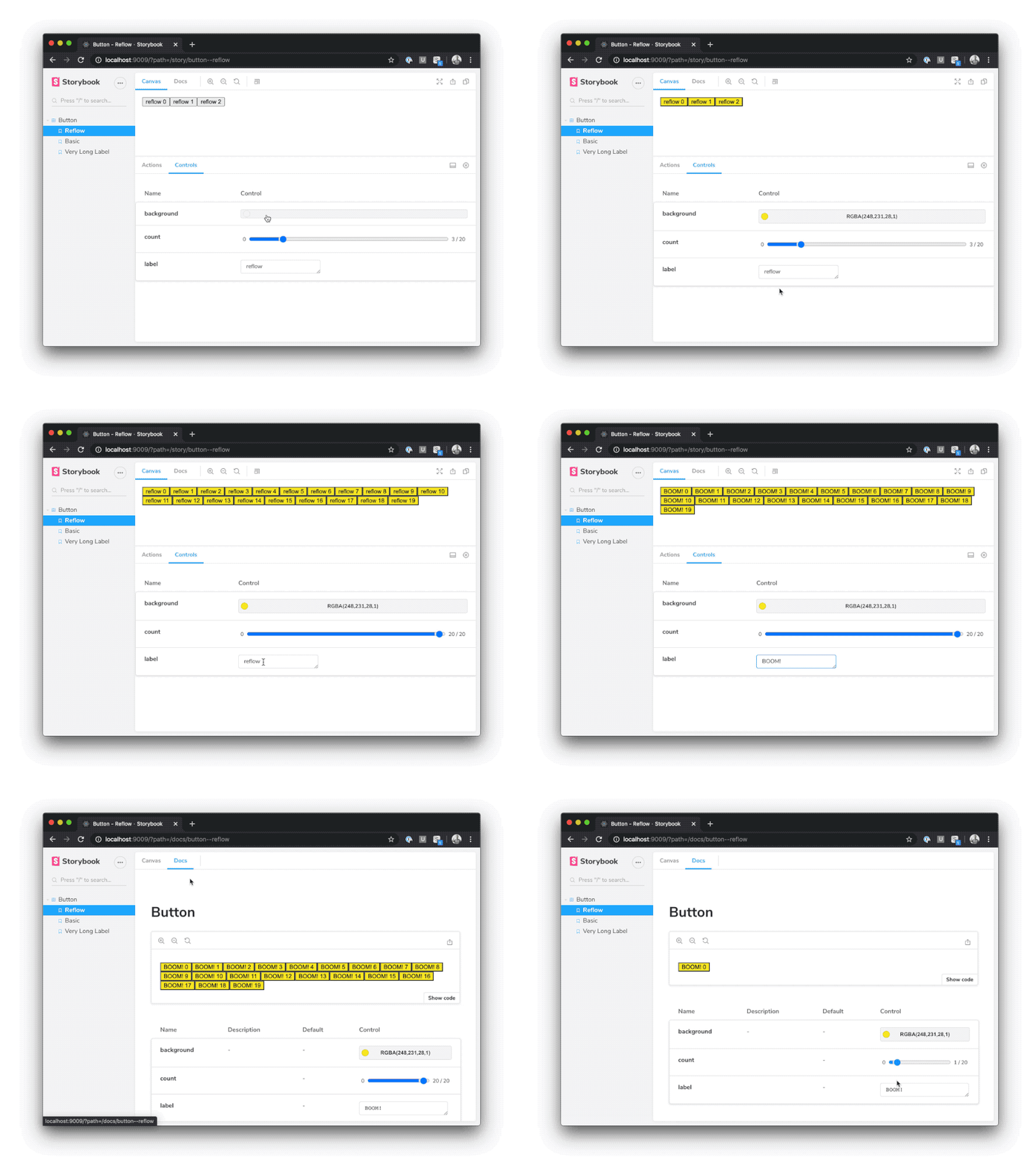
And again, as above, this can be rewritten using fully custom args:
export const Reflow = ({ count, label, ...args }) => (
  <>
    {[...Array(count)].map((_, i) => (
      <Button key={i} label={`${label} ${i}`} {...args} />
    ))}
  </>
);

Reflow.args = {
  count: 3,
  label: 'reflow',
};

Reflow.argTypes = {
  count: {
    control: {
      type: 'range',
      min: 0,
      max: 20,
    },
  },
};
My controls aren't being auto-generated. What should I do?
There are a few known cases where controls can't be auto-generated:
- You're using a framework for which automatic generation isn't supported
- You're trying to generate controls for a component defined in an external library
With a little manual work you can still use controls in such cases. Consider the following example:
import { Button } from 'some-external-library';

export default {
  title: 'Button',
  argTypes: {
    label: { control: 'text' },
    borderWidth: { control: { type: 'number', min: 0, max: 10 } },
  },
};

export const Basic = (args) => <Button {...args} />;

Basic.args = {
  label: 'hello',
  borderWidth: 1,
};
The argTypes annotation (which can also be applied to individual stories if needed), gives Storybook the hints it needs to generate controls in these unsupported cases. See control annotations for a full list of control types.
It's also possible that your Storybook is misconfigured. If you think this might be the case, please search through Storybook's Github issues, and file a new issue if you don't find one that matches your use case.
How can I disable controls for certain fields on a particular story?
The argTypes annotation can be used to hide controls for a particular row, or even hide rows.
Suppose you have a Button component with borderWidth and label properties (auto-generated or otherwise) and you want to hide the borderWidth row completely and disable controls for the label row on a specific story. Here's how you'd do that:
import { Button } from 'button';

export default {
  title: 'Button',
  component: Button,
};

export const CustomControls = (args) => <Button {...args} />;
CustomControls.argTypes = {
  borderWidth: { table: { disable: true } },
  label: { control: { disable: true } },
};
Like story parameters, args and argTypes annotations are hierarchically merged, so story-level annotations overwrite component-level annotations.
How do controls work with MDX?
MDX compiles to component story format (CSF) under the hood, so there's a direct mapping for every example above using the args and argTypes props.
Consider this example in CSF:
import { Button } from './Button';
export default {
  title: 'Button',
  component: Button,
  argTypes: {
    background: { control: 'color' },
  },
};

const Template = (args) => <Button {...args} />;
export const Basic = Template.bind({});
Basic.args = { label: 'hello', background: '#ff0' };
Here's the MDX equivalent:
import { Meta, Story } from '@storybook/addon-docs';
import { Button } from './Button';

<Meta title="Button" component={Button} argTypes={{ background: { control: 'color' } }} />

export const Template = (args) => <Button {...args} />

<Story name="Basic" args={{ label: 'hello', background: '#ff0' }}>
  {Template.bind({})}
</Story>
For more info, see a full Controls example in MDX for Vue.





