Introduction
The all-in-one logiccloud control package for Node-RED environment:

logiccloud control configuration
This node is used to connect to the logiccloud control.
The communication with the logiccloud control is always done via logiccloud Node-RED connector.
The logiccloud Node-RED connector is the one responsible with the data handling between the logiccloud control input / logiccloud control output nodes and the logiccloud control.
The logiccloud Node-RED connector is only allowing access to the logiccloud control access variables defined in its mappings.
This means that the logiccloud Node-RED nodes only have access to a subset of all logiccloud control access variables, so only to the ones defined in the mappings.
If the mappings of logiccloud Node-RED connector are updated, the Node-RED flow has to be restarted in order for the changes to take effect also on logiccloud Node-RED nodes.
The logiccloud control configuration node provides the following properties:
- name: the name of the node; if it is not set, the node will have the default name "logiccloud-control-on:[host]:[port]"
- host: the hostname or IP address of the logiccloud Node-RED connector
- port: the port of the logiccloud Node-RED connector
The logiccloud control configuration node provides browsing support that can be used to discover the available input/output access variables in the logiccloud control (of course, as described before, the ones defined in the mappings by the logiccloud Node-RED connector).
In order to use this feature, the logiccloud control configuration node has to be properly configured (valid host and port of an existing running logiccloud control) and deployed.
logiccloud control input
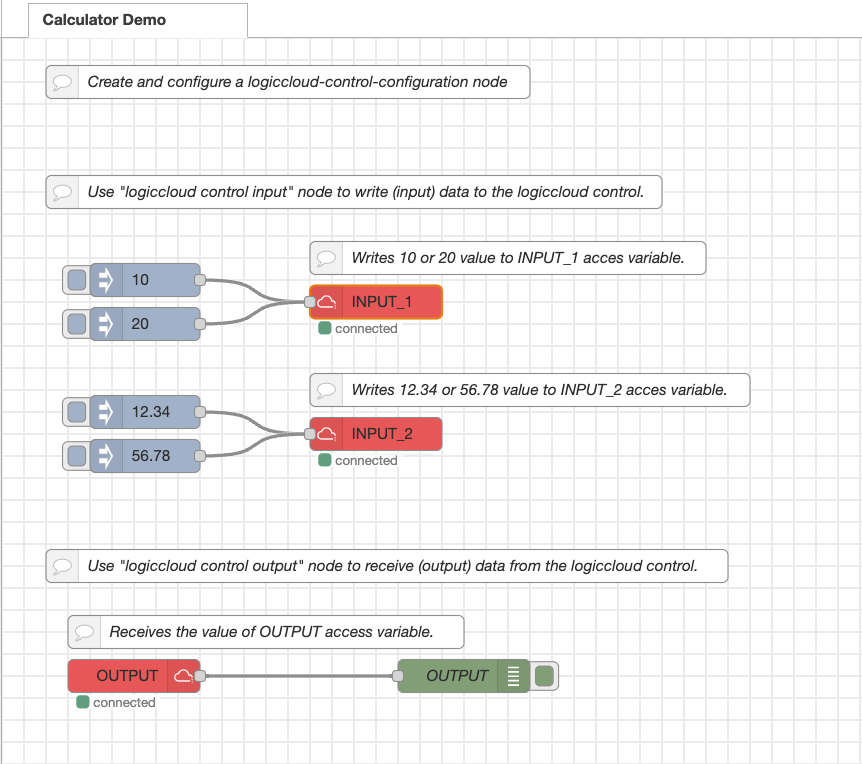
This node is used to write (input) data to the logiccloud control.
The logiccloud control input node provides the following properties:
- name: the name of the node; if it is not set, the node will have the default name "logiccloud-control-input"
- logiccloudControl: the logiccloud control configuration node to be used for the communication with the logiccloud control
- variable: the access variable name to be written; there are two ways to set the access variable name:
- by typing the access variable name in the variable field
- by browsing the available input access variables in the logiccloud control (by clicking on the search icon next to the variable field)
Note: in order to use the browsing functionality, several steps have to be performed beforehand:
- the logiccloud control configuration node has to be properly configured (valid host and port of an existing running logiccloud control Node-RED connector)
- the logiccloud control configuration node has to be deployed
- the logiccloud control configuration node has to be selected in the logiccloudControl field of the logiccloud control input node
- close and re-open the configuration for the logiccloud control input node
If the above steps are performed and the logiccloud control Node-RED connector is running, by clicking the search icon next to the variable field the list of available inputs will be displayed.
Then the user can select the desired access variable.
The access variable name will be automatically filled in the variable field.
If all of the above steps are performed and the logiccloud control Node-RED connector is running, but there are no input access variables defined in the mappings for the logiccloud Node-RED connector, a warning message will be displayed: "No inputs found on logiccloud control on port: [port]".
If one of the above steps is not performed or logiccloud control Node-RED connector is not running, the browsing functionality will not work.
In this case, a warning message will be displayed: "No inputs found on logiccloud control on port: [port]".
The user has to manually type the access variable name in the variable field.
logiccloud control output
This node is used to receive (output) data from the logiccloud control.
The logiccloud control output node provides the following properties:
- name: the name of the node; if it is not set, the node will have the default name "logiccloud-control-output"
- logiccloudControl: the logiccloud control configuration node to be used for the communication with the logiccloud control
- variable: the access variable name for which the node will receive updates; there are two ways to set the access variable name:
- by typing the access variable name in the variable field
- by browsing the available output access variables in the logiccloud control (by clicking on the search icon next to the variable field)
Note: in order to use the browsing functionality, several steps have to be performed beforehand:
- the logiccloud control configuration node has to be properly configured (valid host and port of an existing running logiccloud control Node-RED connector)
- the logiccloud control configuration node has to be deployed
- the logiccloud control configuration node has to be selected in the logiccloudControl field of the logiccloud control output node
- close and re-open the configuration for the logiccloud control output node
If the above steps are performed and the logiccloud control Node-RED connector is running, by clicking the search icon next to the variable field the list of available outputs will be displayed.
Then the user can select the desired access variable.
The access variable name will be automatically filled in the variable field.
If all of the above steps are performed and the logiccloud control Node-RED connector is running, but there are no output access variables defined in the mappings for the logiccloud Node-RED connector, a warning message will be displayed: "No outputs found on logiccloud control on port: [port]".
If one of the above steps is not performed or logiccloud control Node-RED connector is not running, the browsing functionality will not work.
In this case, a warning message will be displayed: "No outputs found on logiccloud control on port: [port]".
The user has to manually type the access variable name in the variable field.
How to use