



Security News
crates.io Ships Security Tab and Tightens Publishing Controls
crates.io adds a Security tab backed by RustSec advisories and narrows trusted publishing paths to reduce common CI publishing risks.
By Sarah Gooding - Jan 27, 2026
@nextcloud/dialogs
Advanced tools
Nextcloud dialog helpers
npm i -S @nextcloud/dialogs
@nextcloud/dialogs | maintained | @nextcloud/vue dependency | Nextcloud server version |
|---|---|---|---|
| 7.x | ✅ | 9.x (Vue 3)¹ | Nextcloud 31 and newer |
| 6.x | ✅ | 8.x | Nextcloud 29, 30, 31, 32 |
| 5.x | ❌ | 8.x | Nextcloud 28, 29, 30 |
| 4.2+ | ❌ | 7.12² | Nextcloud 25, 26, 27, 27.1 |
| 4.1 | ❌ | any | any up to Nextcloud 30 |
¹: In version 7.x the @nextcloud/vue dependency is moved to dependencies so you can also use this library
with an old version of @nextcloud/vue in your app dependencies if your app still uses Vue 2.
Note that this might increase the bundled app size.
If your app also already uses @nextcloud/vue version 9.x and Vue 3 then the bundle size will not increase.
²: Since version 4.2 this package provides a Vue.js based file picker, so this package depends on @nextcloud/vue.
The styles for the components (Toasts and FilePicker) are provided in the style.css file.
So make sure that the @nextcloud/dialogs/style.css file is included in your app to make sure that the toasts or FilePicker have a proper styling applied.
import '@nextcloud/dialogs/style.css'
import { showMessage, showInfo, showSuccess, showWarning, showError } from '@nextcloud/dialogs'
import '@nextcloud/dialogs/style.css'
If you using @nextcloud/dialogs >= 4.0 you don't need any svg or scss loader in you projects anymore.
There are different toast styles available, that are exposed in separate functions:
showMessage('Message without a specific styling')
showInfo('Information')
showSuccess('Success')
showWarning('Warning')
showError('Error')
There are several options that can be passed in as a second parameter, like the timeout of a toast:
showError('This is an error shown without a timeout', { timeout: -1 })
A full list of available options can be found in the documentation.
To spawn the FilePicker provided by the library you have to use the FilePickerBuilder. The FilePickerBuilder is included in the main entry point of this library, so you can use it like this:
import { getFilePickerBuilder } from '@nextcloud/dialogs'
const filepicker = getFilePickerBuilder('Pick plain text files')
    .addMimeTypeFilter('text/plain')
    .addButton({
        label: 'Pick',
        callback: (nodes) => console.log('Picked', nodes),
    })
    .build()

// You get the file nodes by the button callback, but also the pick yields the paths of the picked files
const paths = await filepicker.pick()
For testing all components provide data-testid attributes as selectors, so the tests are independent from code or styling changes.
data-testid | Intended purpose |
|---|---|
select-all-checkbox | The select all checkbox of the file list |
file-list-row | A row in the file list (tr), can be identified by data-filename |
row-checkbox | Checkbox for selecting a row |
row-name | Name of the row / file |
main or stableXv4.0.1): git checkout -b v<version>npm version patch --no-git-tag-version (npm version minor --no-git-tag-version if minor).
This will return a new version name, make sure it matches what you expectgenerate then paste the content to the CHANGELOG.md file
npm run prerelease:format-changelog.
This will apply this regex: by @([^ ]+) in ((https://github.com/)nextcloud-libraries/nextcloud-dialogs/pull/(\d+))
Which this as the replacement: [\#$4]($2) \([$1]($3$1)\)v4.0.1)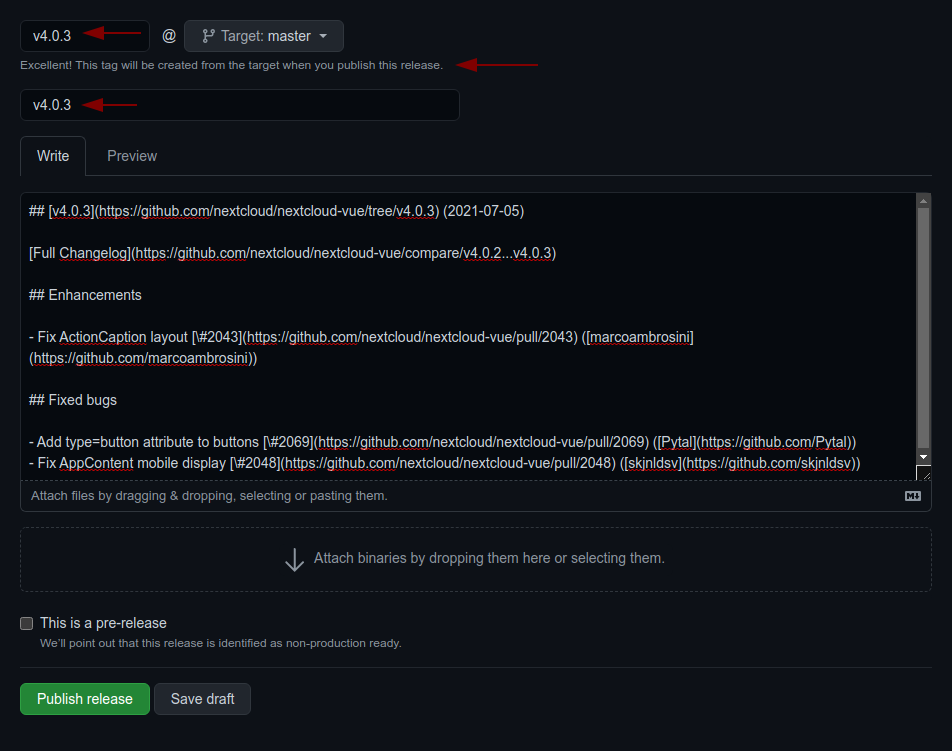
FAQs
Nextcloud dialog helpers
We found that @nextcloud/dialogs demonstrated a healthy version release cadence and project activity because the last version was released less than a year ago. It has 9 open source maintainers collaborating on the project.
Did you know?

Socket for GitHub automatically highlights issues in each pull request and monitors the health of all your open source dependencies. Discover the contents of your packages and block harmful activity before you install or update your dependencies.
Security News
crates.io adds a Security tab backed by RustSec advisories and narrows trusted publishing paths to reduce common CI publishing risks.

Research
/Security News
A Chrome extension claiming to hide Amazon ads was found secretly hijacking affiliate links, replacing creators’ tags with its own without user consent.

Security News
A surge of AI-generated vulnerability reports has pushed open source maintainers to rethink bug bounties and tighten security disclosure processes.