


🚨 Latest Research:Tanstack npm Packages Compromised in Ongoing Mini Shai-Hulud Supply-Chain Attack.Learn More →
Socket
Book a DemoSign in
Socket

@nextcloud/upload

Package Overview
Dependencies
Maintainers
9
Versions
47
Alerts
File Explorer

Advanced tools

Socket logo

Install Socket

Detect and block malicious and high-risk dependencies

Install

@nextcloud/upload

Nextcloud file upload client

latest
Source
npmnpm
Version
1.11.1
Version published
Maintainers
9
Created
Source

@nextcloud/upload

REUSE status npm last version Codecov

Nextcloud upload helpers for Nextcloud apps

Usage

šŸ“˜ API documentation

Development

šŸ“¤ Releasing a new version

  • Pull the latest changes from main or stableX
  • Checkout a new branch with the tag name (e.g v4.0.1): git checkout -b v<version>
  • Run npm version patch --no-git-tag-version (npm version minor --no-git-tag-version if minor). This will return a new version name, make sure it matches what you expect
  • Generate the changelog content from the release page. Create a draft release, select the previous tag, click generate then paste the content to the CHANGELOG.md file
    • adjust the links to the merged pull requests and authors so that the changelog also works outside of GitHub by running npm run prerelease:format-changelog. This will apply this regex: by @([^ ]+) in ((https://github.com/)nextcloud-libraries/nextcloud-upload/pull/(\d+)) Which this as the replacement: [\#$4]($2) \([$1]($3$1)\)
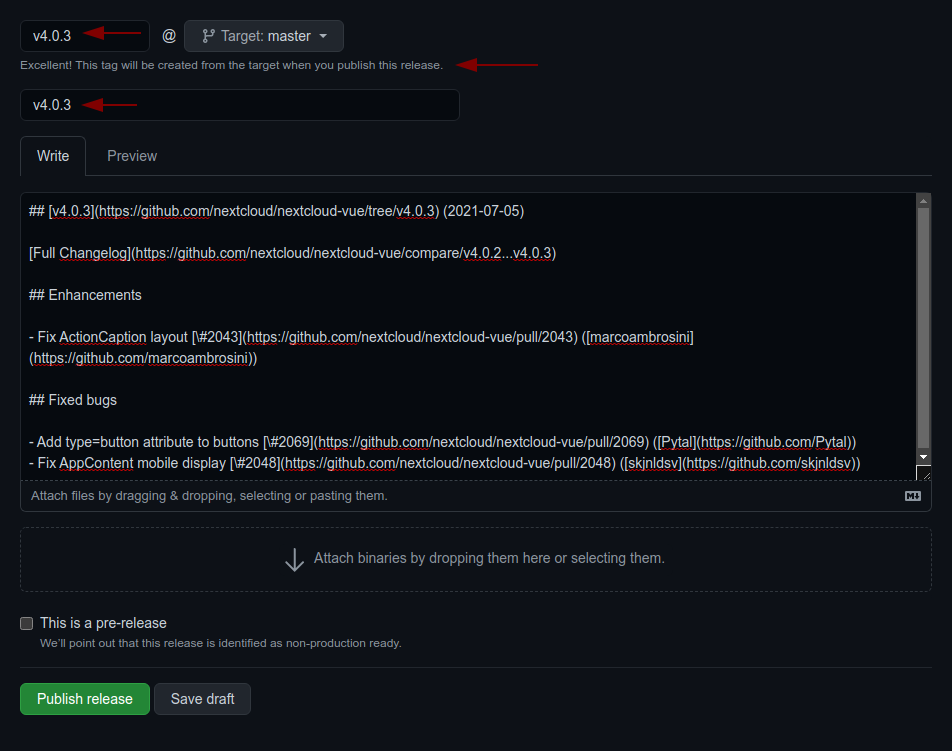
    • use the the version as tag AND title (e.g v4.0.1)
    • add the changelog content as description (https://github.com/nextcloud-libraries/nextcloud-upload/releases)
  • Commit, push and create PR
  • Get your PR reviewed and merged
  • Create a milestone with the follow-up version at https://github.com/nextcloud-libraries/nextcloud-upload/milestones
  • Move all open tickets and PRs to the follow-up
  • Close the milestone of the version you release
  • Publish the previously drafted release on GitHub image

Keywords

nextcloud

FAQs

Package last updated on 29 Jan 2026

Did you know?

Socket

Socket for GitHub automatically highlights issues in each pull request and monitors the health of all your open source dependencies. Discover the contents of your packages and block harmful activity before you install or update your dependencies.

Install

Related posts

