@power-seo/schema
Type-safe JSON-LD structured data for TypeScript and React — 23 schema.org builder functions, 22 React components, schema graph support, and field validation. Works in Next.js, Remix, Node.js, and Edge runtimes.





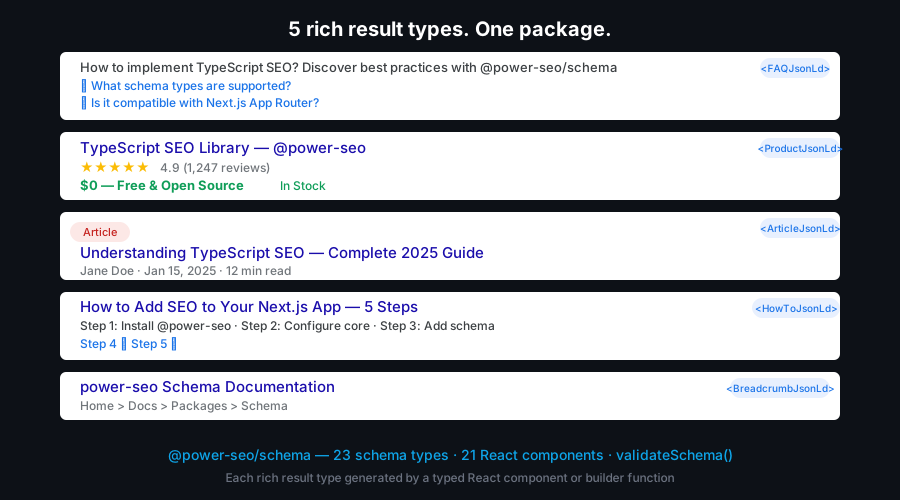
@power-seo/schema gives you a fully typed, builder-function API for generating Google-compliant schema.org markup — with compile-time type checking on every schema property, a validateSchema() utility that surfaces missing required fields before pages go live, and pre-built React components that render <script type="application/ld+json"> tags in one line. Combine multiple schemas into a single @graph document via schemaGraph() so Google parses all of them. All 23 schema types are independently importable and tree-shakeable.
Zero runtime dependencies — only @power-seo/core as a peer.
Why @power-seo/schema?
| Field type safety | ❌ Hand-written JSON, no types | ✅ Typed builder functions catch missing fields at compile time |
| Multiple schemas per page | ❌ Separate <script> tags, Google may miss some | ✅ schemaGraph() combines all into one @graph document |
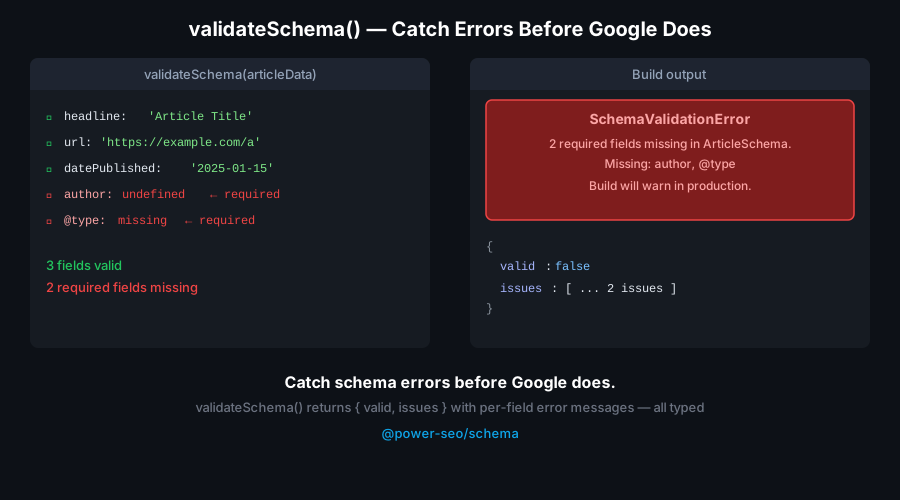
| Field validation | ❌ Silent failures in rich results | ✅ validateSchema() returns structured issues before deploy |
| React rendering | ❌ Manual dangerouslySetInnerHTML boilerplate | ✅ <ArticleJsonLd> and 21 other components in one import |
| Schema coverage | ❌ Only Article/FAQ in most packages | ✅ 23 types: Article, Product, FAQ, LocalBusiness, Event, Recipe, and more |
| Framework support | ❌ WordPress / next-seo only | ✅ Next.js, Remix, Node.js, Edge, static site generators |

Features
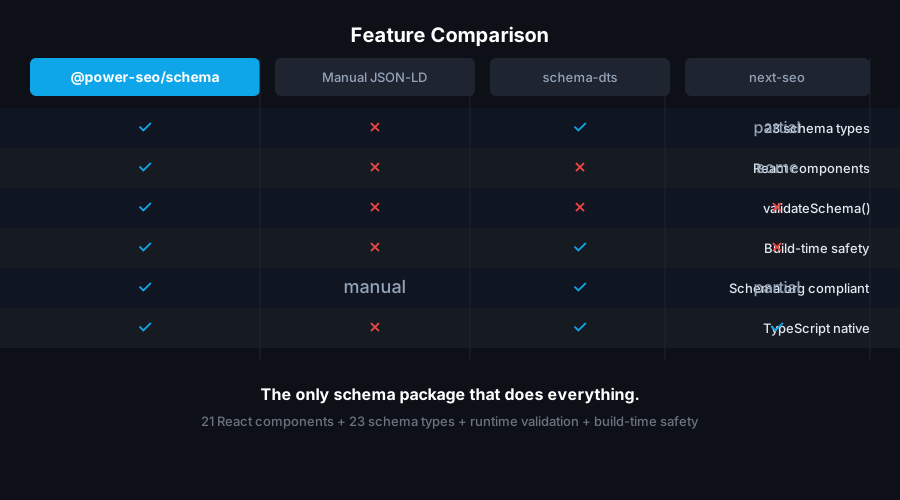
- 23 schema.org type builder functions — Article, BlogPosting, NewsArticle, Product, FAQPage, BreadcrumbList, LocalBusiness, Organization, Person, Event, Recipe, HowTo, VideoObject, Course, JobPosting, SoftwareApplication, WebSite, ItemList, Review, Service, Brand, SiteNavigationElement, ImageObject
- 22 pre-built React components —
<ArticleJsonLd>, <BlogPostingJsonLd>, <NewsArticleJsonLd>, <ProductJsonLd>, <FAQJsonLd>, <BreadcrumbJsonLd>, <LocalBusinessJsonLd>, <OrganizationJsonLd>, <PersonJsonLd>, <EventJsonLd>, <RecipeJsonLd>, <HowToJsonLd>, <VideoJsonLd>, <CourseJsonLd>, <JobPostingJsonLd>, <SoftwareAppJsonLd>, <WebSiteJsonLd>, <ItemListJsonLd>, <ReviewJsonLd>, <ServiceJsonLd>, <BrandJsonLd>, and <JsonLd> (generic, renders any schema)
schemaGraph() — combine multiple schemas into a single @graph document for optimal Google parsingtoJsonLdString() — serialize any schema object to a safe JSON-LD string for dangerouslySetInnerHTMLvalidateSchema() — validate required fields without throwing; returns { valid, issues } with severity, field, and message per issue- React optional — all 23 builder functions work without React; 22 React components available via
/react subpath export
- Type-safe API — TypeScript-first with full typed interfaces for every schema type including nested objects
- Tree-shakeable — import only the schema types you use; zero dead code in your bundle
- Dual ESM + CJS — ships both formats via tsup for any bundler or
require() usage
Comparison
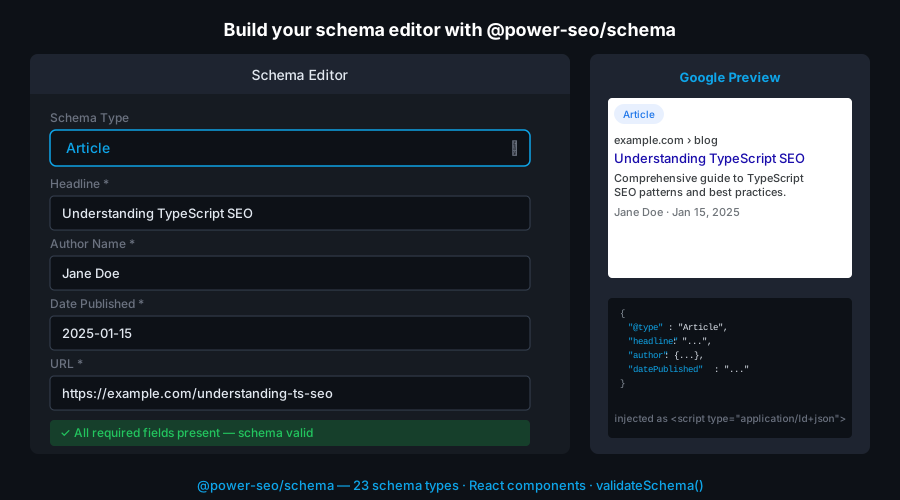
| Typed builder functions | ✅ | Partial | ❌ | ❌ | ❌ |
| Ready-to-use React components | ✅ | ✅ | ❌ | ❌ | Partial |
@graph support | ✅ | ❌ | ❌ | ✅ | ❌ |
| Built-in field validation | ✅ | ❌ | ❌ | ❌ | ❌ |
| Works without React | ✅ | ❌ | ✅ | ✅ | ❌ |
| 23 schema types | ✅ | Partial | ✅ | ✅ | ❌ |
| CI / Node.js usage | ✅ | ❌ | ✅ | ✅ | ❌ |
| Zero runtime dependencies | ✅ | ❌ | ✅ | ❌ | ❌ |
| TypeScript-first | ✅ | Partial | ✅ | ❌ | ❌ |
| Tree-shakeable | ✅ | ❌ | ✅ | ❌ | ❌ |
Installation
npm install @power-seo/schema
yarn add @power-seo/schema
pnpm add @power-seo/schema
Quick Start
import { article, toJsonLdString } from '@power-seo/schema';
const schema = article({
headline: 'My Blog Post',
description: 'An informative article about SEO.',
datePublished: '2026-01-15',
dateModified: '2026-01-20',
author: { name: 'Jane Doe', url: 'https://example.com/authors/jane-doe' },
image: { url: 'https://example.com/article-cover.jpg', width: 1200, height: 630 },
});
const script = toJsonLdString(schema);
import { ArticleJsonLd } from '@power-seo/schema/react';
<ArticleJsonLd
headline="My Blog Post"
description="An informative article about SEO."
datePublished="2026-01-15"
author={{ name: 'Jane Doe', url: 'https://example.com/authors/jane-doe' }}
image={{ url: 'https://example.com/cover.jpg', width: 1200, height: 630 }}
/>;
Usage
Builder Functions (No React Required)
Call any builder function with a typed props object to produce a schema-ready JSON-LD object, then pass it to toJsonLdString() for serialization or schemaGraph() to combine with other schemas.
import { product, toJsonLdString } from '@power-seo/schema';

const schema = product({
  name: 'Wireless Headphones',
  description: 'Premium noise-cancelling headphones.',
  image: { url: 'https://example.com/headphones.jpg' },
  offers: {
    price: 149.99,
    priceCurrency: 'USD',
    availability: 'InStock',
  },
  aggregateRating: {
    ratingValue: 4.7,
    reviewCount: 312,
  },
});

console.log(toJsonLdString(schema));
React Components
Import from the /react entry point for pre-built JSON-LD components that render <script type="application/ld+json"> tags:
import { FAQJsonLd, BreadcrumbJsonLd } from '@power-seo/schema/react';

function PageHead() {
  return (
    <>
      <FAQJsonLd
        questions={[
          { question: 'What is JSON-LD?', answer: 'A structured data format used by Google.' },
          { question: 'Do I need React?', answer: 'No — builder functions work without React.' },
        ]}
      />
      <BreadcrumbJsonLd
        items={[
          { name: 'Home', url: 'https://example.com' },
          { name: 'Blog', url: 'https://example.com/blog' },
          { name: 'My Post' },
        ]}
      />
    </>
  );
}
Schema Graph (Multiple Schemas Per Page)
Use schemaGraph() to combine multiple schema objects into a single @graph document. This ensures Google parses all schemas on the page, not just the first <script> tag it finds.
import {
article,
breadcrumbList,
organization,
schemaGraph,
toJsonLdString,
} from '@power-seo/schema';
const graph = schemaGraph([
article({ headline: 'My Post', datePublished: '2026-01-01', author: { name: 'Jane Doe' } }),
breadcrumbList([
{ name: 'Home', url: 'https://example.com' },
{ name: 'Blog', url: 'https://example.com/blog' },
{ name: 'My Post' },
]),
organization({ name: 'Acme Corp', url: 'https://example.com' }),
]);
const script = toJsonLdString(graph);
Field Validation
validateSchema() checks required fields and returns a structured result without throwing. Use it in CI pipelines to catch missing fields before pages are published.
import { article, validateSchema } from '@power-seo/schema';
const schema = article({ headline: 'Incomplete Article' });
const result = validateSchema(schema);
if (!result.valid) {
const errors = result.issues.filter((i) => i.severity === 'error');
console.error(`${errors.length} validation error(s) found`);
errors.forEach((i) => console.error(` ✗ [${i.field}] ${i.message}`));
process.exit(1);
}
FAQ and Breadcrumb Builder Signatures
faqPage() and breadcrumbList() accept plain arrays directly — not a config object wrapper:
import { faqPage, breadcrumbList } from '@power-seo/schema';
const faq = faqPage([
{ question: 'What is schema.org?', answer: 'A shared vocabulary for structured data.' },
{ question: 'Does Google require JSON-LD?', answer: 'JSON-LD is the recommended format.' },
]);
const breadcrumb = breadcrumbList([
{ name: 'Home', url: 'https://example.com' },
{ name: 'Products', url: 'https://example.com/products' },
{ name: 'Headphones' },
]);
Next.js App Router
Use builder functions in page.tsx to generate JSON-LD for server-side rendering:
import { article, toJsonLdString } from '@power-seo/schema';

export default function BlogPost({ post }: { post: Post }) {
  const schema = article({
    headline: post.title,
    description: post.excerpt,
    datePublished: post.publishedAt,
    dateModified: post.updatedAt,
    author: { name: post.author.name, url: post.author.profileUrl },
    image: { url: post.coverImage, width: 1200, height: 630 },
  });

  return (
    <>
      <script
        type="application/ld+json"
        dangerouslySetInnerHTML={{ __html: toJsonLdString(schema) }}
      />
      <article>{/* page content */}</article>
    </>
  );
}
Security note: toJsonLdString() escapes <, >, and & to their Unicode escape sequences (\u003c, \u003e, \u0026) so a schema string value such as "</script>" cannot break out of the surrounding <script> tag. This protection is applied automatically — you do not need to sanitize schema field values yourself when using toJsonLdString() or the React components. If you write schema JSON manually and inject it with dangerouslySetInnerHTML, apply the same escaping or use toJsonLdString().
CI Validation Gate
Block deploys when schema validation fails:
import { validateSchema } from '@power-seo/schema';
import { allPageSchemas } from './build-schemas';

for (const schema of allPageSchemas) {
  const result = validateSchema(schema);
  if (!result.valid) {
    const errors = result.issues.filter((i) => i.severity === 'error');
    if (errors.length > 0) {
      console.error('Schema validation failed:');
      errors.forEach((i) => console.error(` ✗ [${i.field}] ${i.message}`));
      process.exit(1);
    }
  }
}
API Reference
Entry Points
@power-seo/schema | Builder functions, utilities, and TypeScript types |
@power-seo/schema/react | React components for rendering JSON-LD script tags |
Builder Functions
article(props) | Article | Yes — Article rich results |
blogPosting(props) | BlogPosting | Yes — Article rich results |
newsArticle(props) | NewsArticle | Yes — Top Stories |
product(props) | Product | Yes — Product rich results |
faqPage(questions) | FAQPage | Yes — FAQ rich results |
breadcrumbList(items) | BreadcrumbList | Yes — Breadcrumbs in SERP |
localBusiness(props) | LocalBusiness | Yes — Local Business panel |
organization(props) | Organization | Yes — Knowledge Panel |
person(props) | Person | Yes — Knowledge Panel |
event(props) | Event | Yes — Event rich results |
recipe(props) | Recipe | Yes — Recipe rich results |
howTo(props) | HowTo | Yes — How-to rich results |
videoObject(props) | VideoObject | Yes — Video rich results |
course(props) | Course | Yes — Course rich results |
jobPosting(props) | JobPosting | Yes — Job Posting results |
softwareApp(props) | SoftwareApplication | Yes — App rich results |
webSite(props) | WebSite | Yes — Sitelinks Searchbox |
itemList(props) | ItemList | Yes — Carousel results |
review(props) | Review | Yes — Review snippet |
service(props) | Service | Partial |
brand(props) | Brand | Partial |
siteNavigationElement(props) | SiteNavigationElement | Partial |
imageObject(props) | ImageObject | Yes — Image rich results |
Utility Functions
toJsonLdString | (schema: object, pretty?: boolean) => string | Serialize schema to safe JSON-LD string |
schemaGraph | (schemas: object[]) => object | Combine schemas into a single @graph document |
validateSchema | (schema: object) => { valid: boolean; issues: ValidationIssue[] } | Validate required fields; returns structured issues |
React Components
Import all components from @power-seo/schema/react.
<ArticleJsonLd> | Omit<ArticleSchema, '@type' | '@context'> | Article schema |
<BlogPostingJsonLd> | Omit<ArticleSchema, '@type' | '@context'> | BlogPosting schema |
<NewsArticleJsonLd> | Omit<ArticleSchema, '@type' | '@context'> | NewsArticle schema for Top Stories |
<ProductJsonLd> | Omit<ProductSchema, '@type' | '@context'> | Product with offers and ratings |
<FAQJsonLd> | { questions: Array<{ question: string; answer: string }> } | FAQPage schema |
<BreadcrumbJsonLd> | { items: Array<{ name: string; url?: string }> } | BreadcrumbList schema |
<LocalBusinessJsonLd> | Omit<LocalBusinessSchema, '@type' | '@context'> | LocalBusiness schema |
<OrganizationJsonLd> | Omit<OrganizationSchema, '@type' | '@context'> | Organization schema |
<PersonJsonLd> | Omit<PersonSchema, '@type' | '@context'> | Person schema |
<EventJsonLd> | Omit<EventSchema, '@type' | '@context'> | Event schema |
<RecipeJsonLd> | Omit<RecipeSchema, '@type' | '@context'> | Recipe schema |
<HowToJsonLd> | Omit<HowToSchema, '@type' | '@context'> | HowTo schema |
<VideoJsonLd> | Omit<VideoObjectSchema, '@type' | '@context'> | VideoObject schema |
<CourseJsonLd> | Omit<CourseSchema, '@type' | '@context'> | Course schema |
<JobPostingJsonLd> | Omit<JobPostingSchema, '@type' | '@context'> | JobPosting schema |
<SoftwareAppJsonLd> | Omit<SoftwareAppSchema, '@type' | '@context'> | SoftwareApplication schema |
<WebSiteJsonLd> | Omit<WebSiteSchema, '@type' | '@context'> | WebSite with SearchAction |
<ItemListJsonLd> | Omit<ItemListSchema, '@type' | '@context'> | ItemList schema |
<ReviewJsonLd> | Omit<ReviewSchema, '@type' | '@context'> | Review schema |
<ServiceJsonLd> | Omit<ServiceSchema, '@type' | '@context'> | Service schema |
<BrandJsonLd> | Omit<BrandSchema, '@type' | '@context'> | Brand schema |
<JsonLd> | { schema: object } | Generic — any schema object |
Types
ArticleSchema | Props for Article, BlogPosting, and NewsArticle builder functions |
ProductSchema | Props for product() builder |
FAQPageSchema | Output type of faqPage() |
BreadcrumbListSchema | Output type of breadcrumbList() |
LocalBusinessSchema | Props for localBusiness() builder |
OrganizationSchema | Props for organization() builder |
PersonSchema | Props for person() builder |
EventSchema | Props for event() builder |
RecipeSchema | Props for recipe() builder |
HowToSchema | Props for howTo() builder |
VideoObjectSchema | Props for videoObject() builder |
CourseSchema | Props for course() builder |
JobPostingSchema | Props for jobPosting() builder |
SoftwareAppSchema | Props for softwareApp() builder |
WebSiteSchema | Props for webSite() builder |
ItemListSchema | Props for itemList() builder |
ReviewSchema | Props for review() builder |
ServiceSchema | Props for service() builder |
BrandSchema | Props for brand() builder |
ValidationIssue | { severity: 'error' | 'warning'; field: string; message: string } |
Use Cases
- Blog posts and articles — Article and BlogPosting schema for Google Discover and Top Stories eligibility
- FAQ pages — FAQPage schema for FAQ accordion rich results in SERPs
- Product pages — Product schema with offers and aggregate ratings for product rich results and star display
- Local business sites — LocalBusiness schema for Google Business Panel and Local Pack
- Recipe sites — Recipe schema for rich cards with images, ratings, and cooking time
- Job boards — JobPosting schema for Google for Jobs integration
- Event pages — Event schema for Google Events rich results
- Course platforms — Course schema for education carousels in Google Search
- Software landing pages — SoftwareApplication schema for app details in results
- Multi-schema pages —
schemaGraph() to combine Article + Breadcrumb + Organization into a single @graph
- CI content pipelines —
validateSchema() to block deploys when required fields are missing
Architecture Overview
- Pure TypeScript — no compiled binary, no native modules
- Zero runtime dependencies — only
@power-seo/core as a peer dependency
- Framework-agnostic — builder functions work in any JavaScript environment with no DOM requirement
- SSR compatible — safe to run in Next.js Server Components, Remix loaders, or Express handlers
- Edge runtime safe — no Node.js-specific APIs; builder functions run in Cloudflare Workers, Vercel Edge, Deno
- Tree-shakeable —
"sideEffects": false with named exports per schema type
- Dual ESM + CJS — ships both formats via tsup for any bundler or
require() usage
Supply Chain Security
- No install scripts (
postinstall, preinstall)
- No runtime network access
- No
eval or dynamic code execution
- CI-signed builds — all releases published via verified
github.com/CyberCraftBD/power-seo workflow
- Safe for SSR, Edge, and server environments
All 17 packages are independently installable — use only what you need.
@power-seo/core | npm i @power-seo/core | Framework-agnostic utilities, types, validators, and constants |
@power-seo/react | npm i @power-seo/react | React SEO components — meta, Open Graph, Twitter Card, breadcrumbs |
@power-seo/meta | npm i @power-seo/meta | SSR meta helpers for Next.js App Router, Remix v2, and generic SSR |
@power-seo/schema | npm i @power-seo/schema | Type-safe JSON-LD structured data — 23 builders + 22 React components |
@power-seo/content-analysis | npm i @power-seo/content-analysis | Yoast-style SEO content scoring engine with React components |
@power-seo/readability | npm i @power-seo/readability | Readability scoring — Flesch-Kincaid, Gunning Fog, Coleman-Liau, ARI |
@power-seo/preview | npm i @power-seo/preview | SERP, Open Graph, and Twitter/X Card preview generators |
@power-seo/sitemap | npm i @power-seo/sitemap | XML sitemap generation, streaming, index splitting, and validation |
@power-seo/redirects | npm i @power-seo/redirects | Redirect engine with Next.js, Remix, and Express adapters |
@power-seo/links | npm i @power-seo/links | Link graph analysis — orphan detection, suggestions, equity scoring |
@power-seo/audit | npm i @power-seo/audit | Full SEO audit engine — meta, content, structure, performance rules |
@power-seo/images | npm i @power-seo/images | Image SEO — alt text, lazy loading, format analysis, image sitemaps |
@power-seo/ai | npm i @power-seo/ai | LLM-agnostic AI prompt templates and parsers for SEO tasks |
@power-seo/analytics | npm i @power-seo/analytics | Merge GSC + audit data, trend analysis, ranking insights, dashboard |
@power-seo/search-console | npm i @power-seo/search-console | Google Search Console API — OAuth2, service account, URL inspection |
@power-seo/integrations | npm i @power-seo/integrations | Semrush and Ahrefs API clients with rate limiting and pagination |
@power-seo/tracking | npm i @power-seo/tracking | GA4, Clarity, PostHog, Plausible, Fathom — scripts + consent management |
CyberCraft Bangladesh is a Bangladesh-based enterprise-grade software development and Full Stack SEO service provider company specializing in ERP system development, AI-powered SaaS and business applications, full-stack SEO services, custom website development, and scalable eCommerce platforms. We design and develop intelligent, automation-driven SaaS and enterprise solutions that help startups, SMEs, NGOs, educational institutes, and large organizations streamline operations, enhance digital visibility, and accelerate growth through modern cloud-native technologies.




© 2026 CyberCraft Bangladesh · Released under the MIT License





