@power-seo/sitemap

XML sitemap generation for TypeScript — streaming output, automatic index splitting, image/video/news extensions, and URL validation — works in Next.js, Remix, Express, and edge runtimes with zero runtime dependencies.





@power-seo/sitemap produces standards-compliant <urlset> and <sitemapindex> XML from typed URL arrays. Provide a hostname and URL list — get back a valid XML string ready to serve as Content-Type: application/xml. For large catalogs, stream chunks with constant memory usage or auto-split at the 50,000-URL spec limit with a generated index file. All six functions are independently importable and tree-shakeable.
Zero runtime dependencies — only @power-seo/core as a peer.
Why @power-seo/sitemap?
| Spec compliance | ❌ Hand-built XML, wrong namespaces | ✅ Correct <urlset> + namespace declarations |
| Large sites | ❌ Single file breaks at 50,000 URLs | ✅ Auto-split + sitemap index generation |
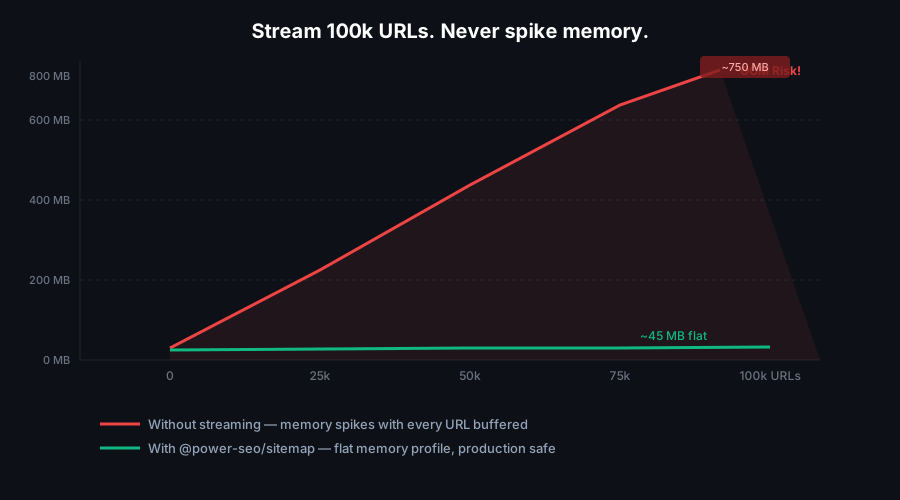
| Memory usage | ❌ String concat spikes on large catalogs | ✅ Synchronous generator yields chunks |
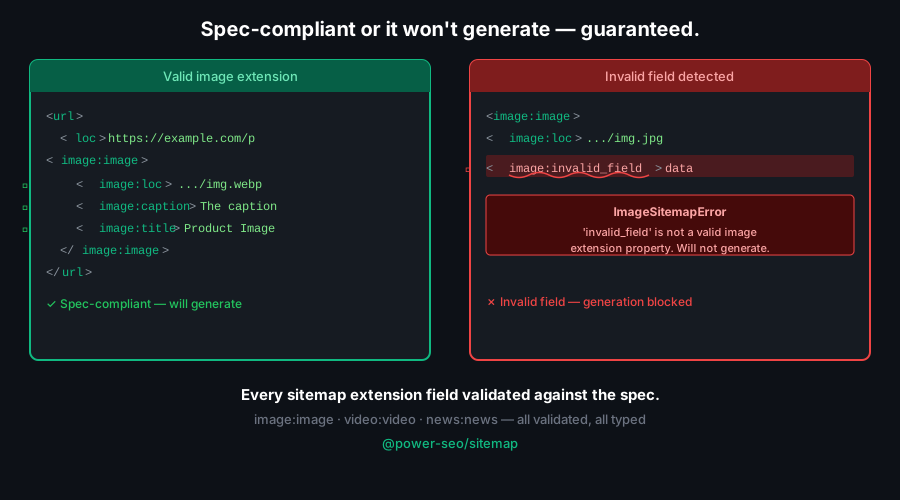
| Image indexing | ❌ Product images undiscoverable | ✅ <image:image> extension per URL |
| Video SEO | ❌ No structured video metadata | ✅ <video:video> extension with title, duration |
| News sitemaps | ❌ Missing publication + date tags | ✅ <news:news> extension for Google News |
| Hostname handling | ❌ Hardcode absolute URLs everywhere | ✅ Pass hostname once; use relative loc paths |
| Validation | ❌ Silent bad data reaches Google | ✅ validateSitemapUrl() returns errors + warnings |

Features
- Full sitemap spec support —
<loc>, <lastmod>, <changefreq>, <priority>, all optional elements
- Hostname + relative paths — pass
hostname in config; loc can be a relative path like /about
- Image sitemap extension —
<image:image> tags with loc, caption, title, geoLocation, license
- Video sitemap extension —
<video:video> tags with title, description, thumbnail, duration, rating
- News sitemap extension —
<news:news> tags with publication name, language, date
- Streaming generation —
streamSitemap() is a synchronous generator yielding XML string chunks; no memory spike on large lists
- Automatic index splitting —
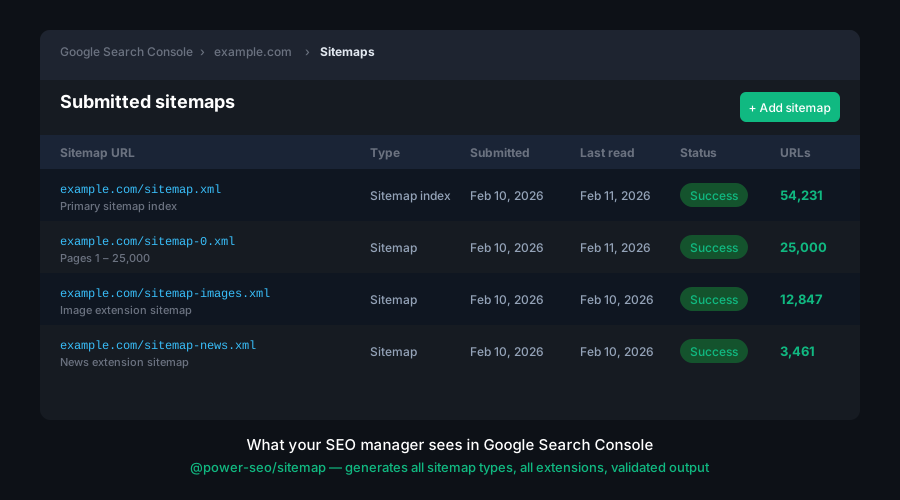
splitSitemap() chunks at MAX_URLS_PER_SITEMAP (50,000) and returns both sitemaps and the index XML
- Sitemap index generation —
generateSitemapIndex() creates a <sitemapindex> pointing to child sitemaps
- Smart namespace detection —
generateSitemap() only declares XML namespaces for extensions (image, video, news) that are actually used
- URL validation —
validateSitemapUrl() returns { valid, errors, warnings } without throwing
- Next.js App Router adapter —
toNextSitemap() converts SitemapURL[] to the MetadataRoute.Sitemap[] format for app/sitemap.ts
- Constants exported —
MAX_URLS_PER_SITEMAP (50,000) and MAX_SITEMAP_SIZE_BYTES (52,428,800)
- Framework-agnostic — works in Next.js API routes, Remix loaders, Express, Fastify, and edge runtimes
- Full TypeScript support — typed
SitemapURL, SitemapImage, SitemapVideo, SitemapNews, SitemapConfig
- Zero runtime dependencies — pure TypeScript, no external XML libraries
- Tree-shakeable — import only the functions you use
Comparison
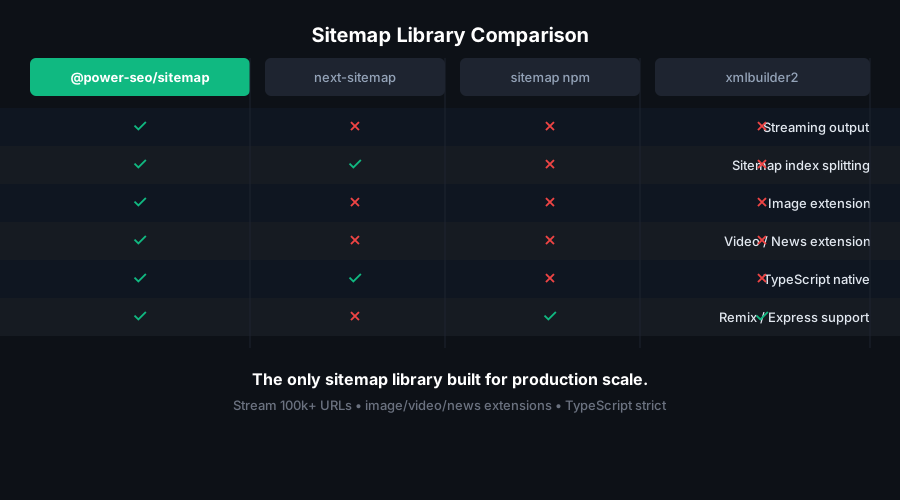
| Image sitemap extension | ✅ | ✅ | ✅ | ❌ |
| Video sitemap extension | ✅ | ❌ | ✅ | ❌ |
| News sitemap extension | ✅ | ❌ | ✅ | ❌ |
| Streaming generation | ✅ | ❌ | ❌ | ❌ |
| Auto index splitting | ✅ | ✅ | ❌ | ❌ |
| URL validation | ✅ | ❌ | ❌ | ❌ |
| Hostname + relative loc paths | ✅ | ❌ | ❌ | ❌ |
| Zero runtime dependencies | ✅ | ❌ | ❌ | ❌ |
| Edge runtime compatible | ✅ | ❌ | ❌ | ❌ |
| TypeScript-first | ✅ | Partial | ❌ | ❌ |
| Tree-shakeable | ✅ | ❌ | ❌ | ❌ |
Next.js app/sitemap.ts adapter | ✅ | ✅ | ❌ | ❌ |
Installation
npm install @power-seo/sitemap
yarn add @power-seo/sitemap
pnpm add @power-seo/sitemap
Quick Start
import { generateSitemap } from '@power-seo/sitemap';
const xml = generateSitemap({
hostname: 'https://example.com',
urls: [
{ loc: '/', lastmod: '2026-01-01', changefreq: 'daily', priority: 1.0 },
{ loc: '/about', changefreq: 'monthly', priority: 0.8 },
{ loc: '/blog/post-1', lastmod: '2026-01-15', priority: 0.6 },
],
});
hostname is required — it is prepended to any loc value that is a relative path. Absolute loc values (starting with http) are used as-is.
Usage
Generating a Sitemap
generateSitemap() accepts a SitemapConfig with hostname and urls and returns a complete XML string.
import { generateSitemap } from '@power-seo/sitemap';
const xml = generateSitemap({
hostname: 'https://example.com',
urls: [
{ loc: '/', lastmod: '2026-01-01', changefreq: 'daily', priority: 1.0 },
{ loc: '/products', changefreq: 'weekly', priority: 0.9 },
{ loc: '/blog', changefreq: 'daily', priority: 0.8 },
],
});
res.setHeader('Content-Type', 'application/xml');
res.send(xml);
Streaming a Large Sitemap
streamSitemap() is a synchronous generator. It yields XML string chunks one <url> at a time — keeping memory usage constant regardless of catalog size.
import { streamSitemap } from '@power-seo/sitemap';
const urls = fetchAllProductUrls();
const stream = streamSitemap('https://example.com', urls);
for (const chunk of stream) {
response.write(chunk);
}
response.end();
Splitting Large Sitemaps with an Index
splitSitemap() chunks a config at the 50,000-URL spec limit and returns all individual sitemap XML strings plus a sitemap index XML string that references them.
import { splitSitemap } from '@power-seo/sitemap';
const { index, sitemaps } = splitSitemap({
hostname: 'https://example.com',
urls: largeUrlArray,
});
for (const { filename, xml } of sitemaps) {
fs.writeFileSync(`./public${filename}`, xml);
}
fs.writeFileSync('./public/sitemap.xml', index);
Custom filename pattern:
const { index, sitemaps } = splitSitemap(
{ hostname: 'https://example.com', urls: largeUrlArray },
'/sitemaps/part-{index}.xml',
);
Generating a Sitemap Index Manually
Use generateSitemapIndex() when you maintain separate sitemaps per section or locale and want to combine them under a single index file.
import { generateSitemapIndex } from '@power-seo/sitemap';

const indexXml = generateSitemapIndex({
  sitemaps: [
    { loc: 'https://example.com/sitemap-pages.xml', lastmod: '2026-01-01' },
    { loc: 'https://example.com/sitemap-products.xml', lastmod: '2026-01-15' },
    { loc: 'https://example.com/sitemap-blog.xml', lastmod: '2026-01-20' },
  ],
});
Image Sitemaps
Add images to any SitemapURL entry to emit <image:image> extension tags:
import { generateSitemap } from '@power-seo/sitemap';

const xml = generateSitemap({
  hostname: 'https://example.com',
  urls: [
    {
      loc: '/products/blue-sneaker',
      lastmod: '2026-01-10',
      images: [
        {
          loc: 'https://cdn.example.com/sneaker-blue.jpg',
          caption: 'Blue sneaker — side view',
          title: 'Blue Running Sneaker',
        },
        {
          loc: 'https://cdn.example.com/sneaker-blue-top.jpg',
          caption: 'Blue sneaker — top view',
        },
      ],
    },
  ],
});
Validating URL Entries
validateSitemapUrl() checks a SitemapURL against the sitemap spec and returns structured errors and warnings — useful in CI or before serving.
import { validateSitemapUrl } from '@power-seo/sitemap';
const result = validateSitemapUrl({
loc: '/about',
priority: 1.5,
changefreq: 'daily',
});
Next.js App Router — app/sitemap.ts Convention
Next.js App Router has a built-in app/sitemap.ts file convention that returns an array of URL objects (not XML). Use toNextSitemap() to convert SitemapURL[] to the required format:
import { toNextSitemap } from '@power-seo/sitemap';
export default async function sitemap() {
const urls = await fetchUrlsFromCms();
return toNextSitemap(urls);
}
toNextSitemap() filters out invalid URLs and maps changefreq to changeFrequency as required by Next.js. The lastmod field is passed through as-is (string or Date).
Next.js App Router — Route Handler (XML)
For full control over the XML output (useful when you need image/video/news extensions), use a route handler instead:
import { generateSitemap } from '@power-seo/sitemap';
export async function GET() {
const urls = await fetchUrlsFromCms();
const xml = generateSitemap({
hostname: 'https://example.com',
urls,
});
return new Response(xml, {
headers: { 'Content-Type': 'application/xml' },
});
}
Remix Resource Route
import { generateSitemap } from '@power-seo/sitemap';
import type { LoaderFunctionArgs } from '@remix-run/node';
export async function loader({ request }: LoaderFunctionArgs) {
const urls = await fetchUrlsFromDb();
const xml = generateSitemap({
hostname: 'https://example.com',
urls,
});
return new Response(xml, {
headers: { 'Content-Type': 'application/xml' },
});
}
API Reference
generateSitemap(config)
function generateSitemap(config: SitemapConfig): string;
hostname | string | ✅ | Base URL prepended to relative loc paths (e.g. 'https://example.com') |
urls | SitemapURL[] | ✅ | Array of URL entries |
maxUrlsPerSitemap | number | — | Override the 50,000-URL chunk size (used by splitSitemap) |
outputDir | string | — | Optional output directory hint (informational; does not write files) |
streamSitemap(hostname, urls)
function streamSitemap(
  hostname: string,
  urls: Iterable<SitemapURL>,
): Generator<string, void, undefined>;
Synchronous generator. Yields XML string chunks — one for the XML declaration and opening tag, one per <url> block, and one for the closing tag. Does not buffer the full XML in memory.
hostname | string | Base URL prepended to relative loc paths |
urls | Iterable<SitemapURL> | Any iterable of URL entries — arrays, generators, database cursors |
splitSitemap(config, sitemapUrlPattern?)
function splitSitemap(
  config: SitemapConfig,
  sitemapUrlPattern?: string,
): { index: string; sitemaps: Array<{ filename: string; xml: string }> };
Splits a large URL set into multiple sitemap files and returns the index XML and all sitemap XMLs. The sitemapUrlPattern parameter controls generated filenames using {index} as a placeholder.
config | SitemapConfig | — | Same config as generateSitemap() |
sitemapUrlPattern | string | '/sitemap-{index}.xml' | Filename pattern for each split sitemap |
Return value:
index | string | Sitemap index XML (<sitemapindex>) referencing all split files |
sitemaps | Array<{ filename: string; xml: string }> | Each split sitemap with its filename and XML string |
generateSitemapIndex(config)
function generateSitemapIndex(config: SitemapIndexConfig): string;
sitemaps | SitemapIndexEntry[] | Array of { loc: string; lastmod?: string } entries |
validateSitemapUrl(url)
function validateSitemapUrl(url: SitemapURL): SitemapValidationResult;
Returns { valid: boolean; errors: string[]; warnings: string[] }. Never throws.
toNextSitemap(urls)
import { toNextSitemap } from '@power-seo/sitemap';

function toNextSitemap(urls: SitemapURL[]): NextSitemapEntry[];
Converts a SitemapURL[] to the array format expected by Next.js App Router's app/sitemap.ts file convention. Invalid URLs (per validateSitemapUrl) are filtered out automatically. changefreq is mapped to changeFrequency.
url | string | Absolute URL (loc) |
lastModified | Date | string | From lastmod (passed through as-is) |
changeFrequency | string | From changefreq |
priority | number | From priority |
Types
SitemapConfig | { hostname: string; urls: SitemapURL[]; maxUrlsPerSitemap?: number; outputDir?: string } |
SitemapURL | Single URL entry — see field table below |
SitemapImage | { loc: string; caption?: string; geoLocation?: string; title?: string; license?: string } |
SitemapVideo | Video extension entry with thumbnailLoc, title, description, and optional fields |
SitemapNews | { publication: { name: string; language: string }; publicationDate: string; title: string } |
SitemapIndexConfig | { sitemaps: SitemapIndexEntry[] } |
SitemapIndexEntry | { loc: string; lastmod?: string } |
SitemapValidationResult | { valid: boolean; errors: string[]; warnings: string[] } |
SitemapURL Fields
loc | string | — | Required. URL path (e.g. /about) or absolute URL. Hostname is prepended to relative paths. |
lastmod | string | — | Last modified date — ISO 8601 or YYYY-MM-DD |
changefreq | 'always' | 'hourly' | 'daily' | 'weekly' | 'monthly' | 'yearly' | 'never' | — | Suggested crawl frequency |
priority | number | (no tag emitted) | Priority 0.0–1.0. When omitted, no <priority> tag is written. |
images | SitemapImage[] | — | Image extension entries — emits <image:image> blocks |
videos | SitemapVideo[] | — | Video extension entries — emits <video:video> blocks |
news | SitemapNews | — | News extension entry — emits <news:news> block |
Constants
MAX_URLS_PER_SITEMAP | 50_000 | Maximum URLs allowed per sitemap file (spec limit) |
MAX_SITEMAP_SIZE_BYTES | 52_428_800 | Maximum sitemap file size in bytes (50 MB = 50 × 1024 × 1024) |
Use Cases
- Next.js App Router — generate sitemaps in
app/sitemap.xml/route.ts at request time or build time
- E-commerce catalogs — product image sitemaps with
<image:image> for every listing; keep Google Images up to date
- News publishers —
<news:news> extension for Google News sitemap submission
- Multi-locale sites — separate sitemaps per locale with a unified sitemap index
- Programmatic SEO — generate sitemaps for thousands of auto-generated pages with no memory overhead
- Large sites — automatic splitting at 50,000 URLs per file with a generated index
- Video platforms —
<video:video> extension with title, description, and thumbnail for video SEO
- CI/CD pipelines — validate URL entries with
validateSitemapUrl() as part of pull request checks
Architecture Overview
- Pure TypeScript — no compiled binary, no native modules
- Zero runtime dependencies — only
@power-seo/core as a peer dependency
- Framework-agnostic — works in any JavaScript environment that supports ES2020+
- SSR compatible — safe to run in Next.js Server Components, Remix loaders, or Express handlers
- Edge runtime safe — no
fs, no path, no Node.js-specific APIs; runs in Cloudflare Workers, Vercel Edge, Deno
- Synchronous generator streaming —
streamSitemap() uses function* — no async overhead, no backpressure complexity
- Smart namespace detection —
generateSitemap() only declares image/video/news namespaces when actually used; streamSitemap() always includes all namespaces for simplicity
- Tree-shakeable —
"sideEffects": false with named exports per function
- Dual ESM + CJS — ships both formats via tsup for any bundler or
require() usage
Supply Chain Security
- No install scripts (
postinstall, preinstall)
- No runtime network access
- No
eval or dynamic code execution
- CI-signed builds — all releases published via verified
github.com/CyberCraftBD/power-seo workflow
- Safe for SSR, Edge, and server environments
All 17 packages are independently installable — use only what you need.
@power-seo/core | npm i @power-seo/core | Framework-agnostic utilities, types, validators, and constants |
@power-seo/react | npm i @power-seo/react | React SEO components — meta, Open Graph, Twitter Card, breadcrumbs |
@power-seo/meta | npm i @power-seo/meta | SSR meta helpers for Next.js App Router, Remix v2, and generic SSR |
@power-seo/schema | npm i @power-seo/schema | Type-safe JSON-LD structured data — 23 builders + 22 React components |
@power-seo/content-analysis | npm i @power-seo/content-analysis | Yoast-style SEO content scoring engine with React components |
@power-seo/readability | npm i @power-seo/readability | Readability scoring — Flesch-Kincaid, Gunning Fog, Coleman-Liau, ARI |
@power-seo/preview | npm i @power-seo/preview | SERP, Open Graph, and Twitter/X Card preview generators |
@power-seo/sitemap | npm i @power-seo/sitemap | XML sitemap generation, streaming, index splitting, and validation |
@power-seo/redirects | npm i @power-seo/redirects | Redirect engine with Next.js, Remix, and Express adapters |
@power-seo/links | npm i @power-seo/links | Link graph analysis — orphan detection, suggestions, equity scoring |
@power-seo/audit | npm i @power-seo/audit | Full SEO audit engine — meta, content, structure, performance rules |
@power-seo/images | npm i @power-seo/images | Image SEO — alt text, lazy loading, format analysis, image sitemaps |
@power-seo/ai | npm i @power-seo/ai | LLM-agnostic AI prompt templates and parsers for SEO tasks |
@power-seo/analytics | npm i @power-seo/analytics | Merge GSC + audit data, trend analysis, ranking insights, dashboard |
@power-seo/search-console | npm i @power-seo/search-console | Google Search Console API — OAuth2, service account, URL inspection |
@power-seo/integrations | npm i @power-seo/integrations | Semrush and Ahrefs API clients with rate limiting and pagination |
@power-seo/tracking | npm i @power-seo/tracking | GA4, Clarity, PostHog, Plausible, Fathom — scripts + consent management |
CyberCraft Bangladesh is a Bangladesh-based enterprise-grade software development and Full Stack SEO service provider company specializing in ERP system development, AI-powered SaaS and business applications, full-stack SEO services, custom website development, and scalable eCommerce platforms. We design and develop intelligent, automation-driven SaaS and enterprise solutions that help startups, SMEs, NGOs, educational institutes, and large organizations streamline operations, enhance digital visibility, and accelerate growth through modern cloud-native technologies.




© 2026 CyberCraft Bangladesh · Released under the MIT License





