


Security News
AI Agent Lands PRs in Major OSS Projects, Targets Maintainers via Cold Outreach
An AI agent is merging PRs into major OSS projects and cold-emailing maintainers to drum up more work.
By Sarah Gooding - Feb 14, 2026
@react-native-clipboard/clipboard
Advanced tools
React Native Clipboard API for macOS, iOS, Android, and Windows





React Native Clipboard API for macOS, iOS, Android, and Windows.
| macOS | iOS | Android | Windows |
|---|---|---|---|
 |  |  | 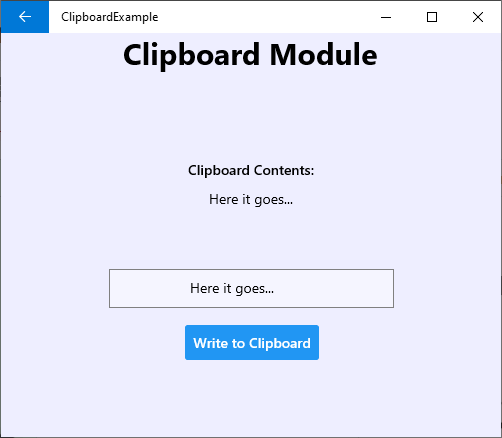 |
Install the library using either Yarn:
yarn add @react-native-clipboard/clipboard
or npm:
npm install --save @react-native-clipboard/clipboard
For iOS, use cocoapods to link the package.
run the following command:
$ npx pod-install
For android, the package will be linked automatically on build.
run the following command to link the package:
$ react-native link @react-native-clipboard/clipboard
For iOS, make sure you install the pod file.
cd ios && pod install && cd ..
or you could follow the instructions to manually link the project
New React Native comes with autolinking feature, which automatically links Native Modules in your project. In order to get it to work, make sure you unlink Clipboard first:
$ react-native unlink @react-native-clipboard/clipboard
react-native moduleThis module was created when the Clipboard API was split out from the core of React Native. To migrate to this module you need to follow the installation instructions above and then change you imports from:
import {Clipboard} from 'react-native';
to:
import Clipboard from '@react-native-clipboard/clipboard';
import React, {useState} from 'react';
import {
  SafeAreaView,
  View,
  Text,
  TouchableOpacity,
  StyleSheet,
} from 'react-native';
import Clipboard from '@react-native-clipboard/clipboard';

const App = () => {
  const [copiedText, setCopiedText] = useState('');

  const copyToClipboard = () => {
    Clipboard.setString('hello world');
  };

  const fetchCopiedText = async () => {
    const text = await Clipboard.getString();
    setCopiedText(text);
  };

  return (
    <SafeAreaView style={{flex: 1}}>
      <View style={styles.container}>
        <TouchableOpacity onPress={copyToClipboard}>
          <Text>Click here to copy to Clipboard</Text>
        </TouchableOpacity>
        <TouchableOpacity onPress={fetchCopiedText}>
          <Text>View copied text</Text>
        </TouchableOpacity>

        <Text style={styles.copiedText}>{copiedText}</Text>
      </View>
    </SafeAreaView>
  );
};

const styles = StyleSheet.create({
  container: {
    flex: 1,
    justifyContent: 'center',
    alignItems: 'center',
  },
  copiedText: {
    marginTop: 10,
    color: 'red',
  },
});

export default App;
getString()static getString()
Get content of string type, this method returns a Promise, so you can use following code to get clipboard content
async _getContent() {
  var content = await Clipboard.getString();
}
getStrings()static getStrings()
(iOS only)
Get contents of string array type, this method returns a Promise, so you can use following code to get clipboard content
async _getContent() {
  var content = await Clipboard.getStrings();
}
setString()static setString(content)
Set content of string type. You can use following code to set clipboard content
_setContent() {
  Clipboard.setString('hello world');
}
| Name | Type | Required | Description |
|---|---|---|---|
| content | string | Yes | The content to be stored in the clipboard |
setStrings()static setStrings(content)
(iOS only) Set content of string array type. You can use following code to set clipboard content
_setContent() {
  Clipboard.setStrings(['hello world', 'second string']);
}
| Name | Type | Required | Description |
|---|---|---|---|
| content | string[] | Yes | The content to be stored in the clipboard |
hasString()static hasString()
Returns whether the clipboard has content or is empty. Can check if there is a content in clipboard without triggering PasteBoard notification for iOS 14+
hasURL()static hasURL()
(iOS only) Returns whether the clipboard has a URL content. Can check if there is a URL content in clipboard without triggering PasteBoard notification for iOS 14+
hasNumber()static hasNumber()
(iOS 14+ only) Returns whether the clipboard has a Number(UIPasteboardDetectionPatternNumber) content. Can check if there is a Number content in clipboard without triggering PasteBoard notification for iOS 14+
hasWebURL()static hasWebURL()
(iOS 14+ only) Returns whether the clipboard has a WebURL(UIPasteboardDetectionPatternProbableWebURL) content. Can check if there is a WebURL content in clipboard without triggering PasteBoard notification for iOS 14+
useClipboard is a utility hooks for the Clipboard module. data contains the content stored in the clipboard.
import React, {useEffect} from 'react';
import {Text} from 'react-native';
import {useClipboard} from '@react-native-clipboard/clipboard';

export const HooksSample = () => {
  const [data, setString] = useClipboard();

  useEffect(() => {
    setString('hello world');
  }, []);

  return <Text>{data}</Text>;
};
getImage()static getImage()
Get content of image in base64 string type, this method returns a Promise, so you can use following code to get clipboard content (iOS and Android Only)
async _getContent() {
  var content = await Clipboard.getImage();
}
If you're using jest as a test runner, you will need to setup a mock for clipboard, as NativeModules will be undefined when testing with Jest.
Create a jest.setup.js in your project root,and set up the following to have Clipboard mocked:
import mockClipboard from '@react-native-clipboard/clipboard/jest/clipboard-mock.js';

jest.mock('@react-native-clipboard/clipboard', () => mockClipboard);
Please see the contributing guide.
The library is released under the MIT licence. For more information see LICENSE.
react-native-clipboard is another library for clipboard management in React Native. It provides similar functionalities to @react-native-clipboard/clipboard, such as copying and reading text from the clipboard. However, @react-native-clipboard/clipboard is more actively maintained and has better support for the latest React Native versions.
expo-clipboard is a part of the Expo SDK and offers clipboard management functionalities. It is similar to @react-native-clipboard/clipboard in terms of features but is designed to work seamlessly within the Expo ecosystem. If you are using Expo for your React Native project, expo-clipboard might be a more convenient choice.
FAQs
React Native Clipboard API for macOS, iOS, Android, and Windows
The npm package @react-native-clipboard/clipboard receives a total of 612,427 weekly downloads. As such, @react-native-clipboard/clipboard popularity was classified as popular.
We found that @react-native-clipboard/clipboard demonstrated a healthy version release cadence and project activity because the last version was released less than a year ago. It has 1 open source maintainer collaborating on the project.
Did you know?

Socket for GitHub automatically highlights issues in each pull request and monitors the health of all your open source dependencies. Discover the contents of your packages and block harmful activity before you install or update your dependencies.
Security News
An AI agent is merging PRs into major OSS projects and cold-emailing maintainers to drum up more work.

Research
/Security News
Chrome extension CL Suite by @CLMasters neutralizes 2FA for Facebook and Meta Business accounts while exfiltrating Business Manager contact and analytics data.

Security News
After Matplotlib rejected an AI-written PR, the agent fired back with a blog post, igniting debate over AI contributions and maintainer burden.