
A Rozenite plugin that provides comprehensive MMKV storage inspection for React Native applications.




The Rozenite MMKV Plugin provides real-time storage inspection, data visualization, and management capabilities for MMKV instances within your React Native DevTools environment.
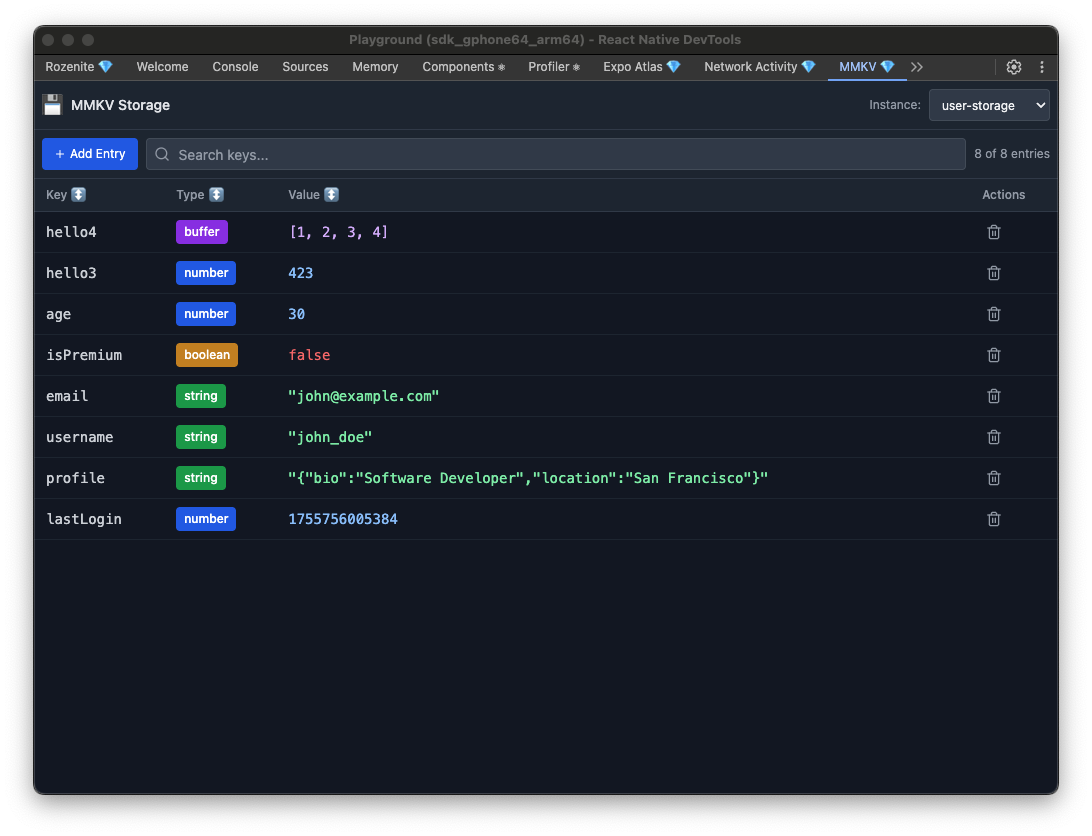
Features
- Real-time Storage Inspection: View all MMKV instances and their contents in real-time
- Multi-Instance Support: Manage and inspect multiple MMKV instances simultaneously
- Data Type Detection: Automatically detects and displays different data types (string, number, boolean, buffer)
- Search & Filter: Quickly find specific keys with real-time search functionality
- Visual Data Representation: Color-coded type indicators and formatted value display
- Blacklist Filtering: Filter out sensitive data or large binary blobs using regex patterns
Installation
Install the MMKV plugin as a dependency:
npm install @rozenite/mmkv-plugin
Note: This plugin requires react-native-mmkv as a peer dependency. Make sure you have it installed:
npm install react-native-mmkv
Quick Start
1. Install the Plugin
npm install @rozenite/mmkv-plugin react-native-mmkv
2. Integrate with Your App
Add the DevTools hook to your React Native app and provide your MMKV instances:
import { MMKV } from 'react-native-mmkv';
import { useMMKVDevTools } from '@rozenite/mmkv-plugin';
const userStorage = new MMKV({ id: 'user-storage' });
const appSettings = new MMKV({ id: 'app-settings' });
const cacheStorage = new MMKV({ id: 'cache-storage' });
function App() {
useMMKVDevTools({
storages: [userStorage, appSettings, cacheStorage],
});
return <YourApp />;
}
With blacklist filtering:
function App() {
useMMKVDevTools({
storages: [userStorage, appSettings, cacheStorage],
blacklist: /cache-storage:.*Binary.*|user-storage:sensitiveToken|.*:temp.*/,
});
return <YourApp />;
}
3. Access DevTools
Start your development server and open React Native DevTools. You'll find the "MMKV Storage" panel in the DevTools interface.
Important Note: You must explicitly provide all MMKV instances you want to inspect to the useMMKVDevTools hook. The plugin cannot automatically detect MMKV instances - only the storages you pass in the storages array will be available in the DevTools interface.
Blacklist Filtering
The MMKV plugin supports filtering out specific properties using regex patterns. This is useful for:
- Performance: Hide large binary blobs that slow down DevTools
- Security: Filter sensitive data like tokens, passwords, or personal information
- Development: Hide temporary or debug data
Blacklist Pattern Format
The blacklist parameter accepts a JavaScript RegExp object matched against {storageId}:{key} format:
useMMKVDevTools({
  storages: [userStorage, cacheStorage],
  blacklist: /cache-storage:.*Binary.*|user-storage:sensitiveToken|.*:temp.*/,
});
This RegExp will hide:
- Any key containing "Binary" in cache-storage (
cache-storage:.*Binary.*)
- The exact key "sensitiveToken" in user-storage (
user-storage:sensitiveToken)
- Any key containing "temp" in any storage (
.*:temp.*)
The | character is the regex OR operator to combine multiple patterns.
Usage
Once you've provided your MMKV instances to the plugin, it provides:
- Instance Selection: Choose which MMKV instance to inspect from a dropdown
- Key-Value Display: View all stored keys with their types and values
- Search Functionality: Filter entries by key name
- Type Indicators: Visual indicators for different data types (string, number, boolean, buffer)
- Real-time Updates: See changes to your MMKV storage as they happen
- Data Management: Add, edit, and delete entries directly from the DevTools interface
- Type-aware Editing: Input validation based on data types when editing entries
Made with ❤️ at Callstack
rozenite is an open source project and will always remain free to use. If you think it's cool, please star it 🌟.
Callstack is a group of React and React Native geeks, contact us at hello@callstack.com if you need any help with these or just want to say hi!
Like the project? ⚛️ Join the team who does amazing stuff for clients and drives React Native Open Source! 🔥





