


Research
Malicious fezbox npm Package Steals Browser Passwords from Cookies via Innovative QR Code Steganographic Technique
A malicious package uses a QR code as steganography in an innovative technique.
By Olivia Brown - Sep 22, 2025
@sentry/browser
Advanced tools
The @sentry/browser package is a JavaScript SDK for Sentry, which is an error tracking service that helps developers monitor and fix crashes in real time. The SDK hooks into the global error handling mechanisms of the browser and captures unhandled exceptions and other errors, providing rich context and insights into the underlying issues.
Error Tracking
This feature automatically captures JavaScript exceptions and sends them to Sentry for analysis and tracking. The code initializes Sentry with a DSN (Data Source Name) and sets up a global error handler to capture exceptions.
Sentry.init({ dsn: 'YOUR_DSN' });
window.onerror = function (errorMsg, url, lineNumber, column, errorObj) {
Sentry.captureException(errorObj);
return false;
}Manual Error Reporting
This allows developers to manually report exceptions or errors to Sentry. The code block demonstrates how to catch an error in a try-catch block and manually send it to Sentry using the captureException method.
Sentry.init({ dsn: 'YOUR_DSN' });

try {
  // Code that might fail
} catch (error) {
  Sentry.captureException(error);
}
Performance Monitoring
This feature enables performance monitoring by capturing transactions and spans. The code initializes Sentry with a sample rate for transactions and demonstrates how to start and finish a transaction, which can be used to measure the performance of operations.
Sentry.init({ dsn: 'YOUR_DSN', tracesSampleRate: 1.0 });

const transaction = Sentry.startTransaction({ name: 'test transaction' });
// ... some code ...
transaction.finish();
Breadcrumbs
Breadcrumbs are a trail of events that happened prior to an issue. This feature allows you to record breadcrumbs manually. The code shows how to add a breadcrumb for an authentication event.
Sentry.init({ dsn: 'YOUR_DSN' });

Sentry.addBreadcrumb({
  category: 'auth',
  message: 'User authenticated',
  level: Sentry.Severity.Info
});
User Feedback
This feature allows you to collect user feedback when an error occurs. The code initializes Sentry and then shows a dialog to the user to collect feedback for a specific event.
Sentry.init({ dsn: 'YOUR_DSN' });

Sentry.showReportDialog({ eventId: 'event_id' });Bugsnag provides similar error tracking and monitoring capabilities as Sentry. It offers real-time error reporting and can be used to monitor application stability. Bugsnag also provides features for error diagnostics and supports multiple platforms.
Raygun is another error monitoring service that offers crash reporting with detailed diagnostics. It supports real-time error tracking and performance monitoring, and it can be used to identify and diagnose software errors and performance issues.
Rollbar offers real-time error tracking and is similar to Sentry in its capabilities. It includes features like telemetry, person tracking, and version tracking. Rollbar provides a comprehensive dashboard for monitoring and analyzing errors.




To use this SDK, call Sentry.init(options) as early as possible after loading the page. This will initialize the SDK
and hook into the environment. Note that you can turn off almost all side effects using the respective options.
import * as Sentry from '@sentry/browser';

Sentry.init({
  dsn: '__DSN__',
  // ...
});
To set context information or send manual events, use the exported functions of @sentry/browser. Note that these
functions will not perform any action before you have called Sentry.init():
import * as Sentry from '@sentry/browser';

// Set user information, as well as tags and further extras
Sentry.setExtra('battery', 0.7);
Sentry.setTag('user_mode', 'admin');
Sentry.setUser({ id: '4711' });

// Add a breadcrumb for future events
Sentry.addBreadcrumb({
  message: 'My Breadcrumb',
  // ...
});

// Capture exceptions, messages or manual events
Sentry.captureMessage('Hello, world!');
Sentry.captureException(new Error('Good bye'));
Sentry.captureEvent({
  message: 'Manual',
  stacktrace: [
    // ...
  ],
});
10.10.0
propagateTraceparent SDK option (#17509)Adds support for a new browser SDK init option, propagateTraceparent for attaching a W3C compliant traceparent header to outgoing fetch and XHR requests, in addition to sentry-trace and baggage headers. More details can be found here.
Adds missing tool call attributes, we add gen_ai.response.tool_calls attribute for Anthropic AI, supporting both streaming and non-streaming requests.
Adds a new experimental flag _experimental.useRunAfterProductionCompileHook to withSentryConfig for automatic source maps uploads when building a Next.js app with next build --turbopack.
When set we:
FAQs
Official Sentry SDK for browsers
The npm package @sentry/browser receives a total of 7,169,606 weekly downloads. As such, @sentry/browser popularity was classified as popular.
We found that @sentry/browser demonstrated a healthy version release cadence and project activity because the last version was released less than a year ago. It has 10 open source maintainers collaborating on the project.
Did you know?

Socket for GitHub automatically highlights issues in each pull request and monitors the health of all your open source dependencies. Discover the contents of your packages and block harmful activity before you install or update your dependencies.
Research
A malicious package uses a QR code as steganography in an innovative technique.

Research
/Security News
Socket identified 80 fake candidates targeting engineering roles, including suspected North Korean operators, exposing the new reality of hiring as a security function.
Application Security
/Research
/Security News
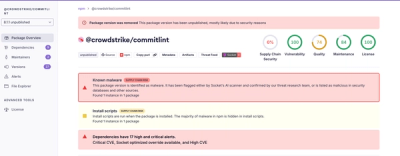
Socket detected multiple compromised CrowdStrike npm packages, continuing the "Shai-Hulud" supply chain attack that has now impacted nearly 500 packages.