





Security News
AI Agent Lands PRs in Major OSS Projects, Targets Maintainers via Cold Outreach
An AI agent is merging PRs into major OSS projects and cold-emailing maintainers to drum up more work.
By Sarah Gooding - Feb 14, 2026
@serenity-js/webdriverio
Advanced tools
Adapter that integrates @serenity-js/web with the latest stable version of WebdriverIO, enabling Serenity/JS reporting and using the Screenplay Pattern to write web and mobile test scenarios









Serenity/JS revolutionises automated testing by enabling your team to write expressive, maintainable tests that align with your unique domain. Seamlessly integrating with WebdriverIO and test runners like Mocha, Cucumber, and Jasmine, Serenity/JS also offers advanced reporting that provides clear insights into test results, helping both technical teams and business stakeholders understand the quality of the system under test.
Serenity/JS integrates with the WebdriverIO command line wizard to help you set up a new project with the required dependencies, configuration and example tests.
If you prefer to review a reference implementation first or use it as a starting point for your project, you can clone a Serenity/JS Project Template for your preferred test runner.
To use the WebdriverIO wizard to create a new project, run the following command in your computer terminal:
npm init wdio ./my-project
To create a Serenity/JS project, select the following options:
To create a Serenity/JS, WebdriverIO and Cucumber project, follow the tutorial:
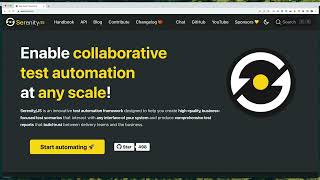
Assuming you've chosen Mocha with Serenity/JS and requested the wizard to generate example test files for you,
you'll find your first test file located at ./test/specs/example.spec.ts:
// ./test/specs/example.spec.ts
import { describe, it } from 'mocha'

import { Ensure, equals } from '@serenity-js/assertions'
import { actorCalled } from '@serenity-js/core'
import { By, Navigate, PageElement, Text } from '@serenity-js/web'

describe('Example', () => {

    it('interacts with a web page', async () => {

        await actorCalled('Alice').attemptsTo(
            Navigate.to('https://serenity-js.org'),
            Ensure.that(
                Text.of(PageElement.located(By.id('cta-start-automating'))),
                equals('Start automating 🚀')
            ),
        )
    })

    // ... other examples
})
You'll notice that the example test file uses:
@serenity-js/assertions - to make assertions about the state of the system under test@serenity-js/core - to create and manage actors@serenity-js/web - to interact with web pagesYou can learn more about these and other Serenity/JS modules in the Serenity/JS API documentation.
The configuration of your project is located in the wdio.conf.ts file. Check out the Serenity/JS WebdriverIO integration guide for more details.
To run your tests and generate Serenity/JS reports, execute the following command in your terminal:
npm run serenity
Your test results will be available in the target/site/serenity directory.
To view them, open the index.html file in your preferred web browser.
Contributions of all kinds are welcome! Get started with the Contributing Guide.
If you enjoy using Serenity/JS, make sure to star ⭐️ Serenity/JS on GitHub to help others discover the framework!
The Serenity/JS code base is licensed under the Apache-2.0 license, while its documentation and the Serenity/JS Handbook are licensed under the Creative Commons BY-NC-SA 4.0 International.
See the Serenity/JS License.
Support ongoing development through GitHub Sponsors. Sponsors gain access to Serenity/JS Playbooks and priority help in the Discussions Forum.
For corporate sponsorship or commercial support, please contact Jan Molak.
FAQs
Adapter that integrates @serenity-js/web with the latest stable version of WebdriverIO, enabling Serenity/JS reporting and using the Screenplay Pattern to write web and mobile test scenarios
The npm package @serenity-js/webdriverio receives a total of 1,947 weekly downloads. As such, @serenity-js/webdriverio popularity was classified as popular.
We found that @serenity-js/webdriverio demonstrated a healthy version release cadence and project activity because the last version was released less than a year ago. It has 1 open source maintainer collaborating on the project.
Did you know?

Socket for GitHub automatically highlights issues in each pull request and monitors the health of all your open source dependencies. Discover the contents of your packages and block harmful activity before you install or update your dependencies.
Security News
An AI agent is merging PRs into major OSS projects and cold-emailing maintainers to drum up more work.

Research
/Security News
Chrome extension CL Suite by @CLMasters neutralizes 2FA for Facebook and Meta Business accounts while exfiltrating Business Manager contact and analytics data.

Security News
After Matplotlib rejected an AI-written PR, the agent fired back with a blog post, igniting debate over AI contributions and maintainer burden.