@snytch/nextjs






Bundle scanning, secret detection, and environment exposure analysis for Next.js applications. Detect leaked API keys, tokens, and credentials in your client bundles and .env files before they reach production.
Next.js secret scanning: how API keys and secrets leak into client bundles
Next.js makes it easy to accidentally expose secrets to the browser in two distinct ways. First, any variable prefixed with NEXT_PUBLIC_ is embedded into the client bundle at build time and sent to every visitor, even if the value is a secret key that was never meant to leave the server. Second, a server-only variable without the prefix can still end up in a client bundle if it's imported by a shared module, a utility function, or a component that renders on both server and client. By the time either problem reaches production, the value is in every visitor's browser, your build artifacts, your CDN cache, and potentially your git history.
The scale of this problem is larger than most teams realize. According to GitGuardian's 2026 State of Secrets Sprawl Report, 28.6 million secrets were added to public GitHub commits in 2025 alone, a 34% year-over-year increase. 64% of valid secrets leaked in 2022 had still not been revoked by 2026.
@snytch/nextjs is a Next.js secret scanner that scans your compiled bundle, checks your .env files, and compares your environments to catch these issues before they reach production. It fits into DevSecOps pipelines and helps teams meet compliance requirements (SOC 2, OWASP) around credential management.
Requirements
- Node.js 18 or later
- A Next.js project with an existing build (
.next/ directory) for snytch scan
Installation
@snytch/nextjs works best on established Next.js projects that already have a build in place. Run npm run build first to generate the .next directory, then install and scan.
npm install -D @snytch/nextjs
Then add these scripts to your package.json:
"scripts": {
  "snytch": "snytch all",
  "snytch:scan": "snytch scan",
  "snytch:check": "snytch check",
  "snytch:diff": "snytch diff"
}
Now you can run npm run snytch to scan, check, and diff in one shot, or run each command individually.
Optionally, create a snytch.config.json file in your project root to customize behavior: set server-only variable names, default diff files, suppression rules, and more.
And the AI RCA will require a key. See AI Root Cause Analysis for setup.
Commands
snytch scan
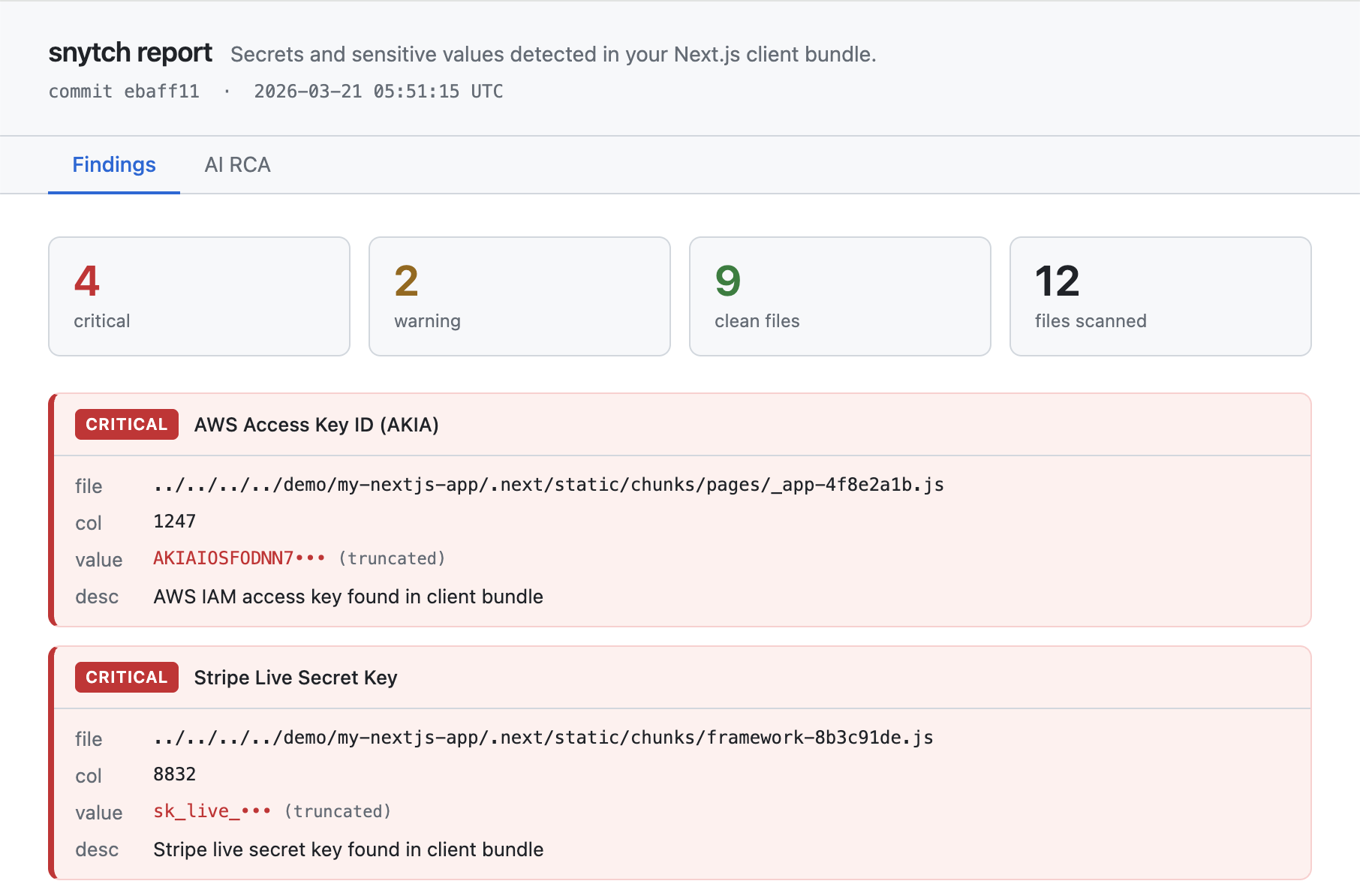
Detect leaked API keys, secrets, and credentials in compiled Next.js bundles.
snytch scan
snytch scan --report --fail-on critical
snytch scan --dir ./apps/web/.next
snytch scan flags
--dir | ./.next | Path to the .next directory |
--json | off | Output results as JSON |
--report | off | Generate an HTML report at ./snytch-reports/snytch-report.html |
--graph | off | Scan the module dependency graph for server-only modules reachable from client entry points. Requires a production build with .next/trace. |
--fail-on | critical | Exit code threshold: critical, warning, or all |
--ai-provider | anthropic | AI RCA provider: anthropic (requires ANTHROPIC_API_KEY) or openai (requires OPENAI_API_KEY) or none. See AI Root Cause Analysis for key setup. |
snytch check
Audit .env files for NEXT_PUBLIC_ variables that expose secrets to the client. Any variable prefixed with NEXT_PUBLIC_ is embedded into the client bundle at build time and sent to every browser that loads your app. This command flags values that match known secret patterns or look high-entropy enough to be credentials.
snytch check
snytch check --env .env.local --env .env.production
snytch check --env .env.local --report
snytch check flags
--env | auto-detected | Path to a .env file. Repeat for multiple files. |
--json | off | Output results as JSON |
--report | off | Generate an HTML report at ./snytch-reports/snytch-check-report.html |
--fail-on | critical | Exit code threshold: critical, warning, or all |
snytch diff
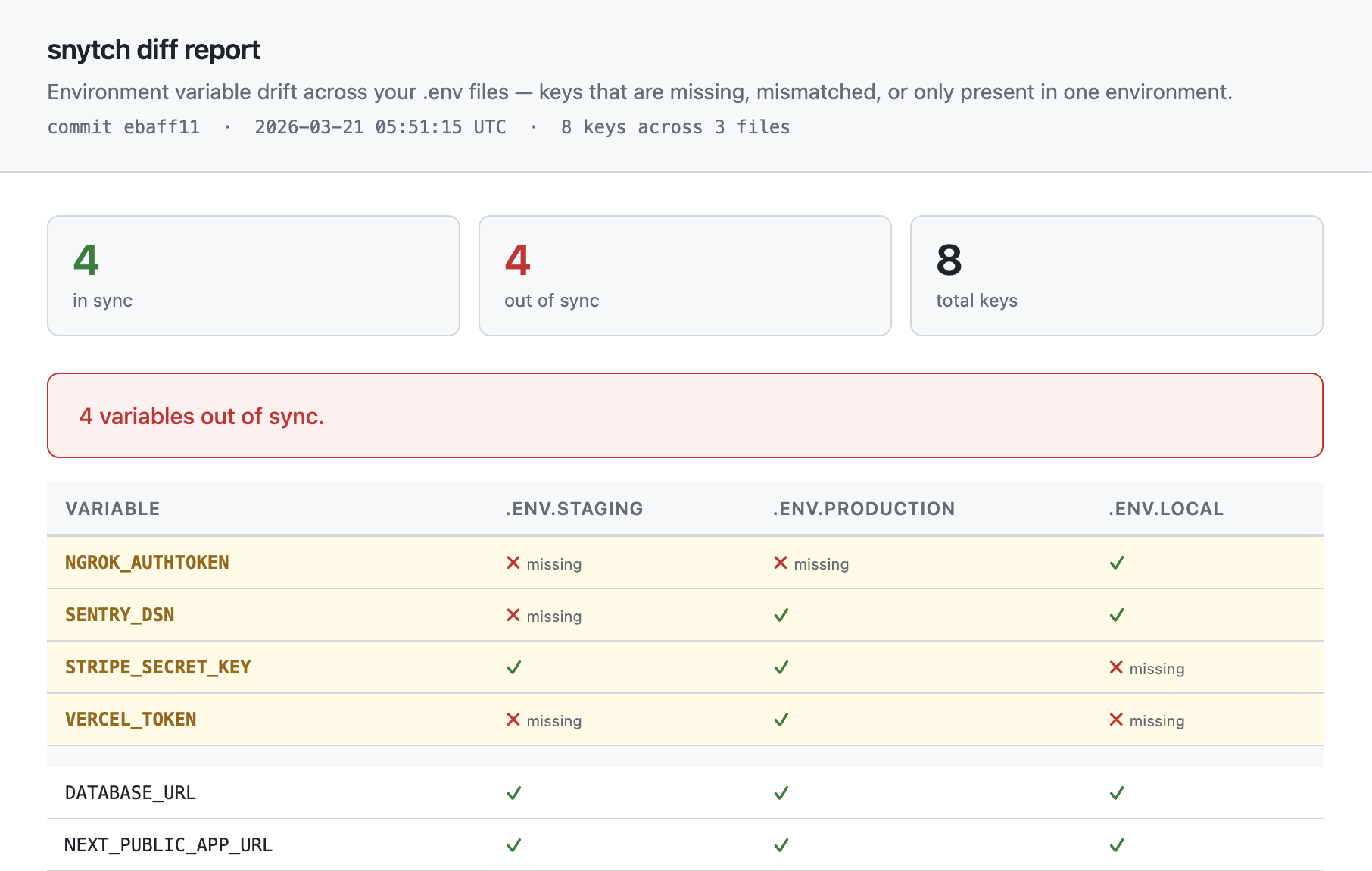
Detect environment variable drift across two or more .env files to prevent production outages caused by missing variables. A developer adds a key to .env.local, the PR merges, and production breaks because nobody added the key there. diff catches that gap before deploy.
It only compares key names, never values. It tells you what is missing, not what the values are. This is primarily a CI/CD tool: locally you typically only have one env file, but in a pipeline you can materialize multiple files from secrets and compare them.
Key matching supports aliased and environment-specific naming conventions via diffAliases in snytch.config.json. If your dev environment uses STRIPE_SECRET_KEY_TEST and production uses STRIPE_SECRET_KEY, you can tell snytch they are the same logical variable. See Configuration for details.
snytch diff --env .env.staging --env .env.production
snytch diff --env .env.staging --env .env.production --env .env.local
snytch diff --env .env.staging --env .env.production --report --strict
If you set diffFiles in snytch.config.json, you can skip the --env flags entirely:
snytch diff
snytch diff flags
CLI --env flags always take priority over the config when both are present.
--env | diffFiles from config | Path to a .env file. Repeat for multiple files. Falls back to diffFiles in snytch.config.json when omitted. At least two files are required (from flags, config, or both). |
--json | off | Output results as JSON |
--report | off | Generate an HTML report at ./snytch-reports/snytch-diff-report.html |
--strict | off | Exit 1 for any drift, not just serverOnly keys |
snytch mcp
Start the snytch MCP server so you can run scans directly from inside your AI editor (Cursor, Windsurf, or Claude Desktop). You don't run this command directly. Your editor launches it automatically based on a small config file you add to your project or home directory.
Once configured, you can ask your assistant things like "scan my bundle for leaked secrets" or "check my .env files for exposed API keys" and get structured results back inline.
To set it up, add this to .cursor/mcp.json in your project root (Cursor) or the equivalent config file for your editor:
{
  "mcpServers": {
    "snytch": {
      "command": "npx",
      "args": ["-y", "@snytch/nextjs", "mcp"]
    }
  }
}
See MCP Server for Cursor, Windsurf, and Claude Desktop below for full setup instructions for each editor, available tools, and schema details.
snytch demo
Runs a fully synthetic end-to-end demonstration of all three commands (scan, check, and diff) using fake findings that cover the full range of severity levels and pattern types. Output is identical to a real run: the same formatters, the same exit code (1), and real HTML reports written to disk.
snytch demo
Three report files are generated in your current directory:
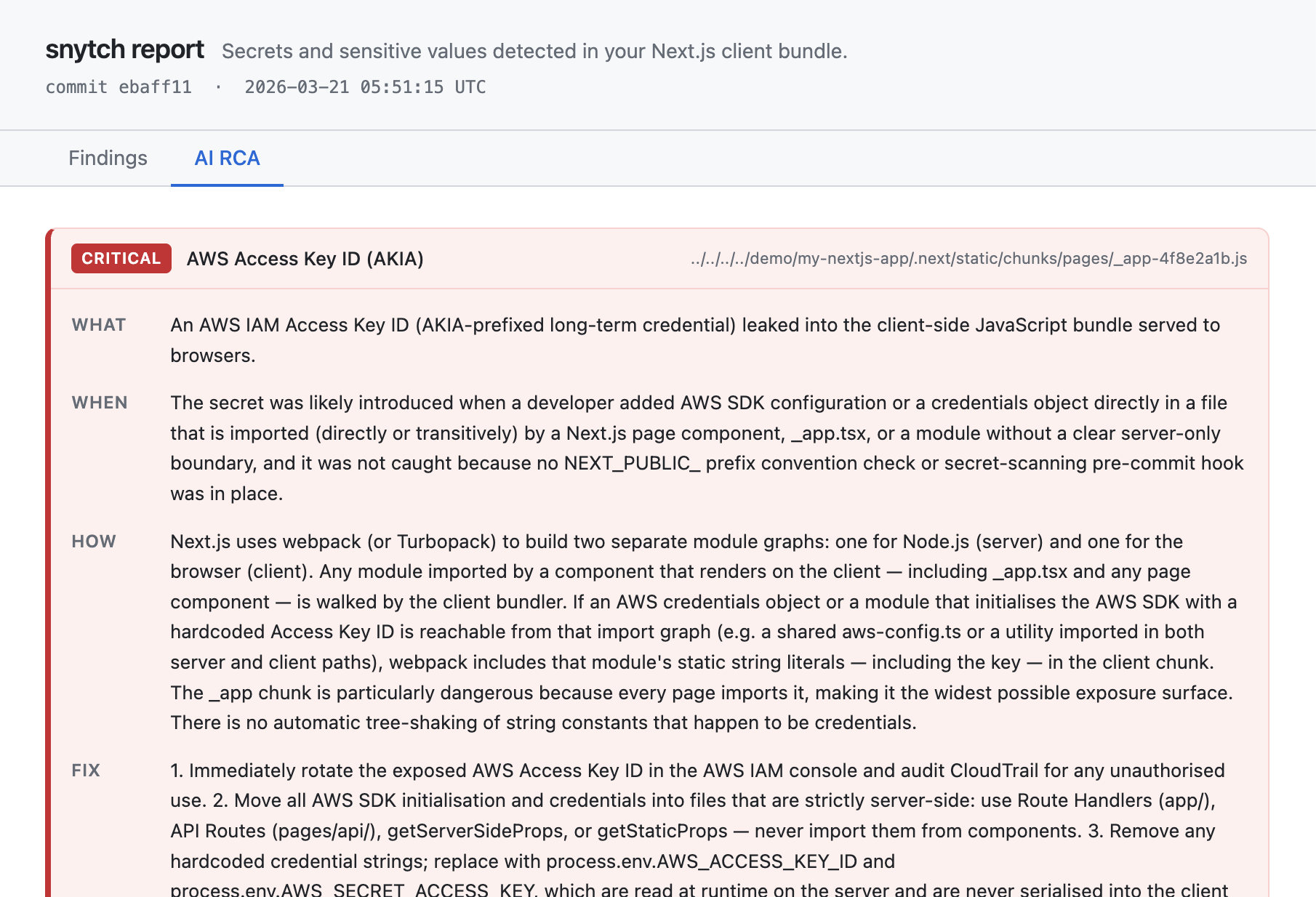
snytch-reports/snytch-report.html | Bundle scan findings with Findings, AI RCA, and Suppressions tabs |
snytch-reports/snytch-check-report.html | NEXT_PUBLIC_ exposure findings |
snytch-reports/snytch-diff-report.html | Environment variable drift across .env files |
[!TIP]
Add this to your .gitignore to avoid committing the reports directory:
snytch-reports/
To see the AI RCA tab populated with real analysis, set an API key before running:
ANTHROPIC_API_KEY=sk-ant-... snytch demo
OPENAI_API_KEY=sk-... snytch demo --ai-provider openai
You will be prompted to delete the generated report files when the demo completes.
snytch all
Runs scan, check, and diff sequentially in a single invocation. Each sub-command is isolated: if one fails, the others still run. Errors are collected and reported at the end.
snytch all [--dir ./.next] [--json] [--report] [--fail-on critical|warning|all] [--ai-provider anthropic|openai|none] [--graph] [--env .env.staging --env .env.production] [--strict]
diff runs when two or more env files are available, either from --env flags or from diffFiles in snytch.config.json.- Exit code is
1 if any sub-command errors or produces findings at the configured --fail-on threshold.
- All other flags (
--json, --report, --graph, --strict, --ai-provider, --dir) work the same as in individual commands.
The matching npm script is:
npm run snytch
Features
This secret scanner covers six surfaces per build:
.next/static/chunks: client-side JavaScript and CSS bundles.next/static/chunks/*.js.map: source maps containing pre-minification source code.next/server/pages: __NEXT_DATA__ blocks embedded in HTML responsesnext.config.js env block: values injected into all bundles at build time.next/server/middleware.js: compiled edge middleware.next/trace module dependency graph (opt-in via --graph): structural import chain analysis- Detects 240+ secret patterns including:
- AWS access keys, session tokens, and resource ARNs
- Stripe, Square, PayPal, Braintree, Coinbase, Razorpay, Adyen, Lemon Squeezy, Paddle, and Recurly keys
- Database connection strings (PostgreSQL, MySQL, MongoDB, Redis, Elasticsearch, Neon, Turso, and more)
- GitHub, GitLab, and Bitbucket tokens (classic and fine-grained)
- Slack, Discord, Twilio, SendGrid, Mailgun, Postmark, Pusher, Ably, and OneSignal tokens
- Notification platforms (Knock, Novu, Customer.io, Svix)
- Private keys and certificates (RSA, EC, DSA, OpenSSH, PGP, PKCS#12/PFX)
- Secret management (Doppler, 1Password, Infisical, HashiCorp Vault, Age encryption)
- JWT tokens, OAuth tokens, and high-entropy bearer tokens
- Cloud provider keys (Google Cloud, Azure, Firebase, Cloudflare, DigitalOcean, Vercel, Heroku)
- CI/CD and deployment platforms (CircleCI, Travis CI, Buildkite, Railway, Render, Fly.io, Pulumi)
- AI and ML API keys (OpenAI, Anthropic, Cohere, Hugging Face, Replicate, Pinecone, Mistral, Groq, Perplexity, Together AI, Fireworks AI, Stability AI, ElevenLabs, Deepgram, AssemblyAI)
- Auth providers (Clerk, Supabase, Auth0, Okta)
- Serverless data platforms (Upstash, Convex)
- Monitoring and observability (Datadog, New Relic, Sentry, Splunk, Grafana)
- High-entropy string heuristics for unknown secret formats
- Config-level suppression rules with required justification and optional expiry dates
- AI root cause analysis via Claude (Anthropic) or GPT-4o (OpenAI) when
--report is set
- Git provenance for each finding (source file + introducing commit)
- HTML report with Findings, AI RCA, and Suppressions tabs
- MCP server for editor integration (Cursor, Windsurf, Claude Desktop)
AI Root Cause Analysis
When --report is set, snytch can use Claude (Anthropic) or GPT-4o (OpenAI) to generate a root cause analysis for each finding: what leaked, how it ended up in the bundle, and how to fix it.
RCA is opt-in. No API calls are made and no tokens are consumed unless you explicitly enable it in your config.
Setup
Step 1: Enable RCA in your config
{
  "rca": {
    "enabled": true,
    "provider": "anthropic"
  }
}
Step 2: Add your API key
Add your key to .env.local in your project root:
ANTHROPIC_API_KEY=sk-ant-...
Or for OpenAI:
OPENAI_API_KEY=sk-...
Snytch reads ANTHROPIC_API_KEY and OPENAI_API_KEY from .env and .env.local automatically. If the key is already set in your shell environment, the shell value takes priority.
You can also pass the key inline for one-off runs:
ANTHROPIC_API_KEY=sk-ant-... snytch scan --report
Step 3: Run a scan with --report
snytch scan --report
snytch scan --report --ai-provider openai
If rca.enabled is not set to true, the --report flag still generates the HTML report but skips the AI analysis section. If rca.enabled is true but no API key is found, RCA is skipped and everything else runs normally.
[!TIP]
Make sure .env.local is in your .gitignore so your API key is never committed.
MCP Server for Cursor, Windsurf, and Claude Desktop
@snytch/nextjs includes an MCP server so you can run secret scans directly from inside Cursor, Windsurf, or Claude Desktop without touching a terminal.
Once configured, you can ask your AI assistant things like:
- "Scan my bundle for leaked secrets"
- "Check my .env files for exposed API keys"
- "Are my staging and production env files in sync?"
The assistant gets structured results back and can propose fixes inline, in the files where the problem lives. Secret values are never transmitted through the MCP layer - only truncated values are passed to the AI.
Tools
snytch_scan | Scan the Next.js bundle for leaked secrets in client-side JS |
snytch_check | Check .env files for dangerous NEXT_PUBLIC_ prefix usage |
snytch_diff | Compare environment variable key presence across .env files |
Tool schemas
snytch_scan
// Input
{ "dir": "./.next" }   // optional, defaults to <cwd>/.next

// Output
{
  "findings": [...],   // truncated values only, rca omitted
  "summary": { "scannedFiles": 12, "total": 2, "critical": 1, "warning": 1, "durationMs": 80 }
}
snytch_check
// Input
{ "envFiles": [".env.local", ".env.production"] }  // optional, auto-detects from cwd

// Output
{
  "findings": [...],
  "summary": { "scannedFiles": 2, "total": 1, "critical": 1, "warning": 0, "durationMs": 5 }
}
snytch_diff
// Input
{ "envFiles": [".env.staging", ".env.production"] }  // required, minimum 2 files

// Output (key names only, values are never read into output)
{
  "inSync":    ["DATABASE_URL", "REDIS_URL"],
  "drift":     [{ "key": "API_KEY", "presentIn": [".env.staging"], "missingFrom": [".env.production"] }],
  "onlyInOne": [{ "key": "DEV_FLAG", "file": ".env.staging" }]
}
Editor setup
The MCP server runs in the directory where your editor is opened, so it automatically picks up the correct .next directory and .env files for your project. No path configuration needed.
Cursor
- Open (or create)
.cursor/mcp.json in your project root.
- Add the following:
{
  "mcpServers": {
    "snytch": {
      "command": "npx",
      "args": ["-y", "@snytch/nextjs", "mcp"]
    }
  }
}
- Open the Cursor Settings panel, go to MCP, and confirm
snytch appears with a green status indicator.
- Open a chat and try: "Use snytch to scan my bundle for leaked secrets."
Windsurf
- Open
~/.codeium/windsurf/mcp_config.json (create it if it doesn't exist).
- Add the following:
{
  "mcpServers": {
    "snytch": {
      "command": "npx",
      "args": ["-y", "@snytch/nextjs", "mcp"]
    }
  }
}
- Open the Windsurf MCP panel and click Refresh to pick up the new server.
- Open a Cascade chat and try: "Check my .env files for exposed API keys."
Claude Desktop
{
  "mcpServers": {
    "snytch": {
      "command": "npx",
      "args": ["-y", "@snytch/nextjs", "mcp"]
    }
  }
}
- Quit and relaunch Claude Desktop.
- Click the tools icon in the chat input to confirm
snytch_scan, snytch_check, and snytch_diff are listed.
- Try: "Scan my Next.js bundle for secrets."
Configuration
Create snytch.config.json in your project root to customize snytch's behavior.
{
  "serverOnly": ["DATABASE_URL", "STRIPE_SECRET_KEY", "NEXTAUTH_SECRET"],
  "diffFiles": [".env.local", ".env.production"],
  "diffAliases": [
    ["STRIPE_SECRET_KEY", "STRIPE_SECRET_KEY_TEST"],
    ["DATABASE_URL", "DEV_DB_URL"]
  ],
  "failOn": "critical",
  "rca": {
    "enabled": true,
    "provider": "anthropic",
    "maxTokens": 2048
  },
  "suppress": [
    {
      "pattern": "JWT Token",
      "reason": "Internal session token, not a credential. Reviewed 2026-03-21",
      "addedBy": "@alice",
      "until": "2026-06-01"
    },
    {
      "pattern": "JWT Token",
      "filePath": "chunks/auth",
      "reason": "Auth module session token, confirmed safe. Other JWT findings remain active.",
      "addedBy": "@bob"
    }
  ]
}
serverOnly | string[] | Variable names that must never be exposed to the client |
diffFiles | string[] | Default env files for snytch diff. When set, diff and all use these files automatically without --env flags. CLI flags override this when provided. |
diffAliases | string[][] | Alias groups for diff key matching. Each inner array lists key names that should be treated as the same logical variable. The first name in each group is the canonical name used in reports. Example: [['STRIPE_SECRET_KEY', 'STRIPE_SECRET_KEY_TEST']]. |
failOn | 'critical' | 'warning' | 'all' | Default exit code threshold for all commands |
rca.enabled | boolean | Set to true to enable AI root cause analysis. When omitted or false, no API calls are made and no tokens are consumed, even if an API key is present. |
rca.provider | 'anthropic' | 'openai' | AI provider for RCA. Defaults to 'anthropic'. Can be overridden per-run with --ai-provider. |
rca.maxTokens | number | Max tokens for AI RCA responses (default: 2048). Increase if responses are being truncated. |
suppress | SuppressRule[] | Rules to silence known-safe findings. See Suppression rules below. |
When serverOnly is set:
snytch check will flag any listed key that appears under NEXT_PUBLIC_snytch diff will exit 1 in non-strict mode if a serverOnly key has driftedsnytch scan will detect literal values of these variables in the bundle
Suppression rules
Each entry in the suppress array supports the following options:
reason | yes | Why this finding is being suppressed. Shown in the report and terminal output. |
pattern | no | Substring match against the finding's pattern name. Omit to match all patterns. |
filePath | no | Substring match against the finding's file path. Use this to suppress a finding in one specific file rather than everywhere. Omit to match all files. |
surface | no | Limit to a specific scan surface: pattern-match, next-data, config-env, middleware-secret, sourcemap-secret. |
addedBy | no | The person who added this rule: a name, username, or email. Shown in the report so others know who to ask about it. |
until | no | ISO-8601 expiry date ("YYYY-MM-DD"). The rule stops suppressing findings on this date and appears as a warning in the report and terminal output. |
All options are AND-matched: a rule with both pattern and filePath only suppresses findings that match both. This lets you target a specific finding in a specific file without suppressing every instance across the project.
Rules with an expired until date are never silently dropped. They surface as warnings so your team knows to remove or extend them.
GitHub Actions and CI/CD secret scanning
Add secret scanning to your GitHub Actions workflow (or any CI/CD pipeline) to fail builds when leaked credentials are detected. The scan command exits with code 1 when findings at or above the specified severity are found, so it works as a pipeline gate without any extra configuration.
- name: Build
  run: npm run build

- name: Scan bundle for secrets
  run: npx @snytch/nextjs scan --fail-on critical

- name: Check NEXT_PUBLIC_ variables
  run: npx @snytch/nextjs check --fail-on critical
To also check environment drift across your .env files, add:
- name: Diff env files
  run: npx @snytch/nextjs diff --env .env.staging --env .env.production
If you have diffFiles set in snytch.config.json, you can simplify this to:
- name: Diff env files
  run: npx @snytch/nextjs diff
[!WARNING]
The diff step requires your .env files to be present in the CI environment. Never commit .env files to the repo. Write them from CI secrets before this step runs:
- name: Write env files from secrets
  run: |
    echo "${{ secrets.ENV_STAGING }}" > .env.staging
    echo "${{ secrets.ENV_PRODUCTION }}" > .env.production
License
MIT





