Security News
gem.coop Tests Dependency Cooldowns as Package Ecosystems Move to Slow Down Attacks
gem.coop is testing registry-level dependency cooldowns to limit exposure during the brief window when malicious gems are most likely to spread.
@storybook/addon-a11y
Advanced tools
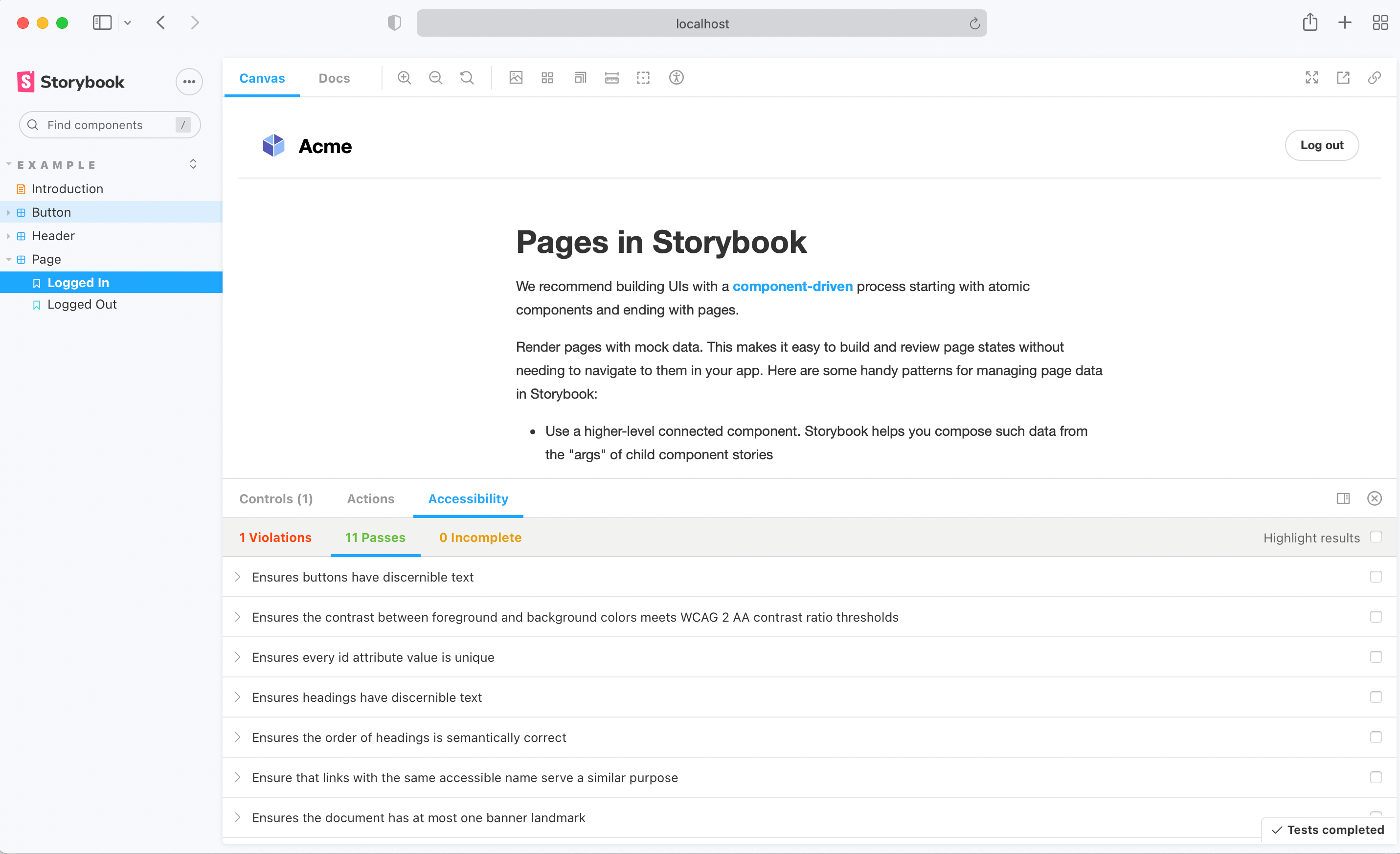
This Storybook addon can be helpful to make your UI components more accessible.

First, install the addon.
$ yarn add @storybook/addon-a11y --dev
Add this line to your main.js file (create this file inside your Storybook config directory if needed).
export default {
addons: ['@storybook/addon-a11y'],
};
And here's a sample story file to test the addon:
import React from 'react';
export default {
title: 'button',
};
export const Accessible = () => <button>Accessible button</button>;
export const Inaccessible = () => (
<button style={{ backgroundColor: 'red', color: 'darkRed' }}>Inaccessible button</button>
);
When Axe reports accessibility violations in stories, there are multiple ways to handle these failures depending on your needs.
At the Story level, override rules using parameters.a11y.config.rules.
export const InputWithoutAutofill = () => <input type="text" autocomplete="nope" />;
InputWithoutAutofill.parameters = {
a11y: {
// Avoid doing this, as it will fully disable all accessibility checks for this story.
disable: true,
// Instead, override rules 👇
// axe-core configurationOptions (https://github.com/dequelabs/axe-core/blob/develop/doc/API.md#parameters-1)
config: {
rules: [
{
// You can exclude some elements from failing a specific rule:
id: 'autocomplete-valid',
selector: '*:not([autocomplete="nope"])',
},
{
// You can also signify that a violation will need to be fixed in the future
// by overriding the result of a rule to return "Needs Review"
// rather than "Violation" if the rule fails:
id: 'landmark-complementary-is-top-level',
reviewOnFail: true,
},
],
},
},
};
Alternatively, you can disable specific rules in a Story:
export const Inaccessible = () => (
<button style={{ backgroundColor: 'red', color: 'darkRed' }}>Inaccessible button</button>
);
Inaccessible.parameters = {
a11y: {
config: {
rules: [{ id: 'color-contrast', enabled: false }],
},
},
};
Tip: clearly explain in a comment why a rule was overridden, it’ll help you and your team trace back why certain violations aren’t being reported or need to be addressed. For example:
MyStory.parameters = {
a11y: {
config: {
rules: [
{
// Allow `autocomplete="nope"` on form elements,
// a workaround to disable autofill in Chrome.
// @link https://bugs.chromium.org/p/chromium/issues/detail?id=468153
id: 'autocomplete-valid',
selector: '*:not([autocomplete="nope"])',
},
{
// @fixme Color contrast of subdued text fails, as raised in issue #123.
id: 'color-contrast',
reviewOnFail: true,
},
],
},
},
};
When you want to ignore an accessibility rule or change its settings across all stories, set parameters.a11y.config.rules in your Storybook’s preview.ts file. This can be particularly useful for ignoring false positives commonly reported by Axe.
// .storybook/preview.ts
export const parameters = {
a11y: {
config: {
rules: [
{
// This tells Axe to run the 'autocomplete-valid' rule on selectors
// that match '*:not([autocomplete="nope"])' (all elements except [autocomplete="nope"]).
// This is the safest way of ignoring a violation across all stories,
// as Axe will only ignore very specific elements and keep reporting
// violations on other elements of this rule.
id: 'autocomplete-valid',
selector: '*:not([autocomplete="nope"])',
},
{
// To disable a rule across all stories, set `enabled` to `false`.
// Use with caution: all violations of this rule will be ignored!
id: 'autocomplete-valid',
enabled: false,
},
],
},
},
};
If you wish to entirely disable a11y checks for a subset of stories, you can control this with story parameters:
export const MyNonCheckedStory = () => <SomeComponent />;
MyNonCheckedStory.parameters = {
// Avoid doing this, as it fully disables all accessibility checks for this story,
// and consider the techniques described above.
a11y: { disable: true },
};
For more customizability use parameters to configure aXe options. You can override these options at story level too.
import React from 'react';
import { storiesOf, addDecorator, addParameters } from '@storybook/react';
export default {
title: 'button',
parameters: {
a11y: {
// optional selector which element to inspect
element: '#storybook-root',
// axe-core configurationOptions (https://github.com/dequelabs/axe-core/blob/develop/doc/API.md#parameters-1)
config: {},
// axe-core optionsParameter (https://github.com/dequelabs/axe-core/blob/develop/doc/API.md#options-parameter)
options: {},
// optional flag to prevent the automatic check
manual: true,
},
},
};
export const accessible = () => <button>Accessible button</button>;
export const inaccessible = () => (
<button style={{ backgroundColor: 'red', color: 'darkRed' }}>Inaccessible button</button>
);
The test runner does not apply any rules that you have set on your stories by default. You can configure the runner to correctly apply the rules by following the guide on the Storybook docs.
A core library for accessibility testing used by many tools and services, including @storybook/addon-a11y. It can be integrated directly into testing workflows or used as part of other tools.
An ESLint plugin that enforces accessibility rules in JSX elements. Unlike @storybook/addon-a11y, which is used within Storybook, this plugin integrates with the ESLint static code analysis tool to catch accessibility issues during code linting.
A library that can be used in React applications to audit accessibility in real-time during development. It also uses axe-core under the hood but is used directly in the app rather than in Storybook.
An automated accessibility testing tool that runs in the command line or as part of your build process. It provides a different approach to accessibility testing compared to the Storybook addon, as it can be used for testing entire pages and is not specific to a component development environment.
FAQs
Storybook Addon A11y: Test UI component compliance with WCAG web accessibility standards
The npm package @storybook/addon-a11y receives a total of 3,834,810 weekly downloads. As such, @storybook/addon-a11y popularity was classified as popular.
We found that @storybook/addon-a11y demonstrated a healthy version release cadence and project activity because the last version was released less than a year ago. It has 12 open source maintainers collaborating on the project.
Did you know?

Socket for GitHub automatically highlights issues in each pull request and monitors the health of all your open source dependencies. Discover the contents of your packages and block harmful activity before you install or update your dependencies.

Security News
gem.coop is testing registry-level dependency cooldowns to limit exposure during the brief window when malicious gems are most likely to spread.

Security News
Following multiple malicious extension incidents, Open VSX outlines new safeguards designed to catch risky uploads earlier.

Research
/Security News
Threat actors compromised four oorzc Open VSX extensions with more than 22,000 downloads, pushing malicious versions that install a staged loader, evade Russian-locale systems, pull C2 from Solana memos, and steal macOS credentials and wallets.