


Security News
AI Agent Lands PRs in Major OSS Projects, Targets Maintainers via Cold Outreach
An AI agent is merging PRs into major OSS projects and cold-emailing maintainers to drum up more work.
By Sarah Gooding - Feb 14, 2026
@storybook/addon-interactions
Advanced tools
Storybook Addon Interactions enables visual debugging of interactions and tests in Storybook.
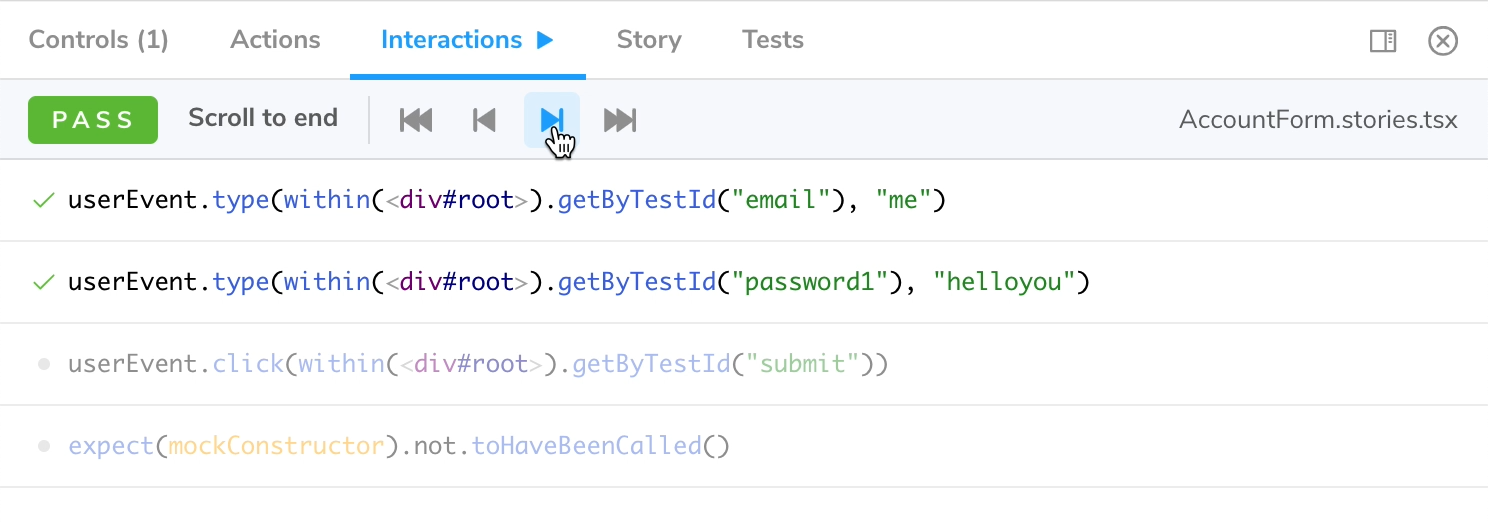
Install this addon by adding the @storybook/addon-interactions dependency:
yarn add -D @storybook/addon-interactions @storybook/jest @storybook/testing-library
within .storybook/main.js:
export default {
  addons: ['@storybook/addon-interactions'],
};
Note that @storybook/addon-interactions must be listed after @storybook/addon-actions or @storybook/addon-essentials.
Interactions relies on "instrumented" versions of Jest and Testing Library, that you import from @storybook/jest and
@storybook/testing-library instead of their original package. You can then use these libraries in your play function.
import { Button } from './Button';
import { expect } from '@storybook/jest';
import { within, userEvent } from '@storybook/testing-library';

export default {
  title: 'Button',
  component: Button,
  argTypes: {
    onClick: { action: true },
  },
};

const Template = (args) => <Button {...args} />;

export const Demo = Template.bind({});
Demo.play = async ({ args, canvasElement }) => {
  const canvas = within(canvasElement);
  await userEvent.click(canvas.getByRole('button'));
  await expect(args.onClick).toHaveBeenCalled();
};
In order to enable step-through debugging, calls to userEvent.*, fireEvent, findBy*, waitFor* and expect have to
be await-ed. While debugging, these functions return a Promise that won't resolve until you continue to the next step.
While you can technically use screen, it's recommended to use within(canvasElement). Besides giving you a better error
message when a DOM element can't be found, it will also ensure your play function is compatible with Storybook Docs.
Any args that are marked as an action (typically via argTypes or argTypesRegex) will be automatically wrapped in
a Jest mock function so you can assert invocations. See
addon-actions for how to setup actions.
The @storybook/addon-actions package allows developers to log actions as users interact with UI components in Storybook. It is similar to @storybook/addon-interactions in that it helps with testing user interactions, but it focuses more on logging the actions rather than simulating and debugging them.
The @storybook/addon-controls package provides a way to dynamically edit props of your components in Storybook. While it does not directly deal with user interactions like @storybook/addon-interactions, it complements the interaction testing by allowing real-time tweaking of component props.
The @storybook/testing-library package offers utilities to test Storybook stories with the Testing Library. It is used in conjunction with @storybook/addon-interactions to simulate user events and assertions, but it can also be used independently for writing tests that mimic user behavior.
FAQs
Automate, test and debug user interactions
The npm package @storybook/addon-interactions receives a total of 2,897,846 weekly downloads. As such, @storybook/addon-interactions popularity was classified as popular.
We found that @storybook/addon-interactions demonstrated a healthy version release cadence and project activity because the last version was released less than a year ago. It has 12 open source maintainers collaborating on the project.
Did you know?

Socket for GitHub automatically highlights issues in each pull request and monitors the health of all your open source dependencies. Discover the contents of your packages and block harmful activity before you install or update your dependencies.
Security News
An AI agent is merging PRs into major OSS projects and cold-emailing maintainers to drum up more work.

Research
/Security News
Chrome extension CL Suite by @CLMasters neutralizes 2FA for Facebook and Meta Business accounts while exfiltrating Business Manager contact and analytics data.

Security News
After Matplotlib rejected an AI-written PR, the agent fired back with a blog post, igniting debate over AI contributions and maintainer burden.