


Security News
Crates.io Users Targeted by Phishing Emails
The Rust Security Response WG is warning of phishing emails from rustfoundation.dev targeting crates.io users.
By Sarah Gooding - Sep 12, 2025
@strattadb/environment
Advanced tools





Environment variable configuration for Node.js made easy.
A lot of applications need to ensure that some environment variables are
set from the beginning, and checking if the value in process.env is undefined
every time is needed gets tedious very fast.
environment allows applications to ensure required env variables are set and are valid according
to your definition of valid. See how to use it.
makeEnv(schema: Schema, processEnv?: { [key: string]: string | undefined }): Envparsers.string(value: string): stringparsers.boolean(value: string): booleanparsers.integer(value: string): numberparsers.float(value: string): numberparsers.email(value: string): stringparsers.url(value: string): stringparsers.ipAddress(value: string): stringparsers.port(value: string): numberparsers.whitelist(whitelistedValues: string[]): Parser<string>parsers.regex(pattern: Regex): Parser<string>parsers.array<T>({ parser: Parser<T>, separator?: string }): Parser<T>parsers.positiveInteger(value: string): numberparsers.nonPositiveInteger(value: string): numberparsers.negativeInteger(value: string): numberparsers.nonNegativeInteger(value: string): numberWith Yarn:
yarn add @strattadb/environment
or with npm:
npm install @strattadb/environment
An example env.js file:
// env.js

import { makeEnv, parsers } from '@strattadb/environment';

const env = makeEnv({
  nodeEnv: {
    parser: parsers.whitelist(['production', 'development', 'test']),
    required: true,
    envVarName: 'NODE_ENV',
  },
  port: {
    parser: parsers.port,
    required: false,
    defaultValue: 4000,
    envVarName: 'PORT',
  },
});

export default env;
Now in a file:
// otherFile.js

import env from './env';

console.log(env.nodeEnv); // development
console.log(typeof env.nodeEnv); // string

console.log(env.port); // 4000
console.log(typeof env.port); // number
makeEnv(schema: Schema, processEnv?: { [key: string]: string | undefined }): EnvEnsures required env variables are present and returns an env object.
Supports passing a processEnv object as the second argument.
If it's not passed, it uses process.env.
This object will be used to look up the environment variables.
Schema:
object - The key will be accessible
in the returning env object.
function - A function that takes a string and can return anything.
The return value will be accesible in env[key].
If the argument is not valid, it should throw.boolean - Whether or not the env variable is required.
If the value true and the env variable is not set, it'll throw.
If the value is false it'll look for the env variable in process.env,
if isn't set, it'll use defaultValue.any? - Only valid if required: false.
This is the default value of the env variable if it's not set.
It won't be parsed or validated.string - The name of the env variable to look up
(process.env[envVarName]).string? - Helper text describing the variable.Env:
any - The keys are the same as the ones in the schema.parsers.string(value: string): stringTrivial parser. It doesn't do any validation.
parsers.boolean(value: string): booleanEnsures the value is a truthy or falsy value.
Truthy values: 'true', '1', 'yes', 'on'.
Falsy values: 'false', '0', 'no', 'off'.
parsers.integer(value: string): numberEnsures the value is an integer.
parsers.float(value: string): numberEnsures the value is a float.
parsers.email(value: string): stringEnsures the value is an email.
parsers.url(value: string): stringEnsures the value is a url.
parsers.ipAddress(value: string): stringEnsures the value is an IP address.
parsers.port(value: string): numberEnsures the value is a port.
parsers.whitelist(whitelistedValues: string[]): Parser<string>Takes a list of valid values and returns a parser that ensures the value is in the whitelist.
Example:
import { makeEnv, parsers } from '@strattadb/environment';

const env = makeEnv({
  color: {
    parser: parsers.whitelilst(['red', 'blue', 'green']),
    required: true,
    envVarName: 'COLOR',
  },
});
parsers.regex(pattern: Regex): Parser<string>Takes a regex and returns a parser that ensures the value matches the pattern.
Example:
import { makeEnv, parsers } from '@strattadb/environment';

const env = makeEnv({
  color: {
    parser: parsers.regex(/^green$/),
    required: true,
    envVarName: 'COLOR',
  },
});
parsers.array<T>({ parser: Parser<T>, separator?: string }): Parser<T>Takes a parser and returns a parser that parses a list of values. The default value separator is ','.
Example:
import { makeEnv, parsers } from '@strattadb/environment';

const env = makeEnv({
  color: {
    parser: parsers.array({ parser: parsers.integer }),
    required: true,
    envVarName: 'FAVORITE_NUMBERS',
  },
});
parsers.positiveInteger(value: string): numberEnsures the value is a positive integer.
parsers.nonPositiveInteger(value: string): numberEnsures the value is a non-positive integer.
parsers.negativeInteger(value: string): numberEnsures the value is a negative integer.
parsers.nonNegativeInteger(value: string): numberEnsures the value is a non-negative integer.
If required is true and the environment variable isn't set,
it'll throw:
// env.js

import { makeEnv, parsers } from '@strattadb/environment';

const env = makeEnv({
  notSet: {
    parser: parsers.string,
    required: true,
    envVarName: 'NOT_SET',
  },
});
node env.js

EnvironmentVariableError: NOT_SET is required but is not set
    at ...
    ...
If the env variable is not required you must specify a default value:
import { makeEnv, parsers } from '@strattadb/environment';

const env = makeEnv({
  port: {
    parser: parsers.port,
    required: false,
    defaultValue: 4000,
    envVarName: 'PORT',
  },
});

console.log(env.port); // 4000
A parser function must take a string value and can return anything. The value you return is what you'll get in the env object. If the value is not valid you should throw an error:
import { makeEnv, parsers } from '@strattadb/environment';

const env = makeEnv({
  someValue: {
    parser: (value) => {
      if (value === 'forbiddenValue') {
        throw new Error('value is forbidden');
      }

      return value;
    },
    required: true,
    envVarName: 'SOME_VALUE',
  },
});
A common pattern is to load the env variables from a file using dotenv and then ensuring that the required variables are actually present:
const dotenv = require('dotenv');

dotenv.config(); // Loads env variables from `.env` file to `process.env`.

const { makeEnv, parsers } = require('@strattadb/environment');

const env = makeEnv({
  secretToken: {
    parser: parsers.string,
    required: true,
    envVarName: 'SECRET_TOKEN',
  },
});
By default, makeEnv uses process.env to look up and get environment variables,
but you can pass you own processEnv object as the second argument that will
be used instead of process.env:
import { makeEnv, parsers } from '@strattadb/environment';

const env = makeEnv(
  {
    hello: {
      parser: parsers.string,
      required: true,
      envVarName: 'HELLO',
    },
  },
  {
    HELLO: 'WORLD',
  },
);
makeEnv in my application?The best place to create the env object is very early
in your application startup.
Everything before you call makeEnv with your schema will
not be guaranteed to have your required env variables.
No, when you create an env object it will read the value of
process.env at that time. After that, if anything makes
changes to process.env, it will not be reflected in the
env object.
debug module with environment?Yes! Set DEBUG=environment.
Yes! You can have as many env objects as you want!
Node.js version 10 or higher. Every version of this library is tested in Node.js 10, 12, 14 and 15.
PRs, feature requests, bug reports, and any kind of contributions are welcome! See CONTRIBUTING.md.
FAQs
Environment variable configuration for Node.js made easy.
We found that @strattadb/environment demonstrated a not healthy version release cadence and project activity because the last version was released a year ago. It has 1 open source maintainer collaborating on the project.
Did you know?

Socket for GitHub automatically highlights issues in each pull request and monitors the health of all your open source dependencies. Discover the contents of your packages and block harmful activity before you install or update your dependencies.
Security News
The Rust Security Response WG is warning of phishing emails from rustfoundation.dev targeting crates.io users.
Product
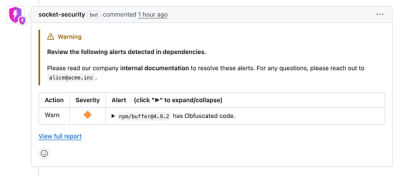
Socket now lets you customize pull request alert headers, helping security teams share clear guidance right in PRs to speed reviews and reduce back-and-forth.
Product
Socket's Rust support is moving to Beta: all users can scan Cargo projects and generate SBOMs, including Cargo.toml-only crates, with Rust-aware supply chain checks.