


Security News
CVE Volume Surges Past 48,000 in 2025 as WordPress Plugin Ecosystem Drives Growth
CVE disclosures hit a record 48,185 in 2025, driven largely by vulnerabilities in third-party WordPress plugins.
By Sarah Gooding - Jan 09, 2026
@syncfusion/ej2-angular-filemanager
Advanced tools
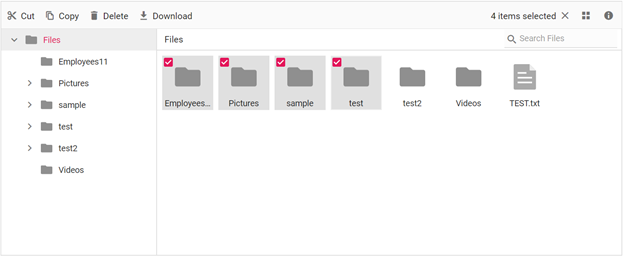
The Angular FileManager component is a graphical user interface that allows users to manage their file system in an intuitive and efficient manner. With this component, you can easily access, edit, upload, download, and organize files and folders. It also offers a convenient way to browse and select items from the file system.
Getting Started . Online demos . Learn more
Trusted by the world's leading companies

You can use Angular CLI to setup your Angular applications. To install Angular CLI use the following command.
npm install -g @angular/cli
Create a new Angular application using below Angular CLI command.
ng new my-app
cd my-app
All Syncfusion Angular packages are published in npmjs.com registry. To install Angular FileManager package, use the following command.
ng add @syncfusion/ej2-angular-filemanager
The above command does the below configuration to your Angular app.
@syncfusion/ej2-angular-filemanager package and its peer dependencies to your package.json file.FileManagerModule in your application module app.module.ts.angular.json file.This makes it easy to add the Syncfusion Angular FileManager module to your project and start using it in your application.
In src/app/app.component.ts, use <ejs-filemanager> selector in template attribute of @Component directive to render the Syncfusion Angular FileManager component.
Add the FileManager component snippet in app.component.html as follows.
<ejs-filemanager id='default-filemanager' [ajaxSettings]='ajaxSettings'>
</ejs-filemanager>
Refer the FileManager component snippet in app.component.ts as follows.
import { Component } from '@angular/core';
@Component({
  selector: 'app-root',
  styleUrls: ['app/app.component.css'],
  templateUrl: 'app/app.component.html'
})
export class AppComponent {
  public hostUrl: string = 'https://ej2-aspcore-service.azurewebsites.net/';
  public ajaxSettings: object = {
url: this.hostUrl + 'api/FileManager/FileOperations'
  };
}
The FileManager component is also offered in following list of frameworks,
 JavaScript |  React |  Vue |  ASP.NET Core |  ASP.NET MVC |
|---|
Product support is available through following mediums.
Check the changelog here. Get minor improvements and bug fixes every week to stay up to date with frequent updates.
This is a commercial product and requires a paid license for possession or use. Syncfusion® licensed software, including this component, is subject to the terms and conditions of Syncfusion® EULA. To acquire a license for 140+ Angular UI components, you can purchase or start a free 30-day trial.
A free community license is also available for companies and individuals whose organizations have less than $1 million USD in annual gross revenue and five or fewer developers.
See LICENSE FILE for more info.
© Copyright 2025 Syncfusion® Inc. All Rights Reserved. The Syncfusion® Essential Studio® license and copyright applies to this distribution.
FAQs
Essential JS 2 FileManager Component for Angular
The npm package @syncfusion/ej2-angular-filemanager receives a total of 2,117 weekly downloads. As such, @syncfusion/ej2-angular-filemanager popularity was classified as popular.
We found that @syncfusion/ej2-angular-filemanager demonstrated a healthy version release cadence and project activity because the last version was released less than a year ago. It has 0 open source maintainers collaborating on the project.
Did you know?

Socket for GitHub automatically highlights issues in each pull request and monitors the health of all your open source dependencies. Discover the contents of your packages and block harmful activity before you install or update your dependencies.
Security News
CVE disclosures hit a record 48,185 in 2025, driven largely by vulnerabilities in third-party WordPress plugins.

Security News
Socket CEO Feross Aboukhadijeh joins Insecure Agents to discuss CVE remediation and why supply chain attacks require a different security approach.

Security News
Tailwind Labs laid off 75% of its engineering team after revenue dropped 80%, as LLMs redirect traffic away from documentation where developers discover paid products.