New Research: Supply Chain Attack on Axios Pulls Malicious Dependency from npm.Details
Socket
Book a DemoSign in
Socket

@userfront/react

Package Overview
Dependencies
Maintainers
2
Versions
71
Alerts
File Explorer

Advanced tools

Socket logo

Install Socket

Detect and block malicious and high-risk dependencies

Install

@userfront/react

Userfront React binding

Source
npmnpm
Version
0.3.2
Version published
Weekly downloads
161
-60.15%
Maintainers
2
Weekly downloads
 
Created
Source

Userfront React

The Userfront React binding allows you to quickly add pre-built signup, login, and password reset forms to your React application.

This binding includes all methods from the Userfront core JS library.

Setup

Working example

You can find installation instructions for your account in the Toolkit section of the Userfront dashboard.

1. Install the @userfront/react package with npm (or yarn)

npm install @userfront/react --save

2. Initialize Userfront and any tools you want to use, then render them

import Userfront from "@userfront/react";

Userfront.init("demo1234");

const SignupForm = Userfront.build({
  toolId: "nkmbbm",
});

class Demo extends React.Component {
  render() {
    return <SignupForm />;
  }
}

This example uses the following:

  • Account ID: demo1234
  • Tool ID: nkmbbm (signup form)

This will add a working signup form to your page:
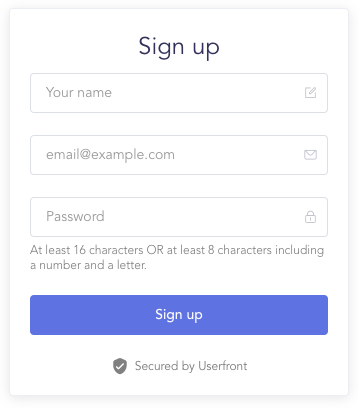
Signup form

Core JS methods

When you add the Userfront React binding to your application, you can use any of the methods from the Userfront core JS library too.

Docs for the core JS methods are here: https://userfront.com/docs/js.html

Note that you do not need to import @userfront/core separately when using the React binding.

Examples:

// Import and initialize Userfront React
import Userfront from "@userfront/react";
Userfront.init("demo1234");

// Send a login link
Userfront.sendLoginLink("jane@example.com");

// Read the access token
Userfront.tokens.accessToken;

// => "eyJhbGciOiJSUzI1NiIsInR5cCI6IkpXVCJ9.eyJtb2RlIjoidGVzdCIsImlzQ29uZmlybWVkIjp0cnVlLCJ1c2VySWQiOjEsInVzZXJVdWlkIjoiZDAwNTlmN2UtYzU0OS00NmYzLWEzYTMtOGEwNDY0MDkzZmMyIiwidGVuYW50SWQiOiJwOW55OGJkaiIsInNlc3Npb25JZCI6IjRlZjBlMjdjLTI1NDAtNDIzOS05YTJiLWRkZjgyZjE3YmExYiIsImF1dGhvcml6YXRpb24iOnsicDlueThiZGoiOnsidGVuYW50SWQiOiJwOW55OGJkaiIsIm5hbWUiOiJVc2VyZnJvbnQiLCJyb2xlcyI6WyJhZG1pbiJdLCJwZXJtaXNzaW9ucyI6W119fSwiaWF0IjoxNjE3MTQ4MDY3LCJleHAiOjE2MTk3NDAwNjd9.gYz4wxPHLY6PNp8KPEyIjLZ8QzG3-NFJGPitginuLaU"

// Log the user out
Userfront.logout();

// Access the user's information
Userfront.user;

/** =>
 * {
 *    email: "jane@example.com",
 *    name: "Jane Example",
 *    image: "https://res.cloudinary.com/component/image/upload/avatars/avatar-plain-9.png",
 *    data: {},
 *    username: "jane-example",
 *    confirmedAt: "2020-01-01T00:00:00.000Z",
 *    isConfirmed: true,
 *    createdAt: "2020-01-01T00:00:00.000Z",
 *    updatedAt: "2020-01-01T00:00:00.000Z",
 *    mode: "test",
 *    tenantId: "demo1234",
 *    userId: 1,
 *    userUuid: "d6f0f045-f6ea-4262-8724-dfc0b77e7dc9",
 * }
 */

Keywords

userfront

FAQs

Package last updated on 09 Mar 2023

Did you know?

Socket

Socket for GitHub automatically highlights issues in each pull request and monitors the health of all your open source dependencies. Discover the contents of your packages and block harmful activity before you install or update your dependencies.

Install

Related posts




