
@vcms-io/solidis
High-performance, SOLID-structured RESP client for Redis and other RESP-compatible servers
Overview •
Benchmarks •
Features •
Installation •
Usage •
Configuration •
Advanced
Extensions •
Errors •
Contributing •
License





🔍 Overview
Solidis is a modern RESP client built with SOLID principles, zero dependencies, and enterprise-grade performance in mind. It supports both RESP2 and RESP3 protocols and is optimized for modern JavaScript/TypeScript applications.
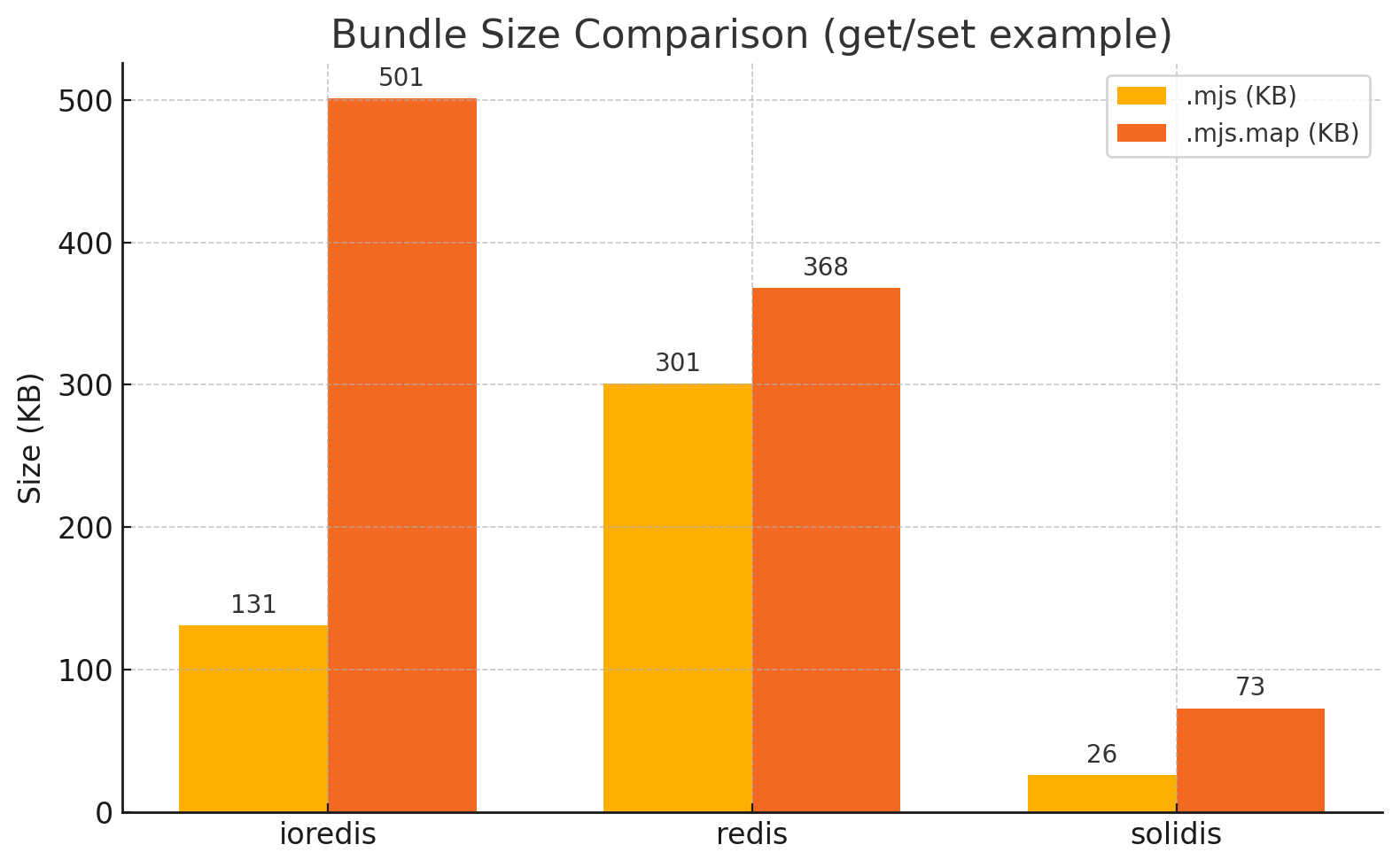
The library is designed for minimal bundle size with maximum type safety and performance:
- Pure ESM/CJS - Support for both module systems
- Tree-shakable - Import only what you need
- Type-safe - Extensive TypeScript definitions for all commands
- Dependency-free - Absolutely zero runtime dependencies
📊 Benchmarks
⚡️ Solidis vs IoRedis ⚡️
1000 concurrent commands × 10 iterations, 1 KB random-string payload per request
Hash
HSET + HGET + HGETALL | 248.82ms | 446.03ms | 79% FASTER 🔥🔥 |
Set Operations
SADD + SISMEMBER + SREM | 257.35ms | 444.08ms | 73% FASTER 🔥🔥 |
Expire
SET + EXPIRE + TTL | 198.11ms | 339.78ms | 72% FASTER 🔥🔥 |
Non-Transaction
SET with EXPIRE + GET | 259.69ms | 394.34ms | 52% FASTER 🔥 |
List
LPUSH + RPUSH + LRANGE | 219.76ms | 345.48ms | 57% FASTER 🔥 |
Counter
INCR + DECR | 174.04ms | 258.71ms | 49% FASTER 🔥 |
List operations
LPUSH + RPUSH + LPOP + RPOP + LLEN | 396.67ms | 587.16ms | 48% FASTER 🔥 |
Transaction + Non-Transaction
SET + GET | 435.46ms | 574.26ms | 32% FASTER ⚡️ |
Multi-key
MSET + MGET | 393.87ms | 437.45ms | 11% FASTER ⚡️ |
Transaction
SET with EXPIRE + GET | 286.75ms | 328.00ms | 14% FASTER ⚡️ |
Set
SADD + SISMEMBER + SMEMBERS | 260.66ms | 275.27ms | 6% FASTER ⚡️ |
Hash operations
HMSET + HMGET + HDEL | 360.69ms | 377.32ms | 5% FASTER ⚡️ |
Info/Config
INFO + CONFIG GET | 371.48ms | 353.02ms | 5% slower |
Up to 79% faster than IoRedis! 🚀
Solidis delivers blazing-fast performance with ZERO dependencies
✨ Key Features
-
Lightweight
- Zero dependencies
- Minimum bundle size < 30KB
- Full bundle size (with all commands) < 105KB
-
High Performance
- Efficient pipeline & batch processing
- Minimal memory footprint (custom optimized parser)
- Zero-copy buffer operations
- Intelligent buffer management
-
Protocol Support
- RESP2 & RESP3 protocols support
- Automatic protocol negotiation
- Binary-safe operations
- Full multi-byte character support
-
Advanced Features
- Transaction support (MULTI/EXEC)
- Pipeline operations
- Pub/Sub functionality
- Automatic reconnection
- Command timeout handling
-
Type Safety
- Robust TypeScript support
- Comprehensive type definitions
- Command-specific type guards
- Runtime reply type checking
-
Extensibility
- Easy to extend client with internal & external commands
- Customizable transaction handling
- Plugin architecture support
📋 Requirements
- Runtime: Node.js 14 or higher
- Development: Node.js 22 LTS recommended for optimal stability
📥 Installation
npm install @vcms-io/solidis
yarn add @vcms-io/solidis
pnpm add @vcms-io/solidis
💻 Usage
📦 Client Types
Solidis offers two client implementations:
1. Basic Client (SolidisClient)
The basic client contains minimal functionality to reduce bundle size. You need to extend it with specific commands:
import { SolidisClient } from '@vcms-io/solidis';
import { get } from '@vcms-io/solidis/command/get';
import { set } from '@vcms-io/solidis/command/set';
import { multi } from '@vcms-io/solidis/command/multi';
import type { SolidisClientExtensions } from '@vcms-io/solidis';
const extensions = {
get,
set,
multi
} satisfies SolidisClientExtensions;
const client = new SolidisClient({
host: '127.0.0.1',
port: 6379
}).extend(extensions);
await client.set('key', 'value');
const value = await client.get('key');
2. Featured Client (SolidisFeaturedClient)
A convenience client with all RESP commands pre-loaded:
import { SolidisFeaturedClient } from '@vcms-io/solidis/featured';
const client = new SolidisFeaturedClient({
host: '127.0.0.1',
port: 6379
});
await client.set('key', 'value');
await client.hset('hash', 'field', 'value');
await client.lpush('list', 'item-1', 'item-2');
🔌 Connection Management
const client = new SolidisClient({
uri: 'redis://127.0.0.1:6379',
lazyConnect: true
}).extend({ get, set });
await client.connect();
client.on('connect', () => console.log('Connected to server'));
client.on('ready', () => console.log('Client is ready for commands'));
client.on('error', (err) => console.error('Error occurred:', err));
client.on('end', () => console.log('Connection closed'));
client.quit();
⚙️ Basic Operations
await client.set('key', 'value');
const value = await client.get('key');
console.log(value);
await client.del('key');
💱 Transactions
const transaction = client.multi();
transaction.set('key', 'value');
transaction.incr('counter');
transaction.get('key');
const results = await transaction.exec();
console.log(results);
const transaction = client.multi();
transaction.set('key', 'value');
transaction.discard();
⏩ Pipelines
const commands = [
['set', 'pipeline', 'value'],
['incr', 'counter'],
['get', 'pipeline']
];
const results = await client.send(commands);
console.log(results);
📡 Pub/Sub
client.on('message', (channel, message) => {
console.log(`Received ${message} from ${channel}`);
});
await client.subscribe('news');
await client.publish('news', 'Hello world!');
⚙️ Configuration
Solidis provides extensive configuration options:
const client = new SolidisClient({
uri: 'redis://localhost:6379',
host: '127.0.0.1',
port: 6379,
useTLS: false,
lazyConnect: false,
authentication: {
username: 'user',
password: 'password'
},
database: 0,
clientName: 'solidis',
protocol: 'RESP2',
autoReconnect: true,
enableReadyCheck: true,
maxConnectionRetries: 20,
connectionRetryDelay: 100,
autoRecovery: {
database: true,
subscribe: true,
ssubscribe: true,
psubscribe: true,
},
commandTimeout: 5000,
connectionTimeout: 2000,
socketWriteTimeout: 1000,
readyCheckInterval: 100,
maxCommandsPerPipeline: 300,
maxProcessRepliesPerChunk: 4 * 1024,
maxSocketWriteSizePerOnce: 64 * 1024,
rejectOnPartialPipelineError: false,
parser: {
buffer: {
initial: 4 * 1024 * 1024,
shiftThreshold: 2 * 1024 * 1024,
},
},
maxEventListenersForClient: 10 * 1024,
maxEventListenersForSocket: 10 * 1024,
debug: false,
debugMaxEntries: 10 * 1024,
});
🚀 Advanced Features
🛠️ Custom Commands
import { SolidisClient } from '@vcms-io/solidis';
import { get, set } from '@vcms-io/solidis/command';
import type { SolidisClientExtensions } from '@vcms-io/solidis';
const extensions = {
get,
set,
fill: async function(this: typeof client, keys: string[], value: string) {
return await Promise.all(keys.map((key) => this.set(key, value)));
},
} satisfies SolidisClientExtensions;
const client = new SolidisClient({
host: '127.0.0.1',
port: 6379
}).extend(extensions);
await client.fill(['key1', 'key2', 'key3'], 'value');
⚡ Raw Commands
When you need to use a command that's not yet implemented:
const result = await client.send([['command', 'some', 'options']]);
🐛 Debugging
Enable detailed debug logging:
const client = new SolidisClient({
debug: true
});
client.on('debug', (entry) => {
console.log(`[${entry.type}] ${entry.message}`, entry.data);
});
🧩 Extensions
The @vcms-io/solidis-extensions package provides additional functionality and utilities for Solidis clients. It includes pre-built extensions to enhance your Redis operations.
📥 Installation
npm install @vcms-io/solidis-extensions
yarn add @vcms-io/solidis-extensions
pnpm add @vcms-io/solidis-extensions
📚 Available Extensions
- SpinLock - A lightweight mutex implemented as a Solidis command extension
- RedLock - Fault-tolerant distributed mutex based on the Redlock algorithm
Check the extensions documentation for detailed usage examples.
⚠️ Error Handling
Solidis provides detailed error classes for different failure modes:
import {
SolidisClientError,
SolidisConnectionError,
SolidisParserError,
SolidisPubSubError,
SolidisRequesterError,
unwrapSolidisError,
} from '@vcms-io/solidis';
try {
await client.set('key', 'value');
} catch (error) {
console.error(unwrapSolidisError(error));
if (error instanceof SolidisConnectionError) {
console.error('Connection error:', error.message);
} else if (error instanceof SolidisParserError) {
console.error('Parser error:', error.message);
} else if (error instanceof SolidisClientError) {
console.error('Client error:', error.message);
}
}
🏗️ Structure
┌─────────────────────────────────────────────────┐
│                  SolidisClient                  │
│                                                 │
│      Creates & coordinates all components       │
│                                                 │
│     ┌────────────────────────────────────┐      │
│     │             Debug Memory           │      │
│     └───────┬───────────────────┬────────┘      │
│             ▼                   ▼               │
│     ┌────────────────┐  ┌────────────────┐      │
│     │   Connection   │─►│   Requester    │─┐    │
│     └────────────────┘  └────────────────┘ │    │
│                         ┌────────────────┐ │    │
│                         │     Parser     │◄┤    │
│                         └────────────────┘ │    │
│                         ┌────────────────┐ │    │
│                         │     PubSub     │◄┘    │
│                         └────────────────┘      │
│                                                 │
└─────────────────────────────────────────────────┘
         ┌──────────────┴─────────────┐
         ▼                            ▼
┌─────────────────┐       ┌───────────────────────┐
│ SolidisClient   │       │ SolidisFeaturedClient │
│ (needs extend)  │       │ (all commands)        │
└─────────────────┘       └───────────────────────┘
The Solidis structure follows a clear component separation:
- SolidisClient: Core entry point that creates and coordinates all components
- Debug Memory: Created in the client and injected into other components
- Connection: Manages TCP/TLS socket connections, reconnection and recovery
- Requester: Handles command pipelining & request states
- Parser: Processes RESP2/RESP3 protocol with optimized buffer handling
- PubSub: Maintains subscription state and is used by Requester for pub/sub events
🔔 Event System
Solidis emits the following events:
client.on('connect', () => console.log('Connected to server'));
client.on('ready', () => console.log('Client is ready'));
client.on('end', () => console.log('Connection closed'));
client.on('error', (err) => console.error('Error:', err));
client.on('message', (channel, message) => console.log(`${channel}: ${message}`));
client.on('pmessage', (pattern, channel, message) => console.log(`${pattern} ${channel}: ${message}`));
client.on('subscribe', (channel, count) => console.log(`Subscribed to ${channel}`));
client.on('unsubscribe', (channel, count) => console.log(`Unsubscribed from ${channel}`));
client.on('debug', (entry) => console.log(`[${entry.type}] ${entry.message}`));
🤝 Contributing
Solidis is an open-source project and we welcome contributions from the community. Here's how you can contribute:
💻 Development Setup
git clone https://github.com/vcms-io/solidis.git
cd solidis
npm install
npm run build
npm test
📜 Contribution Guidelines
-
Fork the Repository: Start by forking the repository and then clone your fork.
-
Create a Branch: Create a branch for your feature or bugfix:
git checkout -b feature/your-feature-name
-
Follow Code Style:
- Use TypeScript strict mode
- Follow existing patterns and naming conventions
-
Submit Pull Request: Push your changes to your fork and submit a pull request.
- Provide a clear description of the changes
- Reference any related issues
- Add appropriate documentation
✅ Code Quality Guidelines
- TypeScript: Use strict typing and avoid
any types and as cast where possible
- Dependencies: Avoid adding new dependencies unless absolutely necessary
- Performance: Consider performance implications of your changes
- Bundle Size: Keep the bundle size minimal
🚀 Release Process
Solidis follows semantic versioning (SemVer):
- Patch (0.0.x): Bug fixes and minor changes that don't affect the API
- Minor (0.x.0): New features added in a backward compatible manner
- Major (x.0.0): Breaking changes to the public API
📄 License
Licensed under the MIT. See LICENSE for more information.





