AIPick
An interactive CLI tool leveraging multiple AI models for quick handling of simple requests
Introduction
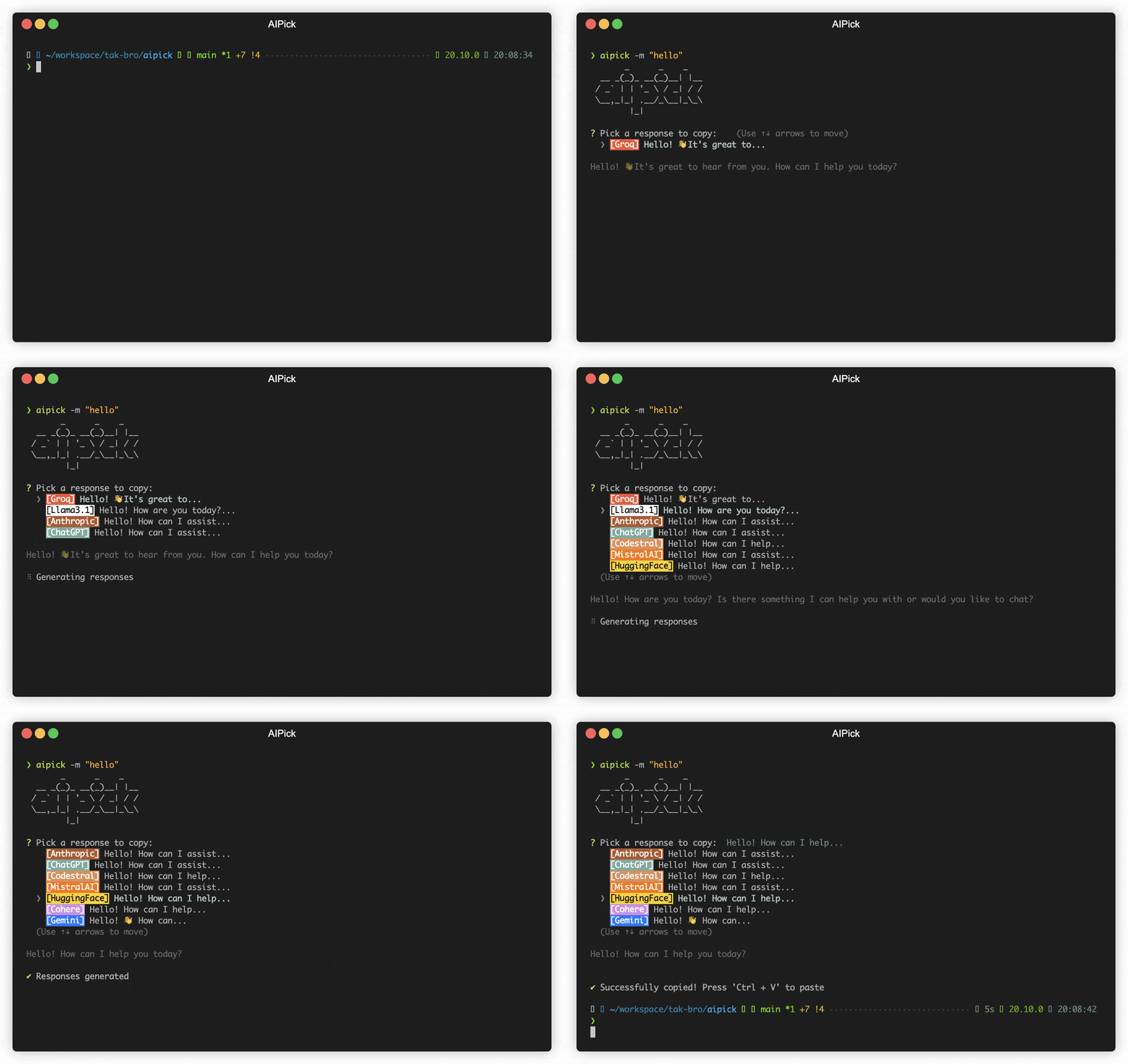
aipick is an interactive CLI tool leveraging multiple AI models for quick and efficient handling of simple requests such as variable name recommendations.
Key Features
- Multi-AI Support: Integrates with OpenAI, Anthropic Claude, Google Gemini, Mistral AI, and more.
- Reactive CLI: Enables simultaneous requests to multiple AIs and selection of the best AI response.
- Custom System Prompt: Supports user-defined system prompt templates.
- Clipboard Integration: Automatically copies selected responses to the clipboard for easy use.
Supported Providers
Remote
Local
Setup
The minimum supported version of Node.js is the v18. Check your Node.js version with node --version.
npm install -g aipick
- Set up API keys (at least one key must be set):
aipick config set OPENAI.key=<your key>
aipick config set ANTHROPIC.key=<your key>
aipick -m "Why is the sky blue?"
👉 Tip: Use the aip alias if aipick is too long for you.
Using Locally
You can also use your model for free with Ollama and it is available to use both Ollama and remote providers simultaneously.
ollama run llama3.1 # model you want use. ex) codestral, gemma2
aipick config set OLLAMA.model=<your model>
If you want to use ollama, you must set OLLAMA.model.
aipick -m "Why is the sky blue?"
👉 Tip: Ollama can run LLMs in parallel from v0.1.33. Please see this section.
Usage
CLI Options
--message or -m: Message to ask AI (required)--systemPrompt or -s: System prompt for fine-tuning
Example:
aipick --message "Explain quantum computing" --systemPrompt "You are a physics expert"
Configuration
Reading and Setting Configuration
- Read:
aipick config get <key>
- Set:
aipick config set <key>=<value>
Example:
aipick config get OPENAI.key
aipick config set OPENAI.generate=3 GEMINI.temperature=0.5
How to Configure in detail
- Command-line arguments: use the format
--[ModelName].[SettingKey]=value
aipick -m "Why is the sky blue?" --OPENAI.generate=3
- Configuration file: use INI format in the
~/.aipick file or use set command.
Example ~/.aipick:
logging=true
temperature=1.0
[OPENAI]
key="<your-api-key>"
temperature=0.8
generate=2
[OLLAMA]
temperature=0.7
model[]=llama3.1
model[]=codestral
The priority of settings is: Command-line Arguments > Model-Specific Settings > General Settings > Default Values.
General Settings
The following settings can be applied to most models, but support may vary.
Please check the documentation for each specific model to confirm which settings are supported.
systemPrompt | System Prompt text | - |
systemPromptPath | Path to system prompt file | - |
timeout | Request timeout (milliseconds) | 10000 |
temperature | Model's creativity (0.0 - 2.0) | 0.7 |
maxTokens | Maximum number of tokens to generate | 1024 |
logging | Enable logging | true |
👉 Tip: To set the General Settings for each model, use the following command.
aipick config set OPENAI.maxTokens="2048"
aipick config set ANTHROPIC.logging=false
systemPrompt
- Allow users to specify a custom system prompt
aipick config set systemPrompt="Your communication style is friendly, engaging, and informative."
systemPrompt takes precedence over SystemPromptPath and does not apply at the same time.
systemPromptPath
- Allow users to specify a custom file path for their own system prompt template
- Please see Custom Prompt Template
aipick config set systemPromptPath="/path/to/user/prompt.txt"
timeout
The timeout for network requests in milliseconds.
Default: 10_000 (10 seconds)
aipick config set timeout=20000
temperature
The temperature (0.0-2.0) is used to control the randomness of the output
Default: 0.7
aipick config set temperature=0
maxTokens
The maximum number of tokens that the AI models can generate.
Default: 1024
aipick config set maxTokens=3000
logging
Default: true
Option that allows users to decide whether to generate a log file capturing the responses.
The log files will be stored in the ~/.aipick_log directory(user's home).
- You can remove all logs below comamnd.
aipick log removeAll
Model-Specific Settings
Some models mentioned below are subject to change.
OpenAI
key | API key | - |
model | Model to use | gpt-3.5-turbo |
url | API endpoint URL | https://api.openai.com |
path | API path | /v1/chat/completions |
proxy | Proxy settings | - |
generate | Number of responses to generate (1-5) | 1 |
OPENAI.key
The OpenAI API key. You can retrieve it from OpenAI API Keys page.
aipick config set OPENAI.key="your api key"
OPENAI.model
Default: gpt-3.5-turbo
The Chat Completions (/v1/chat/completions) model to use. Consult the list of models available in the OpenAI Documentation.
Tip: If you have access, try upgrading to gpt-4 for next-level code analysis. It can handle double the input size, but comes at a higher cost. Check out OpenAI's website to learn more.
aipick config set OPENAI.model=gpt-4
OPENAI.url
Default: https://api.openai.com
The OpenAI URL. Both https and http protocols supported. It allows to run local OpenAI-compatible server.
OPENAI.path
Default: /v1/chat/completions
The OpenAI Path.
OPENAI.generate
Default: 1
The number of commit messages to generate to pick from.
Note, this will use more tokens as it generates more results.
aipick config set OPENAI.generate=2
Ollama
model | Model(s) to use (comma-separated list) | - |
host | Ollama host URL | http://localhost:11434 |
timeout | Request timeout (milliseconds) | 100_000 |
OLLAMA.model
The Ollama Model. Please see a list of models available
aipick config set OLLAMA.model="llama3"
aipick config set OLLAMA.model="llama3,codellama"
aipick config add OLLAMA.model="gemma2"
OLLAMA.model is only string array type to support multiple Ollama. Please see this section.
OLLAMA.host
Default: http://localhost:11434
The Ollama host
aipick config set OLLAMA.host=<host>
OLLAMA.timeout
Default: 10_000 (10 seconds)
Request timeout for the Ollama.
aipick config set OLLAMA.timeout=<timeout>
Unsupported Options
Ollama does not support the following options in General Settings.
HuggingFace
cookie | Authentication cookie | - |
model | Model to use | CohereForAI/c4ai-command-r-plus |
HUGGINGFACE.cookie
The Huggingface Chat Cookie. Please check how to get cookie
aipick config set HUGGINGFACE.cookie="your-cooke"
HUGGINGFACE.model
Default: CohereForAI/c4ai-command-r-plus
Supported:
CohereForAI/c4ai-command-r-plusmeta-llama/Meta-Llama-3-70B-InstructHuggingFaceH4/zephyr-orpo-141b-A35b-v0.1mistralai/Mixtral-8x7B-Instruct-v0.1NousResearch/Nous-Hermes-2-Mixtral-8x7B-DPO01-ai/Yi-1.5-34B-Chatmistralai/Mistral-7B-Instruct-v0.2microsoft/Phi-3-mini-4k-instruct
aipick config set HUGGINGFACE.model="mistralai/Mistral-7B-Instruct-v0.2"
Unsupported Options
Huggingface does not support the following options in General Settings.
- maxTokens
- timeout
- temperature
Gemini
key | API key | - |
model | Model to use | gemini-1.5-pro-latest |
GEMINI.key
The Gemini API key. If you don't have one, create a key in Google AI Studio.
aipick config set GEMINI.key="your api key"
GEMINI.model
Default: gemini-1.5-pro-latest
Supported:
gemini-1.5-pro-latestgemini-1.5-flash-latest
aipick config set GEMINI.model="gemini-1.5-flash-latest"
Unsupported Options
Gemini does not support the following options in General Settings.
Anthropic
key | API key | - |
model | Model to use | claude-3-haiku-20240307 |
ANTHROPIC.key
The Anthropic API key. To get started with Anthropic Claude, request access to their API at anthropic.com/earlyaccess.
ANTHROPIC.model
Default: claude-3-haiku-20240307
Supported:
claude-3-haiku-20240307claude-3-sonnet-20240229claude-3-opus-20240229claude-3-5-sonnet-20240620
aipick config set ANTHROPIC.model="claude-3-5-sonnet-20240620"
Unsupported Options
Anthropic does not support the following options in General Settings.
Mistral
key | API key | - |
model | Model to use | mistral-tiny |
MISTRAL.key
The Mistral API key. If you don't have one, please sign up and subscribe in Mistral Console.
MISTRAL.model
Default: mistral-tiny
Supported:
open-mistral-7bmistral-tiny-2312mistral-tinyopen-mixtral-8x7bmistral-small-2312mistral-smallmistral-small-2402mistral-small-latestmistral-medium-latestmistral-medium-2312mistral-mediummistral-large-latestmistral-large-2402mistral-embed
Codestral
key | API key | - |
model | Model to use | codestral-latest |
CODESTRAL.key
The Codestral API key. If you don't have one, please sign up and subscribe in Mistral Console.
CODESTRAL.model
Default: codestral-latest
Supported:
codestral-latestcodestral-2405
aipick config set CODESTRAL.model="codestral-2405"
Cohere
key | API key | - |
model | Model to use | command |
COHERE.key
The Cohere API key. If you don't have one, please sign up and get the API key in Cohere Dashboard.
COHERE.model
Default: command
Supported models:
commandcommand-nightlycommand-lightcommand-light-nightly
aipick config set COHERE.model="command-r"
Unsupported Options
Cohere does not support the following options in General Settings.
Groq
key | API key | - |
model | Model to use | gemma-7b-it |
GROQ.key
The Groq API key. If you don't have one, please sign up and get the API key in Groq Console.
GROQ.model
Default: gemma2-9b-it
Supported:
gemma2-9b-itgemma-7b-itllama-3.1-70b-versatilellama-3.1-8b-instantllama3-70b-8192llama3-8b-8192llama3-groq-70b-8192-tool-use-previewllama3-groq-8b-8192-tool-use-preview
aipick config set GROQ.model="llama3-8b-8192"
Perplexity
key | API key | - |
model | Model to use | llama-3.1-sonar-small-128k-chat |
PERPLEXITY.key
The Perplexity API key. If you don't have one, please sign up and get the API key in Perplexity
PERPLEXITY.model
Default: llama-3.1-sonar-small-128k-chat
Supported:
llama-3.1-sonar-small-128k-chatllama-3.1-sonar-large-128k-chatllama-3.1-sonar-large-128k-onlinellama-3.1-sonar-small-128k-onlinellama-3.1-8b-instructllama-3.1-70b-instructllama-3.1-8bllama-3.1-70b
The models mentioned above are subject to change.
aipick config set PERPLEXITY.model="llama-3.1-70b"
Upgrading
Check the installed version with:
aipick --version
If it's not the latest version, run:
npm update -g aipick
Custom Prompt Template
aipick supports custom prompt templates through the systemPromptPath option. This feature allows you to define your own system prompt structure, giving you more control over the AI response generation process.
Using the promptPath Option
To use a custom prompt template, specify the path to your template file when running the tool:
aipick config set systemPromptPath="/path/to/user/prompt.txt"
Example Template
Here's an example of how your custom system template might look:
You are a Software Development Tutor.
Your mission is to guide users from zero knowledge to understanding the fundamentals of software.
Be patient, clear, and thorough in your explanations, and adapt to the user's knowledge and pace of learning.
NOTE
- For the
systemPromptPath option, set the template path, not the template content.
- If you want to set the template content, use
systemPrompt option
Loading Multiple Ollama Models
You can load and make simultaneous requests to multiple models using Ollama's experimental feature, the OLLAMA_MAX_LOADED_MODELS option.
OLLAMA_MAX_LOADED_MODELS: Load multiple models simultaneously
Setup Guide
Follow these steps to set up and utilize multiple models simultaneously:
1. Running Ollama Server
First, launch the Ollama server with the OLLAMA_MAX_LOADED_MODELS environment variable set. This variable specifies the maximum number of models to be loaded simultaneously.
For example, to load up to 3 models, use the following command:
OLLAMA_MAX_LOADED_MODELS=3 ollama serve
Refer to configuration for detailed instructions.
2. Configuring aipick
Next, set up aipick to specify multiple models. You can assign a list of models, separated by commas(,), to the OLLAMA.model environment variable. Here's how you do it:
aipick config set OLLAMA.model="mistral,llama3.1"
# or
aipick config add OLLAMA.model="mistral"
aipick config add OLLAMA.model="llama3.1"
With this command, aipick is instructed to utilize both the "mistral" and "llama3.1" models when making requests to the Ollama server.
3. Run aipick
aipick
Note that this feature is available starting from Ollama version 0.1.33.
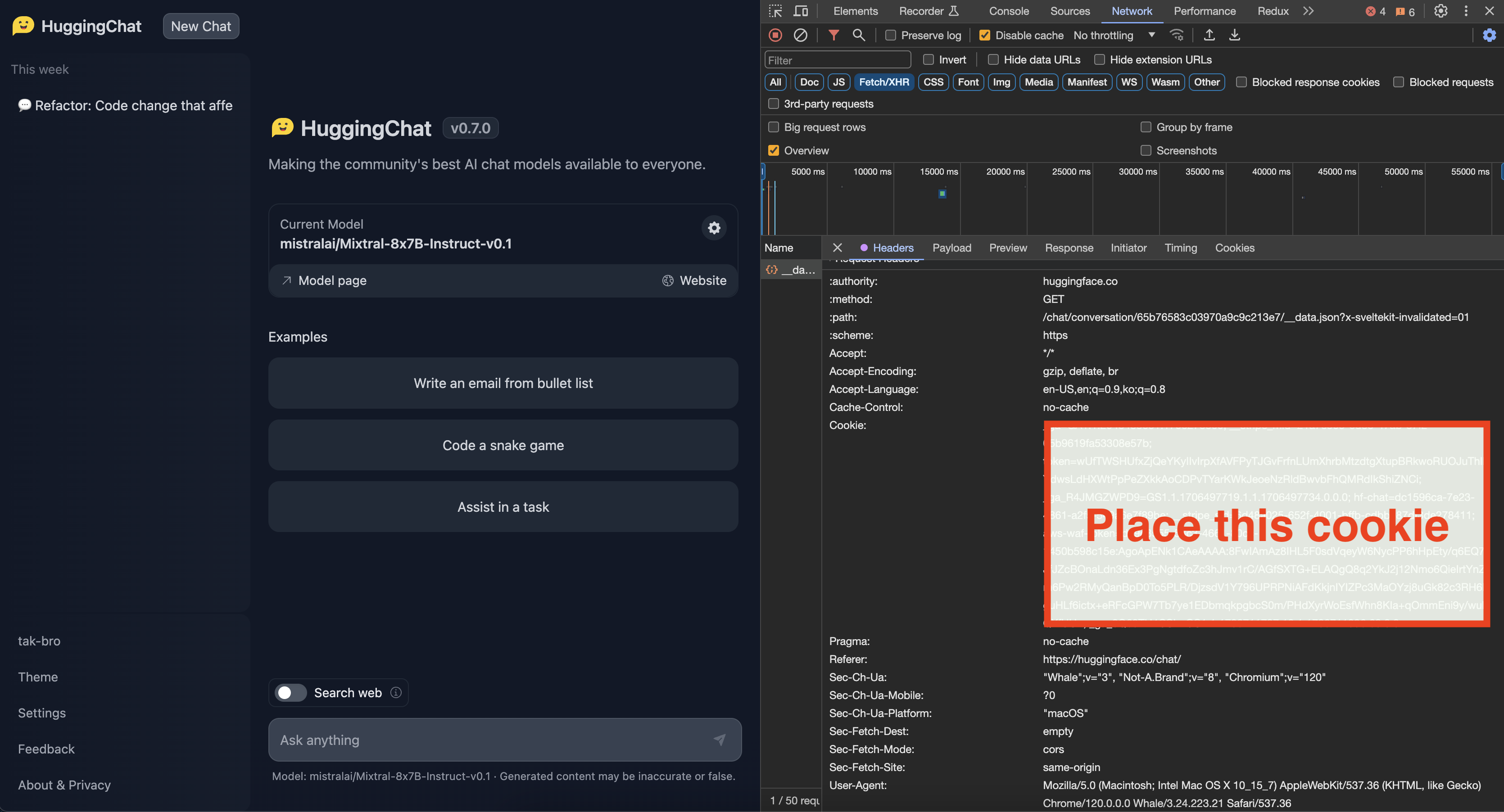
How to get Cookie(Unofficial API)
- Login to the site you want
- You can get cookie from the browser's developer tools network tab
- See for any requests check out the Cookie, Copy whole value
- Check below image for the format of cookie
When setting cookies with long string values, ensure to escape characters like ", ', and others properly.
- For double quotes ("), use \"
- For single quotes ('), use \'
Disclaimer and Risks
This project uses functionalities from external APIs but is not officially affiliated with or endorsed by their providers. Users are responsible for complying with API terms, rate limits, and policies.
Contributing
For bug fixes or feature implementations, please check the Contribution Guide.
If this project has been helpful, please consider giving it a Star ⭐️!
Maintainer: @tak-bro








