Angular Selector




Angular Selector is a native AngularJS directive that transform a simple <select> box into a full html select with typeahead.
Check out the examples page to learn more: http://indrimuska.github.io/angular-selector.
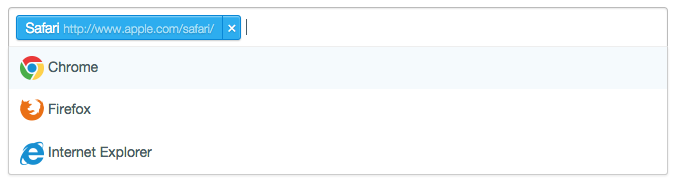
Features
- No-jQuery Required
Angular Selector is a full native Angular directive, so you can use it without have to include any other library (except AngularJS, of course!).
- Skinnable
You can define a template for the items in the dropdown list and a template for selected items.
- RTL Support
To use it in with any kind of text direction.
- Remote Resource Loading
Fetch your data from an external source and use it in your application.
- From HTML
<option> to JS object
Fill your <select> from server-side ad use data-attributes for every option you have, then Angular Selector performs for you the conversion to a simple array of objects.
- Custom Option Creation
You can create new options and add them to the list, just by hitting Enter.
- Keyboard support
Move up and down the dropdown list using keyboard arrows. Select highlighted item pressing Enter. Remove last selected item with Del key.
- Responsive
Perfect for use in mobile environments.
Dependencies
Installation
Get Angular Selector from npm, bower or git:
  npm install angular-selector
bower install angular-selector
  git clone   https://github.com/indrimuska/angular-selector.git
Load stylesheet and scripts into your app:
<script src="//ajax.googleapis.com/ajax/libs/angularjs/1.4.3/angular.min.js"></script>
<script src="//cdn.rawgit.com/indrimuska/angular-selector/master/dist/angular-selector.js"></script>
<link href="//cdn.rawgit.com/indrimuska/angular-selector/master/dist/angular-selector.css" rel="stylesheet">
Add the dependency to your module:
var app = angular.module('MyApp', ['selector']);
Examples
Look at these.
Options
| model | Property | | Two-way binding property that models the select view. |
| name | String | | Input name attribute. |
| disable | Boolean | false | Enable/disable the select. Note the name is disable not disabled to avoid collisions with the HTML5 disabled attribute. |
| disableSearch | Boolean | false | Enable/disable the search input field. |
| require | Boolean | false | Sets required validation. Note the name is require not required to avoid collisions with the HTML5 required attribute. |
| multi | Boolean | false | Allows to select more than one value. Note the name is multi not multiple to avoid collisions with the HTML5 multiple attribute. |
| limit | Integer | Infinity | Maximum number of selectable items when multi is true. |
| placeholder | String | | Optional placeholder text to display if input is empty. |
| options | Array | [] | Set of options to display.
Each object must contain a label key and a value key, otherwise you need to use a custom template (viewItemTemplate and dropdownItemTemplate) or change the default values of valueAttr and labelAttr properties. |
| valueAttr | String | null | Name of the value key in options array. This also sets the type of result for the model: if you don't set this attribute (null by default) the entire object option is returned, otherwise it will be returned only the selected property. |
| labelAttr | String | "label" | Name of the label key in options array. |
| groupAttr | String | "group" | Name of the optgroup label key in options array. It allows to group items by the selected key. Items have to be already sorted to see the groups just one time. |
| debounce | Integer | 0 | Debounce model update value in milliseconds. |
| rtl | Boolean | false | Two-way bindable attribute to set Right-To-Left text direction. |
| api | Object | {} | This object is equipped with the methods for interacting with the selector. Check out the "APIs" example. |
| create | Boolean or Function or Promise | | Allows users to type the label of their own options and push them into the list. You can pass a function that returns the full format of the option, using input as parameter, a Promise, or set it to true to let Angular Selector create an object with the default properties given by valueAttr and labelAttr. Check out "Create custom options" and "Create custom options (using Promise)" examples. |
| change | Function | | Callback fired every time the selected values change. It provides two parameters: newValue and oldValue. |
| remote | Object or Promise | {
method: 'GET',
cache: true,
params: {}
} | You can use remote data fetching with the native $http service or with your own custom service. In the first case this parameter must be the configuration object to pass to the native $http service (docs). In the second case, remote is a function that returns a Promise object. |
| remoteParam | String | "q" | If remote attribute is used with the native $http service, this parameter is the name of the query key in the params object. You should use this to perform server-side filtering. |
| remoteValidation | Object or Promise | {
method: 'GET',
cache: true,
params: {}
} | This should be used to perform validation after a "manual" update of the model. It has the same structure of the remote property, check out "Remote fetching and validation" example. |
| remoteValidationParam | String | "value" | If remoteValidation attribute is used with the native $http service, this parameter is the name of the query key in the params object. |
| removeButton | Boolean | true | Two-way bindable attribute to show the remove button (cross icon). |
| softDelete | Boolean | false | If disableSearch is false, restores the last selected input text (using labelAttr attribute) after pressing Backspace. |
| closeAfterSelection | Boolean | false | Close dropdown after selecting an item. |
| viewItemTemplate | String | "selector/item-default.html" | Template URL for the selected item(s). |
| dropdownItemTemplate | String | "selector/item-default.html" | Template URL for each item in the dropdown list. |
| dropdownCreateTemplate | String | "selector/item-create.html" | Template URL for the dropdown element for the new items. |
| dropdownGroupTemplate | String | "selector/group-default.html" | Template URL for each group (header) in the dropdown list. |
Contributions
For personal support requests, please use Gitter, otherwise create first a live example (with Plunker) then describe your problem using GitHub issue tracker.
License
Copyright (c) 2015 Indri Muska. Licensed under the MIT license.





