ccost 
Analyze Claude Code token usage and costs from local conversation logs and statusline data.
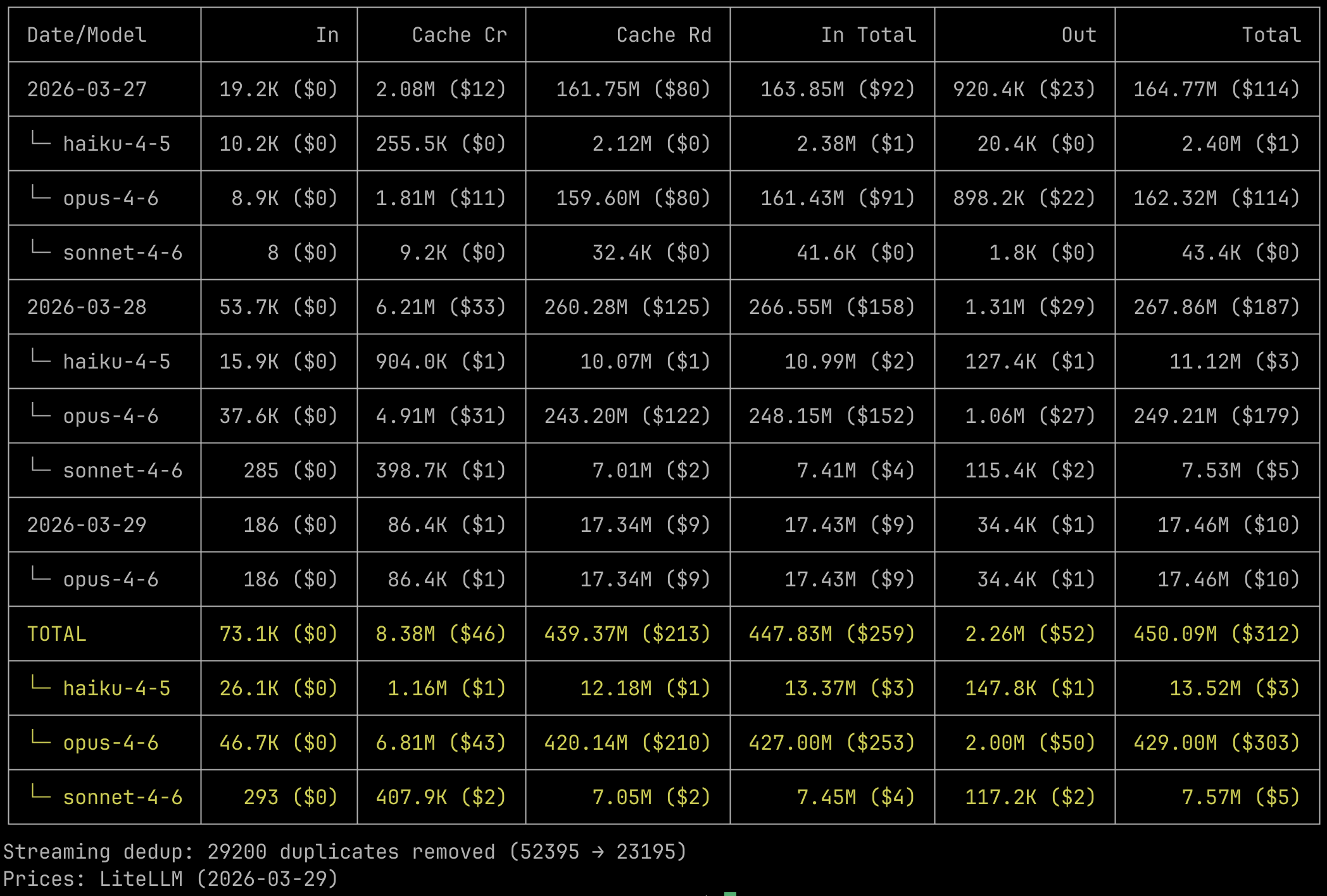
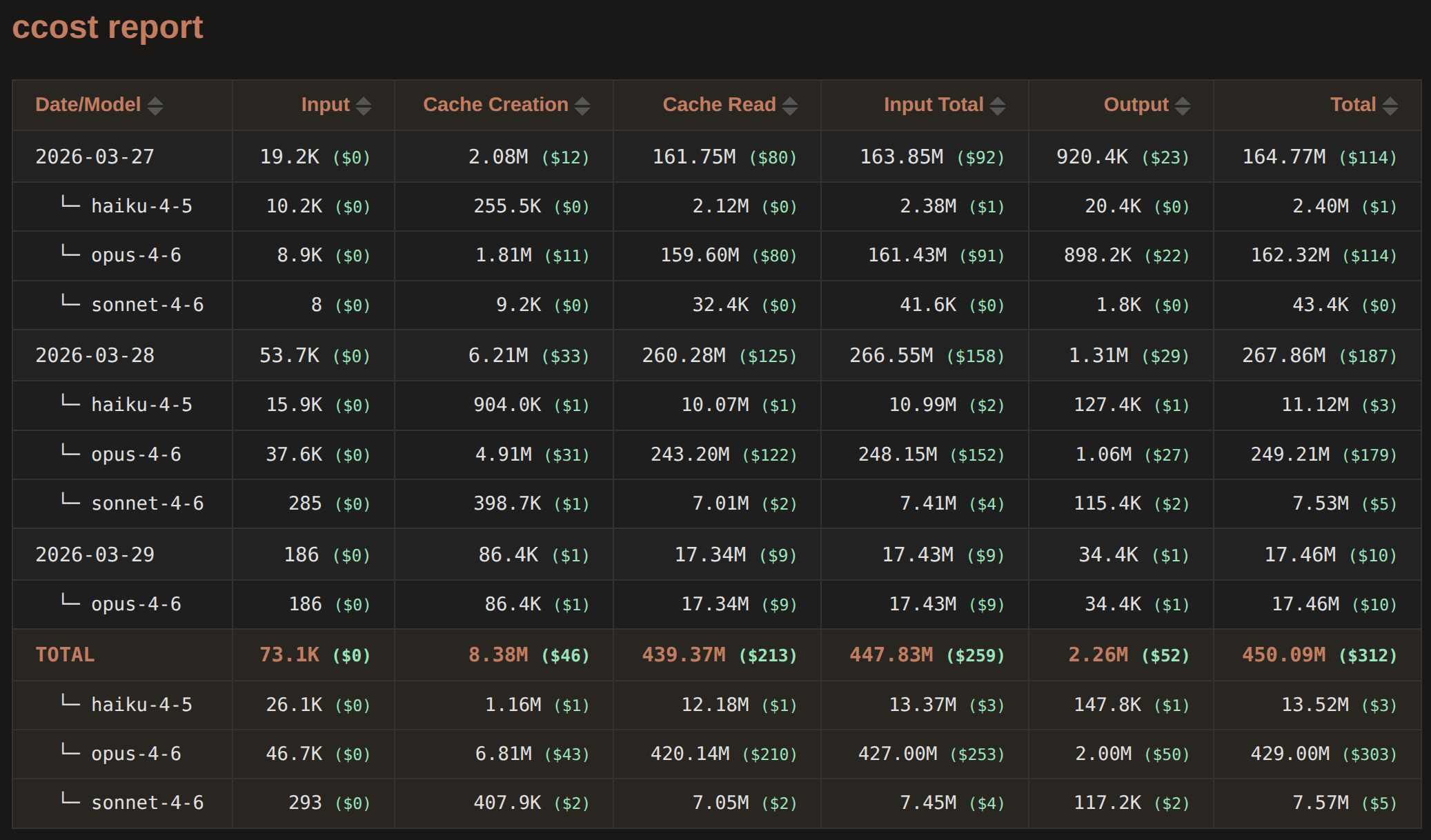
Reads JSONL files from ~/.claude/projects/, deduplicates streaming entries, calculates costs using LiteLLM pricing, and outputs as table, JSON, Markdown, HTML, CSV, TSV, or braille chart (See Screenshot).
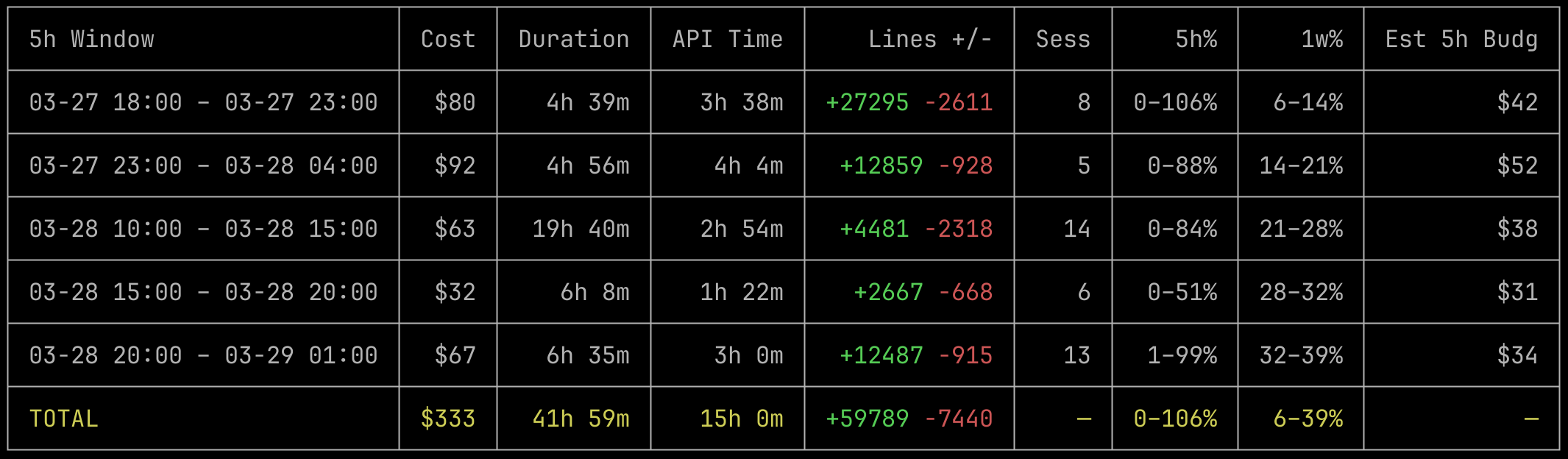
The ccost sl subcommand (setup statusline.jsonl first) analyzes ~/.claude/statusline.jsonl for rate limit tracking, session summaries, budget estimation, and cost comparison (see ccost vs ccost sl).
Blazing fast CLI and library written in Rust with thorough tests. Also powers CC Friend (Claude Code Friend), a Tauri desktop app for visualizing your Claude Code usage and more.



中文文档
Install
npm i -g ccost
Or download prebuilt binaries from GitHub Releases.
Or via Cargo (compiles from source):
cargo install ccost
Quick Start
ccost
ccost --from 2026-03-01 --to 2026-03-31
ccost --per model --cost decimal
ccost --chart cost
ccost sl
ccost sl --per action
ccost sl --per 5h --cost decimal
ccost sl --chart 5h
CLI Reference
Grouping
--per <dim> | Group by: day, hour, month, session, project, model, subagent, tool, line. Up to 2 for nested grouping. Default: --per day --per model. |
--order <order> | Sort: asc (default) or desc. |
Two-level grouping creates parent-child rows, e.g. --per day --per model shows each day with per-model breakdowns.
Date Filtering
--from <date> | Start date (inclusive). YYYY-MM-DD or YYYY-MM-DDTHH:MM:SS. |
--to <date> | End date (inclusive). |
--5hfrom, --5hto | 5-hour window starting/ending at given time. |
--1wfrom, --1wto | 1-week window starting/ending at given time. |
--5hfrom/--5hto are mutually exclusive. Same for --1wfrom/--1wto. The 5h and 1w shortcuts cannot be combined with --from/--to.
Record Filtering
--project <name> | Filter by project path (case-insensitive substring). |
--model <name> | Filter by model name (case-insensitive substring). |
--session <id> | Filter by session ID (case-insensitive substring). |
Timezone
--tz <tz> | UTC, fixed offset (+08:00), or IANA name (Asia/Shanghai). Default: local. |
Cost Display
--cost <mode> | true (default): integer $1. decimal: $1.23. false: hide costs. |
Output
--output <fmt> | json, markdown, html, txt, csv, tsv. Writes to file (default: ccost.<ext>). |
--filename <path> | Custom output filename. |
--table <mode> | auto (default), full, compact. Auto picks compact when terminal < 120 cols. |
--copy <fmt> | Copy to clipboard. Uses pbcopy/xclip/wl-copy/OSC52. Independent of --output. |
Chart
--chart <mode> | Braille line chart: cost or token. |
Granularity auto-selects based on range (hour/day/month). Only --output txt works with --chart.
Pricing
--live-pricing | Fetch latest from LiteLLM (requires network). |
--pricing-data <path> | Custom pricing JSON file. |
Other
--claude-dir <dir> | Override Claude config directory. Default: ~/.claude and ~/.config/claude. |
--help | Show help. |
--version | Show version. |
Statusline Analysis
ccost sl command can analyze ~/.claude/statusline.jsonl, a file produced by a Claude Code statusline hook that snapshots rate limits, cost, duration, and context window usage on every action (see ccost vs ccost sl).
Setup for statusline.jsonl
Automatic Setup
Run in Claude Code on any OS:
/statusline Set up a command-type statusline using ~/.claude/statusline.sh (or ~/.claude/statusline.ps1 on Windows). The script should read stdin and append {"ts":<unix_epoch>,"data":<stdin_json>} to ~/.claude/statusline.jsonl. Create the script and configure settings.json.
Manual Setup
Linux, macOS, WSL
Or set it up manually: add to ~/.claude/settings.json:
  "statusLine": {
    "type": "command",
    "command": "~/.claude/statusline.sh"
  }
Create ~/.claude/statusline.sh:
#!/bin/bash
input=$(cat)
echo "{\"ts\":$(date +%s),\"data\":$input}" >> ~/.claude/statusline.jsonl
chmod +x ~/.claude/statusline.sh
If you already have a statusline script, just append the echo line.
Windows (PowerShell)
Add to ~/.claude/settings.json:
  "statusLine": {
    "type": "command",
    "command": "powershell -NoProfile -File ~/.claude/statusline.ps1"
  }
Create ~/.claude/statusline.ps1:
$input = $Input | Out-String
$ts = [int](New-TimeSpan -Start (Get-Date '1970-01-01') -End (Get-Date).ToUniversalTime()).TotalSeconds
$line = "{""ts"":$ts,""data"":" + $input.Trim() + "}"
Add-Content -Path "$env:USERPROFILE\.claude\statusline.jsonl" -Value $line -Encoding UTF8
View Modes
ccost sl | 5-hour windows (default) |
ccost sl --per action | Rate limit timeline with per-action cost |
ccost sl --per session | By session |
ccost sl --per project | By project |
ccost sl --per day | By day |
ccost sl --per 1h | 1-hour windows within 5h windows |
ccost sl --per 5h | 5-hour rate-limit windows |
ccost sl --per 1w | 1-week rate-limit windows |
ccost sl --chart 5h | 5-hour rate limit % chart |
ccost sl --chart 1w | 1-week rate limit % chart |
ccost sl --chart cost | Cumulative cost chart |
The session/project/day/1h/5h/1w views share columns: Cost, Duration, API Time, Lines +/-, Sess, 5h%, 1w%. Window views (1h/5h/1w) add Est 5h Budget or Est 1w Budget. The 1h view also adds 5h Resets. The action view has its own layout: Time, Cost, 5h%, 1w%, 5h Resets, Session.
The 5h% and 1w% columns show the observed min-max range (e.g. 1-29%).
Statusline Flags
--file <path> | Statusline file. Default: ~/.claude/statusline.jsonl. |
--nopromo | Disable promo adjustment for budget estimation. See below. |
--cost-diff | Compare statusline cost with LiteLLM pricing. Only with --per session. |
All shared flags (--from, --to, --tz, --session, --project, --model, --cost, --output, --filename, --copy, --order, --table) work with ccost sl.
Segments and Continued Sessions
When a session is closed and resumed, cumulative counters reset to zero. ccost sl detects these resets and sums across segments correctly.
When a session is continued via claude --continue, a new session ID is created but cumulative counters (cost, duration, lines) carry over from the predecessor without resetting. ccost sl detects this by subtracting each session's first record values as a baseline, so only the work done in the current session instance is counted.
Rate limits are account-level and do not reset with sessions.
Note: --per day assigns each session to the day it started. Sessions spanning midnight are not split.
Budget Estimation
Window views estimate the total rate-limit budget from cost and the delta in rate-limit percentage:
Est 5h Budget = Cost * 100 / delta_5h%    (for --per 1h and --per 5h)
Est 1w Budget = Cost * 100 / delta_1w%    (for --per 1w)
Where delta% = max% - min% within the window. This uses how much of the rate limit was actually consumed, not the absolute peak.
Since ccost sl only sees Claude Code cost, usage from other Claude products (web, desktop, mobile) inflates the denominator without increasing the numerator. This makes the estimate a lower bound on the real budget, with the gap proportional to non-CC usage.
Promo Adjustment
Budget estimates (and only budget estimates ("Est 5h/1w Budget")) are adjusted by default for known 2x usage promo periods (Dec 2025, Mar 2026). During these promos the rate-limit budget doubles, so the same spend uses half the percentage. Use --nopromo to disable:
ccost sl --per 5h --nopromo
For windows that partially overlap a promo period, the adjustment scales proportionally.
Examples
ccost --per project --cost decimal --output html --filename report.html
ccost --session abc123 --from 2026-03-23
ccost --tz UTC --order desc --from 2026-03-01
ccost --model opus --cost false
ccost --5hfrom 2026-03-24T10:00:00
ccost --live-pricing
ccost --chart cost --1wto 2026-03-25
ccost --per month --output csv --filename usage.csv
ccost --per project --per model --table full
ccost --per subagent --cost decimal
ccost --per session --per subagent
ccost --per tool --cost decimal
ccost --per session --per line
ccost --copy json
ccost sl --per 5h --cost decimal
ccost sl --per session --cost-diff --cost decimal
ccost sl --chart 5h
Library API
ccost is also a Rust library.
[dependencies]
ccost = { path = "../ccost" }
Pipeline
load_records -> calculate_cost -> group_records -> format_*
use ccost::*;

let options = LoadOptions {
    from: Some("2026-03-01".to_string()),
    to: Some("2026-03-31".to_string()),
    tz: Some("UTC".to_string()),
    model: Some("opus".to_string()),
    ..Default::default()
};

let result = load_records(&options);
let pricing = load_pricing();
let priced = calculate_cost(&result.records, Some(&pricing));

let dimensions = vec![GroupDimension::Day, GroupDimension::Model];
let group_options = GroupOptions {
    order: SortOrder::Asc,
    tz: Some("UTC".to_string()),
};
let grouped = group_records(&priced, &dimensions, Some(&group_options));

use ccost::formatters::table::TableOptions;
let table_opts = TableOptions {
    dimension_label: "Date/Model".to_string(),
    price_mode: PriceMode::Decimal,
    compact: false,
    color: Some(true),
};
let table = format_table(&grouped.data, &grouped.totals, &table_opts);
print!("{}", table);
Key Types
struct LoadOptions {
claude_dir: Option<String>,
from: Option<String>,
to: Option<String>,
tz: Option<String>,
project: Option<String>,
model: Option<String>,
session: Option<String>,
}
enum GroupDimension { Day, Hour, Month, Session, Project, Model, Subagent }
struct GroupedData {
label: String,
input_tokens: u64,
output_tokens: u64,
cache_creation_tokens: u64,
cache_read_tokens: u64,
input_cost: f64,
cache_creation_cost: f64,
cache_read_cost: f64,
output_cost: f64,
total_cost: f64,
children: Option<Vec<GroupedData>>,
}
Formatters
format_table() | Unicode box-drawing table with optional ANSI colors |
format_txt() | Same table, no colors |
format_json() | JSON with meta, data, totals, dedup |
format_markdown() | GFM Markdown table |
format_html() | Self-contained HTML with sortable columns |
format_csv() | RFC 4180 CSV |
format_tsv() | Tab-separated values |
render_chart() | Braille line chart |
How It Works
Data Source
Reads JSONL conversation logs from Claude Code's local storage:
~/.claude/projects/*/ (session files and subagents/)~/.config/claude/projects/*/ (alternate location)
Both are scanned and deduplicated via symlink detection. Subagent transcripts are found in both the old (<project>/subagents/) and new (<project>/<session-uuid>/subagents/) directory structures. Each record carries an agent_id (the subagent file stem, or empty for the main session), enabling --per subagent grouping.
Each record's message.content is parsed with lightweight deserialization (only type and name fields from content blocks; input, text, etc. are skipped for performance). Tool names are extracted from tool_use blocks in assistant messages, enabling --per tool grouping. Each record also carries its JSONL line number (1-based), enabling --per line grouping. Line numbers are consistent with ccfriend's transcript line anchors (#N).
Deduplication
Streaming entries share the same messageId:requestId key with increasing output_tokens. Only the highest-output record per key is kept. This dedup is global across all files, preventing double-counting between parent sessions and subagent files.
Pricing
Per-record cost via model-to-price lookup:
- Exact match
- Strip date suffix (
-YYYYMMDD / @YYYYMMDD), retry
- Case-insensitive exact match (with and without date suffix)
- Case-insensitive substring match
Bundled pricing includes Claude, GLM, Kimi, and MiniMax (popular coding LLMs with official Claude Code-compatible API endpoints) from LiteLLM. Use --live-pricing for latest or --pricing-data for custom.
ccost vs ccost sl
Below we'll compare ccost (data from ~/.claude/projects/) and ccost sl (data from statusline.jsonl).
~/.claude/projects/ contains per-request JSONL logs with detailed token counts (input, output, cache creation, cache read) for every API call. ccost computes cost from these counts using LiteLLM pricing.
~/.claude/statusline.jsonl contains periodic snapshots from Claude Code's statusline, including the server-reported cumulative cost and the 5-hour and 1-week rate-limit usage percentages, which are not available anywhere else.
As shown by ccost sl --per session --cost-diff, when LiteLLM pricing is accurate, the cost computed from ~/.claude/projects/ closely matches the server-reported cost in statusline.jsonl. The statusline cost may occasionally undercount because it does not always include subagent costs. Since ~/.claude/projects/ has full per-request token breakdowns, it may be the more reliable source for cost.
The primary value of statusline.jsonl is the rate-limit percentages, not cost. This is why CC Friend (Claude Code Friend) uses cost data computed from ~/.claude/projects/ combined with the 5-hour and 1-week rate-limit percentages from statusline.jsonl.
Project Path Decoding
Directory names like -home-user-workspace-test decode to /home/user/workspace/test.
Screenshots
Terminal
Statusline Analysis (ccost sl)
HTML Report
Development
cargo test
cargo build --release
cargo run -- --help
License
MIT





