


Security News
CVE Volume Surges Past 48,000 in 2025 as WordPress Plugin Ecosystem Drives Growth
CVE disclosures hit a record 48,185 in 2025, driven largely by vulnerabilities in third-party WordPress plugins.
By Sarah Gooding - Jan 09, 2026

Lightning-fast performance analyzer for all npm packages
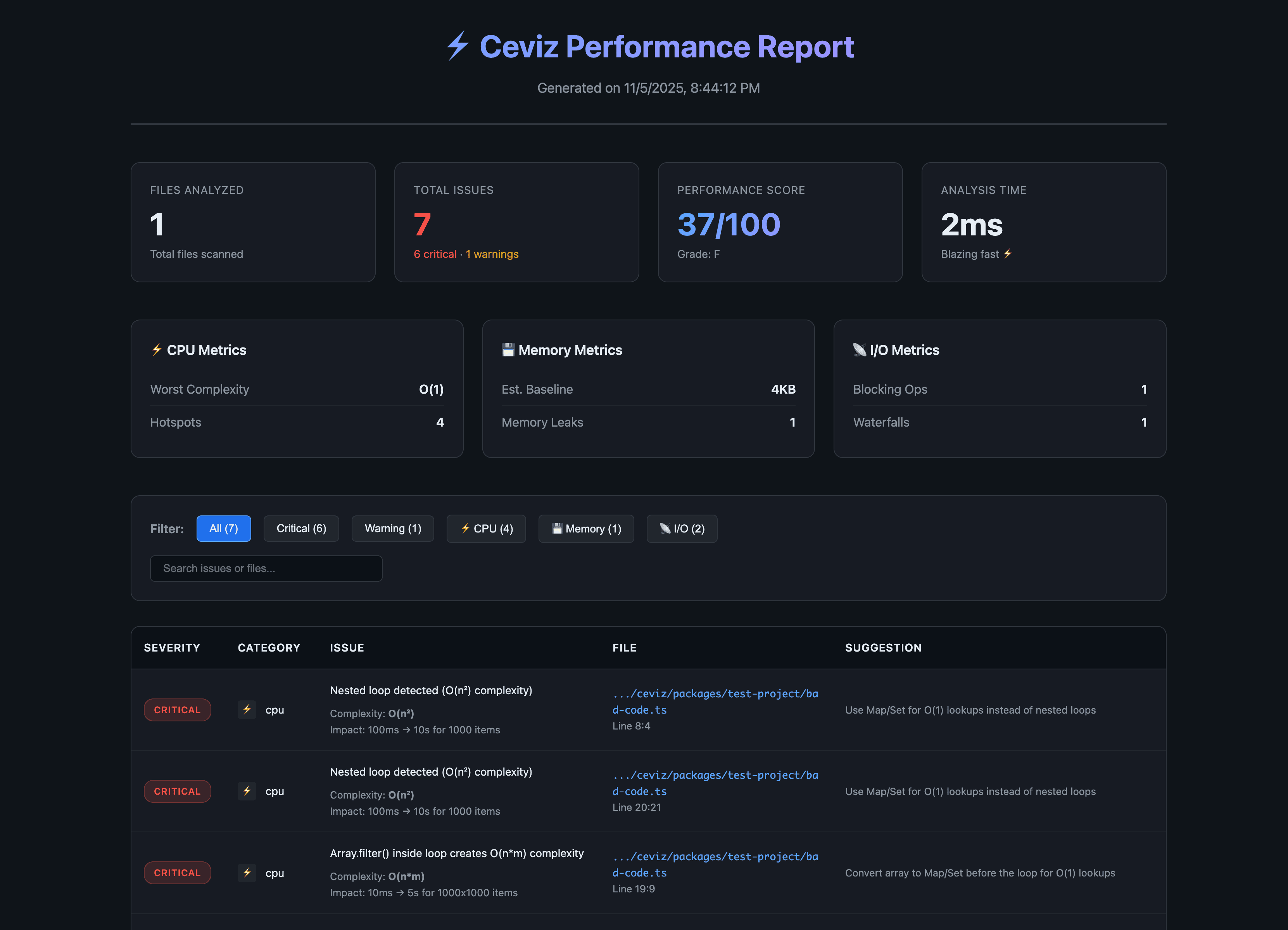
Ceviz automatically scans your codebase and detects performance issues that slow down your application:
# Run without installing
npx ceviz analyze
# Or install globally
pnpm add -g ceviz
# Or add to your project
pnpm add -D ceviz
# Using pnpm exec (in workspace)
pnpm exec ceviz analyze

# Or using node directly
node packages/core/dist/cli.mjs analyze

# Analyze specific path
ceviz analyze ./my-project

# Output as JSON
ceviz analyze --json

# Save JSON to file
ceviz analyze --json report.json

# Generate interactive HTML report (auto-opens in browser)
ceviz analyze --html
ceviz analyze --html report.html

# Use custom config file
ceviz analyze --config ceviz.config.ts
Create ceviz.config.ts in your project root for full TypeScript autocomplete and type checking:
import { defineConfig } from 'ceviz'

export default defineConfig({
  // Load custom plugins
  plugins: [
    'ceviz-plugin-vue',
    './my-custom-plugin.js'
  ],

  // Configure rules
  rules: {
    'nested-loops': 'error',
    'no-console-log': 'off'
  },

  // Output reporters
  reporters: ['console', 'html'],

  // Framework analysis
  scanDeps: false,
  targetDeps: ['nuxt', 'vite']
})
Benefits of defineConfig:
Ceviz can also analyze framework code in node_modules to help you report performance issues to maintainers:
# Analyze any framework in your node_modules
ceviz analyze . --scan-deps --target-deps nuxt,vite,vue
For detailed framework analysis instructions, see FRAMEWORK_ANALYSIS.md.
⚡ Ceviz Performance Analysis
────────────────────────────────────────────────────────────

📊 Summary
────────────────────────────────────────────────────────────
  Files analyzed:     147
  Total issues:       12
    ● Critical:      5
    ● Warnings:      7
    ● Info:          0
  Performance score:  72/100 👍
  Analysis time:      1234ms

🔴 Critical Issues
────────────────────────────────────────────────────────────

  ⚡ CRITICAL: Nested loop detected (O(n²) complexity)
     server/api/users.ts:42
     Impact: 100ms → 10s for 1000 items
     Complexity: O(n²)
     → Use Map/Set for O(1) lookups instead of nested loops

  ⚡ CRITICAL: Array.find() inside loop creates O(n*m) complexity
     composables/useData.ts:78
     Impact: 10ms → 5s for 1000x1000 items
     → Convert array to Map/Set before the loop for O(1) lookups

  💾 CRITICAL: setInterval without cleanup causes memory leak
     components/LiveData.vue:156
     Impact: Memory grows indefinitely
     → Clear interval in onUnmounted lifecycle

  📡 CRITICAL: readFileSync() blocks the event loop
     server/api/config.ts:12
     Impact: 50-200ms block per call
     → Use async version: readFile()

📈 Performance Metrics
────────────────────────────────────────────────────────────
  CPU
    Worst complexity:  O(n²)
    Hotspots:          5 locations

  Memory
    Est. baseline:     450MB
    Memory leaks:      2
    Bloat level:       medium

  Bundle
    Current size:      1.2MB
    Potential savings: 458KB
    Heavy deps:        moment, lodash

  I/O
    Blocking ops:      1
    Waterfalls:        3

💡 Quick wins:
  1. Fix critical O(n²) loops → use Map/Set for lookups
  2. Replace sync file operations → use async versions
  3. Clean up memory leaks → add proper cleanup
// ❌ BAD - O(n²)
users.forEach((user) => {
  posts.forEach((post) => {
    if (post.userId === user.id) {
      // ...
    }
  })
})

// ✅ GOOD - O(n)
const postsByUser = new Map()
for (const post of posts) {
  if (!postsByUser.has(post.userId)) {
    postsByUser.set(post.userId, [])
  }
  postsByUser.get(post.userId).push(post)
}
// ❌ BAD - O(n*m)
items.filter((item) => {
  const category = categories.find(cat => cat.id === item.categoryId)
  return category?.active
})

// ✅ GOOD - O(n)
const categoryMap = new Map(categories.map(c => [c.id, c]))
items.filter(item => categoryMap.get(item.categoryId)?.active)
// ❌ BAD - Memory leak
const interval = setInterval(() => {
  fetchData()
}, 1000)

// ✅ GOOD - Cleaned up
const interval = setInterval(() => {
  fetchData()
}, 1000)

onUnmounted(() => {
  clearInterval(interval)
})
// ❌ BAD - Blocks event loop
const data = fs.readFileSync('file.txt', 'utf-8')

// ✅ GOOD - Non-blocking
const data = await fs.promises.readFile('file.txt', 'utf-8')
// ❌ BAD - Waterfall (3x slower)
const user = await fetchUser()
const posts = await fetchPosts()
const comments = await fetchComments()

// ✅ GOOD - Parallel
const [user, posts, comments] = await Promise.all([
  fetchUser(),
  fetchPosts(),
  fetchComments()
])
Ceviz currently has 5 core rules:
| Rule | Category | Severity | Description |
|---|---|---|---|
nested-loops | CPU | Critical | Detects O(n²) or worse nested loops |
array-find-in-loop | CPU | Critical | Detects O(n*m) array operations in loops |
memory-leak-interval | Memory | Critical | Detects unclosed intervals/timeouts |
sync-file-operations | I/O | Critical | Detects blocking file operations |
sequential-requests | I/O | Warning | Detects parallelizable async operations |
More rules coming soon!
Ceviz supports a powerful plugin system for creating custom rules and reporters.
// ceviz-plugins/my-plugin.ts
import type { CevizPlugin, Rule } from 'ceviz'

const myRule: Rule = {
  id: 'no-console-log',
  name: 'No Console Log',
  category: 'framework',
  severity: 'warning',
  description: 'Detects console.log in production code',
  enabled: true,
  check: (context) => {
    // Your analysis logic
    return []
  },
}

const myPlugin: CevizPlugin = {
  name: 'my-custom-plugin',
  version: '1.0.0',
  rules: [myRule],
  setup: async (context) => {
    // Listen to hooks
    context.hooks.hook('analysis:start', () => {
      console.log('Starting analysis...')
    })
  },
}

export default myPlugin
// ceviz.config.ts
import { defineConfig } from 'ceviz'
import myPlugin from './ceviz-plugins/my-plugin.js'

export default defineConfig({
  plugins: [
    myPlugin,
    'ceviz-plugin-vue', // Or from npm
  ],
})
See PLUGIN_API.md for complete plugin documentation.
Ceviz exits with code 1 if critical issues are found, making it perfect for CI/CD:
# GitHub Actions
name: Performance Check
on: [pull_request]

jobs:
  ceviz:
    runs-on: ubuntu-latest
    steps:
      - uses: actions/checkout@v3
      - uses: pnpm/action-setup@v2
      - run: pnpm dlx ceviz analyze
Ceviz can analyze any npm package and detect performance issues:
Run ceviz analyze --html to generate an interactive HTML report with detailed findings.
We're building something special here, and we want YOU to be part of it!
Ceviz is more than just a tool - it's a movement to make performance analysis accessible, accurate, and actionable for everyone. We're 100% open to contributions and wildly open to new ideas.
We want to take Ceviz far beyond what it is today. Our goal is to build the most comprehensive, accurate, and delightful performance analysis tool in the JavaScript ecosystem - analyzing everything from the smallest edge case to framework-level performance issues.
Whether you're:
Every contribution matters! We're completely open to:
We review PRs quickly and are happy to mentor new contributors!
Ceviz is just getting started. With your help, we can make it the go-to tool for performance analysis across the entire JavaScript ecosystem. Let's build something amazing together!
Join us: GitHub Issues
MIT © Ceviz Team
Built with ❤️ for all npm packages
FAQs
Core performance analysis rules for Ceviz
We found that ceviz demonstrated a healthy version release cadence and project activity because the last version was released less than a year ago. It has 1 open source maintainer collaborating on the project.
Did you know?

Socket for GitHub automatically highlights issues in each pull request and monitors the health of all your open source dependencies. Discover the contents of your packages and block harmful activity before you install or update your dependencies.
Security News
CVE disclosures hit a record 48,185 in 2025, driven largely by vulnerabilities in third-party WordPress plugins.

Security News
Socket CEO Feross Aboukhadijeh joins Insecure Agents to discuss CVE remediation and why supply chain attacks require a different security approach.

Security News
Tailwind Labs laid off 75% of its engineering team after revenue dropped 80%, as LLMs redirect traffic away from documentation where developers discover paid products.