code-template-generator


Table of contents
(*) Tips and tricks for the project templates
1. Introduction
You like to build yourself development environment and install only what you need in your project. You want to know how it works and have more controll as much as possible. Sometimes you just want to have a little tool to show an idea. The application gives you a step on your way and it makes your life more exciting. (^_~)
The application is a lightweight Node.js CLI tool that is using for front-end web development with React. Main features:
- Project generation that has a part of the Build environments project.
- Component generation.
- Asset generation that is useful when you want using your own project template or config files etc.
Screenshot
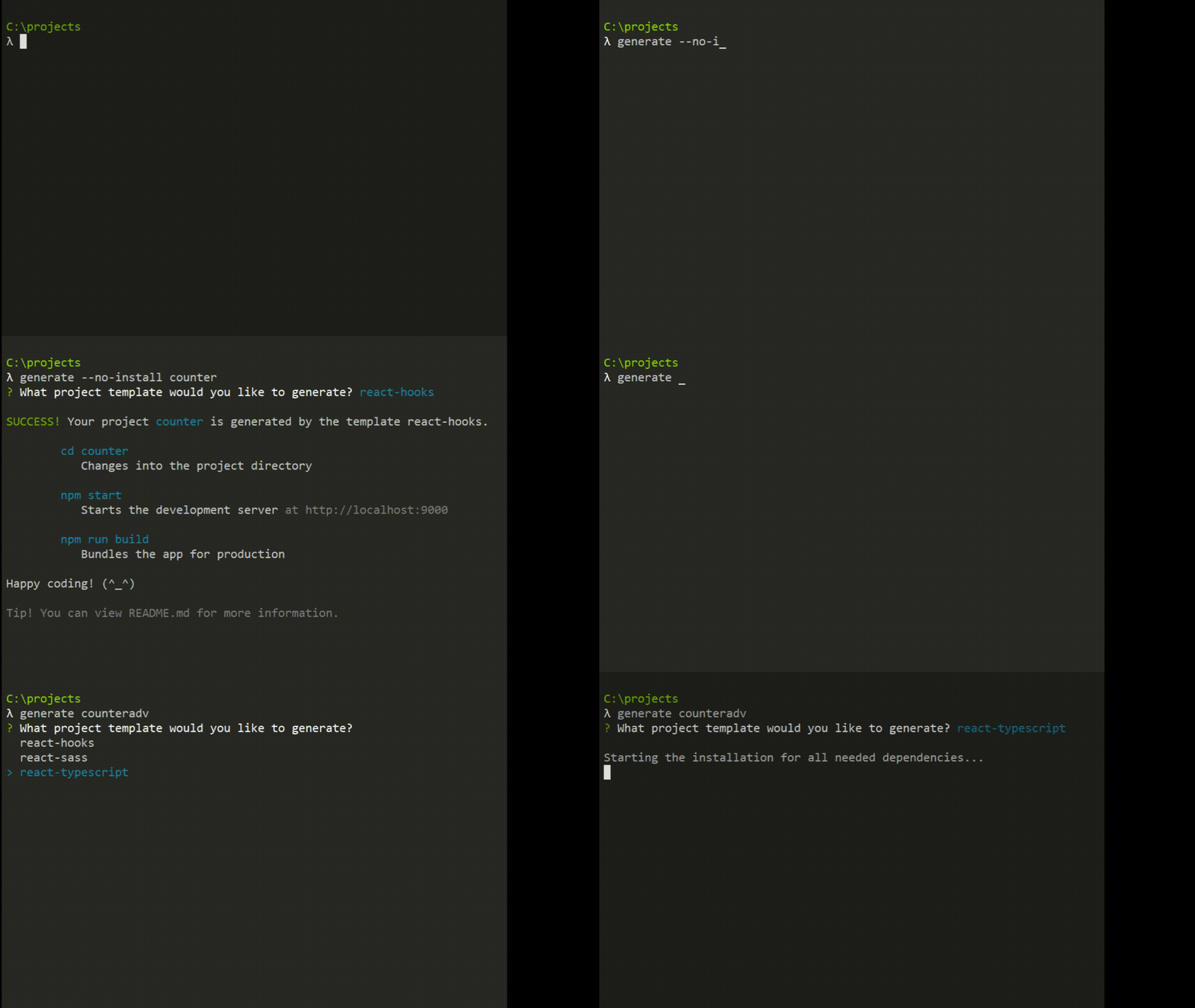
2. Main features
- Project template generation
- Two alternative for Git support during the generation:
- Without Git support (default).
- With Git support by running the
git init command and generation of a .gitignore file while the project is generated from a chosen template.
- Project templates:
- It's simple for configuration and installation of only dependencies you need.
- Fast and flexible.
- Only the minimum needed dependencies are installed and preconfigured.
- Easy to change to (or from) another build environment.
- Compatibility with another projects that are generated from create-react-app.
- Code splitting.
- Image handling.
- Minification for production.
- CSS, JS code injected automatic into the HTML template
/src/index.html.
- Hot Module Replacement (HMR) is enabled.
- You don't need to care about the distribution directory
/dist. The things you care are only the directory /src.
- Anti-caching.
- React component generation can be:
- A single React component that is a JavaScript file (*.js, *.jsx, *.ts, *.tsx).
- A full React component that is a directory with two files are within: a CSS file and a JS file (*.js, *.jsx, *.tsx).
- Asset generation - You can retrieve your own assets (project templates, component templates, config files for ESLint, Webpack etc.) from a directory on local.
.gitignore file generation.- Automatic update checking for the latest stable version that is found on npmjs.com.
2.1 Project templates
| react-hooks | React Hooks, Babel |
| react-sass | React Hooks, Babel and SASS |
| react-typescript | React Hooks, TypeScript, ts-loader |
You can view more details and other project templates in the repository Build environments.
2.2 Component templates
| Plain JavaScript | *.js | *.css, *.js | Can using *.jsx |
| TypeScript | *.tsx | *.css, *.tsx | |
(*) Single component is a JavaScript file with these supported extensions: *.js, *.jsx, *.ts and *.tsx.
(**) Full component is a directory with two files are within: a CSS file and a JS file (*.js, *.jsx, *.tsx).
2.3 Asset generation
You can retrieve your own assets from a directory on local.
Reasons:
- You may have your own project templates, code templates, libraries and many more (.gitignore, .editorconfig, .eslinttrc.json, .eslintignore, webpack.config.js ect).
- You don't want to do the same things as search-copy-paste the assets many times while you are coding or starting a new project.
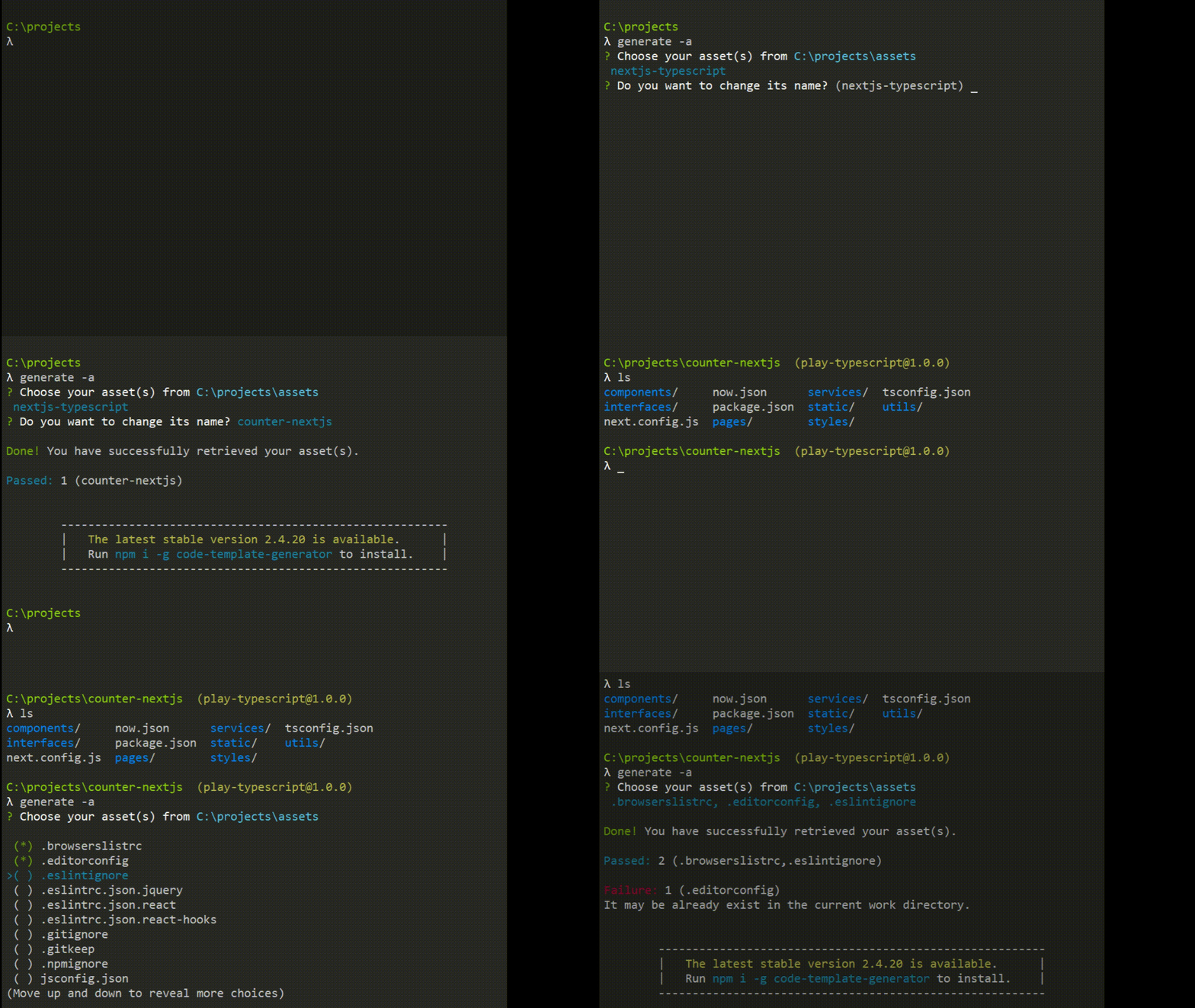
(You can view how to use and the examples are below for more details)
3. Installation
$ npm install --global code-template-generator
System requirements:
- The minimum supported Node.js version is 8.9.0 (Node.js LTS version is a good choice for the stability).
- Administrator permission is required by your operating system for these things:
- Installation of
code-template-generator on global by using the option --global.
- Running the command
generate --update for the latest stable version updating.
4. Usage
$ generate [-option] [--sub-option] [project-name][component-name][path]
Tip! You can use the command gen instead of generate from version 2.2.x. It's more quickly when you enter a command line.
Examples:
generate -v -> Main command.gen -v -> Short command.
4.1 Options
| - | <project-name> | Generate a new project from a chosen template without Git support. |
-g | <project-name> | Run automatically the git init command and generate a .gitignore file on the root of project directory during the generation. |
-c | <component-name>.<extension> | Generate a single React component in the current directory (*.js, *.jsx, *.ts, *.tsx). |
-f | <component-name> | Generate a full React component in the current directory (*.js, *.jsx, *.tsx). |
-i | - | A .gitignore file will be generated in the current directory. |
-v | - | View the installed version. |
-help | - | View help documentation. |
-u | - | Automatic update checking and installation for the latest stable version. (*) |
-cf | (**) | Using with one of these sub options: --set-asset, --view-asset. |
-a | - | Show a list to retrieve chosen asset(s) into the current work directory. |
(*) Administrator permission is required by your operating system. Here are the examples for MacOS and Ubuntu systems by using sudo:
$ sudo generate -u$ sudo generate --update (Using alias)
(**) View how to use with its sub options that are below.
4.2 Sub options
--no-install (No install dependencies)--set-asset (Set a local path to the asset directory)--view-asset (View the current local path to the asset directory)--jsx (Using *.jsx instead of *.js)--tsx (Using *.tsx instead of *.js)
| - | --no-install | <project-name> | Generate a project without both running the git init command and installation of dependencies. |
-g | --no-install | <project-name> | Generate a project with running the git init command but without installation of dependencies. |
-cf | --set-asset | <local-path> | Store a local path to the asset directory into the application config file. |
-cf | --view-asset | - | View the current asset path. |
-f | --jsx | <component-name> | The application creates a *.jsx file instead of a *.js file that is default when it generates a full component. |
-f | --tsx | <component-name> | The application creates a *.tsx file instead of a *.js file that is default when it generates a full component. |
4.3 Aliases
-g | --git |
-c | --component |
-f | --full-component |
-i | --gitignore |
-v | --version |
-help | --help |
-u | --update |
-cf | --config |
-a | --asset |
5. Examples
// Project generation
$ generate first-project   // Generates a project without any options

$ generate -g secondproject   // With Git support by running 'git init'
$ generate --git ThirdProject   // Using alias --git instead of -g
$ generate -g --no-install OtherProject
$ generate --no-install LastProject  // No install dependencies

// Single component -> A JavaScript file
$ generate -c SearchService.js
$ generate -c ReviewComponent.jsx
$ generate -c CountService.ts
$ generate -c CounterComponent.tsx

// Full component
// -> A directory with two files are within (*.css, *.js|jsx|tsx)
$ generate -f Product         // Default is using *.js
$ generate -f --jsx Cart      // Using *.jsx
$ generate -f --tsx Counter   // Using *.tsx

// Asset generation
$ generate -cf --set-asset "C:\Users\name\myassets"  // Windows
$ generate -cf --set-asset "/Users/name/myassets"    // MacOS
$ generate -cf --set-asset "/home/name/myassets"     // Ubuntu
$ generate -cf --view-asset   // View info about the current asset location
$ generate -a                 // Show the asset list and retrieve them

// Others
$ generate -i      // Generate a .gitignore file
$ generate -v      // View the installed version
$ generate -help   // View help documentation
$ generate -u      // Install the latest stable version
6. Thank you!
Special thanks to Harriet Ryder!
Many thanks to Commander.js for the inspiration.





