CMD Draw
A library that allows you to draw and animate on the command line. I created it to make this version of pong for the command line.




Installation
$ npm i command-line-draw
Documentation
There are 4 classes exported by this module, and this section contains documentation for all 4.
A quick note: npm's styling makes this documentation somewhat difficult to read, it may be easier to read it on github.
Table of contents
- Class:
Terminal
new Terminal([config])- Static:
Terminal.BORDERS
- Static:
Terminal.BOTTOM
- Static:
Terminal.FULL
- Static:
Terminal.LEFT
- Static:
Terminal.RIGHT
- Static:
Terminal.TOP
- Static:
Terminal.bitmapPresets
- Static:
Terminal.sevenSegmentPresets
- Event:
'<keyName>'
- Event:
'resize'
terminal.addSprite(sprite)terminal.bitmap(x, y[, color], ...matrixes)terminal.borderCharsterminal.borderStyleterminal.clear()terminal.colorterminal.devterminal.drawBox(x, y, width, height[, color])terminal.drawLine(x1, y1, x2, y2[, color][, thickness][, dashed][, dashThickness][, spaceColor])terminal.hasBorderterminal.heightterminal.interminal.largestBorderterminal.log([data][, ...args])terminal.marginterminal.outterminal.sevenSegment(x, y, a, b, c, d, e, f, g[, color])terminal.sevenSegmentToBitmap(a, b, c, d, e, f, g)terminal.timeterminal.tooBigterminal.widthterminal.write(text, x, y[, color])terminal.writeLarge(text, x, y[, color])
- Class:
Sprite
new Sprite(callback[, config])sprite.callbacksprite.clear()sprite.draw(x, y[, ...args])sprite.move(x1, y1, x2, y2[, t])sprite.moveRelative(dx, dy[, t])sprite.moveTo(x, y[, t])sprite.showingsprite.speedsprite.stop()sprite.xsprite.xRoundersprite.ysprite.yRounder
- Class:
Box
- Class:
Menu
- Class:
Color Not Exported
- Class
Margin Not Exported
- Types

- More Info
Class: Terminal
The terminal object represents the drawing space.
const { Terminal } = require('command-line-draw');
new Terminal([config])
Arguments
config <Object>
in <tty.ReadStream> Where the Terminal reads user input from. Default: process.stdin.out <tty.WriteStream> Where the Terminal writes to. Default: process.stdout.width <number> The width of the Terminal. Default: terminal.out.columns - 2.height <number> The height of the Terminal. Default: terminal.out.rows - 2.border <string> The border style of the terminal. See here for a list of valid border styles. Default: 'light'.color <Object>
foreground <string> The foreground color of the Terminal. See here for a list of valid colors. Default: 'black'.background <string> The background color of the Terminal. See here for a list of valid colors. Default: 'white'.
dev <boolean> Determines behavior of terminal.log(). Default: false.
Creates a new Terminal object.
const { Terminal } = require('command-line-draw');

const terminal = new Terminal();
Static: Terminal.BORDERS
An object containing several unicode box drawing characters, sorted into different border types
Static: Terminal.BOTTOM
A constant equal to the unicode character U+2584 (Lower half block).
Static: Terminal.FULL
A constant equal to the unicode character U+2588 (Full block).
Static: Terminal.LEFT
A constant equal to the unicode character U+258C (Left half block)
Static: Terminal.RIGHT
A constant equal to the unicode character U+2590 (Right half block)
Static: Terminal.TOP
A constant equal to the unicode character U+2580 (Upper half block).
Static: Terminal.bitmapPresets
An object containing boolean[][]s that can be passed into terminal.bitmap() to print letters and punctuation.
const { Terminal } = require("command-line-draw");

const terminal = new Terminal();
terminal.bitmap(0, 0, ...Terminal.bitmapPresets.letters.A);
Static: Terminal.bitmapPresets.letters
An object containing letters that can be passed into terminal.bitmap(). They are indexed "A"-"Z".
const { Terminal } = require("command-line-draw");
const terminal = new Terminal();
terminal.bitmap(0, 0, ...Terminal.bitmapPresets.letters.A);
Static: Terminal.bitmapPresets.punctuation
An object containing punctuation that can be passed into terminal.bitmap(). Included punctuation is ".", "?", and "!".
const { Terminal } = require("command-line-draw");
const terminal = new Terminal();
terminal.bitmap(0, 0, ...Terminal.bitmapPresets.punctuation["!"]);
Static: Terminal.sevenSegmentPresets
An object containing boolean[]s that, using the spread operator, can be passed into terminal.sevenSegment() or terminal.sevenSegmentToBitmap().
const { Terminal } = require("command-line-draw");

const terminal = new Terminal();
terminal.sevenSegment(0, 0, ...Terminal.sevenSegmentPresets.numbers[0]);
Static: Terminal.sevenSegmentPresets.numbers
An object containing boolean[]s that, using the spread operator, can be passed into terminal.sevenSegment() or terminal.sevenSegmentToBitmap(). They are indexed "0"-"9".
const { Terminal } = require("command-line-draw");
const terminal = new Terminal();
terminal.sevenSegment(0, 0, ...Terminal.sevenSegmentPresets.numbers[0]);
Event: '<keyName>'
On all key presses, with the exception of ctrl+c, an event is emitted. The implementation is as follows:
terminal.in.on("keypress", (chunk, key) => {
  if (key.ctrl && !key.meta && !key.shift && key.name === "c") process.exit();
  else if (!this.tooBig) {
    let eventName = "";
    if (key.ctrl) eventName += "ctrl+";
    if (key.meta) eventName += "alt+";
    if (key.shift) eventName += "shift+";
    eventName += key.name;
    this.emit(eventName, key);
  }
});
For example, if the user were to press the up arrow, the event 'up' would be emitted. If they held shift while pressing up, the event 'shift+up' would be emitted.
Event: 'resize'
The 'resize' event is emitted whenever terminal.out is resized.
terminal.addSprite(sprite)
The Sprite cannot be used until it is added to a terminal. When the terminal is resized, sprites that were showing will automatically be redrawn. Has no affect if sprite is already on the terminal,
const { Terminal, Sprite } = require('command-line-draw');
const terminal = new Terminal();
const mySprite = new Sprite((x, y) => {
terminal.drawBox(x, y, 10, 10);
});
terminal.addSprite(mySprite);
mySprite.draw(0, 0);
terminal.bitmap(x, y[, color], ...matrixes)
x <number> The x coordinate at which to print the bitmap.y <number> The y coordinate at which to print the bitmap.color <string> The color of the bitmap Default: terminal.color.foreground.matrixes <boolean[][]> Matrix(es) that represent the bitmap you want to print
Prints a series of bitmaps at a particular position. The bitmaps are a matrix of booleans. true prints ██ in the foreground color, false prints two spaces in the background color.
const { Terminal } = require('command-line-draw');
const terminal = new Terminal();
terminal.bitmap(0, 0, [
[true, true, true],
[true, false, true],
[true, false, true],
[true, false, true],
[true, true, true]
]);
terminal.borderChars
The characters the border is made up of. Equal to Terminal.BORDERS[terminal.borderStyle]
terminal.borderStyle
A string representing the type of border the terminal has. See here for a list of valid border styles.
terminal.clear()
Clears the entire terminal (including logged messages). The border remains visible. Any moving sprites also stop and are cleared.
terminal.drawBox(x, y, width, height[, color])
x <number> The x coordinate of the top-left corner of the box.y <number> The y coordinate of the top-left corner of the box.width <number> The width of the box.height <number> The height of the box.color <string> The color of the box Default: terminal.color.foreground.
Draws a box on the terminal.
terminal.color
A Color object containing information about the terminal's color
terminal.dev
When false, terminal.log() has no affect.
terminal.drawLine(x1, y1, x2, y2[, color][, thickness][, dashed][, dashThickness][, spaceColor])
x1 <number> The x coordinate of the starting point on the line.y1 <number> The y coordinate of the starting point on the line.x2 <number> The x coordinate of the ending point on the line.y2 <number> The y coordinate of the ending point on the line.color <string> The color of the line. Default: terminal.color.foreground.thickness <number> The thickness of the line. Default: 1.dashed <boolean> When true, the line will be dashed (alternating between the foreground and background color). Default: false.dashThickness <number> How thick the dash will be. (e.g, if this is 1, the dash will look like this: █ █ █ █.) Default: 0.5.spaceColor <string> The color of the spaces between the dashes in a dashed line. Default: terminal.color.background.
Draws a line from point (x1, y1) to point (x2, y2). Currently, only vertical and horizontal lines are supported, but not diagonals. The coordinates can be decimals, they will be rounded to the nearest 0.5. Unfortunately, you can only have decimal coordinates on one axis.
const { Terminal } = require('command-line-draw');
const terminal = new Terminal();
terminal.drawLine(0, 1.5, 10, 1.5);
terminal.hasBorder
true if terminal.borderStyle === 'none'. Otherwise it is false.
terminal.height
The height of the terminal.
terminal.in
The input for the terminal.
terminal.largestBorder
The widest of terminal.borderChars.vertical, terminal.borderChars.topLeft, terminal.borderChars.bottomLeft. If terminal.borderStyle === 'solid', it returns 2, if terminal.borderStyle === 'none', it returns 0, otherwise it returns 1.
terminal.log([data][, ...args])
data <any> The data to be printed...args <any> Values to be added to the data
If terminal.dev === true, this method prints to terminal.out with a new line. If it is false, nothing is printed. Logged messages are not reprinted when the terminal is cleared. See console.log() for more details.
terminal.margin
A Margin object containing information about the terminal's margin
terminal.out.
The output for the terminal
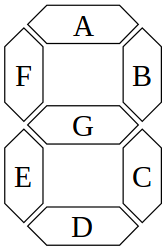
terminal.sevenSegment(x, y, a, b, c, d, e, f, g[, color])
x <number> The x coordinate at at which to write the seven segment displayy <number> The y coordinate at at which to write the seven segment displaya-g <boolean> Boolean values representing each segment of the a seven segment display.
Prints a a seven segment display to the terminal. It is 5 characters tall and 6 wide (each segment is 2 characters wide).
const { Terminal } = require('command-line-draw');
const terminal = new Terminal();
terminal.sevenSegment(0, 0, true, true, true, true, true, true, false);
terminal.sevenSegmentToBitmap(a, b, c, d, e, f, g)
Turns seven boolean values (representing the seven segments of a seven segment display) and returns a boolean matrix (2D <Array>) representing each pixel on a 5x3 grid to display the given values.
const { Terminal } = require('command-line-draw');
const terminal = new Terminal();
const myBooleanMatrix = terminal.sevenSegmentDisplay(true, true, true, true, true, true, false);
terminal.bitmap(0, 0, myBooleanMatrix);
terminal.time
Returns a time (high resolution time in milliseconds, same as performance.now()). The time does not increase when terminal.tooBig === true. It is recommended that you use this to time any animations on the terminal.
terminal.tooBig
Returns true when the terminal's width and height exceed the actual size of the user's command line. Nothing will be drawn until the user's command line becomes larger.
terminal.width
The width of the terminal.
terminal.write(text, x, y[, color][, backgroundColor])
text <string> The text to be written to the terminal.x <number> The x coordinate at which to print the text.y <number> The y coordinate at which to print the text.color <string> The color of the text Default: terminal.color.foreground.backgroundColor <string> The background color of the text Default: terminal.color.background.
Writes text to the terminal at a particular position. If the text is too long and goes outside the terminal, it will not wrap, it will instead throw an error.
terminal.writeLarge(text, x, y[, color])
text <string> The text to be written to the terminal.x <number> The x coordinate at which to print the text.y <number> The y coordinate at which to print the text.color <string> The color of the text Default: terminal.color.foreground.
Prints large text to the terminal at a particular position. Each character is a seven segment display with a 2 character space between characters and 6 character space between words. Allowed characters are letters, numbers, and basic punctuation (.!?).
const { Terminal } = require('command-line-draw');
const terminal = new Terminal({
dev: true
});
terminal.log('Hello World');
Class: Sprite
new Sprite(callback[, config])
callback <Function> This callback is called to draw the shape
x <number> The x coordinate that the sprite should be drawn at.y <number> The y coordinate that the sprite should be drawn at....args <any> Any other arguments passed into the callback.
config <Object>
preciseAxis <string> 'x', 'y', or 'neither'. The axis to use decimal coordinates on. Default: 'neither'.speed <number> | <undefined> The speed the sprite should move if a time is not provided in sprite.move().
sprite.callback
The callback that was passed into the constructor
Creates a new sprite object.
const { Terminal, Sprite } = require("command-line-draw");
const terminal = new Terminal();
const mySprite = new Sprite((x, y) => {
terminal.drawBox(x, y, 10, 10);
});
terminal.addSprite(mySprite);
sprite.draw(0, 0);
sprite.clear()
Clears the sprite from the terminal.
sprite.draw(x, y[, ...args])
Calls sprite.callback in order to draw the sprite.
sprite.move(x1, y1, x2, y2[, t])
x1 <number> The x position for the box to start at.y1 <number> The y position for the box to start at.x2 <number> The x position for the box to end at.y2 <number> The y position for the box to end at.t <number> The time (in seconds) that the movement should take. Default: distance / terminal.speed * 1000. Required if this.speed === undefined.
Moves the sprite from (x1, y1) to (x2, y2).
const { Terminal, Sprite } = require("command-line-draw");
const terminal = new Terminal();
const mySprite = new Sprite((x, y) => {
terminal.drawBox(x, y, 10, 10);
});
terminal.addSprite(mySprite);
sprite.move(0, 0, 10, 10, 2);
sprite.moveRelative(dx, dy[, t])
dx <number> The distance to move on the x axis (can be negative).dy <number> The distance to move on the y axis (can be negative).t <number> The time (in seconds) that the movement should take. Default: distance / terminal.speed * 1000. Required if this.speed === undefined.
Move the sprite to a new position relative to it's current position. Or, in simple english, moves it a certain distance from its current position.
sprite.moveTo(x, y[, t])
x <number> The x position to move to.y <number> The y position to move to.t <number> The time (in seconds) that the movement should take. Default: distance / terminal.speed * 1000. Required if this.speed === undefined.
Moves the sprite from its current position to the new (x, y) position.
sprite.preciseAxis
The precise axis passed into the config in the constructor.
sprite.showing
A boolean indicating if the sprite is currently viable.
sprite.speed
The current speed of the sprite. Is only used by sprite.move() if time is not provided.
sprite.stop()
Stops the sprite if it is moving. No effect if the sprite isn't currently moving.
sprite.x
The current x position of the sprite
sprite.xRounder
The function that rounds the x position. If sprite.preciseAxis === 'x', this is a function that rounds to the nearest 0.5, otherwise it is equal to Math.round()
sprite.y
The current y position of the sprite
sprite.yRounder
The function that rounds the y position. If sprite.preciseAxis === 'y', this is a function that rounds to the nearest 0.5, otherwise it is equal to Math.round()
Class: Box
new Box(width, height, config)
Creates a new box object. A box is a sprite where the callback draws a box of a particular width and height on the canvas.
const { Terminal, Box } = require("command-line-draw");
const terminal = new Terminal();
const myBox = new Box(10, 10);
terminal.addSprite(myBox);
myBox.draw(0, 0);
box.height
The height passed into the constructor. It is readonly, meaning it cannot be set.
box.touching(box)
box <Box> The box to check the position against.
Checks if two boxes are touching.
const { Terminal, Box } = require("command-line-draw");
const terminal = new Terminal();
const box1 = new Box(5, 5);
const box2 = new Box(5, 5);
terminal.addSprite(box1);
terminal.addSprite(box2);
box1.draw(0, 0);
box2.draw(5, 0);
box1.touching(box2);
box.width
The width passed into the constructor. It is readonly, meaning it cannot be set.
callback <Function> The function called when a menu option is selected
i <number> The index of the menu option selected
options <string[]> A list of menu optionsstyle <string> The style of the border. It can be any style on this list except for 'none' or 'solid'. Default: terminal.borderStyle, or 'light' if that is invalid.
Creates a new menu object. A menu can be drawn and allows the user to select an option from your list of options. When the user selects an option, the menu is cleared and the callback is run with the argument i being the index of the selected option.
const { Terminal, Menu } = require("command-line-draw");
const terminal = new Terminal();
const myMenu = new Menu(i => {
}, [
"First option",
"Option 2",
"The 3rd option",
"Option D"
]);
terminal.addSprite(myMenu);
myMenu.draw(0, 0);
The characters the border is made up of. Equal to Terminal.BORDERS[menu.style]. If accessed before this is added to a terminal, it will throw and error if a style was not passed into the constructor.
The height of the menu. Always set to 3.
The list of options passed into the constructor.
The style passed into the constructor. If no style was passed into the constructor, it will throw an error before it has been added to a terminal. After it has been added, it will default to terminal.borderStyle, and, if that is invalid, will default to 'light'.
The width of the menu.
Class: Color Not Exported
The class Color is not exported, however, terminal.color is an instance of it, so its properties and methods are still available to you.
new Color(out)
Creates a new Color object.
const { Terminal } = require('command-line-draw');
const terminal = new Terminal();
const Color = terminal.color.constructor
const color = new Color(process.stdout);
Static: Color.getBackgroundColor(color)
color <string> The name of a color. See here for a list of valid colors.- Returns:
<string> A node.js color escape code. You can find a list of those here.
Returns the color code associated width the color you enter.
const { Terminal } = require('command-line-draw');
const terminal = new Terminal();
terminal.color.constructor.getBackgroundColor('black');
Static: Color.getForegroundColor(color)
color <string> The name of a color. See here for a list of valid colors.- Returns:
<string> A node.js color escape code. You can find a list of those here.
Returns the color code associated width the color you enter.
const { Terminal } = require('command-line-draw');
const terminal = new Terminal();
terminal.color.constructor.getForegroundColor('black');
Static: Color.RESET
The node.js escape code that clears all formatting from the console ('\x1b[0m').
Event: 'change'
The 'change' event is emitted whenever color.reset() is run or color.foreground or color.background are set
color.background
The name of the current background color of the terminal. Is settable. See a list of valid color names here.
color.foreground
The name of the current foreground color of the terminal. Is settable. See a list of valid color names here.
color.refresh()
Clears formatting, then reapplies this.foreground and this.background colors.
color.reset()
Resets this.foreground and this.background to undefined
Class: Margin Not Exported
The class Color is not exported, however, terminal.margin is an instance of it, so its properties and methods are still available to you.
new Margin(out, width, height)
Creates a new Margin object. There is no reason for you to ever use this, I just included it for completion
const { Terminal } = require("command-line-draw");
const terminal = new Terminal();
const Margin = terminal.margin.constructor;
const myMargin = new Margin(process.stdout, terminal.width, terminal.height);
margin.lr
The left-right margin of the terminal. If this is less than terminal.largestBorder, then the terminal will disappear and terminal.tooBig will be set to true
margin.tb
The top-bottom margin of the terminal. If this is less than 1, then the terminal will disappear and terminal.tooBig will be set to true
Types
A type deceleration file has been included at ./lib/cmdDraw.d.ts. I tried, but I don't know typescript, so it likely has mistakes. If you find them, please report them to the github issues page.
More Info
Borders
'light' (Default)'heavy''double''round''solid''none'
Colors

black
red
green
yellow
blue
magenta
cyan
white