


Security News
The Hidden Blast Radius of the Axios Compromise
The Axios compromise shows how time-dependent dependency resolution makes exposure harder to detect and contain.
By Ahmad Nassri - Apr 01, 2026
This is an open source project supported by the Vision Lab at Harvard University. Cubius is a script-based experiment engine that runs psychology experiments online.
This project is designed to help students and researchers make online psychology experiments. The engine takes experiment script, and then compile and run script in browser. Check out the documentation below.
We are looking for contributors to design new modules and effects, please send a PR.

^5.0.0^0.23.0 or npm ^3.0.0After confirming that your environment meets the above requirements, checkout this project and give it a new name:
$ git clone https://github.com/lina128/cubius.git <my-project-name>
$ cd <my-project-name>
When that's done, install the project dependencies. It is recommended that you use Yarn for deterministic dependency management, but npm install will suffice.
$ yarn # Install project dependencies (or `npm install`)
After completing the installation step, you're ready to start the project!
$ yarn start # Start the development server (or `npm start`)
yarn <script> | Description |
|---|---|
start | Serves your app at localhost:1300 |
deploy | Builds the application to ./dist |
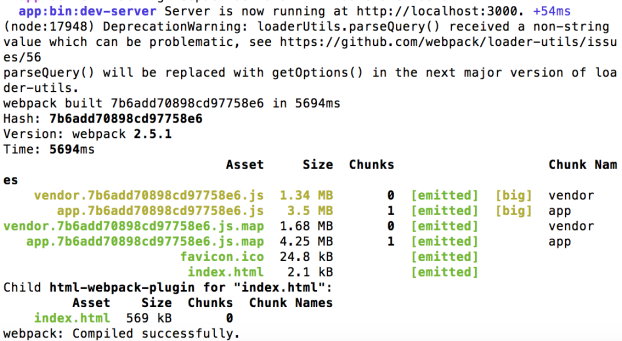
A successful start should look like this screenshot:
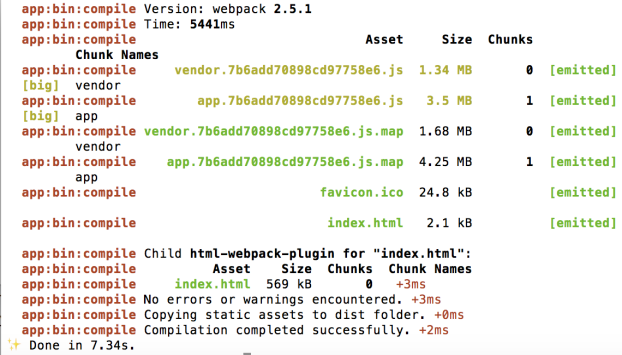
A successful deploy should look like this screenshot:
The project structure follows the fractal pattern demonstrated in this project (https://github.com/davezuko/react-redux-starter-kit) by Davezuko.
.
├── bin                      # All build-related code
├── config                   # All configurations
├── dist                     # Compired files
├── public                   # Static public assets
├── server                   # Express application that provides webpack middleware
│   └── main.js              # Server application entry point
├── src                      # Application source code
│   ├── index.html           # Main HTML page container for app
│   ├── main.js              # Application rendering
│   ├── config.js            # Game configurations
│   ├── Game                 # Main Game object for app
│   ├── states               # Main route definitions and async split points
│   │   ├── index.js         # Bootstrap states
│   │   ├── Blank.js         # Blank state
│   │   ├── Boot.js          # Boot state
│   │   ├── Preload.js       # Preload state
│   │   ├── End.js           # End state
│   │   ├── Text.js          # User-defined state
│   │   ├── Image.js         # User-defined state
│   │   ├── effects             # Fractal route
│   │   │   ├── index.js     # Bootstrap effects
│   │   │   ├── flicker.js   # User-defined effect
│   │   │   ├── flip.js      # User-defined effect
│   │   │   └── rotate.js    # User-defined effect
└── tests                    # Unit tests
Hot reloading is enabled by default when the application is running in development mode (yarn start). With hot reloading, your code updates can be reflected in the app while it's running without restart the server. This is very useful for development. Read more about Hot Module Replacement.
Out of the box, this project is deployable by serving the ./dist folder generated by yarn deploy. The simplest deployment strategy is a static deployment.
Serve the application with a web server by pointing it at your ./dist folder. Make sure to direct incoming route requests to the root ./dist/index.html file. Follow this article on how to host a static website on Amazon S3 (http://docs.aws.amazon.com/AmazonS3/latest/user-guide/static-website-hosting.html).
FAQs
This is an open source project supported by the Vision Lab at Harvard University. Cubius is a script-based experiment engine that runs psychology experiments online.
We found that cubius demonstrated a not healthy version release cadence and project activity because the last version was released a year ago. It has 1 open source maintainer collaborating on the project.
Did you know?

Socket for GitHub automatically highlights issues in each pull request and monitors the health of all your open source dependencies. Discover the contents of your packages and block harmful activity before you install or update your dependencies.
Security News
The Axios compromise shows how time-dependent dependency resolution makes exposure harder to detect and contain.

Research
A supply chain attack on Axios introduced a malicious dependency, plain-crypto-js@4.2.1, published minutes earlier and absent from the project’s GitHub releases.

Research
Malicious versions of the Telnyx Python SDK on PyPI delivered credential-stealing malware via a multi-stage supply chain attack.