


Research
2025 Report: Destructive Malware in Open Source Packages
Destructive malware is rising across open source registries, using delays and kill switches to wipe code, break builds, and disrupt CI/CD.
By Kush Pandya - Dec 24, 2025
eslint-plugin-perfectionist
Advanced tools
ESLint plugin for sorting various data such as objects, imports, types, enums, JSX props, etc.





An ESLint plugin that sets rules to format your code and make it consistent.
This plugin defines rules for sorting various data, such as objects, imports, TypeScript types, enums, JSX props, Svelte attributes, etc. alphabetically, naturally, or by line length.
All rules are automatically fixable. It's safe!
Sorting imports and properties in software development offers numerous benefits:
Readability: Finding declarations in a sorted, large list is a little faster. Remember that you read the code much more often than you write it.
Maintainability: Sorting imports and properties is considered a good practice in software development, contributing to code quality and consistency across the codebase.
Code Review and Collaboration: If you set rules that say you can only do things one way, no one will have to spend time thinking about how to do it.
Code Uniformity: When all code looks exactly the same, it is very hard to see who wrote it, which makes achieving the lofty goal of collective code ownership easier.
Aesthetics: This not only provides functional benefits, but also gives the code an aesthetic appeal, visually pleasing and harmonious structure. Take your code to a beauty salon!
See docs.
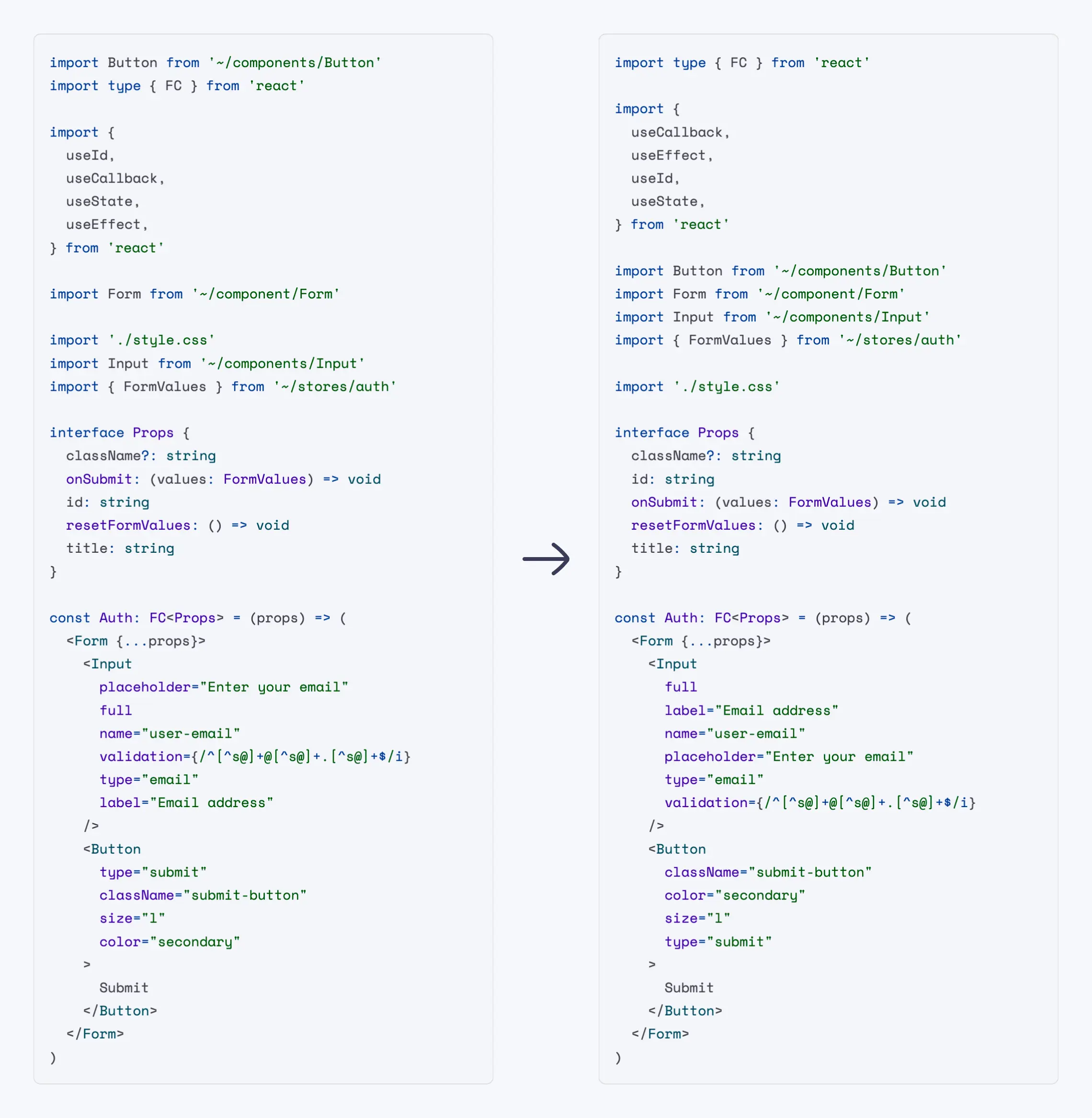
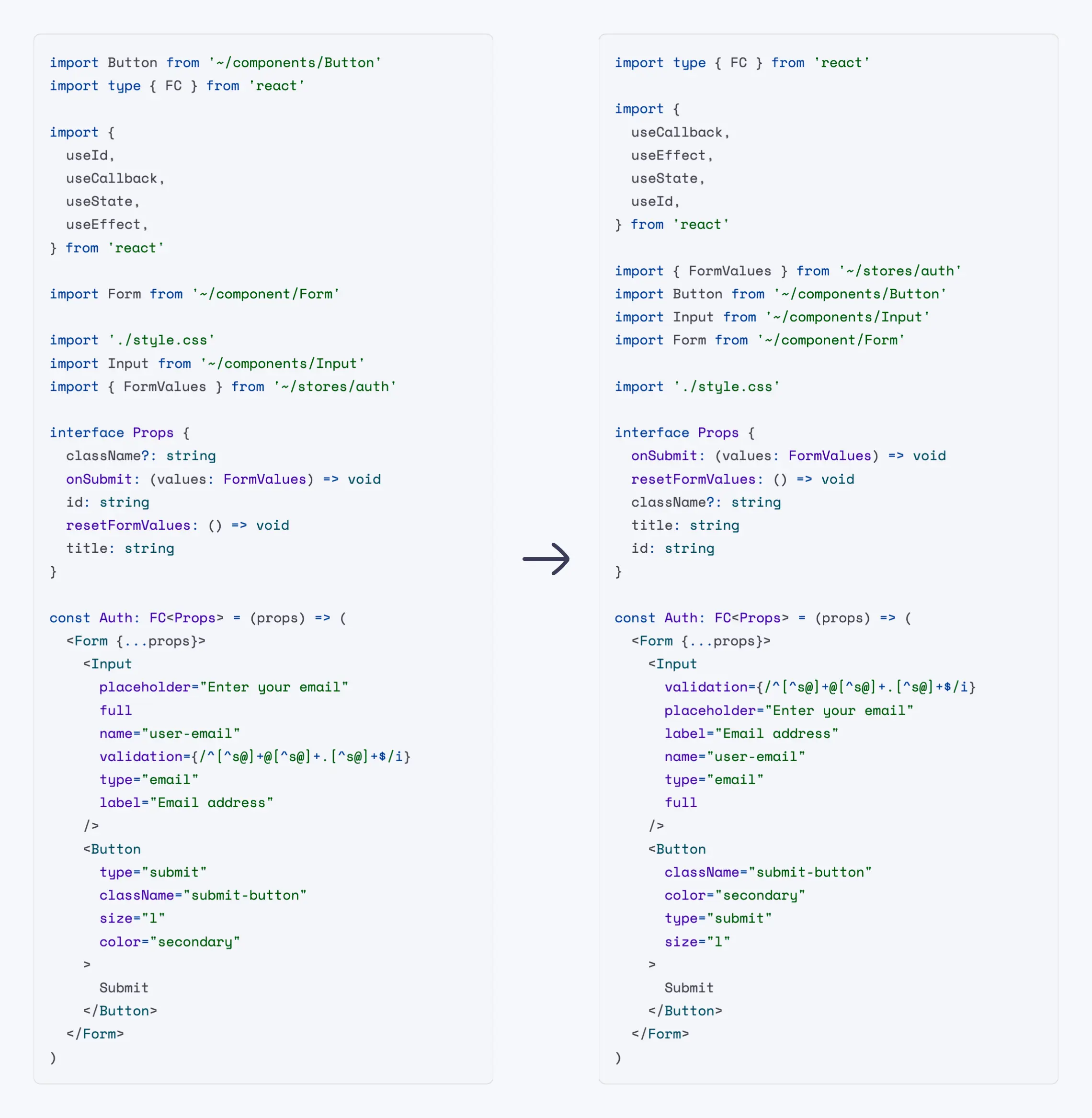
You'll first need to install ESLint v8.45.0 or greater:
npm install --save-dev eslint
Next, install eslint-plugin-perfectionist:
npm install --save-dev eslint-plugin-perfectionist
Add eslint-plugin-perfectionist to the plugins section of the ESLint configuration file and define the list of rules you will use.
eslint.config.js)import perfectionist from 'eslint-plugin-perfectionist'
export default [
{
plugins: {
perfectionist,
},
rules: {
'perfectionist/sort-imports': [
'error',
{
type: 'natural',
order: 'asc',
},
],
},
},
]
.eslintrc.js)module.exports = {
plugins: [
'perfectionist',
],
rules: {
'perfectionist/sort-imports': [
'error',
{
type: 'natural',
order: 'asc',
}
]
}
}
The easiest way to use eslint-plugin-perfectionist is to use ready-made configs. Config files use all the rules of the current plugin, but you can override them.
eslint.config.js)import perfectionist from 'eslint-plugin-perfectionist'
export default [
perfectionist.configs['recommended-natural'],
]
.eslintrc)module.exports = {
extends: [
'plugin:perfectionist/recommended-natural-legacy',
],
}
| Name | Description |
|---|---|
| recommended-alphabetical | All plugin rules with alphabetical sorting in ascending order |
| recommended-natural | All plugin rules with natural sorting in ascending order |
| recommended-line-length | All plugin rules with sorting by line length in descending order |
| recommended-custom | All plugin rules with sorting by your own custom order |
🔧 Automatically fixable by the --fix CLI option.
| Name | Description | 🔧 |
|---|---|---|
| sort-array-includes | Enforce sorted arrays before include method | 🔧 |
| sort-classes | Enforce sorted classes | 🔧 |
| sort-decorators | Enforce sorted decorators | 🔧 |
| sort-enums | Enforce sorted TypeScript enums | 🔧 |
| sort-exports | Enforce sorted exports | 🔧 |
| sort-heritage-clauses | Enforce sorted implements/extends clauses | 🔧 |
| sort-imports | Enforce sorted imports | 🔧 |
| sort-interfaces | Enforce sorted interface properties | 🔧 |
| sort-intersection-types | Enforce sorted intersection types | 🔧 |
| sort-jsx-props | Enforce sorted JSX props | 🔧 |
| sort-maps | Enforce sorted Map elements | 🔧 |
| sort-modules | Enforce sorted modules | 🔧 |
| sort-named-exports | Enforce sorted named exports | 🔧 |
| sort-named-imports | Enforce sorted named imports | 🔧 |
| sort-object-types | Enforce sorted object types | 🔧 |
| sort-objects | Enforce sorted objects | 🔧 |
| sort-sets | Enforce sorted Set elements | 🔧 |
| sort-switch-case | Enforce sorted switch case statements | 🔧 |
| sort-union-types | Enforce sorted union types | 🔧 |
| sort-variable-declarations | Enforce sorted variable declarations | 🔧 |
Yes. To do this, you need to enable autofix in ESLint when you save the file in your editor. You may find instructions for your editor here.
Overall, yes. We want to make sure that the work of the plugin does not negatively affect the behavior of the code. For example, the plugin takes into account spread operators in JSX and objects, comments to the code. Safety is our priority. If you encounter any problem, you can create an issue.
I love Prettier. However, this is not its area of responsibility. Prettier is used for formatting, and ESLint for styling. For example, changing the order of imports can affect how the code works (console.log calls, fetch, style loading). Prettier should not change the AST. There is a cool article about this: "The Blurry Line Between Formatting and Style" by @joshuakgoldberg.
This plugin is following Semantic Versioning and ESLint's Semantic Versioning Policy.
See Contributing Guide.
MIT © Azat S.
eslint-plugin-import is a popular ESLint plugin that provides rules for ensuring proper import/export syntax and order. It focuses on managing module imports and exports, ensuring they are used correctly and consistently.
eslint-plugin-sort-keys-fix is an ESLint plugin that automatically sorts object keys in a consistent order. It is similar to the 'sort-keys' rule in eslint-plugin-perfectionist but focuses specifically on object keys.
eslint-plugin-jsdoc is an ESLint plugin that enforces JSDoc comments and their formatting. While it doesn't focus on sorting, it helps maintain consistent documentation style, which complements the goals of eslint-plugin-perfectionist.
FAQs
ESLint plugin for sorting various data such as objects, imports, types, enums, JSX props, etc.
The npm package eslint-plugin-perfectionist receives a total of 532,332 weekly downloads. As such, eslint-plugin-perfectionist popularity was classified as popular.
We found that eslint-plugin-perfectionist demonstrated a healthy version release cadence and project activity because the last version was released less than a year ago. It has 1 open source maintainer collaborating on the project.
Did you know?

Socket for GitHub automatically highlights issues in each pull request and monitors the health of all your open source dependencies. Discover the contents of your packages and block harmful activity before you install or update your dependencies.
Research
Destructive malware is rising across open source registries, using delays and kill switches to wipe code, break builds, and disrupt CI/CD.

Security News
Socket CTO Ahmad Nassri shares practical AI coding techniques, tools, and team workflows, plus what still feels noisy and why shipping remains human-led.

Research
/Security News
A five-month operation turned 27 npm packages into durable hosting for browser-run lures that mimic document-sharing portals and Microsoft sign-in, targeting 25 organizations across manufacturing, industrial automation, plastics, and healthcare for credential theft.