


Security News
Crates.io Users Targeted by Phishing Emails
The Rust Security Response WG is warning of phishing emails from rustfoundation.dev targeting crates.io users.
By Sarah Gooding - Sep 12, 2025
flux-minimal
Advanced tools
Minimalist library for flux architecture with no production dependencies
npm install --save flux-minimal
flux-minimal takes a few key concepts from flux architecture, Actions and Data Stores, and cuts out everything else. It provides a simple, unopinionated, and non-magical interface to implement a simple form of flux architecture. The goal of flux-minimal is to be intuitive, easy, and fast to start using.
The only pieces of flux-minimal are two constructors: DataStore and Actions.
A DataStore represents a piece of application state. flux-minimal doesn't dictate how these pieces are split up; a flux-minimal DataStore can be used to store the entire state of an application, or of a single component. The important thing is that a flux-minimal DataStore has a non-destructive setState() method that publishes change events to subscribers.
An instance of Actions in flux-minimal represents one group of actions that can be done within an application. Actions are source agnostic, i.e. can be used for actions initiated by the user, or by the program. flux-minimal provides an interface to call actions and subscribe to action calls from anywhere. It supports synchronous and asynchronous actions, and does not dictate whether or not actions should have built-in side effects.
flux-minimal has no reducers, dispatchers, or other concepts found in other flux implementations. It really boils down to two simple "flows":
Where you go from there is up to you.
Creating a new DataStore:
const { DataStore } = require('flux-minimal');

const initialState = {};

const myDataStore = new DataStore(initialState);

// I recommend exporting your DataStore instances to share across the app
Changing the DataStore's state:
console.log(myDataStore.state); // {}

myDataStore.setState({
  hello: 'world'
});

console.log(myDataStore.state); // { hello: 'world' }
Removing existing values:
console.log(myDataStore.state); // { hello: 'world' }

myDataStore.setState({ hello: null });

console.log(myDataStore.state); // {}
Changing/removing existing values within nested objects:
myDataStore.setState({
  nested: {
    foo: 1,
    bar: 2
  }
});

console.log(myDataStore.state.nested);  // { foo: 1, bar: 2 }

myDataStore.setState({
  nested: { foo: 10 }
});

console.log(myDataStore.state.nested);  // { foo: 10, bar: 2 }

myDataStore.setState({
  nested: { foo: null }
});

console.log(myDataStore.state.nested);  // { bar: 2 }
Subscribing to state changes
myDataStore.onStateChanged(() => {
  console.log(myDataStore.state); // { something: 'else' }
});

myDataStore.setState({
  something: 'else'
});
Unsubscribing from state changes:
// onStateChanged returns a reference to the callback
const ref = myDataStore.onStateChanged(() => {
  // ...
});

// Pass it to unsubscribe to remove the callback
myDataStore.unsubscribe(ref);
Replacing the state entirely:
myDataStore.setState({
  loggedIn: true,
  userData: {
    name: 'you',
    superSecretInfo: 'you don\'t want to know'
  }
});

console.log(myDataStore.state); // that whole object up there ^

myDataStore.replaceState({
  loggedIn: false
});

console.log(myDataStore.state); // { loggedIn: false }
Creating a new set of actions:
const { Actions } = require('flux-minimal');

// Add your action names as keys (the values don't matter)
const myActions = new Actions({
  'doStuff': null,
  'doMoreStuff': null
});

// I recommend exporting your Actions instances to share across the app
(Note: the reason we pass in an object here instead of an array is to avoid generating a bunch of "hidden classes" when iterating over the actions to create the internal action objects)
Subscribing to an action:
myActions.on('doStuff', () => {
  console.log('yo');
});

// Make the action happen
myActions.call('doStuff');
Doing stuff inside of an action:
// To do stuff inside of an action use .register()
myActions.register('doStuff', (done) => {
  doSomeAsyncStuff()
    .then(() => {
      done();       // call done() whenever the stuff the action was doing is complete
                    // there's no distinction between synchronous and asynchronous here, you must always call done()
    });
});

myActions.on('doStuff', () => {
  // Won't reach this point until doSomeAsyncStuff() is complete.
});

myActions.call('doStuff');
Note: you can only call .register() once per action, it permanently sets the registered function for that action.
The idea here is to make sure actions themselves only do one thing, from one place. If you want your actions to indirectly cause other "effects", subscribe to them externally and do stuff after they complete.
Actions that take data and do stuff with it:
// If we want to do something like call an API, and we need to take arguments, we can do this:
myActions.register('callAnApi', (done, args) => {
  console.log(args); // { foo: 'bar' }
  someApiCallThatTakesArguments(args)
    .then(() => {
      done();
    });
});

myActions.call('callAnApi', { foo: 'bar' });
Actions that do stuff and then pass data to their subscribers:
myActions.register('callAnApi', (done, args) => {
  someApiCallThatTakesArguments(args)
    .then((response) => {
      done(response);
    });
});

myActions.on('callAnApi', (response) => {
  console.log(response); // the results of the action, whatever that may be
});

myActions.call('callAnApi', {
  foo: 'bar'
});
Unsubscribing:
// myActions.on returns a ref to the subscriber function, just like DataStore:
const ref = myActions.on('someAction', () => {
  // ...
});

myActions.unsubscribe('someAction', ref);


// ------- Alternatively ----------
function callback() {
  // ...
}

myActions.on('someAction', callback);
myActions.unsubscribe('someAction', callback);
// data-stores/my-data-store.js
const { DataStore } = require('flux-minimal');
const myActions = require('./actions/my-actions');

const myDataStore = module.exports = new DataStore({});

myActions.on('submitTheAwesomeForm', (response) => {
  myDataStore.setState(response.data || response.error);
});
// actions/my-actions.js
const { Actions } = require('flux-minimal');

const myActions = module.exports = new Actions({
  'submitTheAwesomeForm': null
});

myActions.register('submitTheAwesomeForm', (done, formData) => {
  callTheApi(formData)
    .then((response) => {
      done(response);
    })
    .catch((error) => {
      done({ error });
    });
});
// app.js
const myActions = require('./actions/my-actions');
const myDataStore = require('./data-stores/my-data-store');

console.log(myDataStore.state); // Does not contain anything

myDataStore.onStateChanged(() => {
  console.log(myDataStore.state); // Now it contains the data that resulted from the user's action
});

function userSubmittedAwesomeForm(formData) {
  myActions.call('submitTheAwesomeForm', formData);
}
Coming later
git clone https://github.com/747823/flux-minimal.git to get reponpm install to get developer dependenciesnpm run build to build distribution filesnpm run test to run unit testsFAQs
Minimalist library for flux architecture with no dependencies
We found that flux-minimal demonstrated a not healthy version release cadence and project activity because the last version was released a year ago. It has 1 open source maintainer collaborating on the project.
Did you know?

Socket for GitHub automatically highlights issues in each pull request and monitors the health of all your open source dependencies. Discover the contents of your packages and block harmful activity before you install or update your dependencies.
Security News
The Rust Security Response WG is warning of phishing emails from rustfoundation.dev targeting crates.io users.
Product
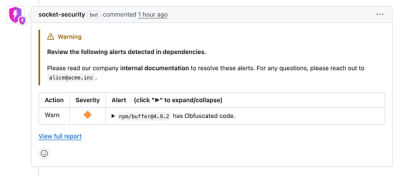
Socket now lets you customize pull request alert headers, helping security teams share clear guidance right in PRs to speed reviews and reduce back-and-forth.
Product
Socket's Rust support is moving to Beta: all users can scan Cargo projects and generate SBOMs, including Cargo.toml-only crates, with Rust-aware supply chain checks.