


Research
PyPI Package Impersonates SymPy to Deliver Cryptomining Malware
Malicious PyPI package sympy-dev targets SymPy users, a Python symbolic math library with 85 million monthly downloads.
By Kirill Boychenko - Jan 21, 2026
generate-backup
Advanced tools

Create backup archives with generate.



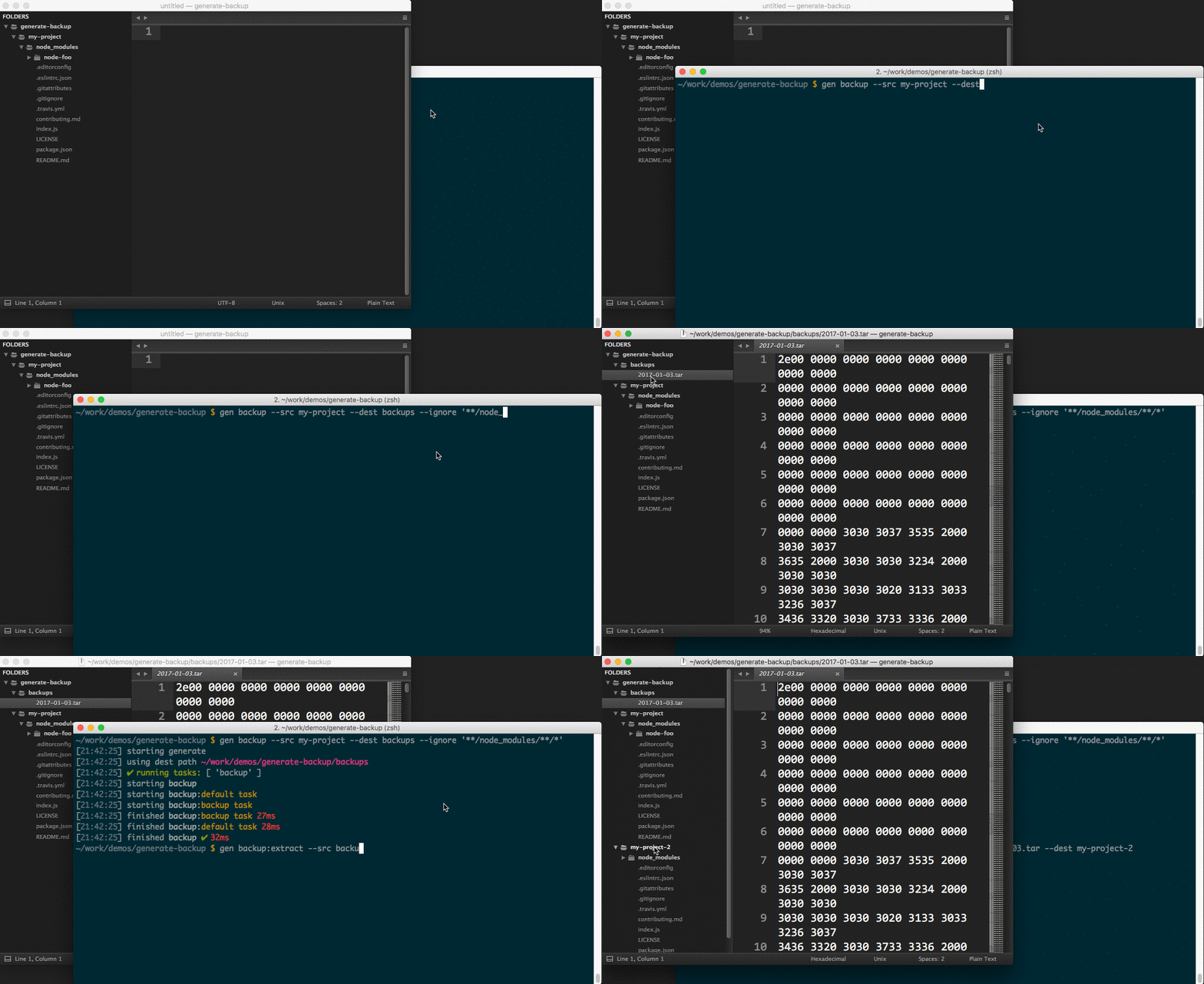
When installed globally, the backup generator is available to use through the gen command:
Backup a folder to a tar file using the default task.
$ gen backup --src my-project --dest /backups/my-project
Extract a tar file to a folder using the extract task.
$ gen backup:extract --src /backups/my-project/2017-01-02.tar --dest my-project-2
Params
app {Object}: generate instance to add tasks to.Example
// use as a plugin with existing generate instance
// $ gen backup
app.use(require('generate-backup'));

// use as a subgenerator on an existing generate instance
// $ gen bkp
app.register('bkp', require('generate-backup'));
Internal functions that are used inside the tasks to provide backup and extract functionality.
Params
options {Object}: Options to control what is archived.returns {Stream}: The stream created by tar-fs.Example
backup({src: './', dest: '/backups'});
Params
options {Object}: Options to control what is extracted.returns {Stream}: The stream created by tar-fs.Example
extract({src: '/backups/2017-01-02.tar', dest: './'});
Generate is a command line tool and developer framework for scaffolding out new GitHub projects using generators and tasks.
Answers to prompts and the user's environment can be used to determine the templates, directories, files and contents to build. Support for gulp, base and assemble plugins, and much more.
For more information:
Installing the CLI
To run the backup generator from the command line, you'll need to install Generate globally first. You can do that now with the following command:
$ npm install --global generate
This adds the gen command to your system path, allowing it to be run from any directory.
Install generate-backup
Install this module with the following command:
$ npm install --global generate-backup
Run this generator's default task with the following command:
$ gen backup
What you should see in the terminal
If completed successfully, you should see both starting and finished events in the terminal, like the following:
[00:44:21] starting ...
...
[00:44:22] finished ✔
If you do not see one or both of those events, please let us know about it.
To see a general help menu and available commands for Generate's CLI, run:
$ gen help
All available tasks.
Default backup task that will backup the specified --src folder a .tar file in the specified --dest folder using an optional --ignore flag.
remove spaces in the ignore pattern
Example
# backup all node projects to the /backups/projects folder but ignore any node_modules folders
$ gen backup --dest /backups/projects --src projects --ignore '** /node_modules/{,** /*}'
extract task that will extract the files from the specified --src .tar file to the specified --dest folder using an optional --ignore flag.
Example
# extract the archived projects from /backups/projects/2017-01-02.tar to the ./restore/projects folder.
$ gen backup --dest restore/projects --src /backups/projects/2017-01-02.tar
Default task aliased for backup
Visit Generate's documentation for tasks.
It's never too early to begin running unit tests. When you're ready to get started, the following command will ensure the project's dependencies are installed then run all of the unit tests:
$ npm install && test
If you're tests are passing and you're ready to publish your generator to npm, you can do that now with the following command:
Are you sure you're ready?!
Let's go!
$ npm publish
Are you using Generate in your project? Have you published a generator and want to share your project with the world?
Here are some suggestions!
@generatejs or use the #generatejs hashtaggenerate-backupgeneratejs tag in questions)generategenerator to package.json.Pull requests and stars are always welcome. For bugs and feature requests, please create an issue.
Install dev dependencies:
$ npm install -d && npm test
Brian Woodward
Copyright © 2017, Brian Woodward. Released under the MIT license.
This file was generated by verb-generate-readme, v0.2.3, on January 02, 2017.
FAQs
Create backup archives with generate.
We found that generate-backup demonstrated a not healthy version release cadence and project activity because the last version was released a year ago. It has 1 open source maintainer collaborating on the project.
Did you know?

Socket for GitHub automatically highlights issues in each pull request and monitors the health of all your open source dependencies. Discover the contents of your packages and block harmful activity before you install or update your dependencies.
Research
Malicious PyPI package sympy-dev targets SymPy users, a Python symbolic math library with 85 million monthly downloads.

Security News
Node.js 25.4.0 makes require(esm) stable, formalizing CommonJS and ESM compatibility across supported Node versions.

Product
Create and share saved alert views with custom tabs on the org alerts page, making it easier for teams to return to consistent, named filter sets.